This appendix presents the vector, matrix, and quaternion types that every system in Taos Engine depends on, along with the formulas and conventions used throughout the engine. It serves as both a tutorial introduction to 3D math for graphics and a quick-lookup reference.
Coordinate Systems and Conventions#
Taos Engine uses a right-handed, Y-up, -Z-forward coordinate system. This is the same convention used by OpenGL, Maya, and many game engines. WebGPU's native coordinate system is also right-handed with a [0, 1] depth range (unlike OpenGL's [-1, 1]).
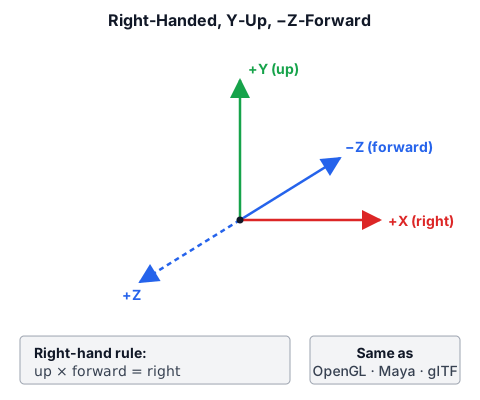
| Convention | Taos Engine choice |
|---|---|
| Handedness | Right-handed |
| Up | +Y (0, 1, 0) |
| Forward | -Z (0, 0, -1) |
| Matrix storage | Column-major in Float32Array |
| Depth range | [0, 1] (WebGPU) |
| Winding order | Counter-clockwise (front faces) |
The Vec3 class encodes these conventions through static factory methods:
static up(): Vec3 {
  return new Vec3(0, 1, 0);
}

static forward(): Vec3 {
  // Right-handed -Z forward convention
  return new Vec3(0, 0, -1);
}

static right(): Vec3 {
  return new Vec3(1, 0, 0);
}

// The cross product confirms right-handedness:
//   up × forward = right
//   (0,1,0) × (0,0,-1) = (1,0,0)
cross(v: Vec3): Vec3 {
  return new Vec3(
    this.y * v.z - this.z * v.y,
    this.z * v.x - this.x * v.z,
    this.x * v.y - this.y * v.x,
  );
}
The cross product formula above is the standard right-handed cross product. You can verify: Vec3.up().cross(Vec3.forward()) = Vec3.right().
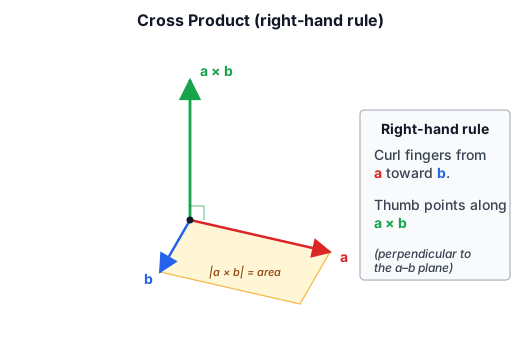
The cross product a × b produces a vector perpendicular to both inputs, with magnitude equal to the area of the parallelogram they span. The right-hand rule fixes the direction.
Vectors#
Vec2, Vec3, Vec4#
Taos Engine defines three vector classes in src/math/: Vec2 (vec2.ts), Vec3 (vec3.ts), and Vec4 (vec4.ts). All three follow the same design pattern:
- Mutable
x,y,z,wfields (you can read and write them directly). - Immutable arithmetic — every operation returns a new vector. The original is never modified (except by
set()). - Method chaining via
set(), which mutates in place and returnsthis.
The Vec3 class is the workhorse of the engine. It represents positions, directions, colors, and normals. Here is its interface:
export class Vec3 {
  x: number;
  y: number;
  z: number;

  constructor(x = 0, y = 0, z = 0);

  // Mutation
  set(x: number, y: number, z: number): this;

  // Arithmetic (all return new Vec3)
  clone(): Vec3;
  negate(): Vec3;
  add(v: Vec3): Vec3;
  sub(v: Vec3): Vec3;
  scale(s: number): Vec3;
  mul(v: Vec3): Vec3;        // Hadamard (componentwise) product
  cross(v: Vec3): Vec3;      // Right-handed cross product
  normalize(): Vec3;
  lerp(v: Vec3, t: number): Vec3;

  // Queries
  dot(v: Vec3): number;
  lengthSq(): number;
  length(): number;
  toArray(): [number, number, number];

  // Static factories
  static zero(): Vec3;
  static one(): Vec3;
  static up(): Vec3;
  static forward(): Vec3;
  static right(): Vec3;
  static fromArray(arr: ArrayLike<number>, offset?: number): Vec3;
}
The immutable-by-default design eliminates an entire class of bugs. When you write:
const reflected = lightDir.sub(normal.scale(2 * dot));the sub and scale calls both return new vectors. The original lightDir and normal are untouched. This makes reasoning about code much simpler, at the cost of some allocation pressure. In practice, the garbage collector handles short-lived vectors efficiently, and hot paths that need zero-allocation can always reuse a scratch vector.
How Vec3 is Used Throughout the Engine#
Vectors are everywhere in Taos Engine — not just for positions and directions, but also for colors and so on. Here are the common usage patterns:
Positions and translations. A game object's position is a Vec3:
class GameObject {
  get position(): Vec3;   // local-space, forwards to the owned Transform
  // ...
}
Directions and normals. Normal vectors are stored in the G-Buffer as Vec3 values encoded into float16 textures:
// G-Buffer target 1 (normal_metallic): rgba16float
//   RGB = world-space normal remapped to [0,1], A = metallic
out.normal_metallic = vec4<f32>(mapped_N * 0.5 + 0.5, metallic);
Colors. RGB colors are also Vec3 values, which makes arithmetic like color.scale(intensity) natural:
export interface DirectionalLight {
  direction: Vec3;
  intensity: number;
  color: Vec3;
  // ...
}
The Vec2 class (vec2.ts) is used for texture coordinates (UVs) and 2D screen positions. The Vec4 class (vec4.ts) is used for homogeneous coordinates, bounding volumes, and packed data.
Vector Operation Formulas#
Dot product
a · b = a.x*b.x + a.y*b.y + a.z*b.zCross product (right-handed)
a × b = (a.y*b.z - a.z*b.y,
         a.z*b.x - a.x*b.z,
         a.x*b.y - a.y*b.x)
Normalization
n = v / |v|Linear interpolation
lerp(a, b, t) = a + (b - a) * ta·b / |a|; the dot product is positive while b stays on a's side of the dashed perpendicular, zero on it, and negative beyond. In the cross-product view the shaded parallelogram's area is |a × b|, and the result points out of the screen (+Z, toward you) when a turns counterclockwise to b. Turn on Unit vectors to see the two products become cos θ and sin θ.Matrices#
The Mat4 class (src/math/mat4.ts) is the most mathematically important type in the engine. It represents 4×4 transformation matrices in column-major order, stored as a Float32Array of 16 elements.
Column-Major Storage#
Column-major means that element at column c, row r is at index c * 4 + r in the flat array:
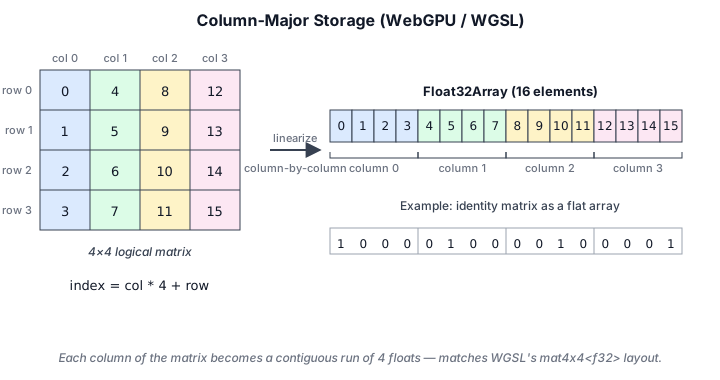
Column 0:  data[0]  data[1]  data[2]  data[3]    (first column)
Column 1:  data[4]  data[5]  data[6]  data[7]    (second column)
Column 2:  data[8]  data[9]  data[10] data[11]   (third column)
Column 3:  data[12] data[13] data[14] data[15]   (fourth column)
This matches WGSL's matrix layout: a mat4x4<f32> is an array of four column vectors, so its 64 bytes in a uniform or storage buffer are the columns in order — exactly the engine's Float32Array, which can therefore be written to the GPU unchanged. (WGSL has no row-major option, so there is no layout qualifier to set.) The identity matrix is constructed as:
static identity(): Mat4 {
  return new Mat4([
    1, 0, 0, 0,   // column 0
    0, 1, 0, 0,   // column 1
    0, 0, 1, 0,   // column 2
    0, 0, 0, 1,   // column 3
  ]);
}
Matrix-Matrix Multiplication#
Matrix multiplication follows the column-major convention: a.multiply(b) computes a * b, meaning b is applied first when transforming vectors. This matches how we compose transforms in the scene graph:
  // Composition: parent * local (parent is applied after local)
  // ── from engine scene graph ──
localToWorld(): Mat4 {
  if (this._parent) {
    return this._parent.localToWorld().multiply(this.localTransform());
  }
  return this.localTransform();
}
View and Projection Matrices#
The lookAt view matrix constructs a right-handed view transformation. It builds an orthonormal camera basis by combining the eye-to-target direction with a world up reference:
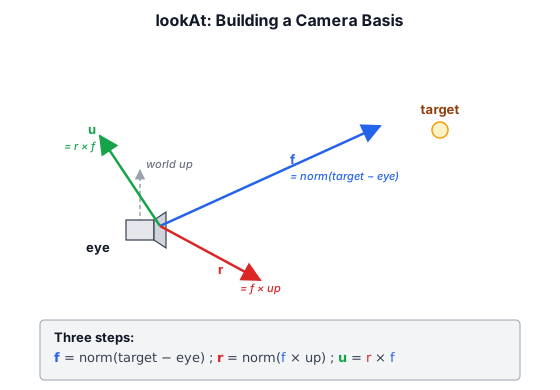
static lookAt(eye: Vec3, target: Vec3, up: Vec3): Mat4 {
  const f = target.sub(eye).normalize();   // forward
  const r = f.cross(up).normalize();       // right
  const u = r.cross(f);                    // true up (orthogonalized)

  return new Mat4([
    r.x, u.x, -f.x, 0,
    r.y, u.y, -f.y, 0,
    r.z, u.z, -f.z, 0,
    -r.dot(eye), -u.dot(eye), f.dot(eye), 1,
  ]);
}
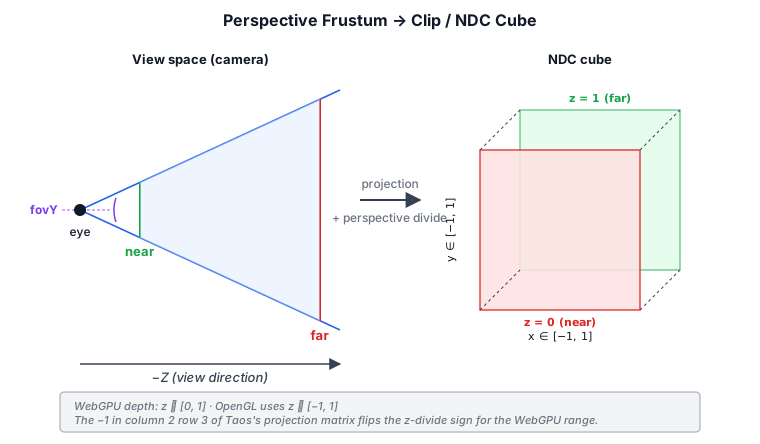
The perspective projection builds a right-handed frustum with WebGPU's [0, 1] depth range. The frustum's contents get warped into a unit cube — clip space — by this matrix and the subsequent perspective divide:
static perspective(fovY: number, aspect: number, near: number, far: number): Mat4 {
  const f = 1 / Math.tan(fovY / 2);
  const nf = 1 / (near - far);

  return new Mat4([
    f / aspect, 0, 0, 0,
    0, f, 0, 0,
    0, 0, far * nf, -1,
    0, 0, near * far * nf, 0,
  ]);
}
The -1 at data[11] (column 2, row 3) is the key difference from OpenGL's projection. In OpenGL ([-1, 1] depth), this value is 1. In WebGPU ([0, 1] depth), it is -1. This flips the sign of the z-divide so that depth values map to [0, 1] after the perspective divide.
Mat4.perspective; the graph below plots depth against view distance on the same axis. The divide by w makes the mapping a hyperbola, so most of the [0, 1] range is spent right in front of the near plane. Pull the near plane in and watch the half-way mark collapse toward the camera; pushing the far plane out changes much less. Log distance axis spreads the crowded lines out.The TRS Transform#
The static trs method composes translation, rotation, and scale into a single matrix:
static trs(
  t: Vec3,
  qx: number, qy: number, qz: number, qw: number,
  s: Vec3,
): Mat4 {
  // Scale -> Rotate -> Translate
  // The matrix is identity * translation * rotation * scale
  // which, in column-major order, applies scale first, then
  // rotation, then translation.
  const rx = qx, ry = qy, rz = qz, rw = qw;
  const xx = rx * rx, yy = ry * ry, zz = rz * rz;
  const xy = rx * ry, xz = rx * rz, xw = rx * rw;
  const yz = ry * rz, yw = ry * rw, zw = rz * rw;

  return new Mat4([
    (1 - 2 * (yy + zz)) * s.x,        // column 0
    2 * (xy + zw) * s.x,
    2 * (xz - yw) * s.x,
    0,
    2 * (xy - zw) * s.y,               // column 1
    (1 - 2 * (xx + zz)) * s.y,
    2 * (yz + xw) * s.y,
    0,
    2 * (xz + yw) * s.z,               // column 2
    2 * (yz - xw) * s.z,
    (1 - 2 * (xx + yy)) * s.z,
    0,
    t.x, t.y, t.z, 1,                   // column 3
  ]);
}
The Normal Matrix#
When transforming surface normals, we cannot use the same matrix as for positions. If the transform contains non-uniform scale, the normals must be transformed by the inverse transpose of the upper-left 3×3 submatrix:
normalMatrix(): Mat4 {
  // Extract upper-left 3x3, invert, transpose
  const m = this.invert();
  // ...
  // Result is the inverse-transpose of the 3x3, embedded
  // in a 4x4 with the rest as identity
}
This is used in the G-Buffer fill shaders when transforming normals from local space to world space.
Matrix Formula Reference#
4×4 identity
I = | 1 0 0 0 |
    | 0 1 0 0 |
    | 0 0 1 0 |
    | 0 0 0 1 |
Translation
T(tx, ty, tz) = | 1 0 0 tx |
                | 0 1 0 ty |
                | 0 0 1 tz |
                | 0 0 0 1  |
Rotation around X
Rx(θ) = | 1     0      0    0 |
        | 0  cos θ -sin θ  0 |
        | 0  sin θ  cos θ  0 |
        | 0     0      0    1 |
Rotation around Y
Ry(θ) = |  cos θ  0  sin θ  0 |
        |    0    1    0    0 |
        | -sin θ  0  cos θ  0 |
        |    0    0    0    1 |
Rotation around Z
Rz(θ) = | cos θ -sin θ  0  0 |
        | sin θ  cos θ  0  0 |
        |    0     0    1  0 |
        |    0     0    0  1 |
Scale
S(sx, sy, sz) = | sx 0  0  0 |
                | 0  sy 0  0 |
                | 0  0  sz 0 |
                | 0  0  0  1 |
Perspective (right-handed, [0,1] depth)
P(fovY, aspect, near, far) =
    f/aspect    0         0           0
        0       f         0           0
        0       0      far*nf       -1
        0       0    far*near*nf     0

where f = 1 / tan(fovY / 2), nf = 1 / (near - far)
Orthographic (right-handed, [0,1] depth)
O(left, right, bottom, top, near, far) =
    -2/rl      0         0         0
      0      -2/tb       0         0
      0        0        nf         0
    (l+r)/rl (t+b)/tb  near*nf    1

where rl = 1/(left-right), tb = 1/(bottom-top), nf = 1/(near-far)
LookAt (right-handed, -Z forward)
V(eye, target, up) =
    rx   ux  -fx   0
    ry   uy  -fy   0
    rz   uz  -fz   0
   -r·e -u·e  f·e  1

where f = normalize(target - eye)
      r = normalize(f × up)
      u = r × f
Normal matrix
The normal matrix is the inverse transpose of the upper-left 3×3 submatrix of the model matrix. It transforms normals correctly under non-uniform scale:
N = (M₃ₓ₃⁻¹)ᵀQuaternions#
Quaternions (src/math/quaternion.ts) represent 3D rotations without the gimbal lock and interpolation problems of Euler angles. A quaternion has four components: a scalar w and a vector (x, y, z), representing w + xi + yj + zk.
Geometrically, a unit quaternion encodes a rotation by angle θ around an axis n̂. The vector part stores n̂ · sin(θ/2) and the scalar part stores cos(θ/2):
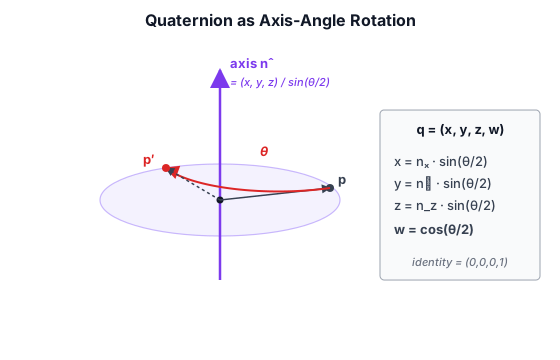
The half-angles in the encoding are why two quaternions q and −q represent the same rotation, and why SLERP needs to take the shorter arc.
Construction and Defaults#
The default quaternion is the identity (0, 0, 0, 1) — representing no rotation:
export class Quaternion {
  x: number;
  y: number;
  z: number;
  w: number;

  constructor(x = 0, y = 0, z = 0, w = 1) {}
}
From Euler Angles#
The fromEuler static method converts intrinsic XYZ Euler angles (radians) to a quaternion. This is the primary way user input (yaw/pitch) becomes a rotation:
static fromEuler(x: number, y: number, z: number): Quaternion {
  // x = pitch, y = yaw, z = roll
  // Intrinsic XYZ order: yaw (Y) * pitch (X) * roll (Z)
  const cx = Math.cos(x / 2), sx = Math.sin(x / 2);
  const cy = Math.cos(y / 2), sy = Math.sin(y / 2);
  const cz = Math.cos(z / 2), sz = Math.sin(z / 2);

  return new Quaternion(
    sx * cy * cz + cx * sy * sz,   // x
    cx * sy * cz - sx * cy * sz,   // y
    cx * cy * sz + sx * sy * cz,   // z
    cx * cy * cz - sx * sy * sz,   // w
  );
}

// The setEuler function lets you set a quaternion from an euler in place.
setEuler(x: number, y: number, z: number): void;
Composition and Rotation#
Quaternion multiplication uses the Hamilton product. a.multiply(b) means this is applied after b:
multiply(b: Quaternion): Quaternion {
  const ax = this.x, ay = this.y, az = this.z, aw = this.w;
  const bx = b.x, by = b.y, bz = b.z, bw = b.w;

  return new Quaternion(
    aw * bx + ax * bw + ay * bz - az * by,
    aw * by - ax * bz + ay * bw + az * bx,
    aw * bz + ax * by - ay * bx + az * bw,
    aw * bw - ax * bx - ay * by - az * bz,
  );
}
To rotate a vector by a quaternion:
rotateVec3(v: Vec3): Vec3 {
  // q * v * q^-1, implemented as:
  // v' = v + 2 * cross(q.xyz, cross(q.xyz, v) + q.w * v)
  const qx = this.x, qy = this.y, qz = this.z, qw = this.w;
  const t1 = qy * v.z - qz * v.y + qw * v.x;
  const t2 = qz * v.x - qx * v.z + qw * v.y;
  const t3 = qx * v.y - qy * v.x + qw * v.z;
  return new Vec3(
    v.x + 2 * (qy * t3 - qz * t2),
    v.y + 2 * (qz * t1 - qx * t3),
    v.z + 2 * (qx * t2 - qy * t1),
  );
}
This avoids constructing and multiplying a full 4×4 rotation matrix when only a single vector rotation is needed.
Spherical Linear Interpolation (SLERP)#
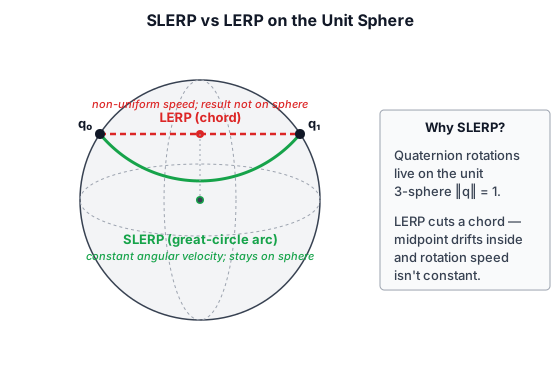
SLERP interpolates between two quaternions with constant angular velocity, making it ideal for smooth camera and animation blending. The intuition is that unit quaternions live on the surface of a 4D unit sphere — SLERP follows a great-circle arc on that sphere, while a naive LERP cuts a straight chord through the interior:
slerp(b: Quaternion, t: number): Quaternion {
  // Cosine of the half-angle between the two rotations
  let cosHalfTheta = this.x*b.x + this.y*b.y + this.z*b.z + this.w*b.w;
  let bx=b.x, by=b.y, bz=b.z, bw=b.w;
  // Take the shorter arc: q and −q are the same rotation
  if (cosHalfTheta < 0) {
    cosHalfTheta = -cosHalfTheta;
    bx=-bx; by=-by; bz=-bz; bw=-bw;
  }
  // Identical rotations: nothing to interpolate
  if (cosHalfTheta >= 1) {
    return this.clone();
  }
  const halfTheta = Math.acos(cosHalfTheta);
  const sinHalfTheta = Math.sqrt(1 - cosHalfTheta*cosHalfTheta);
  // Nearly identical: the sin() ratios are ill-conditioned, so return the midpoint
  if (Math.abs(sinHalfTheta) < 0.001) {
    return new Quaternion(
      this.x*0.5+bx*0.5, this.y*0.5+by*0.5,
      this.z*0.5+bz*0.5, this.w*0.5+bw*0.5,
    );
  }
  const ra = Math.sin((1-t)*halfTheta)/sinHalfTheta;
  const rb = Math.sin(t*halfTheta)/sinHalfTheta;
  return new Quaternion(
    this.x*ra+bx*rb, this.y*ra+by*rb,
    this.z*ra+bz*rb, this.w*ra+bw*rb,
  );
}
The two early-outs guard the division by sinHalfTheta. When the inputs are equal the result is just a copy. When they differ by less than about 0.1° (sinHalfTheta < 0.001), the sine ratios lose precision, and the code returns the midpoint of the two quaternions instead. At that separation the error is invisible, though it does ignore t.
t, for three ways of interpolating: Quaternion.slerp, a normalized component-wise lerp (NLERP), and a lerp of the Euler angles fed back through fromEuler. SLERP's dots are evenly spaced along a single circular arc; NLERP follows the same arc but moves fastest in the middle, so its dots crowd toward the ends; the Euler path leaves the arc, and in Wrap-around it goes the long way around because the angles jump from −150° to 150°.Quaternion Formula Reference#
Identity
q = (0, 0, 0, 1)From axis-angle
q = (axis.x * sin(θ/2),
     axis.y * sin(θ/2),
     axis.z * sin(θ/2),
     cos(θ/2))
Hamilton product
q₁ * q₂ = (w₁*x₂ + x₁*w₂ + y₁*z₂ - z₁*y₂,
           w₁*y₂ - x₁*z₂ + y₁*w₂ + z₁*x₂,
           w₁*z₂ + x₁*y₂ - y₁*x₂ + z₁*w₂,
           w₁*w₂ - x₁*x₂ - y₁*y₂ - z₁*z₂)
Rotation of vector
v' = q * v * q⁻¹

// Simplified:
t = 2 * cross(q.xyz, v)
v' = v + q.w * t + cross(q.xyz, t)
SLERP
cos_θ = q₁ · q₂
if cos_θ < 0: negate q₂
θ = acos(cos_θ)
q' = (sin((1-t)*θ) / sin_θ) * q₁ + (sin(t*θ) / sin_θ) * q₂
Quaternion to matrix
R(q) =
    1-2(yy+zz)  2(xy-zw)    2(xz+yw)    0
    2(xy+zw)    1-2(xx+zz)  2(yz-xw)    0
    2(xz-yw)    2(yz+xw)    1-2(xx+yy)  0
    0           0           0           1

where xx = q.x², xy = q.x*q.y, etc.Transform Composition (TRS)#
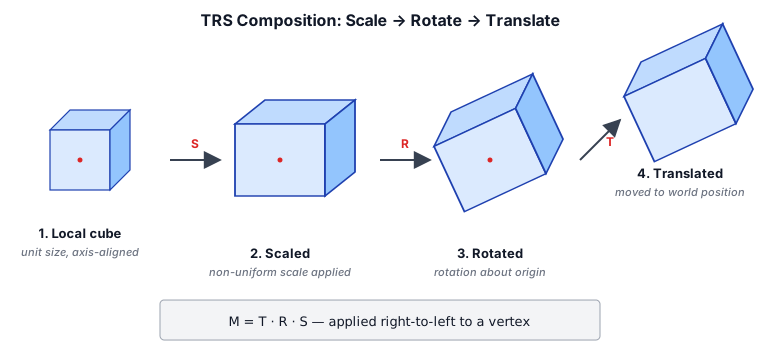
Every GameObject in the scene graph has a local transform built from its position (translation), rotation (quaternion), and scale. The order matters: scale is applied first (in local space), then rotation around the origin, then translation to the final position:
// Composition order: T * R * S
// In column-major convention, S is applied first (local scale),
// then R (rotation around the scaled axes), then T (translation
// to world position).
localTransform(): Mat4 {
  return Mat4.trs(
    this.position,
    this.rotation.x, this.rotation.y,
    this.rotation.z, this.rotation.w,
    this.scale,
  );
}
The world transform composes parent and local transforms:
localToWorld(): Mat4 {
  if (this._parent) {
    // parent * local — parent transform is applied after local
    return this._parent.localToWorld().multiply(this.localTransform());
  }
  return this.localTransform();
}
To go from world space to the camera's view space, we invert the camera's local-to-world matrix:
viewMatrix(): Mat4 {
  return this.gameObject.localToWorld().invert();
}

viewProjectionMatrix(): Mat4 {
  return this.projectionMatrix.multiply(this.viewMatrix());
}Coordinate Space Transformations#
The rendering pipeline moves data through several coordinate spaces. Each stage is a single matrix multiply (or a perspective divide) applied in the vertex shader:
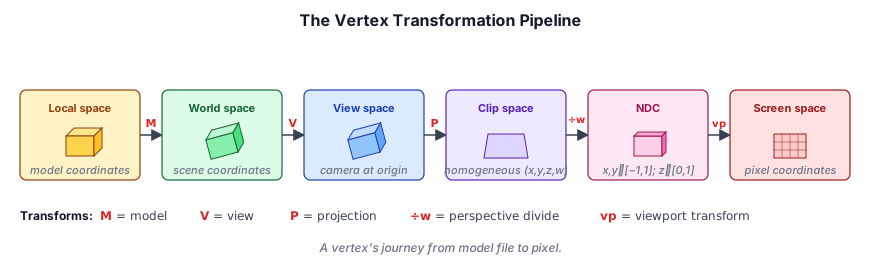
The full chain in text form:
Local space (model)
  ↓  localToWorld (model matrix)
World space
  ↓  viewMatrix
View (camera) space  ── right-handed, -Z forward
  ↓  projectionMatrix
Clip space  ── [0, 1] depth, homogeneous w
  ↓  perspective divide (w)
NDC (normalized device coordinates)  ── x∈[-1,1], y∈[-1,1], z∈[0,1]
  ↓  viewport transform
Screen space (pixels)
In WGSL, this is:
struct Uniforms {
  modelMatrix: mat4x4<f32>,
  viewMatrix: mat4x4<f32>,
  projMatrix: mat4x4<f32>,
};

@group(0) @binding(0) var<uniform> u: Uniforms;

@vertex
fn vs_main(@location(0) position: vec3f) -> @builtin(position) vec4f {
  let worldPos = u.modelMatrix * vec4f(position, 1.0);
  let viewPos = u.viewMatrix * worldPos;
  return u.projMatrix * viewPos;
}Random Numbers and Noise#
Procedural generation is central to a voxel game — terrain height, biome distribution, ore placement, and cloud shapes all require controlled randomness.
Seeded Random (random.ts)#
The Random class implements the xorshift128+ family (Xorwow variant) with explicit seeding. The instance itself is the state — it extends Uint32Array(6):
export class Random extends Uint32Array {
  static global = new Random();

  // Two core generators
  randomUint32(): number;        // Uniform [0, 2^32 - 1]
  randomFloat(min?, max?): number; // Uniform [min, max] (default [0, 1])
  randomDouble(min?, max?): number; // Higher precision [min, max]

  // State management
  get seed(): number;
  set seed(seed: number);        // Re-seed with splitmix32
  reset(): void;                 // Restore to post-construction state
}
The global instance Random.global is auto-seeded from Date.now() at module load. You can create additional instances with explicit seeds for reproducible terrain generation:
// Terrain uses its own seeded RNG for reproducibility
const rng = new Random();
rng.seed = 42;  // Same seed = same terrain
Low-Discrepancy Sequences (Halton)#
Uniform random numbers are the right tool when you want unpredictability, but the wrong tool when you want even coverage. Draw a few uniform random points in a square and you get clumps and gaps — pure randomness clusters. Many graphics algorithms instead want samples that fill the domain as evenly as possible while still looking irregular. That is what a low-discrepancy sequence provides: each new sample preferentially lands in the largest remaining gap.
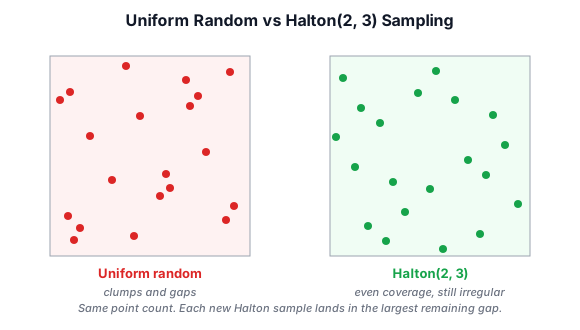
Taos Engine uses the Halton sequence (random.ts), the deterministic workhorse of this family. The index-th value in base b is built by writing index in base b and mirroring its digits across the radix point:
export function halton(index: number, base: number): number {
  let result = 0, f = 1;
  while (index > 0) {
    f /= base;
    result += f * (index % base);   // emit the next base-b digit
    index = Math.floor(index / base);
  }
  return result;
}
For example, in base 2 the integers 1, 2, 3, 4, … map to 0.5, 0.25, 0.75, 0.125, … — each value bisects an existing interval, so the points stay maximally spread no matter how many you take. Different prime bases are decorrelated, so pairing base 2 (for x) with base 3 (for y) yields a well-distributed 2D set. This is the standard Halton(2, 3) pattern.
The engine's main use is temporal anti-aliasing (TAA) sub-pixel camera jitter. Each frame nudges the projection by a fraction of a pixel along the next point in the sequence; accumulating many frames' worth of jittered samples reconstructs detail finer than one pixel. Because the sequence covers the pixel evenly, a short window of frames already samples the whole pixel footprint:
// Map each Halton sample from [0, 1) to a ±0.5-pixel offset in NDC.
// (Clip space spans 2 units across `width` pixels, hence the 2 / size factor.)
const hi = (frameIndex % sampleCount) + 1;   // +1: halton(0, b) is always 0
const jx = (halton(hi, 2) - 0.5) * (2 / width)  * scale;
const jy = (halton(hi, 3) - 0.5) * (2 / height) * scale;
The + 1 skips index 0, whose Halton value is always 0 (an un-jittered sample that would waste a frame). The same generator drives the high-quality cloud renderer's progressive accumulation.
Why not just use Random? Uniform jitter would occasionally bunch several frames near the same sub-pixel spot, leaving other parts of the pixel undersampled and producing visible noise. The Halton sequence guarantees coverage, which is exactly what a converging temporal accumulator needs.
Perlin Noise (noise.ts)#
Taos Engine ports stb_perlin.h v0.5 by Sean Barrett to TypeScript. Six functions provide gradient noise for procedural generation. Each one produces a characteristically different look:
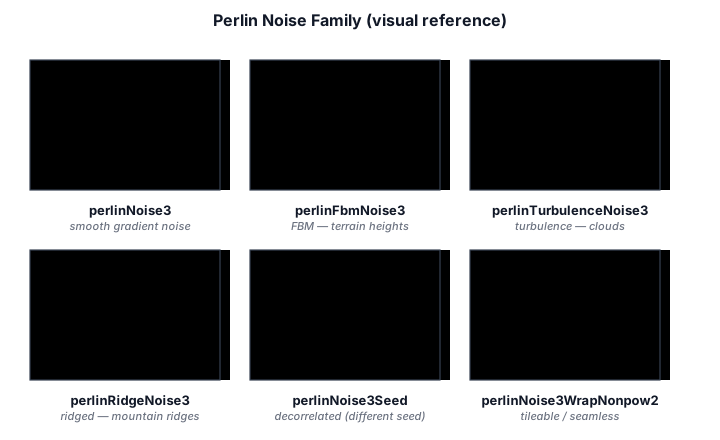
| Function | Use case |
|---|---|
perlinNoise3(x, y, z) | Base 3D Perlin noise, range ~[-1, 1] |
perlinFbmNoise3(x, y, z, lacunarity, gain, octaves) | Fractional Brownian motion — terrain height |
perlinTurbulenceNoise3(x, y, z, lacunarity, gain, octaves) | Turbulence — cloud density |
perlinRidgeNoise3(x, y, z, lacunarity, gain, offset, octaves) | Ridged multifractal — mountain ridges |
perlinNoise3Seed(x, y, z, ...seed) | Decorrelated noise for different features |
perlinNoise3WrapNonpow2(x, y, z, ...wrap) | Arbitrary-size tiling |
Terrain generation combines multiple octaves of perlinFbmNoise3 with elevation-dependent biome blending. Each octave doubles the frequency (lacunarity ≈ 2) and halves the amplitude (gain ≈ 0.5), so coarse landforms come from the low octaves and fine surface detail from the high ones:
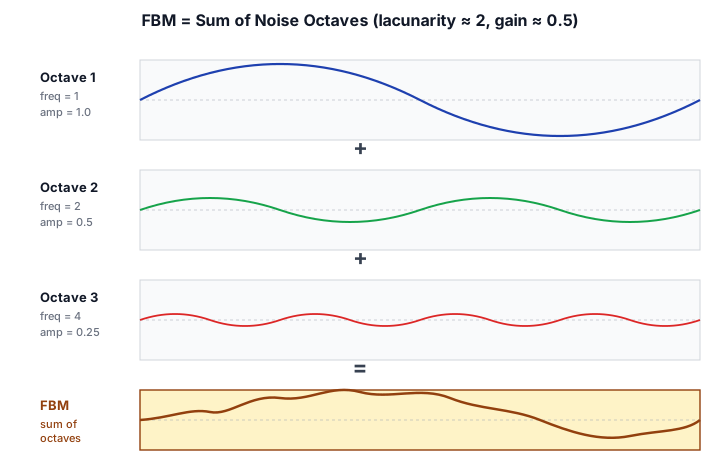
The noise functions operate on 3D coordinates, which allows overhangs and caves — a key advantage over 2D heightmap-based approaches.
Noise Function Signatures#
perlinNoise3(x, y, z)          → [-1, 1] base noise
perlinFbmNoise3(x, y, z, lacunarity, gain, octaves)
                               → fractal Brownian motion
perlinTurbulenceNoise3(x, y, z, lacunarity, gain, octaves)
                               → absolute noise sum
perlinRidgeNoise3(x, y, z, lacunarity, gain, offset, octaves)
→ ridged multifractalThe View Frustum and Culling#
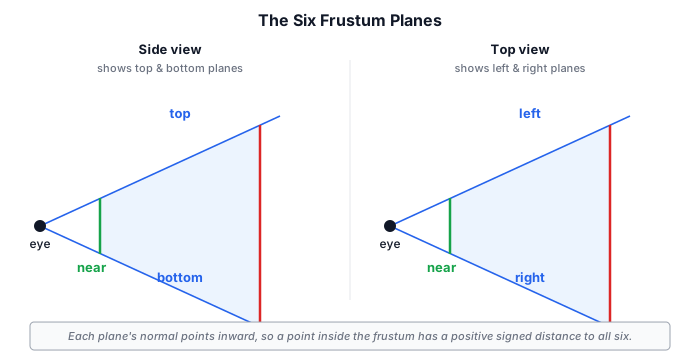
The camera sees a truncated pyramid of space — the view frustum — bounded by six planes: left, right, bottom, top, near, and far. Anything outside it cannot appear on screen, so testing each object against the frustum before drawing it (frustum culling) is one of the cheapest and most effective ways to cut rendering work. Taos Engine uses the same machinery to cull shadow casters against each light's frustum.
Representing a Plane#
A plane in 3D is four numbers (a, b, c, d) satisfying the implicit equation:
a*x + b*y + c*z + d = 0The vector (a, b, c) is the plane's normal. If we normalize the plane so that (a, b, c) is unit length, then evaluating the left-hand side for any point p gives the signed distance from p to the plane: positive on the side the normal points toward, negative behind, zero exactly on it. That signed distance is what makes culling tests trivial.
Extracting the Planes (Gribb–Hartmann)#
The remarkable fact is that all six frustum planes fall straight out of the view-projection matrix — no geometry required. The Gribb–Hartmann method takes sums and differences of the matrix rows: the rows already encode how a point's clip-space x, y, and z compare against its w, which is exactly the clip-space boundary test.
// Mat4 is column-major, so row i = (d[i], d[4+i], d[8+i], d[12+i]).
const d = m.data;
const r0x = d[0], r0y = d[4], r0z = d[8],  r0w = d[12];  // row 0
const r1x = d[1], r1y = d[5], r1z = d[9],  r1w = d[13];  // row 1
const r2x = d[2], r2y = d[6], r2z = d[10], r2w = d[14];  // row 2
const r3x = d[3], r3y = d[7], r3z = d[11], r3w = d[15];  // row 3 (w)

this._setPlane(0, r3x + r0x, r3y + r0y, r3z + r0z, r3w + r0w); // left   (w + x ≥ 0)
this._setPlane(1, r3x - r0x, r3y - r0y, r3z - r0z, r3w - r0w); // right  (w - x ≥ 0)
this._setPlane(2, r3x + r1x, r3y + r1y, r3z + r1z, r3w + r1w); // bottom (w + y ≥ 0)
this._setPlane(3, r3x - r1x, r3y - r1y, r3z - r1z, r3w - r1w); // top    (w - y ≥ 0)
this._setPlane(4, r3x - r2x, r3y - r2y, r3z - r2z, r3w - r2w); // far    (w - z ≥ 0)
this._setPlane(5, r2x,       r2y,       r2z,       r2w);       // near   (z ≥ 0)
The left/right/bottom/top planes use w ± xy because those clip-space bounds are symmetric (-w ≤ x ≤ w). The near and far planes differ from OpenGL: with WebGPU's [0, 1] depth range, the near plane is simply z ≥ 0 (row 2 alone) and the far plane is w - z ≥ 0, rather than OpenGL's symmetric w ± z. Each plane is then divided through by |(a, b, c)| so its evaluation yields a true signed distance.
Testing a Sphere#
The simplest bounding volume is a sphere — a center and radius. A sphere is entirely outside the frustum if it lies fully behind any one plane, i.e. its signed distance to that plane is less than -radius:
intersectsSphere(cx, cy, cz, r, planeCount = 6): boolean {
  const p = this.planes;
  for (let i = 0; i < planeCount; i++) {
    const o = i * 4;
    const dist = p[o] * cx + p[o + 1] * cy + p[o + 2] * cz + p[o + 3];
    if (dist < -r) {
      return false;   // fully behind this plane → cannot be visible
    }
  }
  return true;        // not rejected → keep (conservatively) visible
}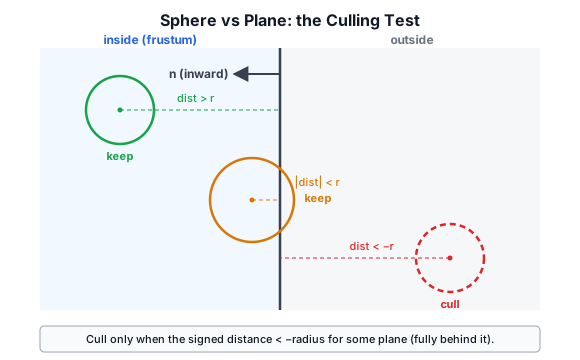
This is conservative: a sphere that straddles a corner can pass all six plane tests yet not truly intersect the frustum body, so it is kept. That is the right trade — culling must never discard something that should be drawn, and the occasional false keep is far cheaper than a more exact test.
The optional planeCount argument lets a caller test only the first five planes (skipping the near plane). Shadow rendering uses this for pancaking: an occluder closer to the light than the shadow cascade's box should still cast into it, so the near plane must not cull it away.
Mat4.perspective and Mat4.lookAt, with each sphere classified by Frustum.intersectsSphere. Dashed lines continue the planes past the frustum, because each test is against an infinite plane. That is why the red sphere near the far corner is kept: it is within one radius of both the side plane and the far plane, yet never touches the frustum itself. Hover a sphere to read its signed distance to each plane. Chapter 18 runs the same planes against chunk bounding boxes instead.Source Files#
src/math/vec2.ts,vec3.ts,vec4.ts— vector typessrc/math/mat4.ts— 4×4 transformation matricessrc/math/quaternion.ts— rotation quaternionssrc/math/frustum.ts— view-frustum planes and culling testssrc/math/random.ts— seeded PRNG and the Halton low-discrepancy sequencesrc/math/noise.ts— Perlin noise family