Textures supply the surface detail that geometry alone cannot express: albedo, normals, packed material channels, environment maps, lookup tables, and volumetric data. In a modern renderer they do more than that. Most of the intermediate state of a frame lives in textures too: G-Buffers, HDR color, shadow maps, depth pyramids, froxel volumes. This chapter covers how Taos Engine creates, formats, samples, mips, compresses, loads, pools, and budgets textures. Chapter 6: Materials then shows how materials bundle them with shaders and parameters.
The code discussed here lives mostly in four places:
| Area | Files |
|---|---|
The Texture wrapper, GPU mip generation, compressed upload | src/assets/texture.ts, src/shaders/mipmap.wgsl |
Loaders (HDR, EXR, KTX2/Basis, .cube LUTs, exact PNG) | src/assets/hdr_loader.ts, src/assets/exr_loader.ts, src/assets/gltf_decoders.ts, src/assets/cube_lut.ts, src/assets/png_codec.ts |
| Atlases and texture arrays | src/assets/block_texture.ts, src/terrain/terrain_system.ts |
| Render-target pooling | src/renderer/render_graph/physical_resource_cache.ts, src/renderer/render_graph/render_graph.ts |
2D, 3D, Cube, and Array Textures#
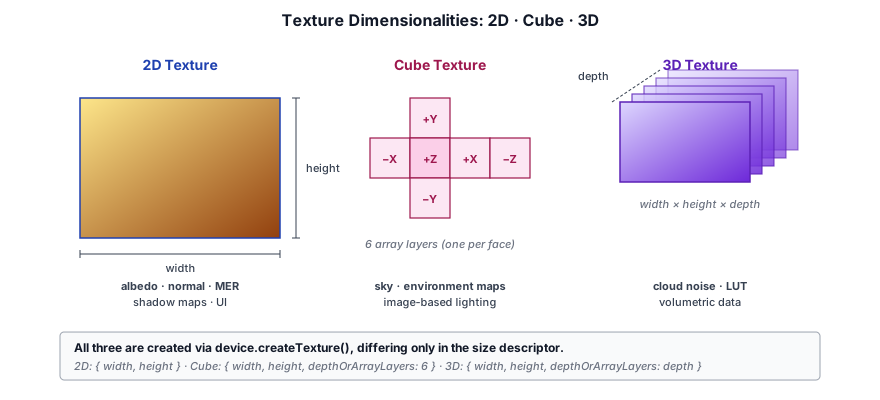
WebGPU separates a texture's storage (a GPUTexture with a dimension of 1d, 2d, or 3d and some number of array layers) from the way a shader views it (a GPUTextureView with a dimension of 2d, 2d-array, cube, cube-array, or 3d). A cube map, for example, is stored as a 2D texture with six array layers and viewed as cube. Taos Engine uses all of these:
5.1.1 The Texture wrapper#
Asset-level textures (anything loaded from a file or generated once) are wrapped in the small Texture class. It owns the GPUTexture plus one default view whose dimension follows a TextureType tag:
export type TextureType = '2d' | '3d' | 'cube' | '2d-array';

export class Texture {
  readonly gpuTexture: GPUTexture;
  readonly view: GPUTextureView;
  readonly type: TextureType;

  constructor(gpuTexture: GPUTexture, type: TextureType) {
    this.gpuTexture = gpuTexture;
    this.type = type;
    this.view = gpuTexture.createView({
      dimension: type === 'cube' ? 'cube' : type === '3d' ? '3d' : type === '2d-array' ? '2d-array' : '2d',
    });
  }

  /** Destroys the underlying GPU texture. */
  destroy(): void { this.gpuTexture.destroy(); }
  // ── static factories: createSolid, fromBitmap, fromCompressed, fromUrl ──
}
The default view covers every mip level and layer, which suits material binding. Code that needs a narrower view, such as a single mip as a render target or a single cube face as a storage target, calls gpuTexture.createView(...) itself (§5.4, §5.9). Render-graph textures are not wrapped in Texture; the graph hands out raw GPUTextures and caches views for them (§5.8).
5.1.2 Where each dimensionality is used#
| View dimension | WGSL type | Examples in Taos Engine |
|---|---|---|
2d | texture_2d<f32> | material maps, block atlases, HDR panoramas, G-Buffer targets, the Hi-Z pyramid |
2d-array | texture_2d_array<f32> | terrain material layers, the terrain virtual-texture page atlas, EXR lightmap slices, ocean simulation cascades |
cube | texture_cube<f32> | IBL irradiance and GGX-prefiltered specular cubes |
cube-array | texture_cube_array<f32> | per-probe irradiance/prefiltered cubes for reflection probes |
3d | texture_3d<f32> | cloud noise, color-grading LUTs, aerial-perspective and volumetric-fog froxels, mesh SDFs |
Cube textures are allocated as six-layer 2D textures and viewed as cube. The IBL baker creates both of its cubes this way. Both carry STORAGE_BINDING because a compute shader writes them one face at a time (§5.9):
// Prefiltered: 128×128 per face, 6 faces, IBL_LEVELS mip levels (roughness 0->1).
const prefiltered = device.createTexture({
  label: 'IBL Prefiltered',
  size:  { width: CUBE_SIZE, height: CUBE_SIZE, depthOrArrayLayers: 6 },
  mipLevelCount: IBL_LEVELS,
  format: 'rgba16float',
  usage: GPUTextureUsage.TEXTURE_BINDING | GPUTextureUsage.STORAGE_BINDING,
});
The deferred lighting shader binds them as texture_cube<f32> and samples them by direction. You can picture the direction as a ray from the center of the cube that exits through one texel of one face.
Cube arrays extend this to many cubes. The reflection-probe feature stores each probe's six faces in consecutive layers of one texture and exposes the whole thing through a single cube-array view, so the lighting pass can index any probe without rebinding:
this._prefilteredCubeArray = device.createTexture({
  label: 'ReflectionProbePrefilteredArray',
  size: { width: prefilteredSize, height: prefilteredSize, depthOrArrayLayers: layers },
  mipLevelCount: IBL_LEVELS,
  format: 'rgba16float',
  usage: GPUTextureUsage.TEXTURE_BINDING | GPUTextureUsage.STORAGE_BINDING,
});
// ── ... ──
this._prefilteredCubeArrayView = this._prefilteredCubeArray.createView({
  dimension: 'cube-array',
  arrayLayerCount: layers,
});
3D textures hold volumetric data and are addressed with a normalized vec3 in [0, 1]³. The cloud renderer's tileable noise volumes are the canonical example. The base volume is 64³ rgba8unorm, with Perlin FBM in R and three Worley octaves in GBA. It is uploaded one mip at a time with rowsPerImage giving the size of one depth slice:
function make3dTexture(device: GPUDevice, label: string, size: number, mips: Uint8Array[]): GPUTexture {
  const tex = device.createTexture({
    label, dimension: '3d',
    size: { width: size, height: size, depthOrArrayLayers: size },
    format: 'rgba8unorm',
    mipLevelCount: mips.length,
    usage: GPUTextureUsage.TEXTURE_BINDING | GPUTextureUsage.COPY_DST,
  });
  let ms = size;
  for (let m = 0; m < mips.length; m++) {
    device.queue.writeTexture(
      { texture: tex, mipLevel: m },
      mips[m].buffer as ArrayBuffer,
      { bytesPerRow: ms * 4, rowsPerImage: ms },
      { width: ms, height: ms, depthOrArrayLayers: ms },
    );
    ms = ms >> 1;
  }
  return tex;
}fn cd_sample_pw(base_noise: texture_3d<f32>, noise_samp: sampler, samp_uv: vec3<f32>) -> f32 {
let s = textureSampleLevel(base_noise, noise_samp, samp_uv, 0.0);
let w = s.g * 0.5 + s.b * 0.35 + s.a * 0.15;
return cd_remap(s.r, 1.0 - w, 1.0, 0.0, 1.0);
}Note the textureSampleLevel(..., 0.0). Cloud density is evaluated inside a ray-march loop, and implicit-derivative sampling (textureSample) is only valid in uniform control flow in a fragment shader. Explicit-LOD sampling is the usual pattern for any texture read inside a loop or a compute shader.
2D arrays hold several same-sized images behind one binding, with the layer selected by an integer in the shader. §5.7.2 covers the terrain's material-layer arrays. Another case is createExrSliceArrayTexture, which reshapes a tall EXR (for example a lightmap atlas exported as a vertical stack of 512-row slices) into an N-layer array, because the tall 2D form would exceed maxTextureDimension2D:
const tex = device.createTexture({
  label: 'EXR Slice Array',
  size: { width, height: sliceHeight, depthOrArrayLayers: layers },
  format: 'rgba16float',
  usage: GPUTextureUsage.TEXTURE_BINDING | GPUTextureUsage.COPY_DST,
});
device.queue.writeTexture(
  { texture: tex },
  halves,
  { bytesPerRow: width * 8, rowsPerImage: sliceHeight },
  { width, height: sliceHeight, depthOrArrayLayers: layers },
);
return new Texture(tex, '2d-array');
A single writeTexture fills every layer. rowsPerImage tells WebGPU how many rows of the source buffer belong to each layer, so the stacked scanlines map directly onto the array.
Formats and Color Spaces#
5.2.1 sRGB versus linear data#
Color images such as albedo, emissive, and UI art are authored in sRGB. Lighting math must happen in linear space. Data images such as normals, roughness/metallic packs, masks, and heights are already linear and must never be converted. Taos Engine handles this with the texture format instead of shader code. Color maps are created as rgba8unorm-srgb, so the texture unit decodes sRGB to linear on every sample, and filtering happens after the decode. Data maps are created as rgba8unorm. The choice is one flag on the upload path:
static fromBitmap(device: GPUDevice, bitmap: ImageBitmap, { srgb = false, usage, mipLevelCount = 1 }: { srgb?: boolean; usage?: GPUTextureUsageFlags; mipLevelCount?: number } = {}): Texture {
  const format: GPUTextureFormat = srgb ? 'rgba8unorm-srgb' : 'rgba8unorm';
  // ── usage always includes TEXTURE_BINDING | COPY_DST | RENDER_ATTACHMENT ──
The other half of this is decoding the image without letting the browser touch the bytes. Every createImageBitmap call in the loaders passes colorSpaceConversion: 'none'. Without that option the browser may apply an embedded ICC profile or gamma, which would silently change a normal map's vectors or double-convert an sRGB image. Callers pick the flag per slot:
| Loader / slot | srgb | Format |
|---|---|---|
| glTF base color, emissive | true | rgba8unorm-srgb (or a -srgb block format for KTX2) |
| glTF normal, MER pack, extension packs, anisotropy | false | rgba8unorm |
| Block color atlas | true | rgba8unorm-srgb |
| Block normal and MER atlases | false | rgba8unorm |
| Terrain albedo layers | n/a (fixed) | rgba8unorm-srgb |
| Terrain normal / roughness / displacement layers | n/a (fixed) | rgba8unorm |
The glTF loader (chapter 4, §4.7) composites the metallic-roughness and occlusion maps into the engine's single MER texture on the CPU. Those composited results are always uploaded linear.
5.2.2 The HDR pipeline formats#
Everything between the lighting pass and the tonemapper is rgba16float, exported as HDR_FORMAT from deferred_lighting_pass.ts. Half floats cover radiance values far above 1.0, are filterable and blendable in core WebGPU, and are a valid storage-texture format, so the same format works for render targets, sampled inputs, and compute outputs. HDR environment maps, IBL cubes, froxel volumes, and the ocean simulation all use it too.
The swap chain itself is negotiated in render_context.ts. Taos Engine first tries an HDR canvas, then falls back to the browser's preferred 8-bit format:
try {
  context.configure({
    device,
    format: 'rgba16float',
    alphaMode: 'opaque',
    colorSpace: 'display-p3',
    toneMapping: { mode: 'extended' },
    usage: canvasUsage,
  });
  const config = context.getConfiguration();
  // Verify that we actually got an HDR display.
  if (config?.toneMapping?.mode === "extended") {
    format = 'rgba16float';
    hdr = true;
  } else {
    // The display doesn't support HDR, get the format used by the canvas.
    format = navigator.gpu.getPreferredCanvasFormat();
  }
} catch {
  format = navigator.gpu.getPreferredCanvasFormat();
  context.configure({ device, format, alphaMode: 'opaque', usage: canvasUsage });
}
The preferred SDR format is bgra8unorm or rgba8unorm, not an -srgb variant. The tonemap pass therefore applies the sRGB transfer function itself, using the exact piecewise curve rather than a pow(1/2.2) approximation. It skips the curve when the canvas is HDR:
fn linear_to_srgb(c: vec3<f32>) -> vec3<f32> {
  let lo = c * 12.92;
  let hi = 1.055 * pow(c, vec3<f32>(1.0 / 2.4)) - 0.055;
  return select(hi, lo, c <= vec3<f32>(0.0031308));
}
// ── ... ──
  let skip_gamma = (params.flags & 8u) != 0u;
  if (skip_gamma) {
    // HDR canvas — high bit depth, no 8-bit banding to fix, so no dither.
    return vec4<f32>(postfx_grain(ldr, in.pos.xy, postfx), coverage);
  }
  var srgb = linear_to_srgb(ldr);
The canvas is configured with RENDER_ATTACHMENT | COPY_SRC. The extra COPY_SRC lets passes such as TAA copy the canvas into a history texture when the canvas is the last color writer.
5.2.3 Formats chosen by purpose#
Beyond color, the engine picks formats for what the data needs, not by habit:
| Format | Used for | Why |
|---|---|---|
depth32float | scene depth (RenderContext.DEFAULT_DEPTH_FORMAT) | full-precision depth for position reconstruction |
r32float | Hi-Z pyramid, mesh SDF volumes, crafty world heightmap | exact values; the Hi-Z chain must not be filtered |
rg32float / rg16float | EVSM2 shadow moments | fp32 when filterable (see below), else fp16 at half the memory |
rgba8uint | raw Radiance RGBE bytes before GPU decode | integer upload, no normalization |
rgba16float | HDR color, IBL, froxels, VT terrain pages (height + normal.xz) | range + filterable + storage-capable |
rgba8unorm | 3D color-grading LUT, cloud noise | compact, filterable; values fit in [0, 1] |
5.2.4 Feature detection#
RenderContext.create requests every feature the adapter exposes and raises a handful of limits to the adapter's maximum:
// Use all available features and limits. Feature detection should be
// used to verify a feature or limit is actually supported before using it.
const requiredFeatures: GPUFeatureName[] = [];
for (const feature of adapter.features) {
  requiredFeatures.push(feature as GPUFeatureName);
}
// ── ... ──
//   - maxSampledTexturesPerShaderStage: the deferred lighting pass is already at
//     the default 16-sampled-texture cap; the virtual-shadow-map pool needs a 17th.
Enabling a feature does not mean code may assume it is there, so each texture path checks device.features at the point of use. The three texture-relevant features are the block-compression families (§5.6) and float32-filterable. The EVSM2 shadow pass is a good example of the second. It chooses its moment format from that feature:
const precision = opts.momentPrecision ?? 'auto';
const fp32Filterable = device.features.has('float32-filterable');
const useFp32 = precision === 'fp16' ? false
  : precision === 'fp32' ? fp32Filterable   // unusable without the feature → fall back
  : fp32Filterable;                          // 'auto'
const momentsFormat: GPUTextureFormat = useFp32 ? 'rg32float' : 'rg16float';
The mesh SDF volume in src/sdf/sdf_volume.ts solves the same problem differently. It stores r32float, binds a nearest sampler, and performs trilinear interpolation manually in the particle shader, so it never depends on the feature at all.
Samplers and Filtering#
A GPUSampler is an immutable object: filter modes, address modes, LOD clamps, anisotropy, and an optional comparison function. Taos Engine creates samplers once per device, either in a pass's create() or in a static WeakMap<GPUDevice, GPUSampler> cache on the material class, and shares them freely. Here is the PBR material's:
private static _getSampler(device: GPUDevice): GPUSampler {
  let s = PbrMaterial._samplerByDevice.get(device);
  if (!s) {
    s = device.createSampler({
      label: 'PbrMaterialSampler',
      magFilter: 'linear',
      minFilter: 'linear',
      mipmapFilter: 'linear',
      addressModeU: 'repeat',
      addressModeV: 'repeat',
    });
    PbrMaterial._samplerByDevice.set(device, s);
  }
  return s;
}
A material created with pixelated: true gets a second cached sampler with nearest for all three filters, for low-resolution art that must stay crisp.
5.3.1 A catalog of the engine's samplers#
These are real samplers from the source, grouped by what they are for:
| Sampler (label) | Filters (mag / min / mip) | Address | Other | Why |
|---|---|---|---|---|
PbrMaterialSampler | linear / linear / linear | repeat | general material maps | |
PbrMaterialNearestSampler | nearest / nearest / nearest | repeat | pixelated materials | |
ChunkAtlasSampler | nearest / nearest / linear | repeat | crisp voxel pixels, smooth fade between mips | |
ChunkAtlasSamplerLinear | linear / linear / linear | repeat | maxAnisotropy: 8 | soft block-light albedo term, no grazing shimmer |
TerrainLayerSampler | linear / linear / linear | repeat | maxAnisotropy: 8 | terrain seen at grazing angles |
CloudNoiseSampler | linear / linear / linear | mirror-repeat (U/V/W) | 3D noise lookup | |
TonemapLutSampler | linear / linear | clamp-to-edge (U/V/W) | trilinear 3D LUT, no wrap bleed | |
ShadowSampler | linear / linear | (default clamp) | compare: 'less-equal' | hardware PCF on depth |
SdfVolumeSampler | nearest / nearest | clamp-to-edge | unfilterable r32float, manual trilinear | |
MipmapSampler / HdrMipgenSampler | linear / linear | (default) / clamp-to-edge | mip downsampling (§5.4) |
Some rules fall out of this table:
- Anisotropy requires all-linear filtering. WebGPU rejects
maxAnisotropy > 1unlessmagFilter,minFilter, andmipmapFilterare alllinear. Both anisotropic samplers above follow that rule. Taos Engine uses anisotropy exactly where surfaces are seen edge-on most of the time: terrain, and the block faces of a voxel world. mipmapFilterdefaults tonearest. A sampler that leaves it unset snaps to the nearest mip level: bilinear filtering within a level, but not trilinear filtering across levels. Every sampler that reads mipmapped surface textures —PbrMaterialSampler,OpenPbrMaterialSampler, the chunk and terrain samplers — sets it tolinearexplicitly, because a visible mip transition line across a large flat ground plane is exactly where trilinear filtering pays off.- Clamp at the edges of lookup tables. The 3D LUT sampler clamps all three axes so a color at 1.0 does not wrap around and blend with the entry for 0.0.
- Comparison samplers are a different sampler type.
compare: 'less-equal'makes the bind-group layout entry acomparisonsampler, and the shader samples withtextureSampleCompare, which returns a filtered pass/fail fraction (hardware 2×2 PCF). The deferred lighting, volumetric fog, and VXGI passes each create one.
5.3.2 Nearest filtering and derivatives in the voxel atlas#
The chunk sampler combines nearest mag/min for the crisp pixel-art look with linear mip filtering, which fades smoothly between mip levels so distant blocks minify without shimmer:
const atlasSampler = device.createSampler({
  label: 'ChunkAtlasSampler',
  // Nearest mag/min keeps the crisp pixel-art look and avoids bilinear
  // bleeding between adjacent atlas tiles; mipmapFilter 'linear' fades
  // smoothly between mip levels so distant blocks minify without shimmer.
  magFilter: 'nearest', minFilter: 'nearest', mipmapFilter: 'linear',
  addressModeU: 'repeat', addressModeV: 'repeat',
});
Atlas UVs are built from fract(world_pos) (§5.7.1), and that creates a subtle mip-selection bug. The hardware picks a mip from the screen-space derivatives of the UV, and fract() jumps by −1 at every block boundary. The resulting derivative spike would select a far-too-coarse mip along a one-pixel seam around every block. The chunk shader avoids it by computing gradients from the continuous world position and passing them explicitly with textureSampleGrad:
// Screen-space gradient of the atlas UV, in atlas (0-1) space, returned as the
// columns (d/dx, d/dy). Derived from the *continuous* world position rather
// than the post-fract() local UV: fract() has a derivative spike at every block
// boundary, and feeding that to the mip selector would pick a too-coarse mip in
// a 1px seam along each boundary.
fn atlas_uv_grads(face: u32, ddx_wp: vec3<f32>, ddy_wp: vec3<f32>) -> mat2x2<f32> {
// ── ... ──
  let albedo_samp = textureSampleGrad(color_atlas,  atlas_samp, uv, ddx, ddy);
  let mer         = textureSampleGrad(mer_atlas,    atlas_samp, uv, ddx, ddy);
let n_ts = textureSampleGrad(normal_atlas, atlas_samp, uv, ddx, ddy).rgb * 2.0 - 1.0;Mipmaps#
5.4.1 Why and how many#
A texture minified without mips aliases. Each screen pixel point-samples one texel out of a large footprint, so distant surfaces sparkle and crawl, and the scattered reads thrash the texture cache. A full mip chain has
levels = 1 + ⌊log₂(max(width, height))⌋levels and costs about one third more memory than level 0 alone (1 + ¼ + ¹⁄₁₆ + … → 4⁄3). The glTF loader gives every texture a full chain for exactly these reasons:
// Full mip-chain level count for a w×h texture. Without mips, minified textures
// (most of a level seen at distance / grazing angles) alias badly and thrash
// the texture cache; the GPU box-downsample costs ~33% extra VRAM. All glTF
// textures get a chain so they minify cleanly.
function mipLevels(w: number, h: number): number {
  return 1 + Math.floor(Math.log2(Math.max(w, h)));
}
Texture.fromUrl uses the same formula when called with generateMips: true. The terrain layer arrays, HDR panoramas, the transmission snapshot, and the Hi-Z pyramid compute their counts the same way.
generateMipmaps. No mips sparkles and crawls with moiré. Bilinear leaves mipmapFilter at its nearest default, and turning on Color mip levels shows the hard bands where it jumps from one level to the next. Trilinear blends the bands away but blurs the distance, and Anisotropic brings the grazing-angle detail back. The readout is the sampler descriptor in use.5.4.2 Downsampling on the GPU#
WebGPU has no built-in mip generator. Taos Engine provides generateMipmaps, which renders each level from the one above it:
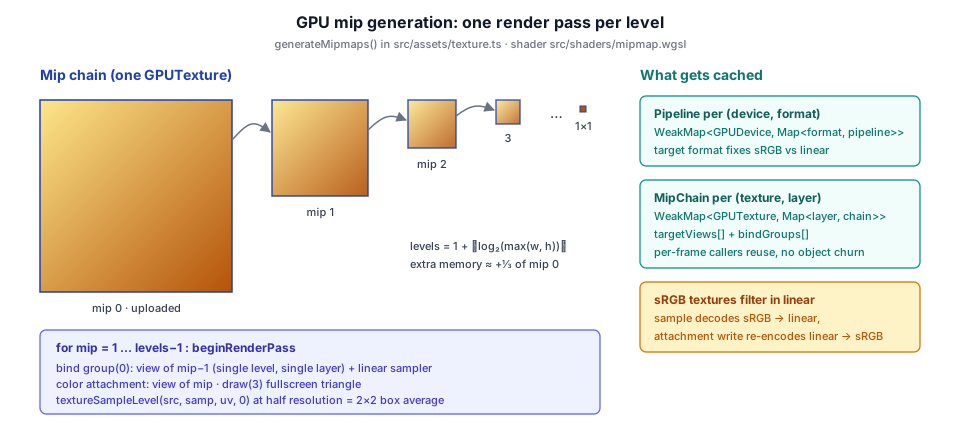
The shader is a fullscreen triangle that samples the previous level with a linear filter. Rendering at exactly half the resolution puts each output pixel center on the shared corner of four source texels, so one bilinear tap is a 2×2 box average:
@group(0) @binding(0) var src : texture_2d<f32>;
@group(0) @binding(1) var samp: sampler;

@vertex
fn vs_main(@builtin(vertex_index) vid: u32) -> VsOut {
  let x = f32((vid & 1u) << 2u) - 1.0;
  let y = f32((vid & 2u) << 1u) - 1.0;
  var out: VsOut;
  out.pos = vec4<f32>(x, y, 0.0, 1.0);
  out.uv  = vec2<f32>(x * 0.5 + 0.5, -y * 0.5 + 0.5);
  return out;
}

@fragment
fn fs_main(in: VsOut) -> @location(0) vec4<f32> {
  return textureSampleLevel(src, samp, in.uv, 0.0);
}
The TypeScript side loops over levels. Each pass binds a single-level view of mip − 1 as the source and a single-level view of mip as the color attachment. WebGPU forbids a subresource from being both sampled and attached in the same pass, but separate single-mip views of the same texture are fine:
for (let mip = 1; mip < mipLevelCount; mip++) {
  const pass = encoder.beginRenderPass({
    label: `Mipmap downsample mip${mip}`,
    colorAttachments: [{
      view: chain.targetViews[mip],
      loadOp: 'clear', storeOp: 'store', clearValue: [0, 0, 0, 0],
    }],
  });
  pass.setPipeline(pipeline);
  pass.setBindGroup(0, chain.bindGroups[mip]);
  pass.draw(3);
  pass.end();
}
if (!externalEncoder) {
  device.queue.submit([encoder.finish()]);
}
Several details make this correct and cheap:
- The pipeline is cached per
(device, format). A render pipeline is compiled for its target format. That format also decides whether downsampling is gamma-correct: for anrgba8unorm-srgbtexture the source view decodes sRGB to linear on sample and the attachment re-encodes on write, so the averaging happens in linear light automatically, with no special shader path. - The texture must have
RENDER_ATTACHMENTusage. This is whyTexture.fromBitmapalways adds it, even though an asset texture is otherwise only sampled. - Per-texture view and bind-group chains are cached. Some callers regenerate mips every frame on the same texture (the transmission snapshot below). Creating fresh views and bind groups per call would be the dominant per-frame GPU-object churn, so they are cached in a
WeakMap<GPUTexture, Map<layer, MipChain>>. The WeakMap drops the chain when the texture is garbage-collected. - An optional external encoder. Passed an encoder,
generateMipmapsrecords into it and does not submit, so it can run inside a render-graph pass in the correct order relative to other work.
The HDR loader has its own copy of this loop in hdr_loader.ts (generateRgba16FloatMips, shader mipgen_2d.wgsl). It uses a clamp-to-edge sampler and records into the same encoder as the RGBE decode dispatch (§5.5.2).
Texture.fromBitmap, as rgba8unorm-srgb and as rgba8unorm, and generateMipmaps builds both chains with the same shader. Each panel to the right reads one mip level deeper. In the top row the sampler decodes to linear before the average, so the gray matches the brightness of the lines at 1:1. In the bottom row the downsample averages the encoded bytes and every minified panel is too dark. Try Red / green lines: averaging the encoded values turns the yellow blend into olive.5.4.3 Mips of a render target every frame#
The transmission pass (refractive glass, chapter 6) needs a blurred view of the scene behind rough glass. It copies the lit HDR buffer into a mip-chained snapshot and downsamples it inside the render graph, so rough surfaces can sample a coarser LOD:
// Mip chain so rough transmission can sample a blurred background by LOD.
const mipLevelCount = Math.floor(Math.log2(Math.max(ctx.width, ctx.height))) + 1;

graph.addPass(`${this.name}.snapshot`, 'transfer', (b: PassBuilder) => {
  snapshot = b.createTexture({
    label: 'TransmissionSnapshot', format: HDR_FORMAT, width: ctx.width, height: ctx.height,
    mipLevelCount,
    extraUsage: GPUTextureUsage.RENDER_ATTACHMENT | GPUTextureUsage.TEXTURE_BINDING,
  } as TextureDesc);
  b.read(deps.hdr, 'copy-src');
  snapshot = b.write(snapshot, 'copy-dst');
  b.setExecute((pctx, res) => {
    const snap = res.getTexture(snapshot);
    pctx.commandEncoder.copyTextureToTexture(
      { texture: res.getTexture(deps.hdr) },
      { texture: snap, mipLevel: 0 },
      { width: ctx.width, height: ctx.height },
    );
    generateMipmaps(ctx.device, snap, HDR_FORMAT, mipLevelCount, pctx.commandEncoder);
  });
});
The pass declares the snapshot only as a copy-dst, but generateMipmaps also renders into it and samples it. The graph cannot see those uses, which is what extraUsage is for (§5.8). The pass also returns early when no transmissive meshes are registered, so opaque scenes never pay for the copy or the mip chain.
5.4.4 Mips of array layers, and capped chains#
generateMipmaps takes an arrayLayer argument for 2d-array textures and builds one chain per layer. The terrain system uses it to fill the mip tails of each default layer at creation (§5.7.2):
// Fill the mip tails so distance sampling never reads garbage.
generateMipmaps(device, layerAlbedoTex, 'rgba8unorm-srgb', LAYER_MIP_COUNT, undefined, layer);
generateMipmaps(device, layerNormalTex, 'rgba8unorm', LAYER_MIP_COUNT, undefined, layer);
A texture atlas cannot simply take a full chain. Once a mip level has fewer texels than there are tiles, a single texel averages several neighboring tiles, and distant blocks pick up their neighbors' colors. BlockTexture caps the chain at the level where one texel covers exactly one tile:
// Mip the atlases so distant blocks minify smoothly instead of shimmering
// (alpha-tested foliage in particular). The chain is capped at
// log2(blockSize)+1 levels: the coarsest level is exactly one texel per
// tile, so no mip ever box-filters across a tile boundary into a neighbor.
const log2Tile = Math.log2(blockSize);
const mipLevelCount = Number.isInteger(log2Tile) ? log2Tile + 1 : 1;
For 16-pixel tiles that is 5 levels (16, 8, 4, 2, 1 texels per tile). A non-power-of-two tile size gets no mips at all instead of a chain that would bleed.
5.4.5 Other mip chains: CPU box filters and reduction pyramids#
Not every chain comes from generateMipmaps:
- 3D textures on the CPU. The cloud noise volumes are generated on the CPU anyway, so their mips are too: each texel of level k+1 is the rounded mean of a 2×2×2 block of level k (cloud_noise.ts). A 3D chain adds only 1⁄7 of level 0 (1 + ⅛ + ¹⁄₆₄ + …).
- Compressed textures carry their mips inside the file (§5.6). Block-compressed formats are not renderable, so they could not be downsampled on the GPU anyway.
- Reduction pyramids. The Hi-Z pyramid used for occlusion culling (hiz_pass.ts, hiz_downsample.wgsl) is an
r32floatmip chain whose levels hold the farthest depth over each footprint (max for standard depth, min for reversed-Z), not the average. It is still built by one fullscreen render pass per level, but the fragment shadertextureLoads a clamped 3×3 neighborhood and reduces. Averaging would make coarse levels report occluders nearer than they are, and the cull would then hide visible objects.
  for (var dy = 0; dy < 3; dy = dy + 1) {
    for (var dx = 0; dx < 3; dx = dx + 1) {
      let c = clamp(base + vec2<i32>(dx, dy), vec2<i32>(0), maxC);
      let d = textureLoad(srcMip, c, 0).r;
#ifdef REVERSED
      acc = min(acc, d);
#else
acc = max(acc, d);Texture Loading#
5.5.1 Browser-decoded images#
PNG, JPEG, and WebP images are decoded by the browser. Texture.fromUrl is the general-purpose entry point: fetch, decode to an ImageBitmap without color conversion, optionally resize, and upload through fromBitmap:
static async fromUrl(device: GPUDevice, url: string, options: { srgb?: boolean; resizeWidth?: number; resizeHeight?: number; usage?: GPUTextureUsageFlags; generateMips?: boolean } = {}): Promise<Texture> {
  const blob = await (await fetch(url)).blob();
  const bitmapOptions: ImageBitmapOptions = { colorSpaceConversion: 'none' };
  if (options.resizeWidth !== undefined && options.resizeHeight !== undefined) {
    bitmapOptions.resizeWidth = options.resizeWidth;
    bitmapOptions.resizeHeight = options.resizeHeight;
    bitmapOptions.resizeQuality = 'high';
  }
  const bitmap = await createImageBitmap(blob, bitmapOptions);
  const mipLevelCount = options.generateMips
    ? 1 + Math.floor(Math.log2(Math.max(bitmap.width, bitmap.height)))
    : 1;
  return Texture.fromBitmap(device, bitmap, { ...options, mipLevelCount });
}
fromBitmap uploads with queue.copyExternalImageToTexture. The browser copies the decoded image straight to the GPU texture without the pixels passing through JavaScript, and then generateMipmaps fills the chain. glTF textures go through the same path, except that the image bytes come from a buffer view inside the GLB (§4.7) and are wrapped in a Blob with the image's MIME type before createImageBitmap.
Exact bytes for data textures. Round-tripping pixels through a 2D canvas (for example putImageData followed by toBlob) premultiplies alpha, which destroys RGB wherever alpha is low. That is fatal for terrain splat maps, which store four independent layer weights in RGBA, where "alpha 0 with nonzero RGB" is the common case. png_codec.ts therefore implements a minimal PNG encoder and decoder (8-bit RGB/RGBA, all five scanline filters, no interlace). It compresses and decompresses IDAT with the browser's native CompressionStream and DecompressionStream, so painted weight maps save and reload bit-exactly.
5.5.2 HDR / RGBE environment maps#
HDR environment maps (.hdr files) store a 360° equirectangular panorama in the Radiance RGBE format: three mantissa bytes (R, G, B) plus a shared exponent byte (E), which packs high dynamic range into 32 bits per pixel. hdr_loader.ts parses the file on the CPU and decodes it to floating point on the GPU.
File Format Parsing#
The .hdr file is a text header followed by binary pixel data. The parser reads the header with an ASCII line reader:
const magic = readAsciiLine();
if (!magic.startsWith('#?RADIANCE') && !magic.startsWith('#?RGBE')) {
  throw new Error('Not a Radiance HDR file');
}
// ── skip header key=value lines until the blank line ──

// Resolution line: -Y height +X width
const resLine = readAsciiLine();
const m = resLine.match(/-Y\s+(\d+)\s+\+X\s+(\d+)/);
// ── ... ──
const height = parseInt(m[1], 10);
const width  = parseInt(m[2], 10);
The pixel data uses one of two encodings, detected per scanline. The new RLE format stores each channel (R, G, B, E) as a separate RLE stream, and a scanline in this format begins with the prefix [2, 2, W>>8, W&255]:
const r = bytes[pos++], g = bytes[pos++], b = bytes[pos++], e = bytes[pos++];
if (r === 2 && g === 2 && (b & 0x80) === 0) {
  const sw = (b << 8) | e;
  if (sw !== width) {
    throw new Error(`HDR scanline width mismatch: ${sw} vs ${width}`);
  }
  readNewScanline(y);
} else {
  readOldScanline(y, r, g, b, e);
}
Within each channel stream, a code byte above 128 means "repeat the next byte code − 128 times". Any other code is a literal run of that many bytes:
while (x < width) {
  const code = bytes[pos++];
  if (code > 128) {
    const count = code - 128;
    const val   = bytes[pos++];
    dst.fill(val, x, x + count);
    x += count;
  } else {
    dst.set(bytes.subarray(pos, pos + code), x);
    pos += code;
    x   += code;
  }
}
The old/uncompressed format stores raw RGBE quads, where a [1, 1, 1, count] quad means "repeat the previous pixel count times".
GPU-Accelerated RGBE Decoding#
The CPU never evaluates 2^(E−128). It uploads the raw bytes as an rgba8uint texture, and a compute shader (rgbe_decode.wgsl) writes linear radiance into an rgba16float storage texture:
// Upload raw RGBE as rgba8uint — no per-pixel Math.pow on the CPU.
const srcTex = device.createTexture({
  label: 'Sky RGBE Raw',
  size: { width, height },
  format: 'rgba8uint',
  usage: GPUTextureUsage.TEXTURE_BINDING | GPUTextureUsage.COPY_DST,
});
// ── ... ──
// Mip pyramid so the IBL prefilter can do filtered importance sampling
// (sample a coarser mip when the GGX lobe is wide), which kills the
// freckle-pattern noise that 256-sample integration leaves behind.
const mipLevelCount = Math.floor(Math.log2(Math.max(width, height))) + 1;

const dstTex = device.createTexture({
  label: 'Sky HDR Texture',
  size: { width, height },
  mipLevelCount,
  format: 'rgba16float',
  usage: GPUTextureUsage.TEXTURE_BINDING
       | GPUTextureUsage.STORAGE_BINDING
       | GPUTextureUsage.RENDER_ATTACHMENT,
});
// ── ... ──
// Bind only mip 0 as a storage view — storage textures are single-mip.
const dstBG = device.createBindGroup({
  layout: dstBGL,
  entries: [{ binding: 0, resource: dstTex.createView({ baseMipLevel: 0, mipLevelCount: 1 }) }],
});
// ── ... ──
pass.dispatchWorkgroups(Math.ceil(width / 8), Math.ceil(height / 8));
pass.end();
generateRgba16FloatMips(device, encoder, dstTex, mipLevelCount);
device.queue.submit([encoder.finish()]);

await device.queue.onSubmittedWorkDone();
srcTex.destroy();
The decode itself folds the mantissa normalization (÷256) into the exponent, so one pow covers both:
@group(0) @binding(0) var src : texture_2d<u32>;
@group(1) @binding(0) var dst : texture_storage_2d<rgba16float, write>;

@compute @workgroup_size(8, 8)
fn cs_decode(@builtin(global_invocation_id) gid: vec3<u32>) {
  let size = textureDimensions(src);
  if (gid.x >= size.x || gid.y >= size.y) { return; }

  let rgbe = textureLoad(src, vec2<i32>(gid.xy), 0);
  var rgb  : vec3<f32>;
  if (rgbe.a == 0u) {
    rgb = vec3<f32>(0.0);
  } else {
    // RGBE: scale = 2^(E - 128) / 256  →  2^(E - 136)
    let scale = pow(2.0, f32(rgbe.a) - 136.0);
    rgb = vec3<f32>(f32(rgbe.r), f32(rgbe.g), f32(rgbe.b)) * scale;
  }
  textureStore(dst, vec2<i32>(gid.xy), vec4<f32>(rgb, 1.0));
}
A few details here recur across the engine. Integer textures (texture_2d<u32>) cannot be filtered, so they are read with textureLoad. The staging texture is destroyed only after onSubmittedWorkDone, because destroying it earlier would invalidate the queued work that reads it. The compute pipeline, the bind group layouts, and the mipgen pipeline are all cached per device in WeakMaps, so repeated loads reuse compiled shaders.
From Panorama to Sky and IBL#
Taos Engine keeps the environment as a 2D equirectangular texture and does not convert it into a cubemap texture for display. The sky pass (sky_texture_pass.ts) reconstructs each pixel's world-space view direction and samples the panorama directly:
// Maps a unit direction to equirectangular (latlong) UV coordinates.
// u wraps around Y axis; v is polar angle from top (0) to bottom (1).
fn equirect_uv(dir: vec3<f32>) -> vec2<f32> {
  let u = atan2(-dir.z, dir.x) / (2.0 * PI) + 0.5;
  let v = acos(clamp(dir.y, -1.0, 1.0)) / PI;
  return vec2<f32>(u, v);
}
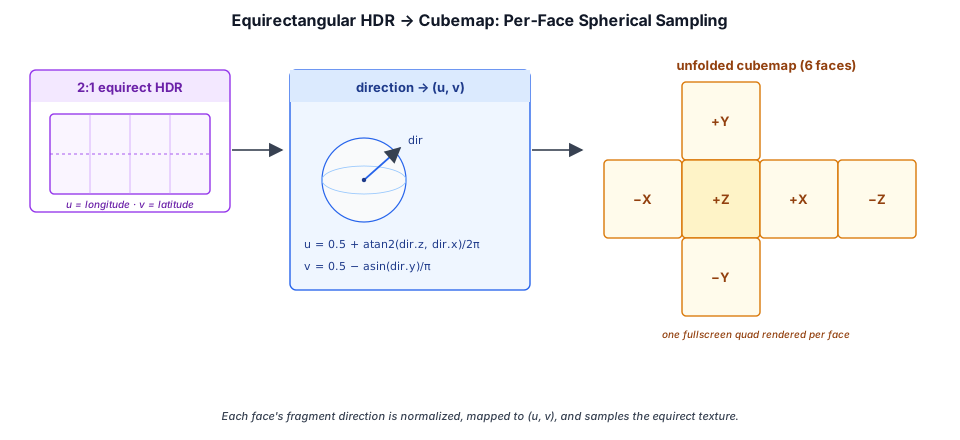
Cubes appear only in the IBL bake (ibl.ts, ibl_baking.wgsl). There, one compute dispatch per cube face (and per roughness level for the prefiltered cube) turns each output texel into a direction, maps that direction through the same equirect_uv, and integrates the panorama around it:
// Convert cube face + normalized UV in [-1,1] to a world-space direction.
// Uses the standard WebGPU/OpenGL cubemap face convention.
fn cube_dir(face: u32, uc: f32, vc: f32) -> vec3<f32> {
  switch face {
    case 0u: { return normalize(vec3<f32>( 1.0, -vc, -uc)); }  // +X
    case 1u: { return normalize(vec3<f32>(-1.0, -vc,  uc)); }  // -X
    case 2u: { return normalize(vec3<f32>( uc,   1.0,  vc)); }  // +Y
    case 3u: { return normalize(vec3<f32>( uc,  -1.0, -vc)); }  // -Y
    case 4u: { return normalize(vec3<f32>( uc,  -vc,  1.0)); }  // +Z
    default: { return normalize(vec3<f32>(-uc,  -vc, -1.0)); }  // -Z
  }
}
This is also where the panorama's mip chain earns its cost. The GGX prefilter uses filtered importance sampling: when a sample's lobe is wide, it reads a coarser mip of the panorama (plus a FIS_MIP_BIAS of 2), so 256 samples produce a smooth integral instead of speckled noise. The procedural sky follows the same convention in reverse: sky_panorama.wgsl bakes an atmosphere panorama with the inverse mapping, which makes it a drop-in replacement for a loaded .hdr.
5.5.3 OpenEXR Environment Maps#
Radiance .hdr is the classic HDR format, but professional content pipelines (rendered panoramas, light probes baked in DCC tools) far more often ship OpenEXR (.exr). EXR stores true 16-bit half or 32-bit float channels instead of RGBE's shared exponent. exr_loader.ts decodes EXR entirely on the CPU into a linear Float32Array, then uploads it as the same rgba16float 2D texture with a full mip pyramid that createHdrTexture produces. An EXR environment therefore drops straight into the IBL prefilter and sky paths with no downstream changes.
Format Coverage#
EXR is a much richer container than Radiance HDR. The loader parses the scanline header (channels, compression, data window, line order) and decodes this subset:
- Channels:
HALF(f16),FLOAT(f32), andUINT. Channels namedR/G/B/Amap to the output. A missing alpha defaults to 1.0, and a lone luminance channelYis replicated to RGB for grayscale maps. - Compression:
NONE,RLE,ZIP,ZIPS,PXR24, andPIZ. ZIP, ZIPS, and PXR24 blocks are zlib streams decoded with the browser's nativeDecompressionStream('deflate'), with no third-party inflate dependency. PIZ is a port of the reference wavelet + Huffman decoder. - Unsupported: tiled, deep, and multi-part files throw with an actionable message ("re-export as scanline"), as do the lossy
B44/DWAA/DWABcodecs.
Half samples are expanded to float through a lazily built 65,536-entry lookup table, which avoids a per-pixel Math.pow on multi-megapixel panoramas:
const lut = new Float32Array(65536);
for (let h = 0; h < 65536; h++) {
  const sign = (h & 0x8000) ? -1 : 1;
  const exp = (h & 0x7c00) >> 10;
  const mant = h & 0x03ff;
  let v: number;
  if (exp === 0) {
    v = sign * Math.pow(2, -14) * (mant / 1024);
  } else if (exp === 0x1f) {
    v = mant ? NaN : sign * Infinity;
  } else {
    v = sign * Math.pow(2, exp - 15) * (1 + mant / 1024);
  }
  lut[h] = v;
}
On upload, createExrTexture converts back to half floats (floatToHalf), writes mip 0 with bytesPerRow: width * 8 (four channels × two bytes), and calls generateMipmaps(device, tex, 'rgba16float', mipLevelCount).
One Loader, Either Format#
Both decoders emit an identical rgba16float 2D texture, so environment_texture.ts exposes one entry point that dispatches on the file extension, and calling code never branches on the format:
export async function loadEnvironmentTexture(device: GPUDevice, url: string): Promise<Texture> {
  const buffer = await (await fetch(url)).arrayBuffer();
  if (/\.exr(\?|#|$)/i.test(url)) {
    return createExrTexture(device, await parseExr(buffer));
  }
  return createHdrTexture(device, parseHdr(buffer));
}
5.5.4 3D color LUTs#
The color-grading stack (chapter 11) can finish with a display-space 3D LUT in the .cube interchange format: LUT_3D_SIZE N followed by N³ r g b rows, red varying fastest. cube_lut.ts parses the text and uploads one texel per entry into an rgba8unorm 3D texture. Red-fastest order is exactly WebGPU's X-fastest texel order, so no reordering is needed:
const tex = device.createTexture({
  label: 'CubeLut3D',
  dimension: '3d',
  size: { width: n, height: n, depthOrArrayLayers: n },
  format: 'rgba8unorm',
  usage: GPUTextureUsage.TEXTURE_BINDING | GPUTextureUsage.COPY_DST,
});
Sampling a LUT needs a half-texel correction. Texel i of an N-texel axis has its center at (i + 0.5)/N, so the input color in [0, 1] is remapped onto [0.5/N, 1 − 0.5/N] before the trilinear lookup:
let n = f32(textureDimensions(lut).x);
let uvw = (clamp(c, vec3<f32>(0.0), vec3<f32>(1.0)) * (n - 1.0) + 0.5) / n;
let graded = textureSampleLevel(lut, samp, uvw, 0.0).rgb;
return mix(c, graded, g.lut_amount);
Values outside [0, 1] are clamped on upload, so HDR or log-encoded LUTs are not supported yet.
Compressed Textures: KTX2 and Basis Universal#
An uncompressed RGBA8 texture costs 4 bytes per texel on the GPU no matter how small its PNG was on disk, because the browser decodes the PNG before upload. Block-compressed formats stay compressed in VRAM. The GPU decodes 4×4 blocks on the fly as it samples, at 8 or 16 bytes per block (0.5 or 1 byte per texel). The catch is that GPU vendors disagree on formats: desktop GPUs expose BC (texture-compression-bc), while many mobile GPUs expose ETC2 and/or ASTC instead.
KTX2 with Basis Universal supercompression resolves this by storing an intermediate encoding (ETC1S for small files, UASTC for high quality) that is transcoded at load time into whichever block format the device supports. glTF references such images through the KHR_texture_basisu extension, which redirects a texture's source to the KTX2 image.
5.6.1 Lazy, worker-safe decoder loading#
The Basis transcoder is a WASM module vendored under src/third_party/basis/. It is only fetched the first time a model actually contains a KTX2 texture, so an uncompressed model pays nothing. The loader is written to work both in a document and inside the tile-decode Worker, where there is no document to append a <script> to:
if (typeof document === 'undefined') {
  // Worker context: importScripts is synchronous and runs on the worker global.
  try {
    (self as unknown as { importScripts: (u: string) => void }).importScripts(url);
    resolve();
  } catch (err) {
    reject(new Error(`Failed to importScripts decoder: ${url} (${(err as Error)?.message ?? err})`));
  }
  return;
}
const el = document.createElement('script');
// ── ... append to document.head, resolve on load; promise memoized per URL ──
getBasisModule() memoizes the initialized module the same way. Concurrent first uses share one promise, so the WASM is compiled once.
5.6.2 Choosing the transcode target#
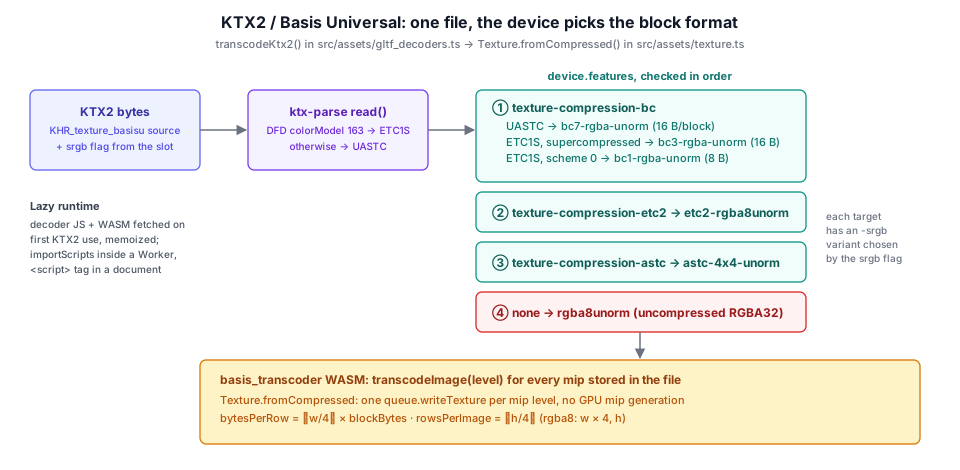
transcodeKtx2 reads the container with ktx-parse, decides ETC1S versus UASTC from the Data Format Descriptor's color model (163 = ETC1S), opens the file in the Basis transcoder, and walks a preference ladder of device features:
const container = readKtx2(bytes);
const isUASTC = container.dataFormatDescriptor[0]?.colorModel !== KHR_DF_MODEL_ETC1S;

const basis = await getBasisModule();
const ktx2File = new basis.KTX2File(bytes);
// ── ... validity check / startTranscoding ... ──

// Pick a transcode target from device features (BC > ETC2 > ASTC > rgba32).
const f = device.features;
let basisFormat: number;
let gpuFormat: GPUTextureFormat;
// Ask the transcoder rather than inferring from the container: ETC1S is
// always BasisLZ-supercompressed, so the supercompression scheme says
// nothing about alpha (testing it sent every opaque ETC1S file to BC3).
const hasAlpha = isUASTC || ktx2File.getHasAlpha();
if (f.has('texture-compression-bc')) {
  if (isUASTC) {
    basisFormat = BASIS_FORMAT.BC7_RGBA; gpuFormat = srgb ? 'bc7-rgba-unorm-srgb' : 'bc7-rgba-unorm';
  } else if (hasAlpha) {
    basisFormat = BASIS_FORMAT.BC3_RGBA; gpuFormat = srgb ? 'bc3-rgba-unorm-srgb' : 'bc3-rgba-unorm';
  } else {
    basisFormat = BASIS_FORMAT.BC1_RGB; gpuFormat = srgb ? 'bc1-rgba-unorm-srgb' : 'bc1-rgba-unorm';
  }
} else if (f.has('texture-compression-etc2')) {
  basisFormat = BASIS_FORMAT.ETC2_RGBA; gpuFormat = srgb ? 'etc2-rgba8unorm-srgb' : 'etc2-rgba8unorm';
} else if (f.has('texture-compression-astc')) {
  basisFormat = BASIS_FORMAT.ASTC_4x4_RGBA; gpuFormat = srgb ? 'astc-4x4-unorm-srgb' : 'astc-4x4-unorm';
} else {
  basisFormat = BASIS_FORMAT.RGBA32; gpuFormat = srgb ? 'rgba8unorm-srgb' : 'rgba8unorm';
}
UASTC maps naturally onto BC7 (both are 16-byte, high-quality RGBA blocks). ETC1S goes to BC3 when the file actually has an alpha slice and to the half-size BC1 when it doesn't. The alpha test has to come from the transcoder (getHasAlpha()), which is why target selection happens only after the KTX2File is opened: ETC1S is always BasisLZ-supercompressed, so the container's supercompression field can't distinguish opaque files from ones with alpha. Every target has an -srgb twin, so the sRGB rule of §5.2.1 still holds: the texture unit decodes color maps to linear on sample even when they are block-compressed. If the device supports no compressed family, the transcoder falls back to plain RGBA8. The model still loads, just without the memory savings.
The transcoder then produces every mip level stored in the file:
for (let level = 0; level < levelCount; level++) {
  const dstSize = ktx2File.getImageTranscodedSizeInBytes(level, 0, 0, basisFormat);
  const dst = new Uint8Array(dstSize);
  if (!ktx2File.transcodeImage(dst, level, 0, 0, basisFormat, 0, -1, -1)) {
    ktx2File.close(); ktx2File.delete();
    throw new Error(`KTX2: failed to transcode mip level ${level}`);
  }
  levels.push(dst);
}
5.6.3 Uploading block-compressed data#
Texture.fromCompressed uploads the transcoded levels. The only subtlety is the row pitch. For block formats, a "row" in writeTexture is a row of 4×4 blocks, so bytesPerRow is the number of blocks across times the block size, and rowsPerImage counts block rows:
const COMPRESSED_BLOCK_BYTES: Partial<Record<GPUTextureFormat, number>> = {
  'bc1-rgba-unorm': 8,  'bc1-rgba-unorm-srgb': 8,
  'bc3-rgba-unorm': 16, 'bc3-rgba-unorm-srgb': 16,
  'bc7-rgba-unorm': 16, 'bc7-rgba-unorm-srgb': 16,
  'etc2-rgba8unorm': 16, 'etc2-rgba8unorm-srgb': 16,
  'astc-4x4-unorm': 16, 'astc-4x4-unorm-srgb': 16,
};
// ── ... in fromCompressed ──
for (let level = 0; level < levels.length; level++) {
  const w = Math.max(1, width >> level);
  const h = Math.max(1, height >> level);
  const bytesPerRow = blockBytes ? Math.ceil(w / 4) * blockBytes : w * 4;
  const rowsPerImage = blockBytes ? Math.ceil(h / 4) : h;
  device.queue.writeTexture(
    { texture: tex, mipLevel: level },
    levels[level],
    { offset: 0, bytesPerRow, rowsPerImage },
    { width: w, height: h, depthOrArrayLayers: 1 },
  );
}
The texture is created with only TEXTURE_BINDING | COPY_DST. Block formats cannot be render attachments, so mips must come from the file, never from generateMipmaps. Note also that queue.writeTexture, unlike buffer-to-texture copies, has no 256-byte bytesPerRow alignment requirement, which is why the tight pitch above is legal.
A current limitation: glTF slots that the loader composites on the CPU (the metallic-roughness + occlusion pack and the extension packs) need decoded pixels. For those slots a KTX2 source is skipped with a warning. Direct slots such as base color, normal, and emissive transcode normally.
5.6.4 Profiles, bundles, and the editor import pipeline#
The same three feature flags drive asset selection as well as transcoding. bundle_profile.ts builds a runtime profile from the live device, so the bundle system can choose between, for example, a desktop build with BC7 and 4K maps and a mobile build with smaller ETC2/ASTC textures:
export function detectProfile(device: GPUDevice): RuntimeProfile {
  const bc = device.features.has('texture-compression-bc');
  const astc = device.features.has('texture-compression-astc');
  const etc2 = device.features.has('texture-compression-etc2');
  const name = !bc && (astc || etc2) ? 'mobile' : 'desktop';
  return {
    name,
    maxTextureSize: device.limits.maxTextureDimension2D,
    textureFormats: { bc, astc, etc2 },
  };
}
On the authoring side, the editor bakes source images into Basis-supercompressed KTX2 ahead of time. Per-texture import settings live in the asset's .meta sidecar and are defined in editor/src/shared/textureImport.ts. A content type (color, normal, linear, grayscale, hdr) seeds the defaults:
| Content type | sRGB | Compression default | Notes |
|---|---|---|---|
color | on | ETC1S, quality 128 | albedo / emissive |
normal | off | UASTC, level 2 | optional green-channel flip |
linear, grayscale | off | ETC1S, quality 128 | packed data, masks, height |
hdr | off | (passed through) | Basis is LDR-only |
The type is guessed from the file name (_normal, _nrm, _orm, rough, .exr, …) and can be overridden. The baked artifact is stored in the project's Cache/ folder under a key derived from an FNV-1a hash of every setting that affects the output (texture_cache_core.ts). Changing a setting re-bakes, and stale variants of the same texture are pruned. Both the editor viewport and the web build read the same processed artifact.
Texture Atlases and Arrays#
Binding many small textures has costs: bind-group switches, more draw calls, and per-stage limits on sampled textures. Taos Engine uses two ways to put many images behind one binding. An atlas packs tiles into one large 2D texture and remaps UVs. A texture array stacks equal-sized layers and selects one by index.
5.7.1 The block texture atlas#
A voxel world has hundreds of block types with up to three distinct textures each (side, top, bottom). Crafty packs all of them into three parallel atlases built offline by npm run build-atlas, which runs scripts/build_atlas.js (the full pipeline, from texture pack to generated block types, is in Crafty §2.13). The script lays out 16-pixel tiles in 25 columns. The shipped atlas is 400 × 1104 pixels, which is 25 × 69 tiles; rows 0–42 hold the static tiles, and the build appends the frames of animated textures (fire, lava, and the like) as extra rows after them, so the row count changes with the pack:
| Atlas | Content | Format |
|---|---|---|
colorAtlas | albedo + alpha (cutout foliage) | rgba8unorm-srgb |
normalAtlas | tangent-space normals | rgba8unorm |
merAtlas | R metallic · G emissive · B roughness | rgba8unorm |
BlockTexture.load in block_texture.ts fetches the three images in parallel and uploads them with the capped mip chain from §5.4.4. Crafty can pass a different tile size (it loads a 32-pixel resource-pack skin through the same API).
The chunk shader does not use a per-material UV transform. A storage buffer holds one BlockData row per block type with its three tile indices, and the fragment shader turns the face, block type, and world position into an atlas UV:
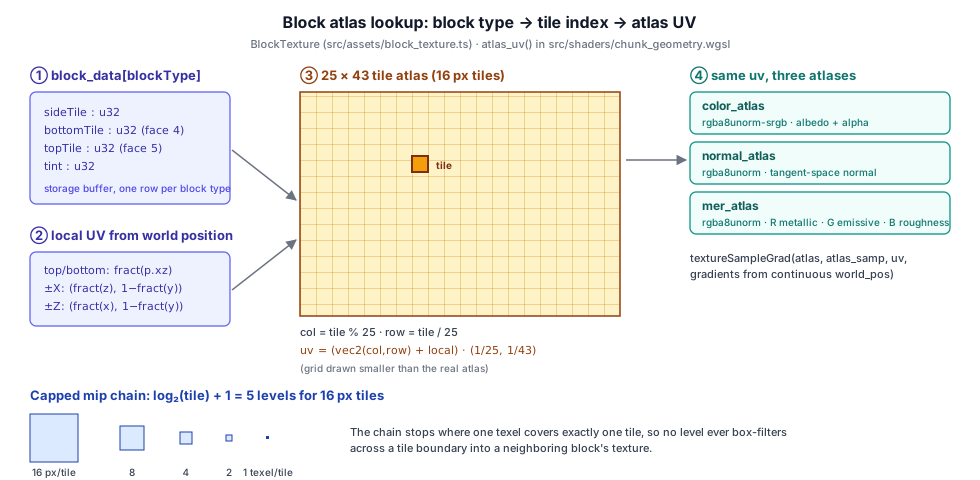
fn atlas_uv(world_pos: vec3<f32>, face: u32, block_type: u32) -> vec2<f32> {
  let bd = block_data[block_type];
  var tile: u32;
  if face == 4u      { tile = bd.bottomTile; }
  else if face == 5u { tile = bd.topTile; }
  else               { tile = bd.sideTile; }

  var local_uv: vec2<f32>;
  if face == 2u || face == 3u {
    local_uv = vec2<f32>(fract(world_pos.z), 1.0 - fract(world_pos.y));
  } else if face == 4u || face == 5u {
    local_uv = fract(world_pos.xz);
  } else {
    local_uv = vec2<f32>(fract(world_pos.x), 1.0 - fract(world_pos.y));
  }

  let tileX = f32(tile % ATLAS_COLS);
  let tileY = f32(tile / ATLAS_COLS);
  return (vec2<f32>(tileX, tileY) + local_uv) * vec2<f32>(INV_COLS, inv_rows());
}

// The row count is not hard-coded: it follows the bound atlas.
fn inv_rows() -> f32 {
  let d = vec2<f32>(textureDimensions(color_atlas));
  return d.x / (f32(ATLAS_COLS) * d.y);
}
Deriving the local UV from fract(world_pos) means a greedy-meshed quad spanning many blocks still repeats the tile once per block, even though its vertices only cover the quad's corners. The price is the derivative discontinuity handled by textureSampleGrad in §5.3.2. All three atlases are sampled at the same UV with the same gradients.
For non-chunk geometry that wants a single block's texture (a PbrMaterial on an arbitrary mesh), BlockTexture.uvTransform(blockId) returns the equivalent [offsetX, offsetY, scaleX, scaleY] for the material's uvOffset/uvScale uniforms.
Atlases have limits. Nearest magnification is needed to stop bilinear filtering from bleeding across tile edges. Mip chains must be capped. Hardware repeat addressing is not available within a tile, which is why the tiling comes from fract. Large, individually tiling materials are better served by an array.
fract(world), sampled with the ChunkAtlasSampler settings. Set Gradients to Implicit and a seam of too-coarse mip runs along every block edge (switch to 4× pixels to see it plainly). Pick the Full mip chain and the distant blocks blur into their atlas neighbors' colors. Tick Linear mag/min filter and neighboring tiles bleed in along every edge close to the camera.5.7.2 Terrain material layers as 2D arrays#
The terrain system blends up to MAX_LAYERS materials per pixel, weighted by splat maps. Each material channel is one 2d-array texture with one layer per material, so the shader indexes layers by integer and every layer tiles with ordinary repeat addressing and full-quality anisotropic filtering:
// --- Layer textures (1024² × layerCount, mipped; defaults: white/flat/half/half)
const arraySize = { width: LAYER_TEXTURE_SIZE, height: LAYER_TEXTURE_SIZE, depthOrArrayLayers: layerCount };
const arrayUsage = GPUTextureUsage.COPY_DST | GPUTextureUsage.TEXTURE_BINDING | GPUTextureUsage.RENDER_ATTACHMENT;
const layerAlbedoTex = device.createTexture({ label: 'TerrainLayerAlbedo',    size: arraySize, format: 'rgba8unorm-srgb', usage: arrayUsage, mipLevelCount: LAYER_MIP_COUNT });
const layerNormalTex = device.createTexture({ label: 'TerrainLayerNormal',    size: arraySize, format: 'rgba8unorm',      usage: arrayUsage, mipLevelCount: LAYER_MIP_COUNT });
const layerRoughTex  = device.createTexture({ label: 'TerrainLayerRoughness', size: arraySize, format: 'rgba8unorm',      usage: arrayUsage, mipLevelCount: LAYER_MIP_COUNT });
const layerDispTex   = device.createTexture({ label: 'TerrainLayerDisp',      size: arraySize, format: 'rgba8unorm',      usage: arrayUsage, mipLevelCount: LAYER_MIP_COUNT });
Every layer of an array must have the same size and format, so LAYER_TEXTURE_SIZE is fixed at 1024 and LAYER_MIP_COUNT = log2(1024) + 1 = 11. Each layer starts with a neutral image (white albedo, flat normal (128, 128, 255), mid-gray roughness and displacement) written with origin: { z: layer }, followed by a per-layer generateMipmaps. loadLayerTextures later replaces individual layers from URLs. Albedo goes into the -srgb array and the other three into linear arrays. Unused slots keep their neutral defaults, so the shader never needs a "has texture" branch.
The same system keeps a second, very different array: the virtual-texture page atlas. It is a 2d-array of rgba16float layers that a compute shader writes as terrain pages stream in around the camera. Each layer is one resident page, with height in R and the normal's X/Z in G/B (Y is reconstructed in the shader). The number of layers is the residency budget (16 slots by default), and the page resolution comes from the quality preset: 128, 256, or 512 texels per page, for an atlas of about 2, 8, or 32 MB.
Render Targets and Pooled Textures#
Asset textures live as long as their owner. Render targets are different: many exist for only part of a frame, their sizes follow the canvas, and they are recreated whenever the pipeline configuration changes. Taos Engine routes all of them through the render graph (src/renderer/render_graph/), which separates the virtual texture a pass declares from the physical GPUTexture backing it.
5.8.1 Declaring textures#
A pass describes a texture with a TextureDesc:
export interface TextureDesc {
  label?: string;
  format: GPUTextureFormat;
  width: number;
  height: number;
  depthOrArrayLayers?: number;
  mipLevelCount?: number;
  sampleCount?: number;
  dimension?: GPUTextureDimension;
  /**
   * Additional usage flags beyond what the graph infers from declared reads/
   * writes. ... this is only needed when the pass uses the texture in a way the graph
   * cannot see (e.g. mipmap generation outside the encoder).
   */
  extraUsage?: GPUTextureUsageFlags;
}
There are four ways to obtain a texture handle, one per lifetime:
| API | Lifetime | Example |
|---|---|---|
b.createTexture(desc) | transient: one frame, pooled | transmission snapshot, aerial-perspective volumes |
graph.importPersistentTexture(key, desc) | persistent: survives frames and graph rebuilds, keyed by string | shadow maps, TAA history, IBL data |
graph.importExternalTexture(tex, desc) | external: caller-owned, never destroyed by the graph | the Hi-Z pyramid, asset textures |
graph.setBackbuffer(...) | the canvas texture, bound at execute time | final tonemap output |
5.8.2 Usage flags are inferred#
A pass never writes GPUTextureUsage flags by hand. Each read/write declares a ResourceUsage, and the compiler ORs together the matching flags from every pass that touches the resource:
function textureUsageFlag(usage: ResourceUsage, format: GPUTextureFormat): GPUTextureUsageFlags {
  switch (usage) {
    case 'attachment':
    case 'depth-attachment':
      return GPUTextureUsage.RENDER_ATTACHMENT;
    case 'depth-read':
      // Depth read-only attachment + likely sampled later; use both.
      return GPUTextureUsage.RENDER_ATTACHMENT | GPUTextureUsage.TEXTURE_BINDING;
    case 'sampled':
      return GPUTextureUsage.TEXTURE_BINDING;
    case 'storage-read':
    case 'storage-write':
    case 'storage-read-write':
      return GPUTextureUsage.STORAGE_BINDING;
    case 'copy-src':
      return GPUTextureUsage.COPY_SRC;
    case 'copy-dst':
      return GPUTextureUsage.COPY_DST;
    // ── ... ──
  }
}
The result is the minimal usage set for the frame's actual pass graph. Minimal usage matters on real hardware: some drivers pick memory layouts or compression based on usage, and STORAGE_BINDING in particular can disable framebuffer compression on some GPUs. extraUsage covers work the graph cannot see. The transmission snapshot of §5.4.3 is the standard case, since generateMipmaps renders into it and samples it from inside a transfer pass.
Persistent textures need one more step. Two passes may import the same key with different usages (for example TAA and a sample that reads its history), so the compiler first aggregates usage across every handle sharing a key, and only then creates the texture. Without that step the texture would be destroyed and recreated mid-compile, leaving earlier bindings dangling.
5.8.3 The physical resource cache#
physical_resource_cache.ts backs transients with a free-list per descriptor. The key covers everything that makes two textures interchangeable:
function textureKey(desc: TextureDesc, usage: GPUTextureUsageFlags): string {
  return `${desc.format}|${desc.width}x${desc.height}x${desc.depthOrArrayLayers ?? 1}|m${desc.mipLevelCount ?? 1}|s${desc.sampleCount ?? 1}|${desc.dimension ?? '2d'}|u${usage}`;
}acquireTexture(desc: TextureDesc, usage: GPUTextureUsageFlags): GPUTexture {
const key = textureKey(desc, usage);
const pool = this._texturePool.get(key);
// FIFO (shift, not pop): release pushes transients back in acquire order, so
// a static pass graph hands the same virtual resource the SAME physical
// texture every frame. That keeps GPUTextureView identity stable, so the view
// and bind-group caches hit instead of rebuilding views/bind groups per frame.
let tex = pool?.shift();
if (!tex) {
tex = this._device.createTexture({ /* ── from desc + usage ── */ });
}
this._liveTransients.push({ kind: 'tex', key, resource: tex });
return tex;
}At the end of execute() every transient returns to its pool. Because the pool is FIFO, a frame with the same pass graph as the last one receives the same GPUTexture for each virtual resource. That keeps two further caches effective:
- Views:
getOrCreateView(texture, viewDesc)caches views per texture in aWeakMap, keyed by the JSON of the view descriptor, so single-mip or single-layer views are created once. - Bind groups:
getOrCreateBindGroupkeys on the layout plus stable numeric ids of every bound buffer, view, and sampler. Stable textures produce stable views and therefore bind-group cache hits instead of per-framecreateBindGroupcalls.
When the canvas resizes, Engine.frame() calls cache.trimUnused(), which destroys every pooled (non-checked-out, non-persistent) texture and buffer and clears the bind-group cache. Otherwise the old-sized render targets would stay in memory. Persistent textures are replaced automatically when their descriptor changes: getOrCreatePersistentTexture destroys and recreates the texture if the requested descriptor key differs from the one it was created with.
The cache does not alias memory between transients whose lifetimes do not overlap. Each distinct descriptor has its own free-list. The source notes this as intentionally out of scope for the first cut.
Storage Textures and Compute#
A storage texture is a texture a shader writes (and, for some formats, reads) by integer coordinate with textureStore/textureLoad, with no sampler or filtering. It is the texture-shaped output of compute shaders. Taos Engine uses storage textures wherever a result is naturally an image or volume computed per texel:
| Writer | Storage view | Format |
|---|---|---|
| RGBE decode (rgbe_decode.wgsl) | texture_storage_2d | rgba16float |
| IBL irradiance / prefilter bake (ibl_baking.wgsl) | texture_storage_2d (one cube face, one mip) | rgba16float |
| Aerial-perspective froxels (aerial_volume.wgsl) | texture_storage_3d | rgba16float |
| Volumetric fog scatter + integration (volumetric_fog.wgsl) | texture_storage_3d | rgba16float |
| VXGI radiance and mips (src/shaders/vxgi/) | texture_storage_3d | rgba16float |
| Mesh SDF bake (sdf_bake.wgsl) | texture_storage_3d | r32float |
| Terrain VT page generation (terrain_page_gen.wgsl) | texture_storage_2d_array | rgba16float |
| Ocean FFT / waves / foam (src/shaders/ocean/) | texture_storage_2d_array | rgba16float |
| DDGI probe atlases (ddgi_probe_update.wgsl) | texture_storage_2d | rgba16float |
| CMAA2 edges / resolve (cmaa2.wgsl) | texture_storage_2d | rgba8unorm, rgba16float |
Three constraints shape how these are used:
One mip, one view. A storage binding covers exactly one mip level. To write level l of a mip-chained texture you bind a view with
baseMipLevel: l, mipLevelCount: 1. That is how the IBL baker writes each roughness level of the prefiltered cube.No cube views. A storage view cannot have
cubedimension, so cube faces are written through2dviews of individual array layers and sampled later through acubeview of the same texture:src/assets/ibl.tsTypeScriptconst pfBG1s = Array.from({ length: IBL_LEVELS * 6 }, (_, i) => { const l = Math.floor(i / 6); const f = i % 6; return makeBG1(prefiltered.createView({ dimension: '2d', baseMipLevel: l, mipLevelCount: 1, baseArrayLayer: f, arrayLayerCount: 1, })); });Format support. Only a subset of formats is storage-capable in core WebGPU.
rgba16float,rgba8unorm, andr32floatare,rgba8unorm-srgbis not. That is one more reasonrgba16floatis the engine's default intermediate format. Write-only access (access: 'write-only'in the layout,writein WGSL) is what nearly all of these passes use. Read-modify-write over a frame is done by ping-ponging two textures or by reading the previous result as a sampled texture.
Inside the render graph, a compute pass declares its outputs with 'storage-write', and the graph adds STORAGE_BINDING to the transient. The aerial-perspective pass creates two 32³ froxel volumes this way:
graph.addPass(this.name, 'compute', (b: PassBuilder) => {
  const desc: Omit<TextureDesc, 'label'> = {
    format: 'rgba16float',
    width: AERIAL_VOLUME_SIZE,
    height: AERIAL_VOLUME_SIZE,
    depthOrArrayLayers: AERIAL_VOLUME_SIZE,
    dimension: '3d',
  };
  const volumeL = b.createTexture({ label: 'aerial.volumeL', ...desc } as TextureDesc);
  const volumeT = b.createTexture({ label: 'aerial.volumeT', ...desc } as TextureDesc);
  outL = b.write(volumeL, 'storage-write');
  outT = b.write(volumeT, 'storage-write');
  // ── ... ──
  b.setExecute((pctx, res) => {
    const bg = res.getOrCreateBindGroup({
      label: 'AerialVolumeBG', layout: this._bgl,
      entries: [
        { binding: 0, resource: { buffer: this._uniformBuf } },
        { binding: 1, resource: res.getTextureView(outL) },
        { binding: 2, resource: res.getTextureView(outT) },
        // ── ... ──
      ],
    });
    const enc = pctx.computePassEncoder!;
    enc.setPipeline(this._pipeline);
    enc.setBindGroup(0, bg);
    enc.dispatchWorkgroups(AERIAL_VOLUME_SIZE / 8, AERIAL_VOLUME_SIZE / 8, 1);
  });
});
The dispatch covers the 32 × 32 froxel columns. Each invocation then marches along its column in depth and calls textureStore once per slice. Later passes read the volumes as ordinary texture_3d<f32> with a linear sampler. Because the graph saw a 'sampled' read as well, the transient has both STORAGE_BINDING and TEXTURE_BINDING.
The declared usage is also what orders passes. The Hi-Z pass renders its pyramid with fragment shaders, yet declares the imported pyramid as 'storage-write'. The declaration exists so that the cull pass that reads the pyramid is ordered after the build and sees the new version, even though the physical texture is external and already has its own usage flags.
Default and Fallback Textures#
A bind group must be complete: every binding in the layout needs a resource, even when a material has no normal map or a feature is disabled. Taos Engine's convention is to bind a 1×1 texture whose value is the identity for the operation that consumes it, so the shader runs the same code with or without real data and never branches on "has texture".
Texture.createSolid(device, r, g, b, a) makes such a texture for general use. PbrMaterial keeps one per slot per device, created lazily through _make1x1View:
private static _getDefaultMerView(device: GPUDevice): GPUTextureView {
  let v = PbrMaterial._defaultMerByDevice.get(device);
  if (!v) {
    // R=255 → metallic multiplier 1, G=0 → no emission, B=255 → roughness ×1.
    v = PbrMaterial._make1x1View(device, 'PbrDefaultMer', [255, 0, 255, 255]);
    PbrMaterial._defaultMerByDevice.set(device, v);
  }
  return v;
}
The values are not arbitrary. Each one is chosen so that "texture × factor" collapses to "factor", which reproduces the glTF rule that a missing texture means the constant factors apply unmodified:
| Slot | Default RGBA | Decoded meaning |
|---|---|---|
| normal | (128, 128, 255, 255) | tangent-space (0, 0, 1): the unperturbed normal |
| MER | (255, 0, 255, 255) | metallic ×1, no MER emission, roughness ×1, occlusion 1 |
| emissive | (255, 255, 255, 255) | white, so emissiveFactor alone controls emission (default 0) |
| extension pack | (255, 255, 255, 255) | clearcoat / sheen / iridescence factors ×1 |
| anisotropy | (255, 128, 255, 255) | direction (1, 0), strength ×1 |
| albedo | not bound | a shader variant (HAS_ALBEDO_MAP) removes the binding instead |
The shader does exactly what the table implies:
let mer      = textureSample(mer_map, mat_samp, uv_mer);
let roughness = max(material.roughness * mer.b, 0.04);
let metallic  = material.metallic  * mer.r;
// ── ... ──
let em_tex   = textureSample(emissive_map, mat_samp, uv_emissive).rgb;
let emission = albedo * mer.g + em_tex * material.emissiveFactor;
The same pattern appears throughout the renderer:
- Terrain splat maps start as a 1×1
(255, 0, 0, 0)texture (all weight on layer 0) untilsetSplatmap()binds real data. A 1×1r32floatHi-Z placeholder sits in the LOD compute's pyramid slot while occlusion is off, and a zero mip count in the uniform gates the reads. - Chunk wetness binds a 1×1
r32floatplaceholder heightmap until the game supplies its own. A size of 0 in the uniform disables the sky-exposure test. - Color grading binds
createIdentityLut(), a 2³ LUT whose trilinear lookup returns its input, until a.cubefile is loaded. Clearing the LUT reverts to it. - Aerial perspective binds a 1×1 black multi-scatter LUT when none is provided, so the multi-scatter term adds nothing.
- Terrain layer arrays fill every layer with neutral content up front (§5.7.2), which is the same idea applied to a whole array.
Each default is created once per device and shared by every material or pass that needs it. They are never destroyed individually; they live as long as the device-keyed WeakMap entry.
Memory Footprint#
WebGPU does not report how much VRAM a texture occupies, and the engine does not keep a global texture-memory counter. Budgeting is done at design time, by choosing sizes and formats, and locally, by the systems that stream. The arithmetic is simple enough to do by hand: bytes = width × height × depth × bytes-per-texel, times about 4⁄3 for a full 2D mip chain (8⁄7 for 3D), and for block formats, bytes per 4×4 block ÷ 16 per texel.
Some representative numbers computed from the constants in the source:
| Resource | Shape / format | Approx. size |
|---|---|---|
| 2048² glTF color map, uncompressed | rgba8unorm + mips | 21.3 MiB |
| same map as KTX2 → BC7 / ETC2 / ASTC 4×4 | 1 B/texel + mips | 5.3 MiB |
| same map as KTX2 → BC1 | 0.5 B/texel + mips | 2.7 MiB |
| Block atlases (Crafty, ×3) | 400 × 1104 rgba8unorm[-srgb], 5 mips | ≈ 2.2 MiB each |
| Terrain layer arrays (4 arrays × 4 layers) | 1024² rgba8unorm[-srgb], 11 mips | ≈ 85 MiB total |
| Terrain VT page atlas | rgba16float array, 16 slots | ≈ 2 / 8 / 32 MB by quality preset |
| 2048 × 1024 HDR panorama | rgba16float + mips | 21.3 MiB |
| IBL prefiltered cube | 128² × 6 rgba16float, 5 mips | ≈ 1.0 MiB |
| IBL irradiance cube / BRDF LUT | 32² × 6 / 64² rgba16float | 48 KiB / 32 KiB |
| Cloud base + detail noise | 64³ + 32³ rgba8unorm, mips | ≈ 1.3 MiB |
| Aerial-perspective volumes (×2) | 32³ rgba16float | 256 KiB each |
| Transmission snapshot at 1920 × 1080 | rgba16float + mips | ≈ 21 MiB (only when transmissive meshes exist) |
| Hi-Z pyramid at 1920 × 1080 | r32float + mips | ≈ 10.5 MiB |
The table shows where the levers are, and the code uses each of them:
- Block compression is the biggest single win for authored content: 4× (BC7/ETC2/ASTC) to 8× (BC1) over RGBA8 (§5.6). The editor pipeline makes it the default for imported textures.
- Fixed-size pools with explicit slot counts bound streaming systems regardless of world size: the terrain VT atlas (
numSlots), the reflection-probe cube arrays, and the cluster page pool of chapter 4. The 3D-tile cache (tile_cache.ts) evicts least-recently-used tiles against a byte budget that can be changed live withsetBudget. - Quality presets choose resolutions. The terrain presets scale page texels (and therefore the atlas size) by 4× per step. The EVSM2 pass halves moment memory by falling back to
rg16float. - Skip what isn't sampled. When SH supplies diffuse IBL, the irradiance cube shrinks to 1×1 (
skipIrradianceCube). The transmission pass allocates nothing when no transmissive mesh is registered. - Right-size mip chains. Full chains everywhere they help minification, capped chains for atlases, a single level for render targets that are never minified.
- Release on resize. Canvas-sized transients are dropped by
trimUnused()when the canvas size changes (§5.8.3). - Device-sized profiles.
detectProfilerecordsmaxTextureDimension2Dnext to the compression families, so bundle variants can ship smaller maps to devices that need them.
Summary#
Textures are the substrate for both materials and the frame's own intermediate state:
- Dimensionality: the
Texturewrapper covers2d,2d-array,cube, and3dviews. Cube arrays hold reflection probes. 3D textures hold noise, LUTs, froxels, and SDFs. Texture reads inside loops use explicit-LOD sampling. - Formats and color spaces: color maps are
-srgbso sampling linearizes them, data maps stay linear, and image decoding always usescolorSpaceConversion: 'none'.rgba16floatis the HDR working format. The canvas is HDR (rgba16float, display-p3, extended) when available, and otherwise the tonemapper applies the exact sRGB curve. Optional features such asfloat32-filterableare checked at the point of use. - Samplers are created once per device and shared. Filters, anisotropy, address modes, and comparison are chosen per use, and the voxel atlas uses explicit gradients to avoid
fract()seams. - Mipmaps are generated on the GPU with one fullscreen pass per level, gamma-correct for sRGB formats, with cached pipelines and per-texture view chains. They also work per array layer, are capped for atlases, and can be regenerated each frame for the transmission snapshot. Reduction pyramids such as Hi-Z use max/min instead of averaging.
- Loading: browser-decoded images upload via
copyExternalImageToTexture. Radiance.hdris parsed on the CPU and decoded torgba16floatby a compute shader. OpenEXR shares a single extension-dispatched loader with it..cubeLUTs become 3D textures. An exact PNG codec protects data textures from premultiplication. - Compression: KTX2/Basis images are transcoded at load time to BC7/BC3/BC1, ETC2, ASTC, or RGBA8 depending on device features, and uploaded per mip with block-aware pitches. The editor bakes KTX2 artifacts from per-texture
.metasettings. - Atlases and arrays: the block atlas maps block type → tile → UV in the shader with a capped mip chain. Terrain materials use 2D arrays with full mips and anisotropic filtering.
- Render targets are virtual resources in the render graph, with inferred usage flags, FIFO-pooled physical textures, cached views and bind groups, and a trim on resize.
- Storage textures carry compute results (HDR decode, IBL faces, froxels, simulations) under the one-mip, no-cube-view, storage-format rules.
- Defaults: identity-valued 1×1 textures keep bind groups complete and shaders branch-free.
- Memory is budgeted through formats, compression, fixed-slot pools, quality presets, and skipping unused resources.
How these textures are bound into materials, and how the deferred G-Buffer encodes the surface properties sampled from them, is the subject of Chapter 6: Materials.
Further reading:
src/assets/texture.ts:Textureclass,generateMipmaps,fromBitmap/fromCompressed/fromUrlsrc/shaders/mipmap.wgsl: mip downsample shadersrc/assets/hdr_loader.ts+src/shaders/rgbe_decode.wgsl: Radiance HDR/RGBE parser and GPU decodesrc/assets/exr_loader.ts: OpenEXR parser (NONE/RLE/ZIP/ZIPS/PXR24/PIZ) →rgba16float, plus slice arrayssrc/assets/environment_texture.ts:loadEnvironmentTextureextension dispatch (.hdr/.exr)src/assets/ibl.ts+src/shaders/ibl_baking.wgsl: IBL cube bake from an equirectangular panoramasrc/assets/gltf_decoders.ts: KTX2/Basis transcoding and feature-based format selectionsrc/assets/bundles/bundle_profile.ts: device profile detection for bundle variantssrc/assets/cube_lut.ts:.cube3D LUT parser and uploadsrc/assets/png_codec.ts: exact RGBA PNG encode/decode for data texturessrc/assets/block_texture.ts+src/shaders/chunk_geometry.wgsl: block atlases and atlas UV lookupsrc/terrain/terrain_system.ts: terrain layer arrays and the VT page atlassrc/renderer/render_graph/physical_resource_cache.ts: transient pooling, persistent textures, view and bind-group cacheseditor/src/shared/textureImport.ts: editor texture import settings and cache keysscripts/build_atlas.js: block texture atlas builder