Chapter 17: Block Voxel Terrain
The voxel world is what distinguishes Crafty from a generic rendering demo. This chapter opens the Crafty: voxel sandbox game part of the book — the first concrete game implementation built on top of the engine. It covers the data structures, generation, and rendering of a Minecraft-style block-based terrain: chunks, greedy meshing, biomes, illuminated blocks, water, and village generation. The pattern is one specific terrain style — block voxels — not the only one a WebGPU engine can render; other game implementations (terraformable planets, infinite procedural landscapes) live in their own chapters.
17.1 Voxel Data Structure#
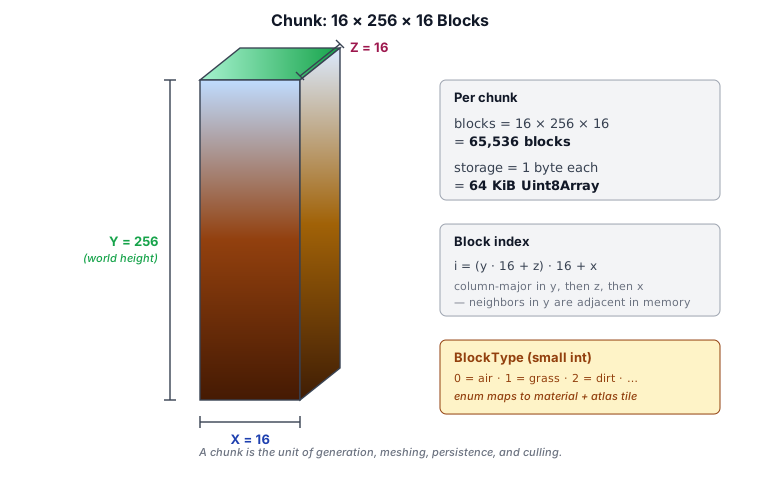
The world is divided into chunks — fixed-size 3D arrays of block IDs. Each chunk is a 16×256×16 volume (X, Y, Z):
// ── from src/block/chunk.ts ──
export class Chunk {
  static CHUNK_WIDTH  = 16;
  static CHUNK_HEIGHT = 16;
  static CHUNK_DEPTH  = 16;
  static SEA_LEVEL    = 15;

  blocks = new Uint16Array(Chunk.CHUNK_WIDTH * Chunk.CHUNK_HEIGHT * Chunk.CHUNK_DEPTH);
  globalPosition = new Vec3();

  constructor(px: number, py: number, pz: number) {
    this.globalPosition.set(px, py, pz);
  }

  getBlock(x: number, y: number, z: number): number { /* ... */ }
  generateVertices(neighbors?: ChunkNeighbors): ChunkMesh { /* greedy mesher */ }
  generateBlocks(seed: number, getErosion?: (gx, gz) => number): void { /* worldgen */ }
}
A chunk is a 16-cube of 4,096 blocks anchored at a world-space min corner; vertical worlds are built by stacking chunks along Y. Block types are stored as 16-bit integers — Crafty's block palette is built from a texture pack and runs well past the 255 a single byte can hold, so the per-block array is Uint16Array, not Uint8Array. The six neighbor-chunk references in ChunkNeighbors are likewise Uint16Array.
The BlockType Enum Is Generated#
BlockType and its companion data tables are no longer hand-written. They are emitted into src/block/block_type_data.ts by scripts/codegen_blocks.js, which merges two inputs:
scripts/block_metadata.json— the hand-authored "engine-special" blocks (NONE,GRASS,SAND,STONE, …AMETHYST) that worldgen and gameplay code reference by name. These get fixed, stable enum IDs in declaration order, plus explicit material, hardness, light, and tint values.assets/generated_atlas/blocks.json— every remaining block face from the texture-atlas build. These are appended alphabetically with material and hardness guessed by a name heuristic.
The generated module is wrapped by a hand-authored facade, src/block/block_type.ts, which re-exports the data and owns the helper functions (isBlockOpaque, isBlockProp, getBlockName, …). The plain-data classes shared by both modules live in src/block/block_type_classes.ts. To change block data you edit block_metadata.json (or the atlas inputs) and re-run node scripts/codegen_blocks.js — see Chapter 28 for the full pipeline.
Each block type carries several parallel data tables, all indexed by the BlockType integer:
| Table | Contents |
|---|---|
blockTextureOffsetData |
Atlas tile coords for the side / bottom / top faces, plus an optional sRGB tint |
blockMaterialData |
MaterialType (Opaque / Semi-transparent / Water / Prop), emitsLight and collidable flags |
blockHardness |
Mining-time multiplier (× 1500 ms) |
blockLightData |
Point-light color / intensity / radius for light-emitting blocks |
blockTypeName |
Human-readable display name |
blockPlaceable |
Whether the block appears in the inventory block picker |
17.2 Chunk Management#
Chunks are loaded and unloaded based on distance from the player. The World class maintains a map of loaded chunks:
// ── from src/block/world.ts ──
export class BlockWorld {
  static readonly MAX_CHUNKS = 2048;

  renderDistanceH = 8;     // horizontal radius in chunks
  renderDistanceV = 4;     // vertical radius in chunks
  chunksPerFrame  = 2;     // generation throttle

  private _chunks = new Map<number, Chunk>();   // bit-packed (cx, cy, cz) key

  getChunk(wx: number, wy: number, wz: number): Chunk | undefined { /* ... */ }
  getBiomeAt(wx: number, wy: number, wz: number): BiomeType { /* ... */ }
}
Chunk coordinates are computed from the world-space block position. _chunks is keyed by a 48-bit packed (cx, cy, cz) integer rather than a string, because the per-frame number of Map.get / Map.has lookups makes template-literal allocation a measurable GC source:
// ── from src/block/world.ts ──
static normalizeChunkPosition(wx: number, wy: number, wz: number): [number, number, number] {
  return [
    Math.floor(wx / Chunk.CHUNK_WIDTH),
    Math.floor(wy / Chunk.CHUNK_HEIGHT),
    Math.floor(wz / Chunk.CHUNK_DEPTH),
  ];
}
Frustum Culling#
Before rendering, each chunk is tested against the camera frustum. Only chunks that intersect the view frustum are submitted to the GPU. This culling is performed on the CPU each frame.
17.3 Procedural World Generation#
World generation runs per-chunk in Chunk.generateBlocks (src/block/chunk.ts). There is no longer a separate generator.ts — terrain, biomes, caves, trees, and props are all built inside the chunk that owns them.
Noise-Based Terrain#
generateBlocks runs in two passes: the first fills solid terrain, the second decorates the surface with trees and props once the ground is in place.
To keep noise evaluations cheap, everything that depends only on world XZ is computed once per column before the per-block loop:
// ── from src/block/chunk.ts (per-column precompute) ──
const cont = perlinNoise3Seed(gx / 2048, 10, gz / 2048, 0, 0, 0, seed);
colHeightMult[ci] = Math.abs(perlinNoise3Seed(gx / 1024, 0, gz / 1024, 0, 0, 0, seed) * 450)
                  * Math.max(0.1, (cont + 1) * 0.5);
colFlatness[ci]   = perlinRidgeNoise3(gx / 256, 15, gz / 256, 2.0, 0.6, 1.2, 6) * 12;
cont is a low-frequency continentalness field deciding how high terrain may climb; colHeightMult is the per-column amplitude; colFlatness is a ridge-noise term that adds mountain ridges. Both are then scaled by a per-biome multiplier (see below). The per-block loop turns those into a surface height:
// ── from src/block/chunk.ts (per-block) ──
const surfaceHeight =
  Math.abs(perlinNoise3Seed(g_x / 256, g_y / 512, g_z / 256, 0, 0, 0, seed) * colHeightMult[ci])
  + colFlatness[ci] + colErosion[ci];
Everything below surfaceHeight becomes solid (unless carved into a cave); everything below Chunk.SEA_LEVEL that is not solid is filled with water.
Deterministic Seed-Based Randomness#
Terrain height and the climate channels use perlinNoise3Seed — a seeded variant of Perlin noise. Every noise call receives the world seed combined with a unique per-feature offset so that the same world seed always produces identical terrain:
// ── from src/block/chunk.ts ──
// Continental shape + height share the base seed; the climate channels each
// add a unique offset so they sample the permutation table independently.
const continentalness = perlinNoise3Seed(gx / 2048, 10, gz / 2048, 0, 0, 0, seed);
const heightMult      = perlinNoise3Seed(gx / 1024,  0, gz / 1024, 0, 0, 0, seed);
// Chunk._sampleClimate — temperature / humidity / special
const temperature = perlinNoise3Seed(gx / 512, -5, gz / 512, 0, 0, 0, seed + 31337);
const humidity    = perlinNoise3Seed(gx / 600,  7, gz / 600, 0, 0, 0, seed + 91019);
const special     = perlinNoise3Seed(gx / 900,  3, gz / 900, 0, 0, 0, seed + 54321);
Internally the seed is hashed into the permutation-table lookup (seed & 0xFF), shifting which gradient vectors are chosen at each lattice point. Two noise calls with different seeds sample independently and produce decorrelated values, even at the same spatial coordinate.
Why seed offsets matter. If the same seed were used for every feature, the continental shelf, the mountain ridges, the biome temperature, and the cave networks would all share the same base pattern — a player would see ridges precisely where caves appear, for example. Each feature is given a large, prime-like offset (seed + 777, seed + 13579, seed + 31337, etc.) so the eight-bit hash lands on different permutation entries and the features are statistically independent:
| Feature | Seed offset | Scale |
|---|---|---|
| Continental shape | seed |
2048 |
| Height multiplier | seed |
1024 |
| Temperature | seed + 31337 |
512 |
| Humidity | seed + 91019 |
600 |
| Special (rare biomes) | seed + 54321 |
900 |
| Grand caverns | seed + 1111 |
200 |
| Cheese caves | seed + 777 |
60 |
| Spaghetti tunnels | seed + 13579, seed + 24680 |
24 |
| Secondary tunnels | seed + 55555, seed + 99999 |
28 |
| Ore veins | seed + 30011 … seed + 30103 |
4.5–9 |
This approach gives deterministic worlds: any player visiting world seed = 42 sees mountains at the same coordinates, the same cave systems, and the same village locations, regardless of platform or renderer.
Biomes#
Crafty has thirteen biomes, defined in src/block/biome_type.ts: Grassy Plains, Forest, Savanna, Desert, Jungle, Swamp, Taiga, Snowy Plains, Snowy Mountains, Rocky Mountains, Badlands, Cherry Grove, and Mushroom Fields.
Biome selection is driven by the three climate noise channels sampled by Chunk._sampleClimate: temperature, humidity, and a low-frequency special channel. The first two place the block on a 2D climate grid; the third occasionally overrides the result with a rare biome.
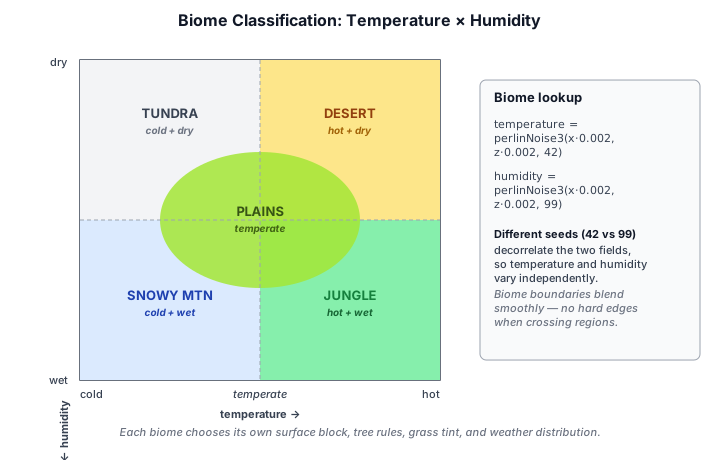
biomeAt(t, h) is the base climate lookup — a cascade of threshold tests on the temperature and humidity values, both in [-1, 1]:
// ── from src/block/biome_type.ts ──
export function biomeAt(t: number, h: number): BiomeType {
  if (t < -0.60) return BiomeType.RockyMountains;
  if (t < -0.42) return BiomeType.SnowyMountains;
  if (t < -0.15) return h > 0.25 ? BiomeType.Taiga : BiomeType.SnowyPlains;
  if (t <  0.32) {
    if (h > 0.42) return BiomeType.Swamp;
    if (h > 0.02) return BiomeType.Forest;
    return BiomeType.GrassyPlains;
  }
  if (h > 0.22)  return BiomeType.Jungle;
  if (h > -0.28) return BiomeType.Savanna;
  return BiomeType.Desert;
}
pickSpecialBiome(t, s) then checks the special noise: a very high value yields Mushroom Fields, a high value yields Badlands (hot) or Cherry Grove (cooler). When the special noise selects nothing, the base climate biome is used. pickBiome(t, h, s) composes the two.
Biome Border Blending#
Hard biome boundaries produce visible seams — a wall of grass meeting a wall of sand. getBiomeBlend(t, h, s) softens them. It returns the biome at the sampled point, its nearest neighboring biome, and a blend weight that rises from 0 to about 0.5 as the sample approaches the climate-space border:
// ── from src/block/biome_type.ts ──
export interface BiomeBlend {
  biome1: BiomeType;   // biome at the sampled point
  biome2: BiomeType;   // nearest neighboring biome
  blend: number;       // 0 = pure biome1, ~0.5 right at the border
}
It locates biome2 by probing outward along the temperature and humidity axes until the climate lookup resolves to a different biome. World generation uses the blend two ways:
- Terrain height is lerped: the per-biome height multipliers (
_biomeHeightScale) forbiome1andbiome2are mixed byblend, so a plain slopes gradually up into a mountain instead of cliff-stepping. - Surface blocks are dithered: a deterministic per-block hash (
_xzHash) is compared againstblend, so individual columns near the border randomly pickbiome2, scattering the two biomes' surface materials together.
Special biomes (Badlands / Cherry Grove / Mushroom Fields) do not blend — they return blend === 0.
Per-Biome Generation#
Each biome controls several aspects of its terrain:
- Surface column —
_generateBlockBasedOnBiomechooses the soil stack: grass over dirt for plains and forests, podzol for taiga, mud for swamp, mycelium for mushroom fields, banded terracotta strata for badlands, sand over sandstone for desert, snow for the snowy biomes. - Height scale —
_biomeHeightScaleranges from 1.7 (Rocky Mountains) down to 0.4 (Swamp). - Trees —
_treeConfiggives each biome its tree species, minimum height, and density: jungle logs, acacia in savanna, spruce in taiga, cherry in cherry grove, and so on. - Weather and sky — biomes map to weather tables and cloud parameters via
getBiomeEnvironmentEffect,getBiomeCloudCoverage, andgetBiomeCloudBounds(snowy biomes get snow, deserts stay clear, mountains carry taller cloud layers).
Caves#
Chunk._isCave carves underground voids with layered noise tests, skipping the top three blocks below the surface so the ground keeps a solid cap. Three cave types intersect:
- Grand caverns — a rare, broad-scale threshold producing huge chambers.
- Cheese caves — a single mid-scale threshold producing open rooms.
- Spaghetti tunnels — two noise isosurfaces near zero intersect to trace a winding 1-D passage; a second pair at a different orientation adds a denser tunnel network. Compressing the vertical scale of one channel biases tunnels toward the horizontal.
Ores#
Underground rock is seeded with ore veins of increasing rarity and depth. Whenever the per-biome soil column resolves to STONE, generateBlocks calls Chunk._oreAt, which may replace that stone with an ore. Ores appear only in rock — never in dirt, sand, gravel, or the banded terracotta of the badlands — and never inside a cave, because the cave carve is tested first and short-circuits to air.
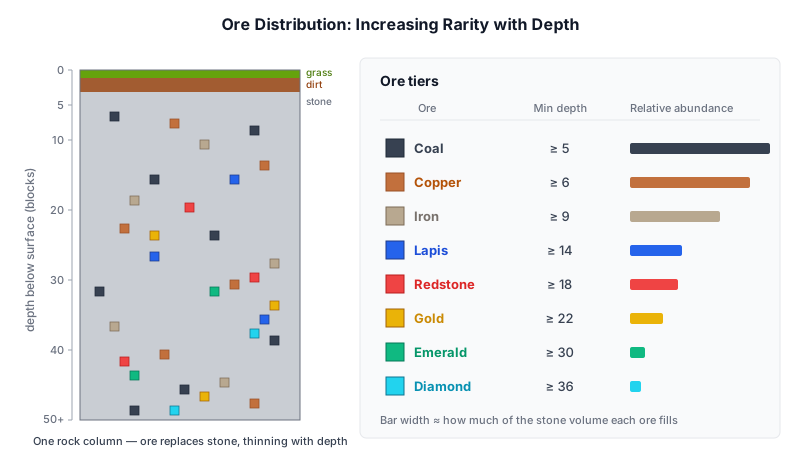
Each ore is an independent 3-D Perlin field. A stone block becomes that ore where its field rises above a per-ore threshold and the column is at least minDepth blocks below the surface:
// ── from src/block/chunk.ts ──
// Ore veins in stone, ordered rarest → most common.
private static readonly _ORES = [
  { block: BlockType.DIAMOND_ORE,  scale: 5.0, threshold: 0.86, minDepth: 36, salt: 30011 },
  { block: BlockType.EMERALD_ORE,  scale: 4.5, threshold: 0.85, minDepth: 30, salt: 30029 },
  { block: BlockType.GOLD_ORE,     scale: 6.0, threshold: 0.80, minDepth: 22, salt: 30047 },
  { block: BlockType.REDSTONE_ORE, scale: 6.0, threshold: 0.76, minDepth: 18, salt: 30059 },
  { block: BlockType.LAPIS_ORE,    scale: 6.0, threshold: 0.76, minDepth: 14, salt: 30071 },
  { block: BlockType.IRON_ORE,     scale: 7.0, threshold: 0.70, minDepth:  9, salt: 30089 },
  { block: BlockType.COPPER_ORE,   scale: 8.0, threshold: 0.66, minDepth:  6, salt: 30097 },
  { block: BlockType.COAL_ORE,     scale: 9.0, threshold: 0.62, minDepth:  5, salt: 30103 },
];

static _oreAt(gx, gy, gz, seed, depthBelowSurface): BlockType {
  for (const ore of Chunk._ORES) {
    if (depthBelowSurface < ore.minDepth) {
      continue;
    }
    const n = perlinNoise3Seed(gx / ore.scale, gy / ore.scale, gz / ore.scale, 0, 0, 0, seed + ore.salt);
    if (n > ore.threshold) {
      return ore.block;
    }
  }
  return BlockType.NONE;
}
Four knobs set each ore's character:
scale— the noise sampling period, i.e. vein size. A large scale (coal, 9) yields chunky veins; a small scale (diamond, 5) yields a handful of isolated cells.threshold— how far up the[-1, 1]noise range a cell must reach to qualify. A low threshold (0.62) is satisfied often; a high one (0.86) almost never, making the ore rare.minDepth— the shallowest a vein may appear, measured as blocks below the local surface (so it tracks terrain rather than a fixed Y, and works under both plains and mountains).salt— a per-ore seed offset, exactly like the cave and biome offsets, so the eight ore fields are statistically independent and their veins do not stack on the same cells.
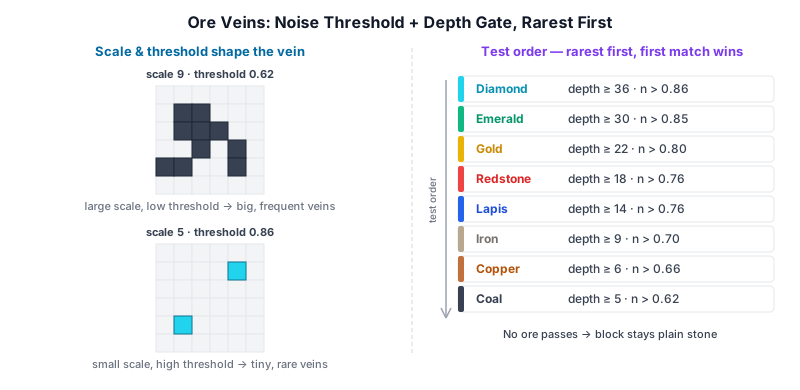
The ores are tested rarest first, and the loop returns on the first hit. Where a rich, deep field (diamond) happens to overlap a common one (coal) in the same block, the rarer ore wins. Common ores — coal, copper, iron — use large scales and low thresholds, so they form sizeable veins starting just under the dirt; the uncommon middle (lapis, redstone) and the rare ores (gold, emerald, diamond) use tighter scales, higher thresholds, and deeper gates, so they surface as small, sparse pockets only far underground. Because every sample is seeded, the ore layout is fully deterministic — world seed = 42 always has the same diamonds in the same blocks.
17.4 Chunk Meshing#
Before a chunk can be rendered, its block data must be converted into vertex buffers — a process called meshing. Each frame, every visible chunk submits its mesh as instanced draw calls in the block geometry pass. Meshes are regenerated whenever a block in the chunk changes (placement, breaking, water flow).
Face Culling#
The core principle of chunk meshing is to only generate geometry for faces that are actually visible. A block face should produce a quad only when the adjacent block in that direction is not solid. "Solid" here means a block whose faces would obstruct the view — opaque blocks are solid, semi-transparent blocks (leaves, glass) are not, and water is handled separately.
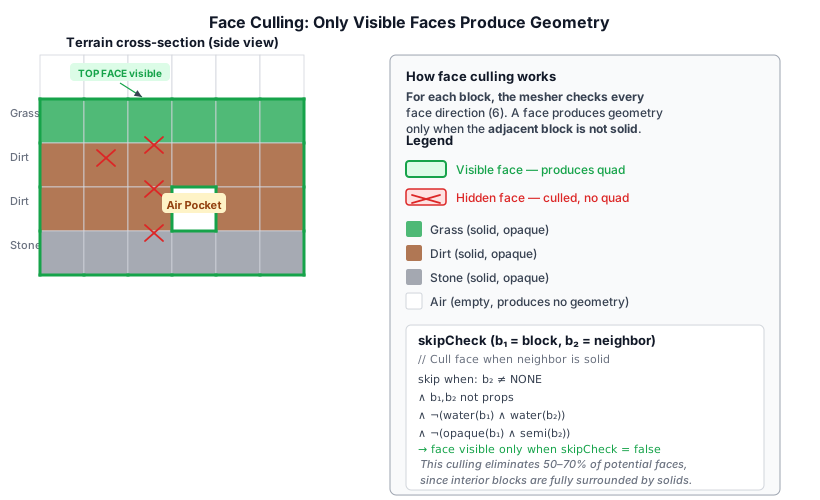
The skipCheck function in Chunk.generateVertices encodes this logic:
b1 = current block type
b2 = neighbor block type in the face direction

skip face if:
  b2 is not BlockType.NONE              (something is there)
  AND neither b1 nor b2 is a prop       (props are always rendered as billboards)
  AND (b1 is not water OR b2 is not water)   (water-water faces are hidden)
  AND (b1 is not opaque OR b2 is not semi-transparent) (semi-transparent blocks
       do not hide opaque faces behind them)
A face is only emitted when skipCheck returns false, meaning the neighbor is either air (BlockType.NONE), water adjacent to a non-water block, or a prop. This culling typically eliminates 50–70% of potential faces, since interior blocks are entirely surrounded by other solids.
The Padded Block Grid#
To avoid per-axis boundary checks in the hot mesher loop, the chunk first builds a (W+2)×(H+2)×(D+2) padded copy of its block array. The interior (indices [1..W]×[1..H]×[1..D]) is a direct copy of the chunk's own blocks. The six outer faces are filled from the ChunkNeighbors object, which exposes the raw Uint8Array block data of each adjacent chunk:
ChunkNeighbors:
  negX, posX — east/west neighbor block arrays
  negY, posY — bottom/top (depth) neighbor block arrays
  negZ, posZ — north/south neighbor block arrays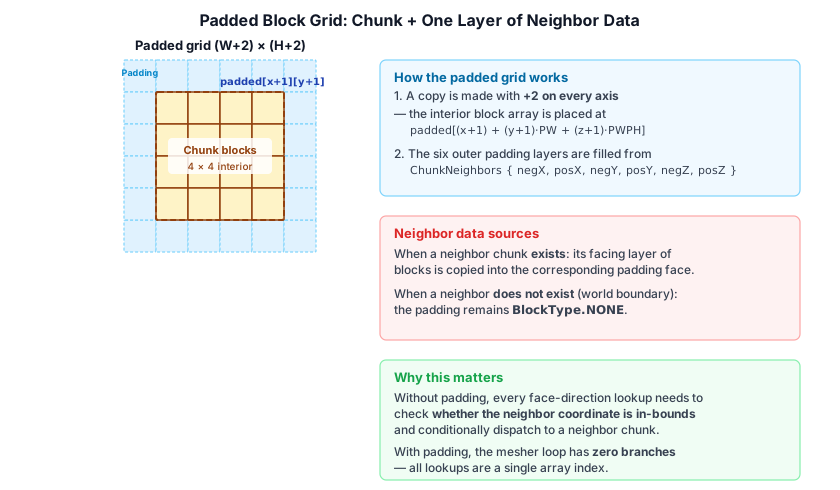
When a neighbor exists, its facing layer of blocks is copied into the padding. When no neighbor exists (chunk at world boundary), the padding remains BlockType.NONE, which causes all chunk-edge faces to emit geometry — the correct behavior for open edges.
With this padded grid, the mesher always reads getType(x, y, z) via a single array index padded[(x+1) + (y+1)*PW + (z+1)*PWPH] with no conditional logic for chunk boundaries.
Vertex Layout#
Each vertex is encoded as five float32 values packed into a single interleaved buffer:
| Component | Description |
|---|---|
x, y, z |
World-space position of the vertex (after greedy merge scaling) |
face |
Face normal index: 0=back(-Z), 1=front(+Z), 2=left(-X), 3=right(+X), 4=bottom(-Y), 5=top(+Y), 6=billboard |
blockType |
Numeric block type ID, used by the fragment shader to look up texture atlas tiles |
Texture coordinates are not stored per vertex. Instead, the fragment shader computes UVs from the world position and face normal using the atlas_uv function in chunk_geometry.wgsl:
// ── from src/shaders/chunk_geometry.wgsl ──
fn atlas_uv(world_pos: vec3<f32>, face: u32, block_type: u32) -> vec2<f32> {
  let bd = block_data[block_type];
  // Select tile based on face: bottomTile (face 4), topTile (face 5), sideTile (others)
  var tile: u32;
  if face == 4u      { tile = bd.bottomTile; }
  else if face == 5u { tile = bd.topTile; }
  else               { tile = bd.sideTile; }

  // Compute local UV from fractional world position, mapping the face axis
  var local_uv: vec2<f32>;
  if face == 2u || face == 3u {           // left/right: ZY plane
    local_uv = fract(world_pos.zy);
  } else if face == 4u || face == 5u {   // bottom/top: XZ plane
    local_uv = fract(world_pos.xz);
  } else {                                // back/front: XY plane
    local_uv = fract(world_pos.xy);
  }

  // Offset into the texture atlas by the block's tile indices
  let tileX = f32(tile % ATLAS_COLS);
  let tileY = f32(tile / ATLAS_COLS);
  return (vec2<f32>(tileX, tileY) + local_uv) * vec2<f32>(INV_COLS, INV_ROWS);
}
Each block type specifies three atlas tiles (topTile, sideTile, bottomTile) so that a grass block, for example, shows grass on top, dirt on the bottom, and a grass-dirt blend on the sides. The face index selects which tile to use. The local UV is derived from fract(world_pos) of the two axes that lie in the face plane, giving a continuous 0–1 tiling along each block face.
Blocks that ship as grayscale masks in the RTX texture pack — notably grass and leaves — also carry an sRGB tint in their BlockData entry, packed as 0x00BBGGRR. The fragment shader linearizes it and multiplies it into the sampled albedo, so grass reads green and spruce leaves blue-green without needing separately colored atlas tiles. A tint of white (0xFFFFFF) means no tint. Tint values are authored per BlockType in block_metadata.json.
Mesh Categories#
Blocks are classified into four material categories, each producing a separate vertex buffer:
| Category | Block types | Rendering | Vertex count |
|---|---|---|---|
| Opaque | Dirt, stone, sand, planks, etc. | G-Buffer (deferred) | 36 per non-culled face, merged into greedy quads |
| Semi-transparent | Leaves, glass | G-Buffer (deferred) with alpha test | Same as opaque |
| Water | Water | Forward pass with refraction/SSR | 3 floats per vertex, 6 verts per face, no greedy merge |
| Prop | Flowers, torches, dead bushes | Forward billboard | 6 verts per block at center position, expanded in vertex shader |
Opaque and semi-transparent meshes use the same vertex layout (5 floats, greedy-merged quads) and are rendered together in the block geometry pass. The fragment shader discards fragments where the texture alpha is below 0.5, which handles leaf and glass edges naturally.
Water is meshed as individual non-merged quads using a simpler 3-float layout (position only). The water surface always emits a top face, plus any side faces that are not adjacent to another water block. At chunk edges, water sides are only suppressed when the neighbor chunk is truly absent (not loaded), not merely when the neighbor has air — this prevents visual gaps at chunk boundaries.
Props are single-point billboards: each prop emits 6 vertices all at the block center position (x+0.5, y+0.5, z+0.5) with face index 6. The vertex shader expands these into camera-facing quads using the billboard_offset function, which maps the vertex index modulo 6 to a corner offset scaled by the camera right/up vectors.
Prop Billboard Rendering#
chunk.ts — Billboarding a prop block:
// ── from src/block/chunk.ts ──
if (isProp) {
  // Single camera-facing billboard quad centered in the block.
  for (let v = 0; v < 6; v++) {
    propBuffer[propIdx++] = x + 0.5;
    propBuffer[propIdx++] = y + 0.5;
    propBuffer[propIdx++] = z + 0.5;
    propBuffer[propIdx++] = 6;         // face=6 signals billboard
    propBuffer[propIdx++] = blockType;
  }
  continue;
}
All six vertices share the same center position (x+0.5, y+0.5, z+0.5) and the marker face index 6. The vertex shader vs_prop in chunk_geometry.wgsl expands them into a camera-facing quad:
// ── from src/shaders/chunk_geometry.wgsl ──
fn billboard_offset(vid: u32) -> vec2<f32> {
  switch vid % 6u {
    case 0u: { return vec2<f32>(-0.5, -0.5); }
    case 1u: { return vec2<f32>( 0.5, -0.5); }
    case 2u: { return vec2<f32>(-0.5,  0.5); }
    case 3u: { return vec2<f32>( 0.5, -0.5); }
    case 4u: { return vec2<f32>( 0.5,  0.5); }
    default: { return vec2<f32>(-0.5,  0.5); }
  }
}

@vertex
fn vs_prop(vin: VertexInput, @builtin(vertex_index) vid: u32) -> PropVertexOutput {
  let center = vin.position + chunk.offset;
  let cam_right = vec3<f32>(camera.view[0].x, camera.view[1].x, camera.view[2].x);
  let cam_up    = vec3<f32>(camera.view[0].y, camera.view[1].y, camera.view[2].y);
  let off = billboard_offset(vid);
  let wp  = center + cam_right * off.x + cam_up * off.y;
  // ...
}
The camera right and up vectors are extracted from the view matrix (column-major storage), so the quad always faces the camera regardless of orientation. The UVs follow the same vertex-index pattern, mapping the atlas tile onto the expanded quad.
Because props are alpha-tested (discarded below 0.5 alpha) and use cullMode: none, they work as thin billboards visible from both sides — ideal for grass blades, flowers, and torches.
Shadow passes render props twice — once with right=(1,0,0) and once with right=(0,0,1) — forming a cross-shaped shadow that avoids the paper-thin appearance a single billboard would produce when viewed edge-on from the light source.
Greedy Merge#
The mesher does not emit one quad per block face. Instead it scans each axis plane and merges adjacent faces of the same block type into the largest possible rectangle (the full algorithm is described in 16.5 Greedy Meshing). The merge is tracked with a drawnFaces bitfield (uint16 per (x, y, face) combination, with the z bit marking faces that have already been claimed by a larger quad). This merge step is what makes chunk rendering viable — a flat terrain chunk may have only a few hundred quads instead of tens of thousands.
17.5 Greedy Meshing#
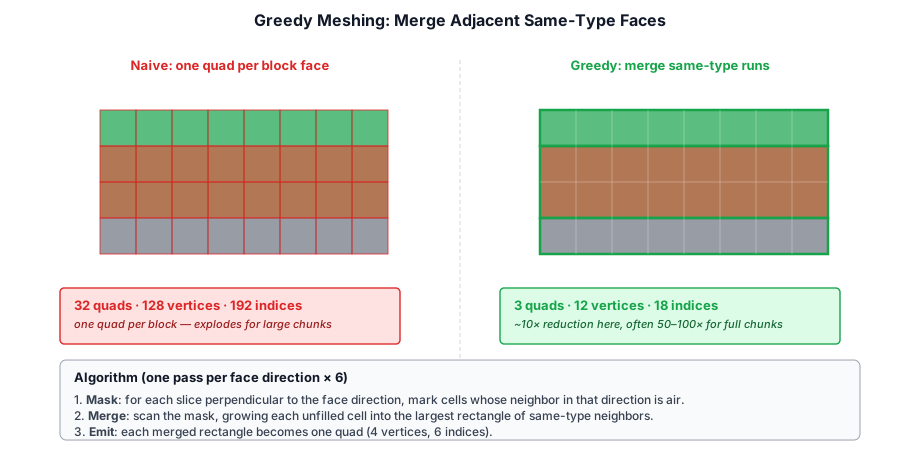
Rendering each visible block face as two triangles creates millions of quads — far too many for real-time performance. Greedy meshing solves this by merging adjacent faces of the same block type into larger quads:
Algorithm#
For each face direction (6 directions), the algorithm:
- Mask generation. For each slice perpendicular to the face direction, generate a 2D binary mask of solid blocks whose neighbor in the face direction is air.
- Greedy merge. Scan the mask and merge contiguous runs into the largest possible rectangle.
- Emit quad. Each merged rectangle becomes a single quad (4 vertices, 6 indices).
This reduces the vertex count by 10-100× compared to naive face-per-block rendering. The result is stored in a chunk's mesh, which is regenerated when blocks in the chunk change.
// ── from src/block/chunk.ts ──
class ChunkMesh {
  vertexBuffer: GPUBuffer;
  indexBuffer: GPUBuffer;
  indexCount: number;
  opaque: boolean;  // Separate meshes for opaque and transparent blocks
}
Separate Opaque and Transparent Meshes#
Each chunk produces two meshes: one for opaque blocks (dirt, stone, etc.) and one for transparent/translucent blocks (water, leaves, glass). The opaque mesh writes depth and G-Buffer normally. The transparent mesh uses alpha blending in the forward pass.
17.6 Block Interaction#
Ray Casting#
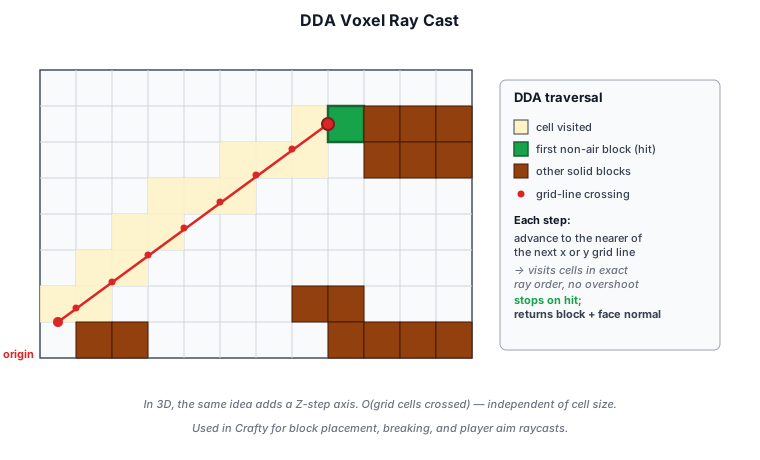
The player interacts with blocks by aiming at them. A ray is cast from the camera through the crosshair, and the voxel traversal uses a DDA (digital differential analyzer) algorithm — at each step it advances to whichever grid line is closer along the ray, visiting cells in exact order:
// ── from src/block/world.ts ──
function raycastVoxels(origin: Vec3, direction: Vec3, world: World, maxDist: number): BlockHit | null {
  // DDA traversal through the voxel grid
  // Returns the first non-air block intersected, plus the face normal
}
Block Placement#
Right-clicking a block face places a new block adjacent to the targeted face. Placement is instantaneous — the block ID is written to the chunk's blocks array and the chunk mesh is marked dirty for regeneration. The BlockInteractionState fires an onLocalEdit callback with { kind: 'place', x, y, z, blockType }.
Instant Breaks#
Blocks with hardness = 0 (props: flowers, torches, dead bushes; also water and air) are removed immediately with no crack animation. The BlockInteractionState detects hardness 0 and calls completeBreak() directly without entering the progressive mining loop.
Chunk Dirtying#
Both placement and breaking follow the same re-meshing pattern:
- The block ID is updated in the chunk's
blocksarray viachunk.setBlock(). - The chunk is marked for re-mesh via
world._updateChunk(). - If the modified block lies at a chunk boundary (within 1 block of the edge), neighboring chunks are also marked dirty, since their face-culling depends on this chunk's blocks.
- Re-meshing is deferred: changes are accumulated in a
_dirtyChunksset and processed once per frame.
On the server side (server/src/world_state.ts), edits are validated (integer coords, deduplicated against prior edits at the same cell) and broadcast to all clients as { t: 'block_edit', edit } messages.
Block Breaking Progression#
When the player holds left-click on a block within reach, the break timer advances each frame. The BlockInteractionState in crafty/game/block_interaction.ts tracks:
// ── from crafty/game/block_interaction.ts ──
interface BlockInteractionState {
  targetBlock: Vec3 | null;
  breakProgress: number;        // accumulated ms spent mining this block
  breakingBlock: Vec3 | null;   // world position of the block being broken
  breakTime: number;            // total ms required (hardness × 1500)
  crackStage: number;           // -1 = none, 0-9 = current crack overlay stage
  onBlockBroken: (x: number, y: number, z: number, blockType: BlockType) => void;
  onBlockChip: (x: number, y: number, z: number, blockType: BlockType) => void;
}
Break Time#
The total time to break a block is determined from its hardness value in blockHardness[] (src/block/block_type.ts):
// ── from src/block/block_type.ts ──
function getBreakTime(blockType: BlockType): number {
  return blockHardness[blockType] * 1500;  // ms
}
A hardness of 0 means the block breaks instantly (no crack animation). Examples:
| Block | Hardness | Break Time |
|---|---|---|
| Dirt, Sand | 0.5 | 750 ms |
| Grass | 0.6 | 900 ms |
| Stone, Amethyst | 1.5 | 2250 ms |
| Trunk, Planks | 2.0 | 3000 ms |
| Diamond, Iron ore | 3.0 | 4500 ms |
| Obsidian | 10.0 | 15000 ms |
Per-Frame Accumulation#
Each frame, updateBlockInteraction() in crafty/game/block_interaction.ts:233 accumulates breaking time:
// ── from crafty/game/block_interaction.ts ──
// Called every frame with dt in seconds
this.breakProgress += dt * 1000;
The current crack stage is computed from progress:
// ── from crafty/game/block_interaction.ts ──
const newStage = Math.floor(this.breakProgress / this.breakTime * 10);
if (newStage !== this.crackStage && newStage < 10) {
  this.crackStage = newStage;
  this.onBlockChip(x, y, z, blockType);  // emit chip particles
}
if (this.breakProgress >= this.breakTime) {
  this.completeBreak();  // remove block, emit break particles + sound
}
When the player releases the mouse button or looks away from the block, all break state resets to zero — progress is not preserved between attempts.
Crack Overlay Rendering#
The BlockHighlightPass (src/renderer/render_graph/passes/block_highlight_pass.ts) renders a crack overlay on the targeted block face. The crack atlas occupies the rightmost column of the block texture atlas: 9 crack stages stacked vertically, mapped by crackStage (0-9). The WGSL shader in block_highlight.wgsl samples this tile and composites a dark overlay with luminance-based alpha:
// ── from src/shaders/block_highlight.wgsl ──
// Crack alpha from luminance of the crack tile sample
let crack_luma = dot(crack_sample.rgb, vec3<f32>(0.299, 0.587, 0.114));
let crack_alpha = smoothstep(0.3, 0.7, crack_luma);
let final_alpha = min(0.35 + crack_alpha * 0.5, 0.9);
The final fragment combines a base dark overlay (0.35 alpha) with the crack texture, capped at 0.9 alpha. This is drawn as 36 face vertices and 144 edge wireframe vertices around the targeted block.
Particle Emission#
Block breaking produces two kinds of particles, both emitted through a dedicated GPU particle pass (ParticlePass with blockBreakConfig):
Chip Particles on Crack Stage Advance#
Each time the crack stage advances (every 10% of break time), a burst of 4 particles is emitted from the block center:
// ── from crafty/game/block_interaction.ts ──
blockInteraction.onBlockChip = (x, y, z, blockType) => {
  const [r, g, b] = getBlockColor(blockType);
  passes.blockBreakPass?.burst(
    { x: x + 0.5, y: y + 0.5, z: z + 0.5 },
    [r, g, b, 1],
    4
  );
};
The block color is extracted at startup by loadBlockColors() (crafty/game/block_colors.ts), which samples each block type's top-face tile from the texture atlas and averages it into an sRGB-to-linear converted [r, g, b] triplet.
Break Particles on Destruction#
When the block is fully broken, a larger burst of 14 particles is emitted from the same position, following the same color-tinting scheme.
Particle Configuration#
Both bursts use the blockBreakConfig in crafty/config/particle_configs.ts:
// ── from crafty/config/particle_configs.ts ──
export const blockBreakConfig: ParticleGraphConfig = {
  emitter: {
    maxParticles: 1024,
    spawnRate: 0,          // bursts only — no continuous emission
    lifetime: [0.5, 1.0],
    shape: { kind: 'sphere', radius: 0.15, solidAngle: Math.PI },
    initialSpeed: [2.0, 4.5],
    initialColor: [1, 1, 1, 1],  // overridden per burst by the block's tint
    initialSize: [0.025, 0.05],
    roughness: 0.9, metallic: 0.0,
  },
  modifiers: [
    { type: 'gravity', strength: 14.0 },
    { type: 'drag', coefficient: 0.6 },
  ],
  renderer: { type: 'sprites', blendMode: 'alpha', billboard: 'camera', shape: 'pixel',
      renderTarget: 'hdr' },
};
Key properties:
- Spawn shape: A hemisphere (solidAngle: π) of radius 0.15 blocks, centered on the block position — particles scatter outward from the block face.
- Initial speed: Random between 2.0 and 4.5 blocks/second, giving a snappy ejection.
- Lifetime: Random between 0.5 and 1.0 seconds, after which the particle fades.
- Gravity: 14.0 blocks/s² pulls particles downward, creating an arc.
- Drag: 0.6 coefficient decelerates particles for a natural settling look.
- Render shape:
'pixel'— each particle is a small square sprite, always camera-facing viabillboard: 'camera'. - Color: The config's
initialColoris overridden per burst call. The block's linear-RGB average color from the atlas is passed as the tint, so dirt particles are brown, stone particles are gray, grass particles are green, etc.
The ParticlePass (src/renderer/render_graph/passes/particle_pass.ts) simulates particles entirely on the GPU via compute shaders generated by ParticleBuilder (src/particles/particle_builder.ts). The burst() method queues a one-shot spawn that replaces any prior pending burst:
// ── from src/renderer/render_graph/passes/particle_pass.ts ──
burst(position: Vec3, color: [number, number, number, number], count: number): void {
  this._pendingBurst = { position, color, count };
}
On the next GPU dispatch, these particles are emitted into the simulation buffer and rendered as billboard sprites into the HDR render target, composite over the scene.
Audio#
Block breaking and placement trigger spatial audio via the AudioManager (crafty/game/audio_manager.ts).
Surface-to-Sound Mapping#
Each block type maps to a SurfaceGroup via blockTypeToSurface() (src/engine/audio_surface.ts):
| Surface Group | Block Types |
|---|---|
grass |
GRASS, DIRT, TREELEAVES, SNOW, GRASS_SNOW, GRASS_PROP, SNOWYLEAVES |
sand |
SAND |
wood |
TRUNK, SPRUCE_PLANKS |
stone |
STONE, GLASS, GLOWSTONE, MAGMA, OBSIDIAN, DIAMOND, IRON, SPECULAR, CACTUS, AMETHYST |
Dig Sound Playback#
When a block is fully broken, the onBlockBroken callback fires:
// ── from crafty/game/block_interaction.ts ──
blockInteraction.onBlockBroken = (x, y, z, blockType) => {
  const [r, g, b] = getBlockColor(blockType);
  passes.blockBreakPass?.burst(/* ... */, 14);     // break particles
  const surface = blockTypeToSurface(blockType);
  audio.playDig(surface, new Vec3(x + 0.5, y + 0.5, z + 0.5));  // dig sound
};
playDig() selects a random audio buffer from the matching surface group's pre-loaded pool (assets/sounds/player/dig/) — each surface has 4 .wav variants for variety — and plays it as a spatial one-shot:
// ── from crafty/game/audio_manager.ts ──
playDig(surface: SurfaceGroup, pos: Vec3): void {
  const list = this._digBuffers.get(surface);
  const buf = list[Math.floor(Math.random() * list.length)];
  this.playBufferAt(buf, pos, 0.8);
}
Spatial Audio Pipeline#
playBufferAt() creates a OneShot instance with Web Audio API nodes:
- AudioBufferSourceNode — plays the sound buffer once.
- PannerNode — HRTF-based 3D panning with inverse distance model:
maxDistance: 50 blocksrefDistance: 5 blocksrolloffFactor: 1.0
- GainNode — final volume =
volume × sfxVolume × masterVolume(0.8 × 0.7 × 0.5 = 0.28 by default).
The listener position and orientation are updated each frame from the camera transform via updateListener() in AudioManager. Finished one-shots are automatically pruned.
Audio Asset Inventory#
| Category | Files | Purpose |
|---|---|---|
dig/grass1-4.wav |
4 | Breaking grass, dirt, leaves |
dig/sand1-4.wav |
4 | Breaking sand |
dig/stone1-4.wav |
4 | Breaking stone, ores, glass |
dig/wood1-4.wav |
4 | Breaking wood trunks, planks |
Audio Initialization#
The Web Audio AudioContext is created lazily on the first user gesture (click/touch) in crafty/main.ts:189 to comply with browser autoplay policies. Sound buffers are loaded asynchronously and cached in AudioManager._digBuffers, _stepBuffers, and _fallBuffers maps.
17.7 Illuminated Blocks and Point Lights#
Certain block types emit light, adding dynamic illumination to the world. Light-emitting blocks fall into two categories: blocks whose glow is baked into the G-Buffer emission channel, and blocks that create runtime PointLight components.
Emissive Blocks (G-Buffer)#
Blocks with emitsLight = 1 in blockMaterialData write their emission color into the G-Buffer's normal_emission target (mer.g channel), which is accumulated during the deferred lighting pass. These blocks glow without creating a dynamic light source — they illuminate only themselves, not the surrounding geometry:
| Block | Color | Intensity |
|---|---|---|
| Glowstone | Warm yellow | 24.8 |
| Obsidian | Purple | 12.0 |
Point Light Blocks#
Torches and magma blocks create full PointLight components at runtime, producing dynamic lighting that affects nearby geometry through the deferred lighting pass. The PointLight data (position, color, intensity, radius) is uploaded to a GPU storage buffer each frame and evaluated in the PBR lighting loop.
Light parameters (blockLightData in block_type.ts):
| Block | Color | Intensity | Radius |
|---|---|---|---|
| Torch | Warm orange (0.95, 0.56, 0.01) |
4.0 | 3.22 |
| Magma | Hot red (0.95, 0.06, 0.12) |
32.0 | 8.72 |
Runtime light management (lights.ts):
// ── from crafty/game/lights.ts ──
export function addTorchLight(bx: number, by: number, bz: number, scene: Scene): void {
  const go = new GameObject({ name: 'TorchLight' });
  go.setPosition(bx + 0.5, by + 0.9, bz + 0.5);
  const pl = go.addComponent(new PointLight());
  pl.color = new Vec3(1.0, 0.52, 0.18);
  pl.intensity = 4.0;
  pl.radius = 6.0;
  scene.add(go);
}
Torch lights are positioned at y + 0.9 (near the top of the block) and offset from each torch's base position by a unique phase value. Magma lights sit at y + 0.5 (block center).
Lights are created and destroyed on block interaction:
| Event | Action |
|---|---|
| Player places torch | addTorchLight() called from block_interaction.ts:143 |
| Player breaks torch | removeTorchLight() called from block_interaction.ts:81 |
| Multiplayer remote edit | Same add/remove triggered from network handler |
| Chunk load | All torch/magma blocks in the chunk spawn lights via world.onChunkAdded |
Flicker Animation#
Both light types animate via sinusoidal flicker, updated each frame in updateTorchFlicker and updateMagmaFlicker (lights.ts):
// ── from crafty/game/lights.ts ──
export function updateTorchFlicker(t: number): void {
  for (const { pl, phase } of torchLights.values()) {
    const flicker = 1.0
      + 0.08 * Math.sin(t * 11.7 + phase)
      + 0.05 * Math.sin(t *  7.3 + phase * 1.7)
      + 0.03 * Math.sin(t * 23.1 + phase * 0.5);
    pl.intensity = 4.0 * flicker;
  }
}
Three summed sine waves with different frequencies produce a natural, non-repetitive flicker. Torch flicker has a small amplitude (±16%) for a steady candle-like glow. Magma flicker uses slower, deeper modulation (±34%) to simulate the pulsing of molten rock.
GPU Light Loop#
Point lights are evaluated in the deferred shading fragment shader (point_spot_lighting.wgsl). Each pixel loops over all active point lights, culling those outside their radius:
// ── from src/shaders/point_spot_lighting.wgsl ──
for (var i = 0u; i < lightCounts.numPoint; i++) {
  let pl   = pointLights[i];
  let diff = pl.position - world_pos;
  let dist = length(diff);
  if (dist >= pl.radius) { continue; }
  let L     = diff / dist;
  let NdotL = max(dot(N, L), 0.0);
  if (NdotL <= 0.0) { continue; }
  let att  = point_attenuation(dist, pl.radius);
  accum += brdf * pl.color * pl.intensity * NdotL * att;
}
The point_attenuation function applies a smooth falloff so light fades to zero at the radius boundary, avoiding hard cut-off lines. The per-frame loop in main.ts:981 gathers all PointLight components from the scene and uploads them to the GPU via point_spot_light_pass.ts.
17.8 Erosion Simulation#
Crafty includes an optional erosion simulation for more realistic terrain. A compute shader simulates water flow and sediment transport:
- Water deposition. Rain adds water to heightfield cells.
- Flow. Water moves downhill, carrying sediment.
- Erosion and deposition. Fast-moving water erodes the terrain; slow-moving water deposits sediment.
The simulation runs as a background compute pass and updates the terrain height map, which is sampled during chunk generation.
17.9 Water Propagation#
When water blocks are placed or generated in the world, they spread according to a simple cellular automaton run on the CPU each tick. The algorithm lives in World._tickWater() in src/block/world.ts.
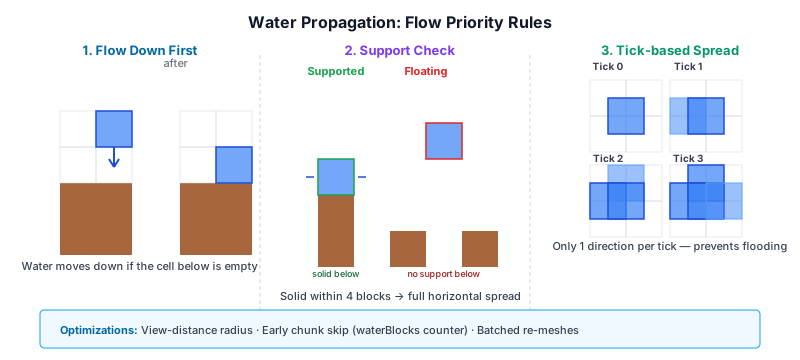
Flow Rules#
Water spreads in a fixed priority order:
Flow down first. Water always attempts to flow downward first before spreading horizontally. If the block below is air or a prop, the water block moves down and the original position becomes air.
Support check. Horizontal spreading only occurs when the water has "support" — defined as a solid block within 4 blocks vertically below it. Without support, water behaves as "fountain" water and can still spread 1 block horizontally.
Horizontal spread. If supported, water spreads to adjacent empty cells in the four horizontal directions (N, S, E, W). Only one direction is filled per tick to prevent instant flooding.
// ── from src/block/world.ts ──
// In src/block/world.ts
private _flowWater(wx: number, wy: number, wz: number): void {
  const below = this.getBlockType(wx, wy - 1, wz);
  if (below === BlockType.NONE || isBlockProp(below)) {
    this.setBlockType(wx, wy - 1, wz, BlockType.WATER);
    this.setBlockType(wx, wy, wz, BlockType.NONE);
    return;
  }
  // ... then horizontal spreading logic
}
Performance Optimizations#
- Scanning radius. Only water blocks within a fixed radius around the player are ticked (determined by the view distance). This saves scanning the entire loaded world.
- Early skip for chunks. Chunks track their
waterBlockscount — if zero, the chunk is skipped during scanning. - Batched re-meshing. Instead of regenerating a chunk's mesh every time a single water block changes, changes are accumulated in a
_dirtyChunksset and re-meshed exactly once per tick.
17.10 Water Rendering#
Water is a transparent block type rendered through the WaterPass (src/renderer/render_graph/passes/water_pass.ts), a forward pass that runs after deferred lighting. It composites over the HDR buffer using src-alpha blending, combining screen-space refraction, depth-based murkiness, and screen-space reflections.
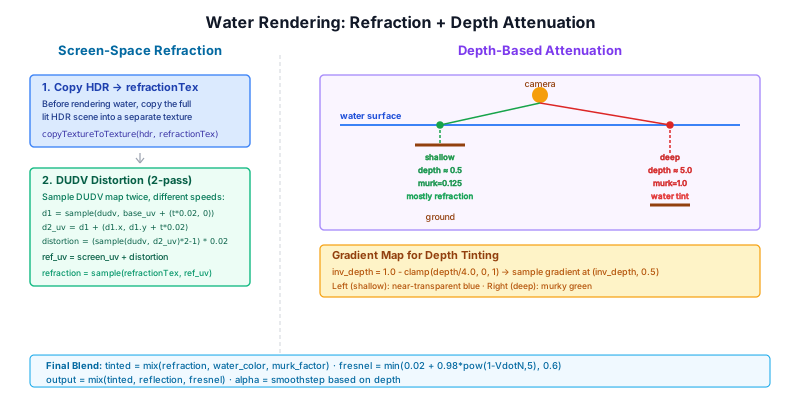
Screen-Space Refraction#
Before rendering water, the current HDR scene is copied to a refractionTex. During water shading, the scene behind the water is sampled with UV distortion driven by an animated DUDV normal map:
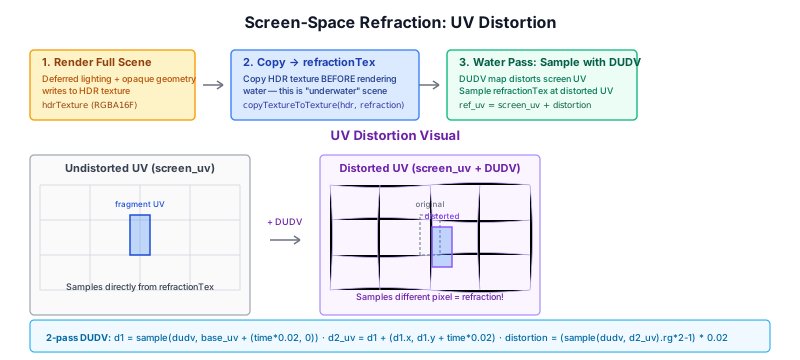
// ── from src/shaders/water.wgsl ──
// Animated DUDV distortion — two-pass stacked sampling for complex ripples
let base_uv = vec2<f32>(world_pos.x, world_pos.z) * (1.0 / 8.0);
let d1 = textureSample(dudv_tex, samp, vec2<f32>(base_uv.x + water.time * 0.02, base_uv.y)).rg;
let d2_uv = d1 + vec2<f32>(d1.x, d1.y + water.time * 0.02);
let distortion = (textureSample(dudv_tex, samp, d2_uv).rg * 2.0 - 1.0) * 0.02;

let ref_uv = clamp(screen_uv + distortion, vec2<f32>(0.001), vec2<f32>(0.999));
let refraction = textureSample(refraction_tex, samp, ref_uv).rgb;
The DUDV map is sampled twice with different time offsets to create a more complex wave pattern than a single scroll.
Depth-Based Attenuation#
Water opacity and tint are determined by the water depth — the distance from the water surface to the solid geometry below, computed by linearizing the G-Buffer depth and comparing it to the water fragment's depth:
// ── from src/shaders/water.wgsl ──
let water_depth = floor_lin - water_lin;
const MURKY_DEPTH: f32 = 4.0;
let murk_factor = clamp(water_depth / MURKY_DEPTH, 0.0, 1.0);
let inv_depth = clamp(1.0 - murk_factor, 0.1, 0.99);
let water_color = textureSample(gradient_tex, samp, vec2<f32>(inv_depth, 0.5)).rgb;
let tinted = mix(refraction, water_color, murk_factor);
A gradient texture (gradient_tex) encodes the water color progression: shallow water is nearly transparent (showing the refracted background), while deep water transitions to a murky blue-green tint. Depth also controls alpha: shallow edges fade to transparent, while deep water becomes opaque.
Screen-Space Reflection + Sky Fallback#
Reflections use a hybrid approach:
- Screen-space reflection (SSR) ray-marches the reflected view direction in view space, sampling the refraction texture (pre-water HDR scene).
- HDR sky panorama is used as a fallback for rays that miss scene geometry or leave the screen bounds.
17.11 Screen-Space Reflections (SSR)#
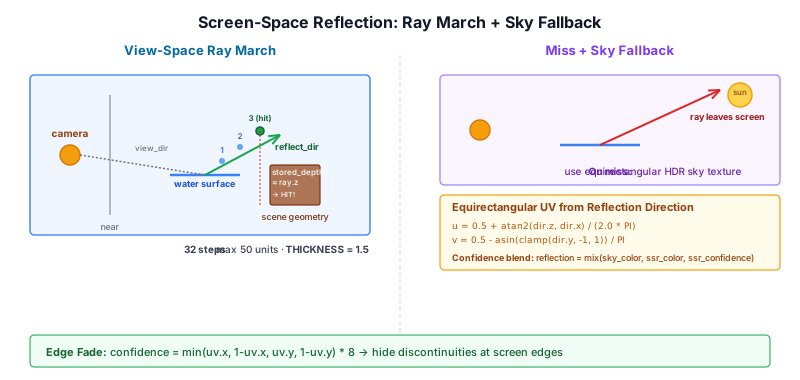
The SSR implementation in water.wgsl uses a view-space ray march with 32 steps:
// ── from src/shaders/water.wgsl ──
fn ssr(world_pos: vec3<f32>, normal: vec3<f32>, view_dir: vec3<f32>) -> vec4<f32> {
  let reflect_dir = reflect(-view_dir, normal);
  let ray_vs = normalize((cam.view * vec4<f32>(reflect_dir, 0.0)).xyz);
  let origin_vs = (cam.view * vec4<f32>(world_pos, 1.0)).xyz;

  if (ray_vs.z >= -0.001) { return vec4<f32>(0.0); }  // only trace rays away from camera

  let NUM_STEPS: u32 = 32u;
  let MAX_DIST : f32 = 50.0;
  let THICKNESS: f32 = 1.5;

  for (var s = 0u; s < NUM_STEPS; s++) {
    let t = (f32(s) + 1.0) * MAX_DIST / f32(NUM_STEPS);
    let p = origin_vs + ray_vs * t;
    // project to UV, compare against stored G-Buffer depth...
  }
}Algorithm#
- Transform to view space. Both the reflection origin (water surface point) and reflected direction are transformed into view space.
- Ray march. For each of 32 steps along the ray (up to 50 world units), the ray point is projected to screen UV.
- Depth test. The stored G-Buffer depth is linearized and compared against the ray point's view-space Z. If they differ by less than
THICKNESS(1.5 units), it's a hit. - Sky fallback. On miss, the equirectangular HDR sky panorama — baked from the atmosphere model and rebaked as the sun moves (§10.7) — is sampled using the reflection direction:
// ── from src/shaders/water.wgsl ──
fn sky_uv(d: vec3<f32>) -> vec2<f32> {
  let u = 0.5 + atan2(d.z, d.x) / (2.0 * PI);
  let v = 0.5 - asin(clamp(d.y, -1.0, 1.0)) / PI;
  return vec2<f32>(u, v);
}
Confidence Blending#
SSR hits are not binary. The function returns vec4(color, confidence) where confidence fades:
- Edge fade:
min(uv.x, 1-uv.x, uv.y, 1-uv.y) * 8— rays hitting near screen edges have low confidence, hiding discontinuities. - Sky intensity: The HDR sky reflection is multiplied by
sky_intensity(0 at night, 1 at noon) to match diurnal lighting.
Fresnel Blend#
The final reflection contribution is controlled by Schlick Fresnel with water's F₀ ≈ 0.02:
// ── from src/shaders/water.wgsl ──
let VdotN = clamp(dot(view_dir, normal), 0.0, 1.0);
let fresnel_r = min(0.02 + 0.98 * pow(1.0 - VdotN, 5.0), 0.6);  // capped at 0.6
let world_color = mix(tinted, reflection, fresnel_r);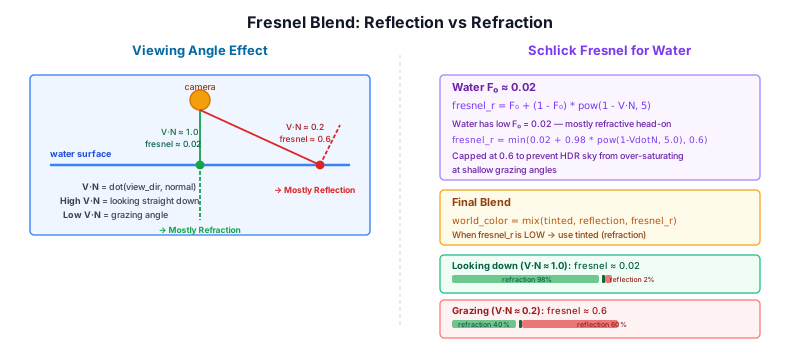
Reflection is minimal when looking straight down (high V·N), rising towards grazing angles. The 0.6 cap prevents bright HDR sky values from washing out the water at shallow viewing angles.
17.12 Village Generation#
Villages are generated procedurally when chunks load, in crafty/game/village_gen.ts. The system hooks into the chunk load event and places clusters of houses under the right conditions.
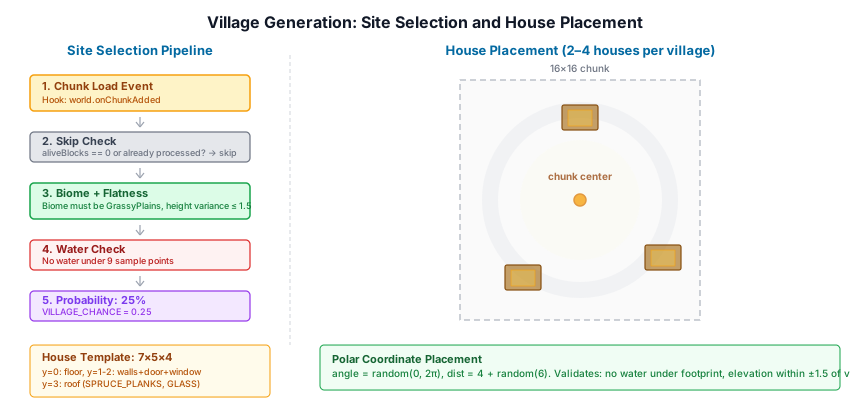
Site Selection#
Villages only spawn in the GrassyPlains biome. When a chunk loads, the generator checks:
- Water check. No water blocks under the candidate chunk (sampled at 9 grid points).
- Flatness check. Terrain height varies by ≤ 1.5 blocks across the chunk.
- Probability roll. 25% chance if all other conditions pass.
// ── from crafty/game/village_gen.ts ──
const VILLAGE_CHANCE = 0.25;

function _isFlatEnough(world: World, baseX: number, baseZ: number, refY: number): boolean {
  for (let dx = 0; dx < CHUNK_SIZE; dx += 4) {
    for (let dz = 0; dz < CHUNK_SIZE; dz += 4) {
      const y = world.getTopBlockY(baseX + dx, baseZ + dz, 200);
      if (y <= 0 || Math.abs(y - refY) > 1.5) return false;
    }
  }
  return true;
}
House Placement#
When a village is selected, 2–4 houses are placed in a cluster around the chunk center. Each candidate position uses polar coordinates (random angle + random distance 4–10 blocks from center) and must pass three checks:
- Overlap avoidance. House footprints are 7×5 blocks. Before placing, the new house is tested against all already-placed houses using an AABB collision check with 1-block padding. If it overlaps, it is skipped.
- Footprint flatness. All 35 columns of the 7×5 area must have ground height within ±1.5 blocks of the village reference height. This prevents houses from overhanging terrain edges.
- No water. Scans a 5×5 grid of sample points one block below the house for water blocks.
// ── from crafty/game/village_gen.ts ──
const placed: { x: number; z: number }[] = [];
for (const p of placed) {
  if (hx < p.x + 8 && hx + 7 > p.x && hz < p.z + 6 && hz + 5 > p.z) {
    // overlap — skip
  }
}

function _isHouseFootprintFlat(world: World, hx: number, hz: number, refY: number,
    tolerance: number): boolean {
  for (let dx = 0; dx < 7; dx++) {
    for (let dz = 0; dz < 5; dz++) {
      const y = world.getTopBlockY(hx + dx, hz + dz, 200);
      if (y <= 0 || Math.abs(y - refY) > tolerance) return false;
    }
  }
  return true;
}
House Template#
Houses are simple 7×5×4 structures defined as layered arrays:
| Layer | Purpose |
|---|---|
| y=0 | Solid plank floor |
| y=1–2 | Walls with door opening (front) and glass window (back) |
| y=3 | Flat plank roof |
// ── from crafty/game/village_gen.ts ──
const _WALL_L1: number[][] = [
  [1,1,1,2,1,1,1],  // z=0: back wall, glass at center x=3
  [1,0,0,0,0,0,1],
  [1,0,0,0,0,0,1],
  [1,0,0,0,0,0,1],
  [1,1,1,0,1,1,1],  // z=4: front wall, door opening at x=3
];
Currently, all houses use SPRUCE_PLANKS for structure and GLASS for windows.
17.13 Summary#
The voxel terrain system features:
- Chunked world: 16×256×16 chunks stored as a dense
Uint16Arraywith load/unload by distance - Generated block palette: 879 block types code-generated from a publically available texture pack
- Procedural generation: Per-chunk noise terrain, 13 biomes on a temperature/humidity climate grid with border blending, layered caves
- Ore distribution: Depth-gated 3-D noise veins (coal → diamond) of increasing rarity that replace underground stone, tested rarest-first
- Deterministic seeding: Seeded Perlin noise with per-feature offsets for reproducible worlds
- Greedy meshing: Mask-based quad merging for minimal triangle counts
- Prop billboarding: Camera-facing quads for grass, flowers, and torches with cross-shaped shadow passes
- LOD system: Three distance-based levels of detail
- Illuminated blocks: Emissive G-Buffer blocks (glowstone, obsidian) and dynamic point lights (torch, magma) with sinusoidal flicker animation
- Block interaction: DDA ray casting for placement, progressive breaking with crack overlay (10 stages), hardness-based timers
- Break particles: GPU-accelerated chip bursts on crack advance and break particles tinted to block color
- Break audio: Spatial audio with HRTF panning, surface-group sound mapping (grass, sand, stone, wood)
- Erosion simulation: Water flow and sediment transport via compute shader
- Water system: Cellular automaton propagation with screen-space refraction, SSR, and Fresnel blending
- Village generation: Procedural house placement with template-based layout
Further reading:
src/block/— Block types, chunk, world, and biome classessrc/block/chunk.ts— Chunk data structure, greedy meshing, per-chunk terrain/biome/cave generation (generateBlocks)src/block/block_type.ts— Hand-authored facade: helper functions over the generated block tablessrc/block/block_type_data.ts— Auto-generatedBlockTypeenum and per-block data tablessrc/block/block_type_classes.ts— Plain-data classes (BlockMaterialData,BlockLightData,MaterialType)src/block/biome_type.ts—BiomeTypeenum, climate-grid biome selection, border blendingsrc/block/block_manifest.ts— Atlas tile lookup fromblocks.jsonscripts/codegen_blocks.js+scripts/block_metadata.json— Block-type code generator and its metadata sourcecrafty/game/lights.ts— Point light creation, removal, and flicker animation for torch/magmacrafty/game/village_gen.ts— Village and house placementcrafty/game/block_interaction.ts— Block breaking/placement state machine and per-frame update, light trigger on place/breaksrc/renderer/render_graph/passes/block_geometry_pass.ts— Block G-Buffer rendering, prop pipeline setupsrc/renderer/render_graph/passes/block_shadow_pass.ts— Prop shadow pass (cross-shaped billboard shadows)src/renderer/render_graph/passes/point_spot_light_pass.ts— Point light CPU→GPU uploadsrc/shaders/chunk_geometry.wgsl— Chunk G-Buffer shader,vs_propbillboard expansionsrc/shaders/prop_shadow.wgsl— Prop billboard shadow shader (X/Z dual orientation)src/shaders/point_spot_lighting.wgsl— GPU point light PBR evaluationsrc/engine/components/point_light.ts— PointLight engine componentsrc/renderer/render_graph/passes/block_highlight_pass.ts— Crack overlay rendering (10-stage crack texture)src/shaders/block_highlight.wgsl— Crack overlay WGSL shadercrafty/config/particle_configs.ts—blockBreakConfigparticle emitter/modifier definitionssrc/renderer/render_graph/passes/particle_pass.ts— GPU particle simulation and burst APIcrafty/game/block_colors.ts— Atlas-based block color extraction for particle tintingcrafty/game/audio_manager.ts— Spatial audio manager,playDig()andplayStep()src/engine/audio_surface.ts—blockTypeToSurface()mapping for dig/step soundssrc/renderer/render_graph/passes/water_pass.ts— Water surface renderingsrc/shaders/water.wgsl— Water shader (SSR, refraction, depth tinting)