The renderer and the engine loop don't know about input. Mouse, keyboard, touch, and gamepad events are owned by the controllers that interpret them — primarily CameraController (free-fly debug/editor camera) and PlayerController (the first-person walking player) — plus the mobile-only TouchControls overlay that emits virtual joystick / look / button events, and the GamepadController that polls the Web Gamepad API and emits the same shape of events. This chapter walks through all four.
Where Input Lives#
There is no central Input singleton. Each controller registers the DOM listeners it needs in attach(canvas), drains them inside update(dt), and removes them in detach():
attach(canvas: HTMLCanvasElement): void {
  canvas.addEventListener('click',         this._onClick);
  document.addEventListener('mousedown',   this._onMouseDown);
  document.addEventListener('mouseup',     this._onMouseUp);
  document.addEventListener('mousemove',   this._onMouseMove);
  document.addEventListener('keydown',     this._onKeyDown);
  document.addEventListener('keyup',       this._onKeyUp);
  window.addEventListener('blur',          this._onBlur);
}
Keyboard state is kept as a small Set<string> of KeyboardEvent.code values ('KeyW', 'Space', 'ShiftLeft', …) and queried each frame. Mouse motion is consumed eagerly in the move handler and integrated into yaw/pitch. The blur listener clears the key set so a windowed game doesn't stay walking forward after the user alt-tabs out.
CameraController is also a Component, so the usual lifecycle is automatic: add it to the camera's GameObject and the engine updates it every frame, lazily calling attach(canvas) on the engine canvas the first time it runs and detach() when it's removed. The manual attach / update(cameraGO, dt) form above is still there for code that drives its own loop or needs a controller to run in a specific order relative to other beforeFrame work (e.g. the geo tutorials, which update the controller right before floating-origin reanchoring):
cameraGO.addComponent(CameraController.create({ speed: 250 })); // engine drives itThe convention every controller in the engine follows is a small surface of public analog and flag fields that any input source can write to, in addition to the keyboard the controller reads natively:
inputForward = 0;   // [-1, 1] analog (touch joystick, gamepad, scripted)
inputStrafe  = 0;   // [-1, 1] analog (positive = right)
inputUp      = false;
inputDown    = false;
inputFast    = false;
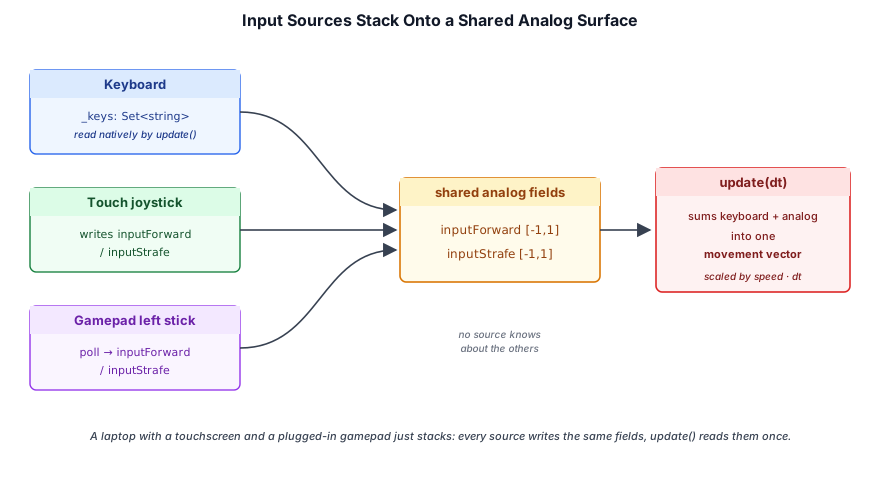
A keyboard press flips _keys; a touch joystick writes inputForward / inputStrafe; the gamepad backend (§13.5) writes the same fields from a stick poll. The update loop reads keyboard + analog and sums them, so a hybrid setup (laptop with touchscreen and a gamepad plugged in) just stacks — no input source has to know about the others.
Pointer Lock#
For first-person mouse-look, the browser's Pointer Lock API hides the cursor and reports raw movementX / movementY deltas instead of clamped client coordinates. The pattern is the same in both controllers: a usePointerLock flag gates whether canvas clicks acquire the lock, and mousemove integrates deltas only while document.pointerLockElement === canvas:
this._onMouseMove = (e: MouseEvent) => {
  if (this.usePointerLock) {
    if (document.pointerLockElement !== this._canvas) return;
    this.yaw   -= e.movementX * this.sensitivity;
    this.pitch  = clamp(this.pitch + e.movementY * this.sensitivity, -HALF_PI, HALF_PI);
  } else {
    // click-and-drag fallback for editor mode
    ...
  }
};
Touch never uses pointer lock — it conflicts with touchstart / touchmove event delivery. When the touch overlay activates, it sets controller.usePointerLock = false and (for the player) calls document.exitPointerLock() so the two input modes never fight.
The Camera Controller#
CameraController is the dual free-fly + orbit camera used by most samples. A mode: 'fly' | 'orbit' field picks the scheme; both share the same yaw/pitch + position state, so flipping between them mid-session is seamless (covered in §13.3.1). In the default fly mode, WASD (or arrow keys) drives horizontal motion, Space / ShiftLeft are vertical, ControlLeft is a 3× speed boost, and the mouse wheel dollies along the view direction. Yaw is rotation around world-Y, pitch is rotation around local-X, clamped to ±89° so the camera never gimbal-flips:
update(gameObject: GameObject, dt: number): void {
  const sinY = Math.sin(this.yaw);
  const cosY = Math.cos(this.yaw);
  let dx = 0, dy = 0, dz = 0;

  if (this._keys.has('KeyW') || this._keys.has('ArrowUp'))    { dx -= sinY; dz -= cosY; }
  if (this._keys.has('KeyS') || this._keys.has('ArrowDown'))  { dx += sinY; dz += cosY; }
  // ... A / D, Space / ShiftLeft ...

  // Analog (touch joystick) adds on top of keyboard.
  if (this.inputForward !== 0) { dx -= sinY * this.inputForward; dz -= cosY * this.inputForward; }
  if (this.inputStrafe  !== 0) { dx += cosY * this.inputStrafe;  dz -= sinY * this.inputStrafe;  }

  const len = Math.sqrt(dx*dx + dy*dy + dz*dz);
  if (len > 0) {
    const fast = this._keys.has('ControlLeft') || this._keys.has('AltLeft') || this.inputFast;
    const s = this.speed * (fast ? 3.0 : 1.0) * dt / len;
    gameObject.position.x += dx * s;
    gameObject.position.y += dy * s;
    gameObject.position.z += dz * s;
  }

  gameObject.rotation = Quaternion.fromAxisAngle(AXIS_Y, this.yaw)
    .multiply(Quaternion.fromAxisAngle(AXIS_X, -this.pitch));
}
applyLookDelta(dx, dy) is the programmatic equivalent of mouse movement — it adds to yaw/pitch with the same sensitivity scaling. Touch-drag look handlers and double-tap controllers call it directly:
applyLookDelta(dx: number, dy: number): void {
  this.yaw   -= dx * this.sensitivity;
  this.pitch  = clamp(this.pitch + dy * this.sensitivity, -HALF_PI, HALF_PI);
}
13.3.1 Orbit Mode#
Setting mode = 'orbit' turns the same controller into a turntable around a focus point. The trick that keeps fly and orbit unified is a single extra scalar, focusDistance: the focus point is always implicit at position + forward · focusDistance, and in orbit mode the position is derived from it each frame instead of integrated directly:
const rotation = this._orient(yaw, pitch, tilt);
const f = rotation.rotateVec3(FORWARD);
gameObject.position.x = pivot.x - f.x * focusDistance;   // camera sits `focusDistance`
gameObject.position.y = pivot.y - f.y * focusDistance;   // behind the pivot, looking at it
gameObject.position.z = pivot.z - f.z * focusDistance;
Every gesture is then a small edit of (yaw, pitch, focusDistance, pivot):
| Input | Effect |
|---|---|
| Left-drag | rotate yaw/pitch about the fixed pivot |
| Middle/Right-drag, or Shift+Left-drag | pan the pivot in the camera plane (the grabbed point tracks the cursor) |
| Wheel | multiplicative zoom on focusDistance, clamped to minDistance / maxDistance |
| WASD | flies the pivot along the view — the camera rides along, so switching back to fly is seamless |
focusOn(point, distance?) | recenters the pivot, preserving the viewing angle |
Because fly just slides position (keeping focusDistance fixed) and orbit just re-derives position from the pivot, flipping mode never causes a jump: a lazy entry-sync rebuilds the pivot from wherever the camera currently is. Right-drag panning needs the browser context menu suppressed, so attach also registers a contextmenu handler that calls preventDefault() over the canvas while in orbit mode.
Setting enableDamping = true (with a damping time-constant in seconds) eases the displayed yaw/pitch/distance/pivot toward their targets with a frame-rate-independent exponential, giving inertia on orbit/pan/zoom and a smooth fly-to on focusOn. With damping off the path is exact, so fly mode stays frame-for-frame identical to before.
CameraController over a small courtyard. The glowing marker is the focus point: in fly mode it rides focusDistance ahead of the camera, and in orbit mode it is the pivot the camera turns, pans, and zooms around. Switch modes mid-gesture and nothing jumps. With damping on, the pivot moves the instant you pan while the camera eases after it; lengthen the time constant to exaggerate the inertia, or turn damping off for exact, frame-for-frame motion.The crafty-specific FPS PlayerController — gravity, jumping, AABB collision, ray casting — uses the same analog-input surface as the camera controller and is covered in Crafty Chapter 3: Player Physics.
Touch Controls#

Desktop input — pointer lock, keyboard, mouse drag — doesn't translate to a touchscreen. TouchControls is the engine-side mobile overlay: a <div> pinned over the canvas that hosts a virtual joystick, a canvas-drag look region (optionally with pinch-zoom), and a declarative registry of buttons. It owns all the cross-cutting concerns every mobile game has to solve — joystick math, tap detection, iOS dropped-touch reconciliation, desktop-chrome hiding — and exposes them through callbacks so the per-game behavior (which buttons, what they do, how look deltas reach the controller) stays in the game.
The overlay is engine-level, not game-level — it lives at src/engine/touch_controls.ts and is re-exported from src/engine/index.js for samples to import. Every sample that supports phones — the FPS shooter, the cloud flythrough, the fox terrain explorer, terranaut — wires this overlay; the crafty game does the same.
13.4.1 Lazy Initialization#
Desktop sessions should pay nothing for the mobile overlay — no DOM, no listeners, no style injection. setupTouchControlsLazy registers a single one-shot touchstart capture-phase listener on the window and only constructs TouchControls if a real touch arrives:
export function setupTouchControlsLazy(
  canvas: HTMLCanvasElement,
  opts: TouchControlsOptions,
  onInit?: (controls: TouchControls) => void,
): { controls: TouchControls | null; cancel(): void } {
  const handle = { controls: null as TouchControls | null, cancel: () => {} };
  const listener = (): void => {
    if (handle.controls) return;
    handle.controls = new TouchControls(canvas, opts);
    onInit?.(handle.controls);
  };
  window.addEventListener('touchstart', listener, { once: true, passive: true, capture: true });
  handle.cancel = () => window.removeEventListener('touchstart', listener, true);
  return handle;
}
The onInit callback fires once after the overlay is built, which is where games register their buttons and disable pointer lock on the underlying controller. The handle is returned synchronously so callers can hold a reference even before the first touch; controls stays null for the lifetime of a desktop session.
13.4.2 The Virtual Joystick#
The joystick is a circular thumb pad, anchored to either edge of the screen and rendered as two concentric <div>s — the outer ring (the well) and the inner knob. Pressing the well captures one touch ID; subsequent moves of that touch update the knob and emit normalized analog values:
private _updateJoystick(clientX: number, clientY: number): void {
  const r = this._joyOpts.radius;
  let dx = clientX - this._joyOriginX;
  let dy = clientY - this._joyOriginY;
  const len = Math.hypot(dx, dy);
  if (len > r) {
    const s = r / len;
    dx *= s; dy *= s;  // clamp knob to the well
  }
  this._stick.style.transform = `translate(${dx}px, ${dy}px)`;

  let fx = dx / r;
  let fy = dy / r;
  if (Math.hypot(fx, fy) < this._joyOpts.deadZone) { fx = 0; fy = 0; }
  // forward = -fy (push up = positive), strafe = +fx (push right = positive)
  this._joyOpts.onChange?.(-fy, fx);
}
The (forward, strafe) convention matches the analog fields on both controllers — push the stick up and forward is positive, push right and strafe is positive. Most callers just forward straight through:
joystick: {
  radius: 60, knobRadius: 26, deadZone: 0.14,
  onChange: (forward, strafe) => {
    controller.inputForward = forward;
    controller.inputStrafe  = strafe;
  },
},
JoystickOptions exposes side: 'left' | 'right' for the default edge anchoring, plus explicit left / right / bottom overrides for any CSS-length placement. Radius, knob radius, dead zone, and the pixel inset from the edges are all configurable. Pass joystick: false to omit the joystick entirely (useful for camera-only overlays).
The same callback fires with (0, 0) on release, on touchcancel, on lost touch IDs, and on window blur — controllers can treat inputForward === 0 && inputStrafe === 0 as "stick centered" without tracking touch state themselves.
13.4.3 The Camera Region#
The canvas itself is the look-drag surface. CameraRegionOptions configures one of three modes — left half, right half, or full canvas — and a multiplier the raw pixel deltas are scaled by before reaching onLook:
cameraRegion: {
  side: 'right',     // left-thumb joystick + right-thumb look
  lookScale: 1.5,
  onLook: (dx, dy) => controller.applyLookDelta(dx, dy),
  onTap: () => fireWeapon(),
  onDoubleTap: () => toggleFreeCamera(),
},
Several behaviors fall out of the same touch tracker:
- Look-drag: each touch's
(x, y)is remembered between events; ontouchmove, the delta from the previous position is scaled bylookScaleand emitted asonLook(dx, dy). Multiple simultaneous look fingers are tolerated. - Pinch-zoom (opt-in): when
pinch: trueand exactly two touches are active, the spread distance is tracked and the change emitted asonZoom(delta). Look is suppressed during a pinch so the gesture is unambiguous. - Tap and double-tap: a touch that lifts within
tapMaxMs(default 250 ms) and traveled less thantapMaxDist(default 12 px) firesonTap. Two taps within ~350 ms fireonDoubleTapinstead. Crucially,touchcanceldoes not count as a tap — that event comes from OS interruptions (incoming call, edge swipe, app switcher) and shouldn't trigger gameplay actions.
The FPS shooter wires the right-half region for aim, taps for single-shot fire, and a separate hold-style FIRE button (the canonical "use both thumbs" layout). The terranaut planet sample uses the full canvas with pinch: true and onZoom driving an orbit camera. Any combination of look-only, pinch-zoom, and taps the game needs falls out of the same options bag.
13.4.4 The Button Registry#
Buttons are declarative — addButton(spec) constructs a circular <div> at an absolute position and wires the event handlers for one of four interaction modes:
| Mode | Behavior |
|---|---|
'tap' | onDown fires on the release (touchend), iff the touch ended on the button. Aborted if the user slides off. Used for single-action buttons (single shot, jump). |
'hold' | onDown on first touch, onUp on last release. A second touch on the same button while it's held is ignored (single-touch). Used for FIRE, sprint-while-held, anything that should be active exactly while the finger is down. |
'multi-hold' | Like 'hold' but tolerates two simultaneous touches on the same button (e.g. both thumbs landing on FIRE). onUp only fires when the last touch lifts. |
'toggle' | Each touchstart flips an internal toggleOn flag and calls onToggle(on). The button can be styled differently in the "on" state via onStyle. Used for sprint-as-toggle, crouch, flashlight, weapon-mode swap. |
A ButtonSpec is a flat record:
export interface ButtonSpec {
  id: string;
  label: string;
  /** CSS-length placement; mix left/right and top/bottom freely. */
  left?: string; right?: string; top?: string; bottom?: string;
  /** Diameter in pixels. Default 64. */
  size?: number;
  /** Behavior: 'tap' (default), 'hold', 'toggle', 'multi-hold'. */
  mode?: ButtonMode;
  /** Extra CSS class for custom styling rules. */
  className?: string;
  /** Override of the default visual style. */
  style?: ButtonStyle;
  /** Toggle mode: visual override when the button is "on". */
  onStyle?: ButtonStyle;
  /** Toggle mode: initial on/off. Default false. */
  initialOn?: boolean;
  /** Fires on the active edge (release for tap, press for hold / multi-hold). */
  onDown?: () => void;
  /** Fires on release (hold / multi-hold). */
  onUp?: () => void;
  /** Toggle change callback; receives the new state. */
  onToggle?: (on: boolean) => void;
}
A typical FPS button bar wires four modes side-by-side — multi-hold for FIRE, plain tap for JUMP / RELOAD, toggle for CROUCH:
controls.addButton({
  id: 'fire', label: 'FIRE', mode: 'multi-hold',
  right: '22px', bottom: '22px', size: 90,
  style:   { background: 'rgba(220,100,90,0.32)' },
  onStyle: { background: 'rgba(255,120,100,0.62)' },
  onDown: opts.onFireDown,
  onUp:   opts.onFireUp,
});
controls.addButton({
  id: 'jump', label: 'JUMP',
  right: '136px', bottom: '35px', size: 64,
  onDown: () => { opts.controller.inputJumpRequested = true; },
});
controls.addButton({
  id: 'crouch', label: 'CROUCH', mode: 'toggle',
  right: '136px', bottom: '136px', size: 64,
  style:   { background: 'rgba(150,150,200,0.28)' },
  onStyle: { background: 'rgba(180,180,240,0.62)' },
  onToggle: (on) => { opts.controller.inputCrouching = on; },
});getButton(id), setButtonLabel(id, label), setButtonStyle(id, style), and removeButton(id) are exposed for buttons that need to mutate at runtime — e.g. terranaut's MODE button flips its label between '+ ADD' and '- CARVE' and changes background tint when the controller toggles between sculpting modes.
13.4.5 Robustness: Dropped Touches and Backgrounding#
iOS Safari occasionally drops touchend / touchcancel events when system UI takes over (incoming call, Control Center swipe, app switcher). Without intervention, a fire button stays "stuck on" because the touch ID it captured never gets released. TouchControls defends against this in three ways:
private _attachEvents(): void {
  // ... per-element listeners ...
  // Capture-phase global listeners that compare our tracked IDs to the live
  // TouchList on every end/cancel, and release any that have vanished.
  document.addEventListener('touchend',         this._onGlobalTouchEnd, { passive: true, capture: true });
  document.addEventListener('touchcancel',      this._onGlobalTouchEnd, { passive: true, capture: true });
  document.addEventListener('visibilitychange', this._onVisibilityChange);
  window.addEventListener('blur',               this._onWindowBlur);
}

private _reconcileTouches(active: TouchList): void {
  const has = (id: number) => { /* linear scan over active */ };
  if (this._joyTouchId !== null && !has(this._joyTouchId)) {
    this._joyTouchId = null;
    this._resetStick();
    this._joyOpts.onChange?.(0, 0);
  }
  // ... same for camTouches and per-button touchIds ...
}- Reconcile on every end/cancel. A capture-phase document listener compares every tracked touch ID against the live
TouchList. Any tracked ID not present is forcibly released — knob recentered, buttononUpfired, callbacks notified. - Reset on visibility loss. When
document.visibilityState !== 'visible', every tracker is cleared andonChange(0, 0)/onUp()fired for everything held. - Reset on window blur. Same as visibility loss, but covers the iframe-loses-focus case.
The result: even on iOS's flakiest moments, the controller never stays accelerating after the thumb leaves the screen.
13.4.6 Styling and Chrome Hiding#
The overlay ships with a sensible default look — translucent white well, slightly brighter knob, semi-transparent buttons. CSS custom properties expose every color so callers can rethematize the whole overlay in one block:
const handle = setupTouchControlsLazy(canvas, {
  rootClass: 'cloud-touch',
  styles: {
    joystickBg:    'rgba(40, 80, 120, 0.18)',
    joystickBorder:'rgba(180, 220, 255, 0.5)',
    knobBg:        'rgba(160, 200, 240, 0.5)',
    buttonBg:      'rgba(110, 180, 230, 0.28)',
    customCss:     '.cloud-touch .tc-button { font-weight: 700; }',
  },
  joystick: { onChange: ... },
});
Per-button styles are set inline through ButtonSpec.style / onStyle; the className field tags a button so the optional customCss block can target it specifically.
Desktop chrome — the source viewer toggle, fullscreen toggle, deep-dive link, render-graph viz button — overlaps the touch buttons on a small screen. hideOverlappingChrome (default true) injects a stylesheet that hides a default set of selectors whenever the overlay is active, and extraHiddenChrome: string[] adds caller-specific selectors:
const handle = setupTouchControlsLazy(canvas, {
  extraHiddenChrome: ['#info', '#sun-control'],
  // ...
});
The hide is keyed off a body class (<rootClass>-active), so it tracks the overlay's lifetime and reverts cleanly when destroy() runs.
Gamepad Controls#
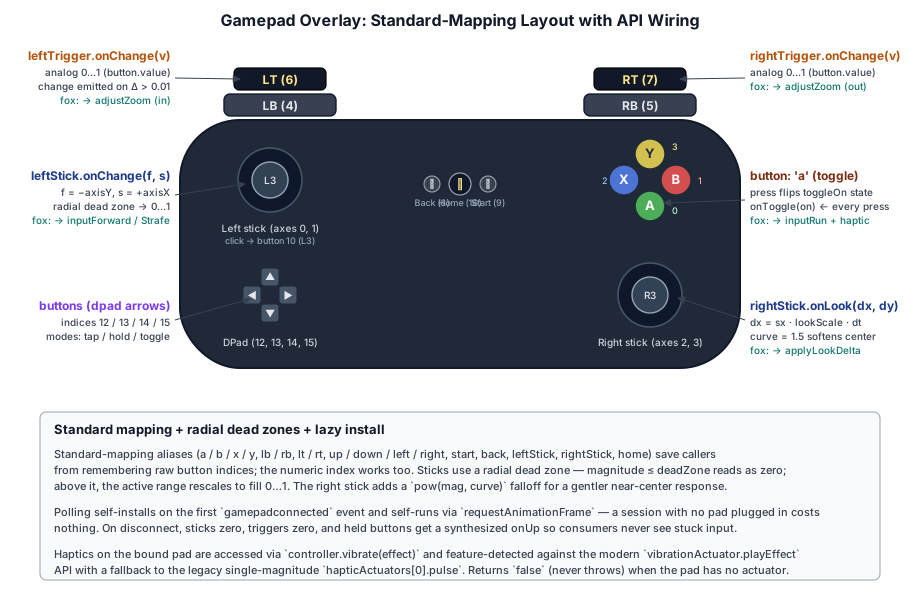
GamepadController is the engine-side gamepad backend. It mirrors TouchControls field-for-field — leftStick.onChange(forward, strafe) is the same callback shape as the touch joystick, rightStick.onLook(dx, dy) matches the camera-region look callback, and the button registry uses the same 'tap' / 'hold' / 'toggle' modes. A game that already wires touch input drops in gamepad support with the same callback bodies pointed at different option keys.
The Gamepad API is poll-based, not event-driven: there is no gamepadmove. GamepadController reads navigator.getGamepads() on every requestAnimationFrame, computes diffs against the previous frame, and dispatches sticks / triggers / buttons as if they were events. The polling loop self-installs (see §13.5.1) so consumers don't have to remember to call poll(dt) from their own update.
13.5.1 Lazy Initialization#
Same principle as touch: a session without a gamepad pays nothing. setupGamepadControlsLazy listens for a single 'gamepadconnected' event and only constructs the controller (and starts the rAF loop) when one fires:
export function setupGamepadControlsLazy(
  opts: GamepadControllerOptions,
  onInit?: (controller: GamepadController) => void,
): { controller: GamepadController | null; cancel(): void } {
  const handle = { controller: null as GamepadController | null, cancel: () => {} };
  // A pad already plugged in at page load may not fire a fresh
  // 'gamepadconnected' until the user presses a button — that's the spec.
  // Still safe to install immediately if getGamepads() reports one.
  const existing = navigator.getGamepads?.();
  if (existing) {
    for (let i = 0; i < existing.length; i++) {
      if (existing[i]) {
        handle.controller = new GamepadController(opts);
        onInit?.(handle.controller);
        return handle;
      }
    }
  }
  const listener = () => {
    if (handle.controller) return;
    handle.controller = new GamepadController(opts);
    onInit?.(handle.controller);
  };
  window.addEventListener('gamepadconnected', listener, { once: true });
  handle.cancel = () => window.removeEventListener('gamepadconnected', listener);
  return handle;
}
The browser's wake rule for 'gamepadconnected' is "user must have interacted with the pad", which is the right gate — a connected-but-untouched pad doesn't kick off a polling loop. On disconnect, the controller zeroes its sticks/triggers and synthesizes onUp for any held button, so consumers don't see stuck input when someone yanks the cable.
13.5.2 Sticks#
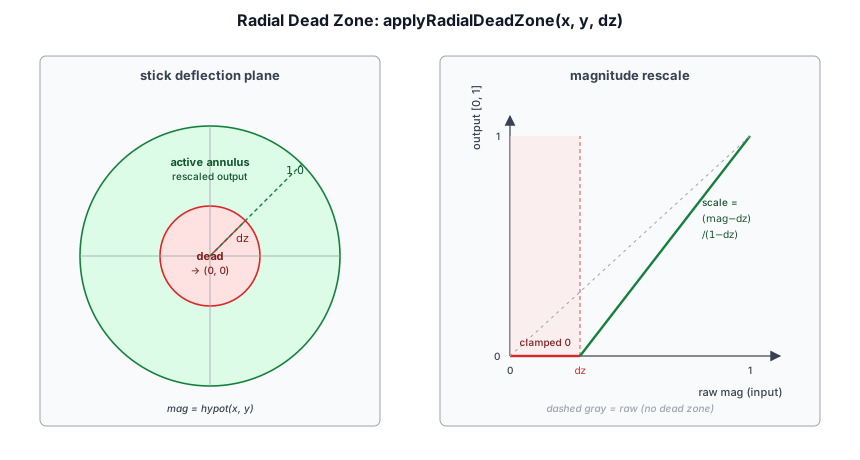
Both sticks support a radial dead zone — magnitude below the threshold reads as (0, 0), magnitude above it gets rescaled so the active range stretches from 0 → 1 instead of deadZone → 1:
function applyRadialDeadZone(x: number, y: number, dz: number): [number, number, boolean] {
  const mag = Math.hypot(x, y);
  if (mag <= dz) return [0, 0, false];
  const scale = (mag - dz) / (1 - dz) / mag;
  return [x * scale, y * scale, true];
}
The left stick is the analog-movement source. The callback shape (forward, strafe) is identical to the touch joystick, so most callers just forward it to the controller's inputForward / inputStrafe:
leftStick: {
  deadZone: 0.16,
  onChange: (forward, strafe) => {
    controller.inputForward = forward;
    controller.inputStrafe  = strafe;
  },
},
Same (0, 0) semantics as touch: the callback fires once with zeroes when the stick crosses back inside the dead zone, so consumers can treat zero as "centered" without tracking transitions themselves.
The right stick is the look source. Sticks don't move in pixels the way a mouse or finger does — they hold a position. rightStick integrates a per-frame delta: dx = stickX * lookScale * dt (with an optional curve exponent for a softer center response and an invertY flag for camera-style "pull down to look up"):
rightStick: {
  deadZone: 0.16,
  lookScale: 900,   // pixel-equivalent units / sec at full deflection
  curve: 1.6,       // pow() exponent — >1 softens near-center motion
  onLook: (dx, dy) => controller.applyLookDelta(dx, dy),
},
Because dx/dy come out in "pixel-equivalent units", the same applyLookDelta that mouse drag and touch drag call works unchanged. Tune lookScale until full-stick deflection feels like a fast mouse swipe.
Pass false for either stick to omit it (e.g. a right-stick-only camera-orbit configuration).
applyRadialDeadZone stretches the remaining travel back to 0 → 1. Untick the rescale to see the tempting shortcut that jumps straight to deadZone at the edge, and raise the look curve to soften the right stick's response near center.13.5.3 Buttons and Triggers#
The button registry uses the same 'tap' / 'hold' / 'toggle' modes as touch — tap fires onDown on release, hold fires onDown/onUp on press/release, toggle flips a flag on press:
buttons: [{
  button: 'a',          // standard-mapping alias; raw index also accepted
  mode: 'toggle',
  onToggle: (on) => { controller.inputRun = on; },
}],
Standard-mapping aliases ('a', 'b', 'x', 'y', 'lb', 'rb', 'back', 'start', 'leftStick', 'rightStick', 'up', 'down', 'left', 'right', 'home') save the caller from memorizing button indices. The full table is exported as STANDARD_GAMEPAD_BUTTONS; pass a raw index for non-standard mappings.
Triggers are exposed separately because their value is analog (0..1), not just pressed/released. leftTrigger and rightTrigger fire onChange(value) only when the value moves by more than ~1 % past the dead zone, so consumers don't get a flood of redundant calls:
leftTrigger:  { onChange: (v) => { brake    = v; } },
rightTrigger: { onChange: (v) => { throttle = v; } },
A common pattern — converting a held trigger to a continuous "rate of change" effect — is to store the latest value in a local and apply it per rAF:
let lastLT = 0, lastRT = 0, lastT = performance.now();
requestAnimationFrame(function tick(now) {
  const dt = (now - lastT) / 1000;
  lastT = now;
  if (lastLT > 0 || lastRT > 0) {
    controller.adjustZoom((lastRT - lastLT) * GAMEPAD_ZOOM_RATE * dt);
  }
  requestAnimationFrame(tick);
});
13.5.4 Haptics#
GamepadController exposes a small haptic surface backed by vibrationActuator.playEffect on modern Chromium and Edge, with a fallback to the legacy single-magnitude hapticActuators[0].pulse on older browsers. The API is feature-detected — hasVibration is true iff either path works on the bound pad — and vibrate() is a no-op that resolves false when nothing is available:
vibrate(effect: HapticEffect | number): Promise<boolean>;
stopVibration(): void;
get hasVibration(): boolean;

interface HapticEffect {
  duration: number;          // ms
  startDelay?: number;       // ms
  strongMagnitude?: number;  // 0..1 — low-frequency motor
  weakMagnitude?: number;    // 0..1 — high-frequency motor
  type?: 'dual-rumble' | 'trigger-rumble';
}
A duration shorthand (gp.vibrate(120)) plays a 120 ms full-magnitude rumble on both motors. The fox sample uses a stronger thump when engaging RUN and a lighter blip when stopping, so the gait change has tactile feedback:
onToggle: (on) => {
  controller.inputRun = on;
  void pad?.vibrate(on
    ? { duration: 90, strongMagnitude: 0.7, weakMagnitude: 0.4 }
    : { duration: 50, strongMagnitude: 0.0, weakMagnitude: 0.3 });
},
The promise never rejects — browser-side errors (canceled effect, pad unplugged mid-effect) resolve to false so haptic code never has to wrap a try/catch around gameplay logic.
13.5.5 A Note on Polling#
GamepadController self-polls via requestAnimationFrame by default (autoPoll: true). For consumers that already drive a fixed-step update loop and want gamepad reads to land at the same instant as scene-state updates, set autoPoll: false and call poll(dt) from inside that loop. The dispatch logic is identical either way; the only difference is who drives the clock.
rAF naturally pauses when the tab is hidden, so a backgrounded page stops polling without any visibility-change wiring. On destroy() the rAF is canceled and the connect/disconnect listeners are removed.
The Free-Fly Convenience Wrapper#
Most non-game samples just want "joystick → free-fly camera + UP / DOWN buttons" with no further customization. setupCameraTouchControls is a one-line wrapper that wires setupTouchControlsLazy to a CameraController exactly that way:
export function setupCameraTouchControls(
  canvas: HTMLCanvasElement,
  controller: CameraController,
  opts: CameraTouchOptions = {},
): { controls(): TouchControls | null; cancel(): void } {
  const handle = setupTouchControlsLazy(canvas, {
    joystick: {
      onChange: (forward, strafe) => {
        controller.inputForward = forward;
        controller.inputStrafe  = strafe;
      },
    },
    cameraRegion: {
      side: 'right',
      lookScale: opts.lookScale ?? 1.5,
      onLook: (dx, dy) => controller.applyLookDelta(dx, dy),
    },
  }, (controls) => {
    controller.usePointerLock = false;
    if (opts.addVerticalButtons !== false) {
      controls.addButton({ id: 'up',   label: '▲', /* ... */
        mode: 'hold', onDown: () => { controller.inputUp   = true; }, onUp: () => { controller.inputUp   = false; } });
      controls.addButton({ id: 'down', label: '▼', /* ... */
        mode: 'hold', onDown: () => { controller.inputDown = true; }, onUp: () => { controller.inputDown = false; } });
    }
  });
  return { controls: () => handle.controls, cancel: () => handle.cancel() };
}
Reference samples like the rg deferred / forward demos use this wrapper unchanged. Game-specific overlays (FPS shooter, fox explorer, terranaut, cloud flythrough) construct the underlying setupTouchControlsLazy directly so they can add gameplay-specific buttons.
Summary#
The engine's input layer is intentionally small:
- No central
Inputsingleton. Controllers (CameraController,PlayerController) own their DOM listeners and consume them inupdate(dt). - Common analog surface. Every controller exposes
inputForward/inputStrafe/inputUp/inputDown(and friends), so the touch overlay, the gamepad backend, and scripted demos all share the same wire format. Keyboard + analog inputs sum each frame — sources stack naturally without coordination. - Pointer lock for desktop FPS aim, click-and-drag fallback for editor mode, suppressed entirely on touch.
TouchControls— engine-level mobile overlay with virtual joystick, look-drag region (optionally with pinch-zoom and taps), and a declarative button registry (tap/hold/multi-hold/toggle). Lazy-installed on firsttouchstart, so desktop sessions never pay for it.GamepadController— Web Gamepad API backend with callback shapes that mirrorTouchControls1:1 (left/right sticks, dead-zoned axes,'tap'/'hold'/'toggle'buttons, analog triggers, optional haptics). Lazy-installed on the first'gamepadconnected'event, self-polls via rAF; a session without a pad pays nothing.- Per-controller wiring stays in the game. Overlay and gamepad callbacks (
onChange,onLook,onTap,onDown,onToggle) route to the controller fields the game cares about; neither layer touches game state directly. - iOS-grade robustness. Touch reconciles on every end/cancel and hard-resets on visibility loss and blur; gamepad zeroes sticks and synthesizes
onUpfor held buttons on disconnect. Stuck input from a dropped touch or a yanked cable is impossible.
Further reading:
- src/engine/touch_controls.ts —
TouchControls,setupTouchControlsLazy,setupCameraTouchControls - src/engine/gamepad_controller.ts —
GamepadController,setupGamepadControlsLazy,STANDARD_GAMEPAD_BUTTONS,HapticEffect - src/engine/camera_controller.ts — dual free-fly + orbit camera with the analog-input surface
- crafty/game/player_controller.ts — FPS player controller (coyote time, swim, auto-step)
- samples/fps_shooter/fps_touch_controls.ts — joystick + look + multi-hold FIRE + tap-to-fire + toggle CROUCH
- samples/terranaut/terranaut_touch_controls.ts — joystick + pinch-zoom orbit + RUN toggle + MODE switch
- samples/terrain/fox_touch_controls.ts — joystick + drag-orbit + pinch-zoom + RUN toggle, and gamepad (sticks + A-toggle RUN + LT/RT zoom + RUN-engage haptic thump)