Audio is a first-class engine subsystem living in src/audio/. It wraps the Web Audio API behind a small, game-oriented API — buses, triggered sound effects, spatial positioning, background music, an insertable effects chain, microphone capture, and analysis for visualization. The central object is AudioEngine: it is standalone (not tied to the renderer), so the game (crafty/) and the standalone samples drive it the same way. Two scene components, AudioSource and AudioListener, glue it to the GameObject hierarchy when you want sound to follow objects.
This chapter explains how the subsystem is built and why it is shaped the way it is. The call-by-call reference — every option, default, and gotcha — lives in the API guide, docs/modules/audio.md. Crafty Chapter 7 shows how Crafty wires the engine into footsteps, digging, and ambient music.
The whole subsystem is about 1,300 lines:
| File | Role |
|---|---|
| src/audio/audio_engine.ts | AudioEngine: context lifecycle, bus tree, loading, playback, music, listener |
| src/audio/audio_bus.ts | AudioBus: a gain node plus an ordered effect chain |
| src/audio/sound_handle.ts | SoundHandle: one playing voice and its per-voice nodes |
| src/audio/audio_loader.ts, audio_clip.ts | Fetch, decode, and cache AudioClips |
| src/audio/audio_effects.ts | Reverb, filter, delay, distortion, compressor factories |
| src/audio/microphone.ts | getUserMedia capture |
| src/audio/audio_analyser.ts | AnalyserNode wrapper for waveform, spectrum, and level |
| src/audio/audio_components.ts | Side-effect registration with the core engine and scene runtime |
| src/engine/components/audio_source.ts, audio_listener.ts | Scene components |
The Web Audio Model#
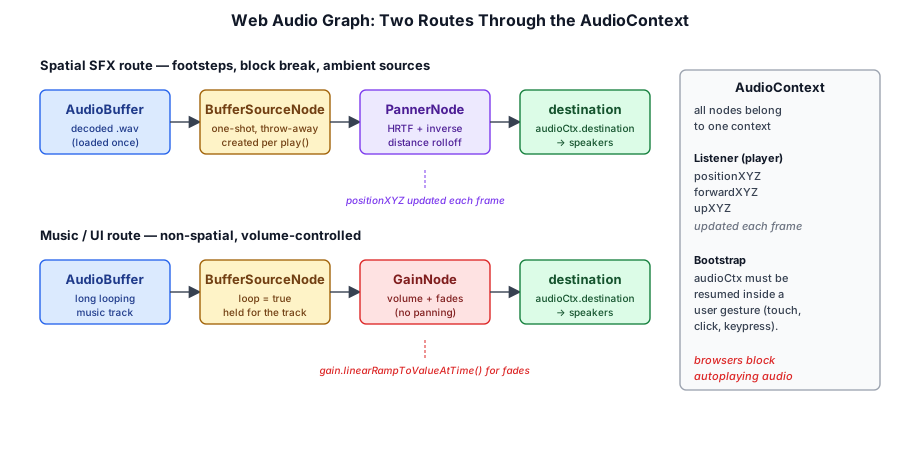
The Web Audio API exposes an AudioContext — a graph of AudioNodes that is rendered on a dedicated, real-time audio thread. JavaScript never touches samples on the hot path; it builds and rewires the graph, and the browser's audio thread pulls blocks of 128 frames (a render quantum) through it. Sources (decoded buffers, the microphone, oscillators) connect through processing nodes (gain, panner, filters, convolvers) to the destination, which is the speakers. The figure above is the simplest possible picture of the two routes a game needs; the rest of this chapter adds the buses and effects Taos Engine puts between the sources and the destination.
Three properties of this model shape every design decision in src/audio/.
14.1.1 Parameters Live on the Audio Clock#
Every continuously variable quantity — a gain, a pan position, a filter cutoff, a playback rate — is an AudioParam, not a plain number. An AudioParam can be set immediately (param.value = x) or scheduled against context.currentTime, the audio thread's sample-accurate clock:
const now = ctx.currentTime;
g.cancelScheduledValues(now);            // drop any ramp already in flight
g.setValueAtTime(g.value, now);          // anchor the ramp at the current value
g.linearRampToValueAtTime(target, now + seconds);
That three-line idiom appears in the bus fade, the voice fade-in, setVolume, and stop(fade). The anchor step matters: a linear ramp interpolates from the previous scheduled event, so without setValueAtTime(g.value, now) a ramp that interrupts another would jump to wherever the last event left off. Because the ramp runs on the audio thread, fades stay smooth even when the main thread hitches on a long frame.
14.1.2 Source Nodes Are Single-Use#
An AudioBufferSourceNode can be start()ed exactly once. After it ends (or is stopped) it cannot be restarted; you create another. Node creation is cheap by design — the heavy object, the decoded AudioBuffer, is shared by reference across any number of sources. This is why Taos Engine has no pool of reusable voices: the platform makes the source node a throwaway, and the engine leans into that (§14.5).
14.1.3 Browsers Block Autoplay#
A page cannot make sound until the user interacts with it. A context constructed before the first click, tap, or keypress starts in the 'suspended' state, and resume() only succeeds when called from (or after) a user gesture. Any audio API for the web has to answer "what happens if the game tries to play before the user has clicked?" Taos Engine's answer is explained in §14.2.2.
The AudioEngine and the Context Lifecycle#
AudioEngine owns one AudioContext, an AudioLoader, a map of AudioBuses, and the list of live SoundHandle voices:
export class AudioEngine {
  private _ctx: AudioContext | null = null;
  private _loader: AudioLoader | null = null;

  private readonly _buses = new Map<string, AudioBus>();
  private _masterBus: AudioBus | null = null;

  private readonly _voices: SoundHandle[] = [];

  private _musicHandle: SoundHandle | null = null;

  private _muted = false;
  // ── … ──
}
The typical standalone use is four lines:
import { AudioEngine } from '../src/audio/index.js';

const audio = new AudioEngine();
audio.resumeOnGesture();                 // unlock on first click / key / touch
const clip = await audio.load('/sfx/hit.ogg');
audio.play(clip, { bus: 'sfx' });        // one-shot
14.2.1 Lazy Context Creation#
The constructor does nothing. The context, the loader, and the bus tree are all created the first time anything touches the context getter:
get context(): AudioContext {
  if (!this._ctx) {
    this._ctx = new AudioContext();
    this._loader = new AudioLoader(this._ctx);
    this._initBuses(this._ctx);
  }
  return this._ctx;
}
Every public entry point that needs the graph — bus(), master, load(), decode(), loader, play() — begins with a bare this.context; expression statement whose only purpose is to trigger that getter. The payoff is that constructing an AudioEngine at startup costs nothing, and a code path that never produces sound never spins up an audio thread. The same laziness is repeated one level up in the core engine (§14.2.4).
14.2.2 Unlocking: resume and resumeOnGesture#
There are two ways to get the context running. resume() is for code that is already inside a gesture handler — a "Play" button, a menu click:
async resume(): Promise<void> {
  const ctx = this.context;
  if (ctx.state === 'suspended') {
    await ctx.resume();
  }
}
resumeOnGesture() is for everything else. It arms listeners for the four events browsers treat as user activation and tries to resume on each one:
resumeOnGesture(target: EventTarget = window): void {
  const ctx = this.context;
  if (ctx.state === 'running') {
    return;
  }
  const events = ['pointerdown', 'touchend', 'keydown', 'click'];
  const onGesture = (): void => {
    void ctx.resume();
    if (ctx.state !== 'suspended') {
      for (const e of events) {
        target.removeEventListener(e, onGesture);
      }
    }
  };
  for (const e of events) {
    target.addEventListener(e, onGesture);
  }
}
Two details are deliberate. First, the listener list is broad: mobile Safari historically only honored touchend for audio unlock, while desktop browsers accept pointerdown or keydown, so listening to all four covers every platform with one call. Second, the listeners do not use { once: true } — a gesture that fails to unlock (for example a pointerdown that the browser does not count as activation) must not disarm the others. The listeners remove themselves only once the context is observed to have left the 'suspended' state. Because ctx.resume() is asynchronous, that observation usually happens on the next event after the unlock; the extra calls are harmless no-ops.
14.2.3 The Null-Return Contract#
What should play() do before the unlock? Queueing the sound to play later is almost always wrong — a footstep that fires three seconds late when the user finally clicks is worse than silence. So the engine refuses cleanly:
private _spawn(clip: AudioClip, opts: VoiceOptions, busName: string): SoundHandle | null {
  const ctx = this.context;
  if (ctx.state !== 'running') {
    return null;
  }
  const bus = this.bus(busName);
  const handle = new SoundHandle(ctx, clip, bus.input, opts);
  this._voices.push(handle);
  return handle;
}
play() and playAt() both funnel through _spawn, so both return SoundHandle | null, and callers use optional chaining (handle?.follow(enemy)). The ready getter (_ctx !== null && _ctx.state === 'running') lets code check ahead of time. Long-lived sounds such as music are the exception where "try again later" is the right behavior; §14.7 shows how the samples retry playMusic from the first gesture.
14.2.4 Keeping Audio Out of the Core Bundle#
The core Engine exposes a shared engine.audio, and the scene runtime can instantiate AudioSource / AudioListener from serialized scenes. But a project that never plays sound should not ship any Web Audio code. The solution is a one-function indirection seam in the core:
let _factory: (() => AudioEngine) | null = null;

export function registerAudioEngineFactory(factory: () => AudioEngine): void {
  _factory = factory;
}

export function createAudioEngine(): AudioEngine {
  if (!_factory) {
    throw new Error(
      "[engine] audio is not available — import the audio module once (e.g. `import 'taos/audio'`) before using engine.audio or audio components.",
    );
  }
  return _factory();
}
The AudioEngine import in that file is import type, erased at build time. Engine calls createAudioEngine() lazily from its audio getter, and the audio module's index.ts performs a side-effect import of audio_components.ts, which fills in the factory and the scene-component builders:
registerAudioEngineFactory(() => new AudioEngine());
// ── … ──
registerComponentFactory('AudioSource', buildAudioSource);
registerComponentFactory('AudioListener', buildAudioListener);
A project opts into audio simply by importing taos/audio once. Forgetting to do so produces the descriptive error above instead of a silent failure.
14.2.5 Teardown#
dispose() stops the music, disposes every live voice and every bus, and closes the context. Closing matters in the editor and in hot-reloading samples: each open AudioContext holds an audio thread and an output device stream, and some browsers limit how many can be open at once, so leaking one per reload eventually degrades or breaks audio for the whole tab.
Buses and the Mixer Hierarchy#
Every sound routes through a named AudioBus — a mixing group with its own gain, mute, and optional effect chain. A fresh engine has master plus sfx, music, ui, and voice, all routed into master, which feeds the destination. Because the buses form a tree of gain nodes, volumes cascade: the effective level of an SFX voice is voice.volume × sfx.volume × master.volume.
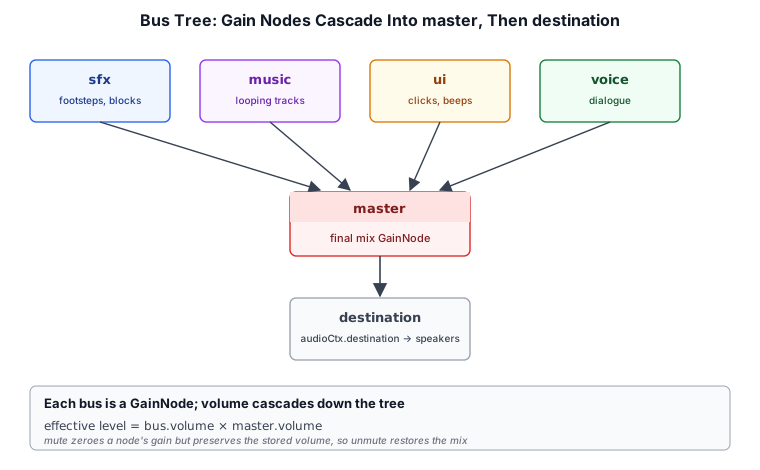
The tree is built once, the moment the context is created:
private _initBuses(ctx: AudioContext): void {
  const master = new AudioBus(ctx, 'master', ctx.destination);
  master.volume = 1;
  this._masterBus = master;
  this._buses.set('master', master);
  for (const name of ['sfx', 'music', 'ui', 'voice']) {
    this._buses.set(name, new AudioBus(ctx, name, master.input));
  }
}
The four child buses are the categories a settings screen typically exposes as sliders — effects, music, interface, and dialogue (or voice chat, or the microphone monitor). They are conventions, not special cases: bus(name) lazily creates any other name, parented to master, so a game can add 'ambience' or 'vehicles' without touching the engine. The BusName type keeps the built-ins autocompleting while still accepting arbitrary strings:
export type BusName = 'master' | 'sfx' | 'music' | 'ui' | 'voice' | (string & {});The (string & {}) trick prevents TypeScript from collapsing the union to plain string, which would lose the literal suggestions in the editor.
14.3.1 Anatomy of a Bus#
An AudioBus is a GainNode, an ordered list of effects, a parent node, and an optional analyser tap. Its input is the gain node, so connecting a source to a bus is just source.connect(bus.input):
constructor(ctx: AudioContext, name: string, parent: AudioNode) {
  this._ctx = ctx;
  this.name = name;
  this._parent = parent;
  this._gain = ctx.createGain();
  this._gain.gain.value = 1;
  this._gain.connect(parent);
}

/** Connect sources (voices, other buses, effects) into the bus here. */
get input(): AudioNode {
  return this._gain;
}
The parent is any AudioNode — another bus's input, or ctx.destination for master. setParent(node) re-points it, which is enough to build deeper trees (a 'footsteps' bus under 'sfx', say) even though the engine only ever builds a two-level tree itself.
14.3.2 Volume, Mute, and Fades#
The bus keeps two logical fields, _volume and _muted, and derives the node's gain from them:
private _applyGain(): void {
  this._gain.gain.value = this._muted ? 0 : this._volume;
}
Separating the stored volume from the applied gain is what makes mute non-destructive: muting writes 0 to the node but leaves _volume alone, so unmuting restores the previous mix exactly. AudioEngine.muted simply forwards to master.muted, and masterVolume / musicVolume are shorthands for master.volume / bus('music').volume. These are the knobs a settings panel's sliders and a global mute toggle drive (Crafty's is described in Crafty §5.7; the engine's control-panel kit is in Chapter 15).
fade() schedules a ramp instead of setting the value immediately, using the idiom from §14.1.1:
fade(target: number, seconds = 0.5): void {
  this._volume = target;
  const g = this._gain.gain;
  const now = this._ctx.currentTime;
  g.cancelScheduledValues(now);
  g.setValueAtTime(g.value, now);
  g.linearRampToValueAtTime(this._muted ? 0 : target, now + seconds);
}
Note that _volume is updated to the target immediately, so reading bus.volume mid-fade reports where the fade is going, not where it currently is. A muted bus fades toward 0 regardless, preserving the mute.
Loading and Decoding Clips#
An AudioClip is a thin wrapper over a decoded AudioBuffer, carrying the name or URL it came from plus duration, channels, and sampleRate accessors. Clips are the unit the rest of the API trades in; nothing plays a URL directly except the playMusic convenience.
14.4.1 A Cache of Promises#
AudioLoader caches promises, not clips:
private readonly _cache = new Map<string, Promise<AudioClip>>();

load(url: string): Promise<AudioClip> {
  let pending = this._cache.get(url);
  if (!pending) {
    pending = this._fetchDecode(url);
    this._cache.set(url, pending);
  }
  return pending;
}
Storing the in-flight promise gives two properties for free. A second load(url) issued while the first is still downloading shares the same fetch and decode — a preloading screen and a gameplay trigger that race for the same file cost one request. And once resolved, the same URL always yields the same AudioClip object, so clips can be compared by identity. loadAll(urls) is Promise.all over load, so batches are parallel and deduped too.
Failures must not poison the cache, or one flaky request would make a sound permanently unavailable:
private async _fetchDecode(url: string): Promise<AudioClip> {
  try {
    const resp = await fetch(url);
    const data = await resp.arrayBuffer();
    const buffer = await this._ctx.decodeAudioData(data);
    return new AudioClip(buffer, url);
  } catch (err) {
    // Drop the rejected promise so a later retry can succeed.
    this._cache.delete(url);
    console.warn('[audio] failed to load', url, err);
    throw err;
  }
}
14.4.2 Decoding Bytes You Already Have#
Not every clip comes from a URL. The scene runtime reads asset bytes through a resolver, the audio visualizer sample decodes files the user drops on the page, and bundles may deliver audio inside a larger archive. decode(name, data) covers these cases and caches the result under name, so later load(name) calls hit the cache:
async decode(name: string, data: ArrayBuffer): Promise<AudioClip> {
  const buffer = await this._ctx.decodeAudioData(data);
  const clip = new AudioClip(buffer, name);
  this._cache.set(name, Promise.resolve(clip));
  return clip;
}
decodeAudioData detaches the ArrayBuffer it is given — the bytes are transferred to the decoder and the caller's buffer becomes empty. Pass a copy (bytes.slice(0)) if the raw bytes are needed afterward.
14.4.3 Memory: Compressed on the Wire, PCM in RAM#
Decoding expands the compressed file to 32-bit float PCM at the context's sample rate. A stereo clip at 48 kHz occupies 48,000 × 2 × 4 = 384 KB per second, so a four-minute music track that is 4 MB as Ogg Vorbis becomes about 92 MB decoded. That is fine for short effects — the whole footstep and block-sound set of a game is a few megabytes — but it is the main reason long tracks should be loaded on demand rather than all at startup. loader.evict(url) drops one cache entry (or all of them with no argument) so a level transition can release its tracks; the memory is reclaimed once no playing voice still references the buffer.
Voices: the SoundHandle#
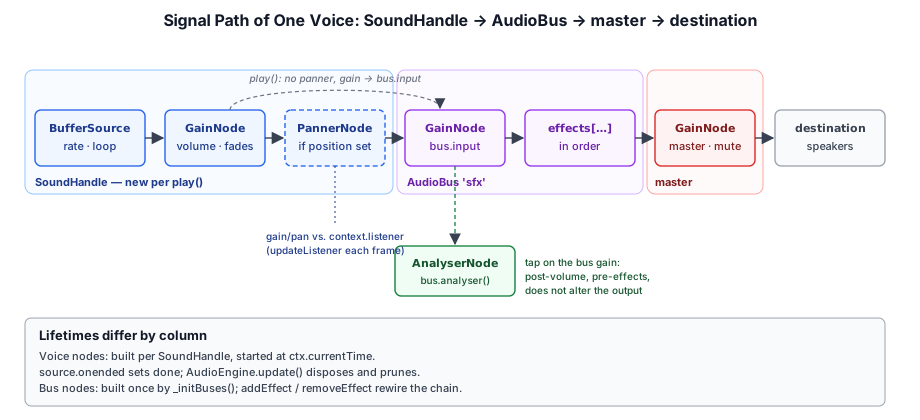
play() (flat) and playAt() (spatial) both spin up a short-lived voice and return a SoundHandle — the control surface for that one sound. playAt is literally play with a position folded into the options:
playAt(
  clip: AudioClip,
  pos: Vec3Like,
  opts: VoiceOptions & { bus?: BusName } = {},
): SoundHandle | null {
  return this._spawn(clip, { ...opts, position: pos }, opts.bus ?? 'sfx');
}
14.5.1 Building the Chain#
All of a voice's nodes are created and wired in the handle's constructor: a buffer source, a per-voice gain, and — only when a position is given — a panner.
constructor(ctx: AudioContext, clip: AudioClip, destination: AudioNode, opts: VoiceOptions = {}) {
  this._ctx = ctx;
  this._baseVolume = opts.volume ?? 1;

  this._gain = ctx.createGain();
  this._src = ctx.createBufferSource();
  this._src.buffer = clip.buffer;
  this._src.loop = opts.loop ?? false;
  this._src.playbackRate.value = opts.playbackRate ?? 1;
  if (opts.detune !== undefined && this._src.detune) {
    this._src.detune.value = opts.detune;
  }

  this._src.connect(this._gain);

  if (opts.position) {
    this._panner = ctx.createPanner();
    // ── … panner configuration, see §14.6 ──
    this._gain.connect(this._panner);
    this._panner.connect(destination);
  } else {
    this._panner = null;
    this._gain.connect(destination);
  }

  const now = ctx.currentTime;
  const fadeIn = opts.fadeIn ?? 0;
  if (fadeIn > 0) {
    this._gain.gain.setValueAtTime(0, now);
    this._gain.gain.linearRampToValueAtTime(this._baseVolume, now + fadeIn);
  } else {
    this._gain.gain.value = this._baseVolume;
  }

  this._src.onended = () => {
    this._finished = true;
    this.onEnded?.();
  };
  this._src.start(now, opts.offset ?? 0);
}
A few choices are worth calling out:
- Gain before panner. The per-voice gain sits between the source and the panner, so a fade or
setVolumechanges loudness without affecting the spatial cues. Non-spatial voices skip the panner entirely rather than using a centered one — a panner is not free (§14.13). destinationis a bus input, neverctx.destination. The handle does not know about buses;_spawnhands itbus.input, so every voice inherits the bus's volume, mute, and effects.detuneis guarded. Older WebKit builds lackedAudioBufferSourceNode.detune; thethis._src.detunecheck keeps the option harmless there.- Voices start immediately, at
currentTime. There is no scheduled start in the future; a game wanting rhythmic timing would schedule sources itself on the context clock.
14.5.2 Controlling a Live Voice#
The handle's methods map directly onto the nodes it owns. setVolume(v, ramp) uses the cancel-anchor-ramp idiom on the voice gain when ramp > 0. setPlaybackRate and setDetune write the source's params. stop(fade) is the interesting one, because it has to both fade and end the voice:
stop(fade = 0): void {
  if (this._finished) {
    return;
  }
  const now = this._ctx.currentTime;
  if (fade > 0) {
    const g = this._gain.gain;
    g.cancelScheduledValues(now);
    g.setValueAtTime(g.value, now);
    g.linearRampToValueAtTime(0, now + fade);
    try {
      this._src.stop(now + fade);
    } catch {
      /* already stopped */
    }
  } else {
    try {
      this._src.stop();
    } catch {
      /* already stopped */
    }
  }
}
Both the ramp and the stop are scheduled at the same instant on the audio clock, so the source is cut exactly when its gain reaches zero — no click from stopping a still-audible sound, and no main-thread timer to keep alive. Stopping a source that has already been stopped throws in some browsers, hence the try blocks; fadeOut(d) is an alias for stop(d).
14.5.3 Pitch: playbackRate versus detune#
playbackRate resamples the buffer: 2.0 plays twice as fast and an octave higher, and the clip's duration halves. detune is expressed in cents (100 cents = one semitone) and the two combine multiplicatively — the effective rate is playbackRate × 2^(detune/1200). Slightly randomizing either per trigger is the cheapest way to keep repeated effects (footsteps, gunfire, block breaks) from sounding mechanical. Crafty's AudioManager gets its footstep variety by picking a random clip from a per-surface set, and its playStep forwards an optional pitch straight to playbackRate.
14.5.4 Lifetime and Pruning#
A handle knows it is finished when the source's onended event fires — naturally at the end of a non-looping clip, or after stop(). The event sets done and invokes the optional onEnded callback. Actually releasing the nodes is left to the engine's per-frame update():
update(_dt = 0): void {
  for (let i = this._voices.length - 1; i >= 0; i--) {
    const v = this._voices[i];
    if (v.done) {
      v.dispose();
      this._voices.splice(i, 1);
      if (this._musicHandle === v) {
        this._musicHandle = null;
      }
    } else {
      v.syncFollow();
    }
  }
}
The loop runs backward so splice does not skip elements. The same pass advances follow()-bound voices (§14.6.3), so one call per frame does all of the engine's housekeeping. activeVoices reports the length of this list — the sample bench prints it after each trigger.
Who calls update() depends on who owns the frame loop. An app built on Engine gets it for free: Engine.frame() calls update(dt) on its shared engine.audio right after scene.update, so follow() targets are read after this frame's gameplay has moved them, and Engine.destroy() disposes the audio engine. A standalone AudioEngine has no loop of its own, so its owner must call it — the audio_test sample does so in its requestAnimationFrame callback, and Crafty's AudioManager calls it right after updating the listener. A standalone engine whose owner never calls update() still plays every sound correctly (finished sources are silent), but followed voices stop tracking their targets, and the handles and their disconnected-at-end nodes accumulate in _voices. Calling it twice in a frame is harmless.
14.5.5 No Voice Limiting or Pooling#
The engine deliberately does not cap polyphony or recycle voices. Pooling is impossible at the node level (§14.1.2), and the right policy for which sound to drop when too many are playing — oldest, quietest, farthest, lowest priority — is a game decision, not an engine one. What the engine provides are the ingredients: activeVoices for a global budget, the returned handle for stopping a specific voice, and onEnded for tracking a per-category count. Game code layers its own policy on top; for instance, a "one of these at a time" sound keeps its previous handle and calls stop(0.05) before starting the next.
3D Spatialization#
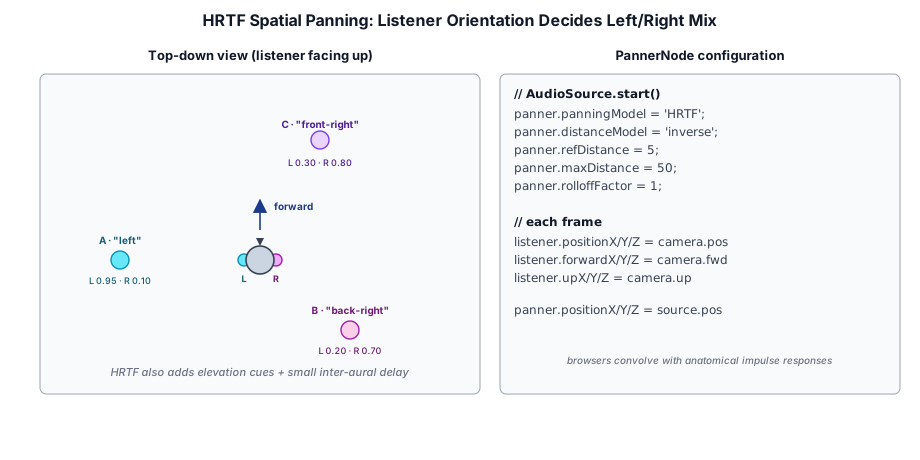
Spatial audio has two halves: each source has a position (a PannerNode per voice), and there is one listener with a position and orientation (context.listener). The browser computes, per voice and per render quantum, the direction and distance from listener to source and turns them into a left/right filter pair and a distance attenuation.
14.6.1 Panner Configuration#
When a voice has a position, the constructor configures its panner from DEFAULT_SPATIAL merged with the caller's spatial options:
const DEFAULT_SPATIAL: Required<SpatialOptions> = {
  panningModel: 'HRTF',
  distanceModel: 'inverse',
  refDistance: 5,
  maxDistance: 50,
  rolloffFactor: 1,
};
// ── … in the constructor ──
if (opts.position) {
  this._panner = ctx.createPanner();
  const s = { ...DEFAULT_SPATIAL, ...opts.spatial };
  this._panner.panningModel = s.panningModel;
  this._panner.distanceModel = s.distanceModel;
  this._panner.refDistance = s.refDistance;
  this._panner.maxDistance = s.maxDistance;
  this._panner.rolloffFactor = s.rolloffFactor;
  this._writePosition(opts.position);
  this._gain.connect(this._panner);
  this._panner.connect(destination);
}
Panning model. 'HRTF' convolves the signal with a measured head-related transfer function — the filtering a real head and outer ear apply to sound from each direction. On headphones it gives convincing front/back and elevation cues, not just left/right balance. The alternative, 'equalpower', is a plain constant-power stereo pan: far cheaper, but it cannot distinguish a sound in front from one behind. The browser default is 'equalpower'; Taos Engine defaults to HRTF because games are frequently played on headphones and the difference is immediately audible.
Distance model. The Web Audio specification defines three gain curves, where d is the listener-to-source distance:
distanceModel | Gain |
|---|---|
'linear' | 1 − rolloff × (clamp(d, ref, max) − ref) / (max − ref) |
'inverse' | ref / (ref + rolloff × (max(d, ref) − ref)) |
'exponential' | (max(d, ref) / ref) ^ (−rolloff) |
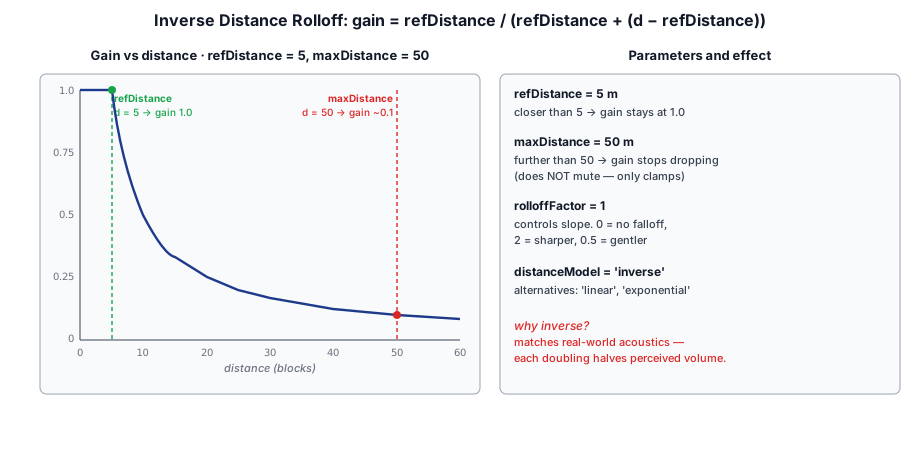
Taos Engine defaults to 'inverse' with refDistance = 5 and rolloffFactor = 1, so gain is 1.0 inside five meters and then falls as 5/d: half volume at 10 m, a tenth at 50 m. With a rolloff of 1 this is the physical inverse-distance law for sound pressure — every doubling of distance costs 6 dB — which is why it sounds natural. Note that maxDistance only participates in the 'linear' model; under 'inverse' a sound keeps getting quieter past 50 m and never quite reaches silence. Games that want sounds to cut out entirely at a range should either choose 'linear' (which reaches zero at maxDistance when rolloffFactor is 1) or not trigger far-away sounds in the first place — the latter also saves the panner cost.
The panner's directional cone (coneInnerAngle, coneOuterAngle, coneOuterGain) is left at the browser defaults, which make every source omnidirectional. Doppler shift is not modeled: the old PannerNode.setVelocity API was removed from the specification, and the engine does not emulate it by modulating playbackRate.
audio.playAt and bound with follow() circles the listener, who faces up the screen. Switch between HRTF and equal-power panning and listen for the front/back cue that only HRTF gives. Change the distance model, refDistance, and rolloff and watch the inset: gain stays at 1.0 inside the reference ring, falls as ref/d under the inverse model, and reaches silence only with the linear model's maxDistance (the red ring).14.6.2 Writing Positions#
Positions are written through the positionX/Y/Z AudioParams where they exist, with a fallback to the older setPosition method for browsers that predate them:
private _writePosition(pos: Vec3Like): void {
  const p = this._panner!;
  if (p.positionX) {
    p.positionX.value = pos.x;
    p.positionY.value = pos.y;
    p.positionZ.value = pos.z;
  } else {
    // Older Safari/Firefox path.
    (p as unknown as { setPosition(x: number, y: number, z: number): void })
      .setPosition(pos.x, pos.y, pos.z);
  }
}
The input type is the structural Vec3Like ({ x, y, z }), so the engine's own Vec3, a plain object literal, or a physics body's position all work without conversion — and src/audio/ has no import of the math library at all.
Positions are assigned directly (.value =), taking effect at the next render quantum. At 60 frames per second a fast-moving source jumps a little each frame; in practice the jumps are small relative to the distance and HRTF interpolation smooths them, so no per-frame ramp is scheduled.
14.6.3 Following a Moving Object#
For a source attached to something that moves — a buzzing bee, a car engine, an orbiting emitter — calling setPosition every frame is tedious. follow(target) binds the voice to anything with a position field, and the engine's update() pushes the latest position through syncFollow() each frame:
follow(target: PositionProvider | null): this {
  this._follow = this._panner ? target : null;
  return this;
}

syncFollow(): void {
  if (this._follow && this._panner) {
    this._writePosition(this._follow.position);
  }
}
follow returns this for chaining (audio.playAt(clip, bee.position)?.follow(bee)) and is a no-op on a non-spatial voice. Because the voice holds a reference to the target, the target's position must be kept current in place — mutating a Vec3 works; replacing the object's position property with a new vector also works, since syncFollow reads the field each frame. The audio_test sample's orbiting emitter is exactly this: a { position: Vec3 } object whose vector is updated before audio.update(dt).
14.6.4 The Listener#
The other half is the listener — the "ears" — which must track the camera. updateListener takes a position, a forward vector, and an up vector:
updateListener(position: Vec3Like, forward: Vec3Like, up: Vec3Like): void {
  const ctx = this._ctx;
  if (!ctx || ctx.state !== 'running') {
    return;
  }
  const l = ctx.listener;
  if (l.positionX) {
    l.positionX.value = position.x;
    l.positionY.value = position.y;
    l.positionZ.value = position.z;
    l.forwardX.value = forward.x;
    l.forwardY.value = forward.y;
    l.forwardZ.value = forward.z;
    l.upX.value = up.x;
    l.upY.value = up.y;
    l.upZ.value = up.z;
  } else {
    const legacy = l as unknown as {
      setPosition(x: number, y: number, z: number): void;
      setOrientation(fx: number, fy: number, fz: number, ux: number, uy: number, uz: number): void;
    };
    legacy.setPosition(position.x, position.y, position.z);
    legacy.setOrientation(forward.x, forward.y, forward.z, up.x, up.y, up.z);
  }
}
Note the early return: this method reads this._ctx rather than the context getter, so calling it every frame before audio is unlocked does not create a context as a side effect. Firefox historically exposed only the setPosition / setOrientation form on the listener; the fallback covers it.
Web Audio's coordinate system is right-handed with +Y up and a default listener facing −Z — the same conventions Taos Engine's cameras use — so camera vectors can be passed straight through with no axis flips. Crafty derives the forward vector from the player's yaw and pitch, with positive pitch looking down:
// Audio listener: sync 3D position / orientation to the camera.
{
  const yaw   = playerSetup.isPlayerMode() ? player.yaw   : freeCamera.yaw;
  const pitch = playerSetup.isPlayerMode() ? player.pitch : freeCamera.pitch;
  const cp = Math.cos(pitch);
  _forward.x = -Math.sin(yaw) * cp;
  _forward.y = -Math.sin(pitch);
  _forward.z = -Math.cos(yaw) * cp;
  audio.updateListener(camPos, _forward, _upVec);
}
Scene-driven apps get the same result from the AudioListener component, which reads the vectors out of the camera's world matrix (§14.11.1).
Music and Crossfades#
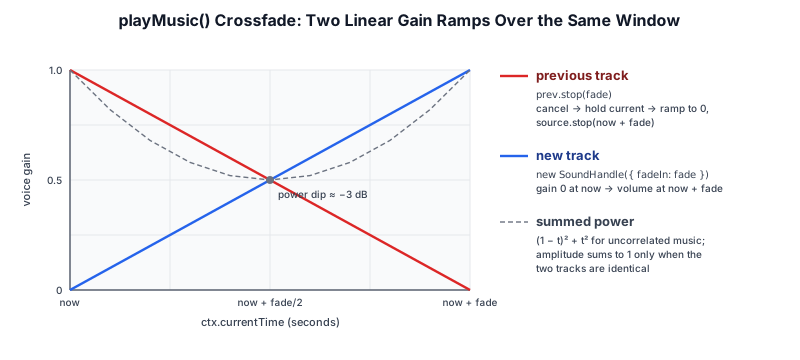
Background music is a looping voice on the music bus with one extra rule: only one track plays at a time. playMusic accepts a URL or a preloaded clip, and starting a new track replaces the old one, optionally crossfading:
async playMusic(track: string | AudioClip, opts: MusicOptions = {}): Promise<SoundHandle | null> {
  const ctx = this.context;
  const clip = typeof track === 'string' ? await this.load(track) : track;
  if (ctx.state !== 'running') {
    // Not unlocked yet; caller should `resumeOnGesture` and retry.
    return null;
  }
  const fade = opts.fade ?? 0;
  const prev = this._musicHandle;
  if (prev) {
    prev.stop(fade);
  }
  const handle = new SoundHandle(ctx, clip, this.bus('music').input, {
    loop: opts.loop ?? true,
    volume: opts.volume ?? 1,
    fadeIn: fade,
  });
  this._voices.push(handle);
  this._musicHandle = handle;
  handle.onEnded = () => {
    if (this._musicHandle === handle) {
      this._musicHandle = null;
    }
  };
  return handle;
}
The crossfade is nothing more than two things already described: the old handle's stop(fade) ramps its gain to zero and schedules its source to stop, while the new handle's fadeIn ramps from zero to the target volume. Both ramps are anchored at the same currentTime, so they are sample-aligned on the audio thread. Both are linear in gain; for two unrelated pieces of music the combined loudness dips by about 3 dB at the midpoint (the dashed curve in the figure). For fades of a second or two under gameplay this is rarely noticeable. An equal-power curve would avoid the dip, but the Web Audio API has no built-in equal-power ramp and the engine keeps to the built-in linearRampToValueAtTime.
Other details:
- Load before the state check. The clip is loaded (and cached) before checking whether the context is running. A
playMusicissued at startup therefore still warms the cache, and the retry after the first gesture starts instantly. onEndedbookkeeping. The closure clears_musicHandleonly if it still points at this handle. Without the identity check, the old track'sendedevent — which fires at the end of the crossfade, after the new track has been installed — would clear the pointer to the new track.- The music handle is an ordinary voice. It lives in
_voices, is pruned byupdate(), and can be controlled like any other handle.stopMusic(fade)andfadeOutMusic(duration)stop it;musicVolumesets the bus, so it composes with the per-trackvolume.
Because playMusic returns null before the unlock, the pattern for autoplaying ambient music is "try now, try again on the first gesture". The grassy hills sample does exactly that:
const audio = new AudioEngine();
audio.musicVolume = 0.3;
audio.resumeOnGesture();
void audio.playMusic(ambienteUrl);
addEventListener('pointerdown', () => { void audio.playMusic(ambienteUrl); }, { once: true });
If the context happened to be unlocked already, the second call crossfades the track into itself with a zero-length fade — a restart, not a doubling — because the one-track rule stops the first handle.
Effects#
14.8.1 The AudioEffect Contract and Chain Rewiring#
An effect is any self-contained sub-graph with a single input and a single output:
export interface AudioEffect {
  /** Node that incoming signal connects to. */
  readonly input: AudioNode;
  /** Node that carries the processed signal onward. */
  readonly output: AudioNode;
  /** Disconnect every internal node. */
  dispose(): void;
}
Buses hold effects in an array and splice them between the bus gain and the parent. Rather than patching individual connections on insert and remove, the bus tears down its outgoing connections and rebuilds the whole chain in order:
private _rebuild(): void {
  this._gain.disconnect();
  for (const e of this._effects) {
    e.output.disconnect();
  }

  let node: AudioNode = this._gain;
  for (const e of this._effects) {
    node.connect(e.input);
    node = e.output;
  }
  node.connect(this._parent);

  // Re-attach the analyser tap to the post-volume node.
  if (this._analyser) {
    this._gain.connect(this._analyser.input);
  }
}
Chains are a handful of nodes long and change rarely (a settings toggle, entering a cave), so the simplicity of a full rebuild costs nothing. Only each effect's output is disconnected; its internal wiring from input onward is untouched, so an effect survives being moved around the chain. addEffect returns the effect it was given, so the caller can keep a reference for a later removeEffect, which also disposes it. clearEffects() removes and disposes all of them.
Because disconnect() on the bus gain cuts every outgoing connection, the analyser tap has to be re-attached at the end — hence the last three lines.
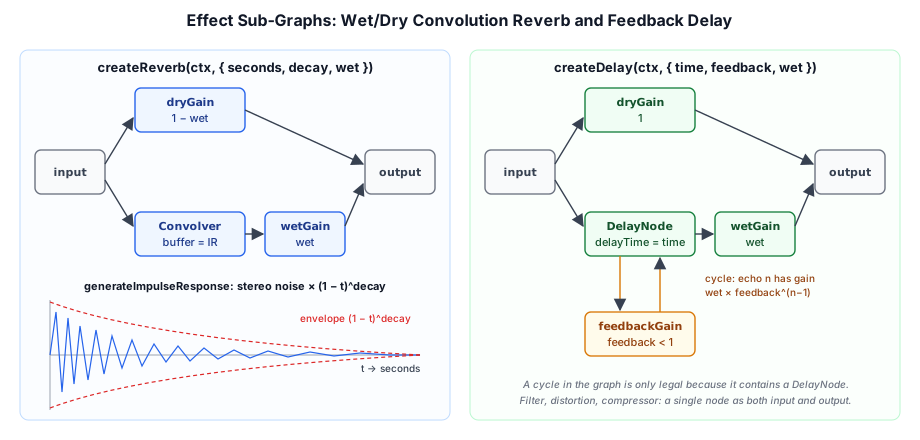
The five factories below return plain objects satisfying AudioEffect. Three of them are a single node that serves as both input and output; the other two build small graphs.
14.8.2 Convolution Reverb with a Synthetic Impulse Response#
A convolution reverb convolves the signal with an impulse response (IR) — a recording of how a space responds to a single click. Real IRs are recorded audio files; Taos Engine generates one instead, so reverb needs no assets:
export function generateImpulseResponse(
  ctx: BaseAudioContext,
  seconds: number,
  decay: number,
  random: () => number = Math.random,
): AudioBuffer {
  const rate = ctx.sampleRate;
  const length = Math.max(1, Math.floor(seconds * rate));
  const impulse = ctx.createBuffer(2, length, rate);
  for (let ch = 0; ch < 2; ch++) {
    const data = impulse.getChannelData(ch);
    for (let i = 0; i < length; i++) {
      const t = i / length;
      data[i] = (random() * 2 - 1) * Math.pow(1 - t, decay);
    }
  }
  return impulse;
}
White noise under a (1 − t)^decay envelope is a surprisingly good model of a diffuse reverb tail: after the first few reflections, a real room's response is dense and effectively random, and its energy decays smoothly. Filling the two channels with independent noise decorrelates left and right, which is what makes the tail sound wide rather than centered. seconds sets the tail length (the room size) and decay the curve's steepness (how absorbent the room is). The random parameter exists so tests can inject a deterministic generator.
The effect itself is a parallel wet/dry mix:
convolver.buffer = generateImpulseResponse(ctx, seconds, decay);
dryGain.gain.value = 1 - wet;
wetGain.gain.value = wet;

input.connect(dryGain).connect(output);
input.connect(convolver).connect(wetGain).connect(output);
connect returns its argument, so each line reads as a signal path. The dry and wet gains are complementary (1 − wet and wet), which keeps the overall level roughly constant as the mix changes. The ConvolverNode normalizes its IR by default, so the random amplitude of the generated noise does not change the reverb's loudness.
Convolution is the most expensive effect in the set — the browser performs a partitioned FFT convolution whose cost grows with the IR length — so a single reverb on a bus is preferable to one per voice.
14.8.3 Feedback Delay#
The echo effect adds a feedback loop around a DelayNode:
delay.delayTime.value = time;
feedbackGain.gain.value = feedback;
dryGain.gain.value = 1;
wetGain.gain.value = wet;

input.connect(dryGain).connect(output);
input.connect(delay);
delay.connect(feedbackGain).connect(delay); // feedback loop
delay.connect(wetGain).connect(output);
Cycles are normally illegal in a Web Audio graph — they would require a node's output before it has been computed — but a cycle that contains a DelayNode is allowed, because the delay's output at time t depends only on its input at t − delayTime. Each trip around the loop multiplies the signal by feedback, so the n-th echo arrives at n × time seconds with gain wet × feedback^(n−1). The default of 0.35 dies away within a few repeats; the option is documented as [0, 1) because a feedback of 1 or more never decays.
createDelay(maxDelay) has to be told the longest delay the line may ever hold, because the node preallocates its buffer; the factory defaults it to max(time, 1) seconds so the time can be modulated up to a second later without reallocation.
14.8.4 Filter, Distortion, and Compressor#
Filter. createFilter wraps a BiquadFilterNode — the standard second-order IIR filter, configurable as lowpass, highpass, bandpass, notch, peaking, or shelving. Its defaults are a 1 kHz lowpass with Q = 1. A lowpass on the sfx bus is the classic "underwater" or "stunned" effect, and the audio bench uses a 600 Hz resonant lowpass (Q: 4) as its filter demo.
Distortion. createDistortion wraps a WaveShaperNode, which maps each input sample through a lookup curve. The curve comes from a pure function that the unit tests check for oddness and monotonicity:
export function makeDistortionCurve(amount: number, samples = 44100): Float32Array<ArrayBuffer> {
  const curve = new Float32Array(samples);
  const k = amount;
  const deg = Math.PI / 180;
  for (let i = 0; i < samples; i++) {
    const x = (i * 2) / samples - 1; // -1 .. 1
    curve[i] = ((3 + k) * x * 20 * deg) / (Math.PI + k * Math.abs(x));
  }
  return curve;
}
This is a soft-clipping curve of the form c·x / (π + k|x|): nearly linear for small inputs, bending over as |x| grows, with k controlling how early it bends. Being an odd function (f(−x) = −f(x)) means it distorts both half-waves symmetrically, producing only odd harmonics and no DC offset. One consequence of the constants is that the curve's peak output approaches about ±0.35 as k grows, so the effect also lowers the level; compensate with the bus volume if needed. The shaper runs with '4x' oversampling by default, since clipping generates harmonics above the Nyquist frequency that would otherwise alias back down as harsh inharmonic tones.
Compressor. createCompressor wraps a DynamicsCompressorNode. The defaults (threshold −24 dB, knee 30 dB, ratio 12, 3 ms attack, 250 ms release) match the node's own defaults and give gentle "glue". With a high ratio and a low threshold it acts as a limiter, which is the most useful thing to put on the master bus: dozens of voices summing at once can exceed full scale and clip at the output, and a limiter catches those peaks.
14.8.5 Ordering#
Effect order is insertion order, and it matters. The conventional arrangement is corrective effects first (filters, distortion), time-based effects later (delay, reverb), and dynamics last (a compressor or limiter). Reverb after a lowpass sounds like a muffled sound in a big room; a lowpass after reverb sounds like a big room heard through a wall.
sfx bus, and each toggle inserts one of the engine's effect factories into that bus's chain, which is rebuilt in order on every change. The scope and spectrum read an analyser on master, downstream of the effects: the 600 Hz lowpass strips the top of the spectrum, distortion adds harmonics, and the delay and reverb smear the waveform in time. Flip Order with the filter and reverb on to hear the muffled big room turn into a big room heard through a wall.Microphone Input#
Microphone wraps getUserMedia and a MediaStreamAudioSourceNode. It is constructed only through the async static request, because acquiring the device is an asynchronous permission prompt that may fail:
static async request(ctx: AudioContext, opts: MicrophoneOptions = {}): Promise<Microphone> {
  const stream = await navigator.mediaDevices.getUserMedia({
    audio: {
      echoCancellation: opts.echoCancellation ?? true,
      noiseSuppression: opts.noiseSuppression ?? true,
      autoGainControl: opts.autoGainControl ?? true,
    },
    video: false,
  });
  const source = ctx.createMediaStreamSource(stream);
  const analyser = new AudioAnalyser(ctx, opts.analyser);
  return new Microphone(stream, source, analyser);
}
The three processing constraints default to on, which is right for voice: echo cancellation stops the game's own output from feeding back through the mic, and noise suppression and automatic gain produce a steady level for metering or voice-activated features. An app that wants the raw signal — a tuner, a musical instrument input — should turn all three off, because they distort pitch and dynamics. The promise rejects if the user denies permission or there is no input device, so callers wrap requestMicrophone() in try/catch.
Two design choices keep the microphone safe by default:
- Not routed to the speakers. The constructor connects the source only to the built-in analyser. Sending a live microphone to the speakers without headphones creates an acoustic feedback loop, so monitoring is opt-in:
mic.connect(audio.bus('voice').input). - The analyser tap is sticky.
disconnect()with no argument removes every connection, so it immediately re-connects the analyser, keepinggetLevel()working:
disconnect(node?: AudioNode): void {
  if (node) {
    this._source.disconnect(node);
  } else {
    this._source.disconnect();
    this._source.connect(this.analyser.input);
  }
}
muted and stop() are different operations. Muting disables the stream's audio tracks, which silences the input but keeps the device open (the browser's recording indicator stays on) so unmuting is instant. stop() stops every track, which releases the device and turns the indicator off, and tears down the nodes; the object cannot be reused afterward.
Analysis#
AudioAnalyser wraps an AnalyserNode for visualization and metering. An AnalyserNode is a transparent pass-through — its output equals its input — that keeps a rolling window of the most recent fftSize samples and can hand them to JavaScript either raw (time domain) or as a magnitude spectrum (frequency domain).
14.10.1 Taps and Where They Sit#
There are three ways to obtain one: audio.createAnalyser() for a free-standing analyser you connect yourself, bus.analyser(opts) to tap a bus, and the one built into every Microphone. The bus version creates the tap once and returns it on later calls:
analyser(opts?: AudioAnalyserOptions): AudioAnalyser {
  if (!this._analyser) {
    this._analyser = new AudioAnalyser(this._ctx, opts);
    this._gain.connect(this._analyser.input);
  }
  return this._analyser;
}
The analyser is connected as a side branch off the bus gain, and its output goes nowhere. It therefore measures the bus signal after the bus volume but before the bus's effect chain: a reverb on the bus does not show up in its spectrum, and a bus muted to zero reads as silence. Since only the first call's opts are used, a later call with different options returns the existing tap unchanged; set fftSize and smoothing through the setters instead.
14.10.2 Waveform, Spectrum, and Level#
The read methods fill caller-supplied Float32Arrays so a visualizer can allocate once and read every frame without generating garbage:
const a = audio.master.analyser({ fftSize: 2048, smoothing: 0.82 });
const wave     = new Float32Array(a.node.fftSize);   // time domain
const spectrum = new Float32Array(a.binCount);       // fftSize / 2 bins
function draw(): void {
  a.getWaveform(wave);          // samples in [-1, 1]
  a.getFrequencies(spectrum);   // magnitudes in dB, roughly -100..0
}fftSizeis the window length, a power of two between 32 and 32768 (default 2048). The spectrum hasfftSize / 2bins, and bin i is centered ati × sampleRate / fftSizeHz — about 23.4 Hz per bin at 48 kHz with the default size. Larger windows resolve frequency more finely but respond more slowly to change.smoothing(smoothingTimeConstant, default 0.8) blends each spectrum with the previous one, so bars decay smoothly instead of flickering. It affects only the frequency data, not the waveform.getLevel()computes the root-mean-square of the current waveform — a cheap loudness estimate for meters, voice-activity checks, and reactive visuals. It uses a private scratch buffer that is reallocated only whenfftSizechanges:
getLevel(): number {
  const buf = this._scratch();
  this.node.getFloatTimeDomainData(buf);
  let sum = 0;
  for (let i = 0; i < buf.length; i++) {
    sum += buf[i] * buf[i];
  }
  return Math.sqrt(sum / buf.length);
}
A full-scale sine wave reads about 0.707 (1/√2); typical mixed game audio reads far lower, so meters usually apply gain or a logarithmic scale before display.
14.10.3 From Spectrum to Visuals#
The linear bin layout does not match hearing, which is roughly logarithmic in frequency: half of a 1024-bin spectrum covers 12–24 kHz, where there is little musical content. The audio_visualizer sample, which drives a grid of GPU agents from a bus analyser, folds the bins into log-spaced bands and adds its own fast-attack, slow-release smoothing on top of the analyser's:
function updateBands(an: AudioAnalyser): void {
  const bins = an.binCount;
  if (freqBuf.length !== bins) {
    freqBuf = new Float32Array(bins);
  }
  an.getFrequencies(freqBuf);
  const minBin = 1;
  const maxBin = bins - 1;
  const ratio = maxBin / minBin;
  for (let b = 0; b < BANDS; b++) {
    const lo = Math.floor(minBin * Math.pow(ratio, b / BANDS));
    const hi = Math.max(lo + 1, Math.floor(minBin * Math.pow(ratio, (b + 1) / BANDS)));
    // ── … average the normalized dB values in [lo, hi) ──
    const prev = bands[b]!;
    const k = v > prev ? 0.6 : state.release;   // snap up, ease down
    bands[b] = prev + (v - prev) * k;
  }
}
Bin 0 (DC) is skipped, and the max(lo + 1, …) guard ensures the narrow low-frequency bands still contain at least one bin. The asymmetric smoothing — respond immediately to a rise, decay slowly — is the behavior of a physical VU meter and is what makes beats read clearly.
sfx bus while a logarithmic sine sweep (or a beat loop) plays. In Linear bins the sweep crawls through the left edge for most of its length and then races across the empty upper half; in Log bands it moves at a steady pace, as hearing does. Change fftSize to trade frequency resolution for time resolution, raise smoothing to calm the bins, and move the band release to change how slowly the bands fall after snapping up. The meter at the right is getLevel()'s RMS.The Component Layer#
For Scene/Component-driven apps, two components in src/engine/components/ replace the manual updateListener and follow plumbing. Both take the AudioEngine as a constructor argument rather than locating a global one, so nothing ties them to a singleton: standalone apps pass the engine they created, and the scene runtime passes engine.audio.
cameraGO.addComponent(new AudioListener(audio));
const src = bee.addComponent(new AudioSource(audio, { clip: buzz, loop: true }));
src.play();
14.11.1 AudioListener#
The listener has no configuration; each frame it reads its GameObject's world matrix and forwards position and orientation:
update(_dt: number): void {
  this.gameObject.localToWorldInto(this._world);
  const d = this._world.data;
  this._pos.set(d[12], d[13], d[14]);
  // Column 2 is the object's +Z (back); the listener faces -Z. Column 1 is up.
  this._forward.set(-d[8], -d[9], -d[10]);
  this._up.set(d[4], d[5], d[6]);
  this._audio.updateListener(this._pos, this._forward, this._up);
}
Taos Engine matrices are column-major, so the translation is elements 12–14, and the basis vectors are the first three columns. The object's local +Z axis points backward (cameras look down −Z), so forward is the negated third column. Working from the world matrix rather than the local transform means the listener is correct even when the camera is parented under a moving player or vehicle. The Vec3/Mat4 scratch objects are allocated once in the component, so the per-frame path allocates nothing.
Exactly one AudioListener should be active per engine; a second one would overwrite the first every frame.
14.11.2 AudioSource#
AudioSource is a thin wrapper over play / playAt whose position comes from its GameObject:
play(): SoundHandle | null {
  if (!this.clip) {
    return null;
  }
  this.stop();
  const pos = this._computeWorldPos();
  const common = {
    bus: this.bus,
    loop: this.loop,
    volume: this.volume,
    playbackRate: this.playbackRate,
  };
  this._handle = this.spatial
    ? this._audio.playAt(this.clip, pos, { ...common, spatial: this.spatialOptions })
    : this._audio.play(this.clip, common);
  return this._handle;
}

update(_dt: number): void {
  if (!this._handle) {
    return;
  }
  if (this._handle.done) {
    this._handle = null;
    return;
  }
  if (this.spatial) {
    this._handle.setPosition(this._computeWorldPos());
  }
}
A source owns at most one voice: play() stops the previous handle first, so calling it repeatedly restarts rather than layering. For overlapping one-shots from the same object (rapid gunfire), call audio.playAt directly with the object's position instead. Instead of follow(), the component pushes the world position itself in update(), because a GameObject's position field is its local translation; following it would place a parented object's sound in the wrong place. The fields (clip, bus, loop, volume, playbackRate, spatial, spatialOptions) are read at play() time, so changing them affects the next play, not the current voice — use handle.setVolume() for a live change.
14.11.3 Lifecycle#
The components tie voices to the scene lifecycle:
onAttach(): void {
  if (this._autoplay) {
    this.play();
  }
}

onDetach(): void {
  this.stop();
}
onAttach fires when the component joins a live scene, so an autoplay source starts when its object enters the world, and destroying the object (or removing the component) stops its sound rather than leaving an orphaned loop playing. As with any play, an autoplay before the unlock gesture returns null and does not retry — a looping ambient source that must survive that case should call play() again once audio.ready becomes true.
14.11.4 Serialized Scenes#
When a scene file is instantiated, the factory registered in audio_components.ts builds the component against ctx.engine.audio. The clip in an AudioSourceDoc is an asset GUID, not decoded audio, so the factory returns the component immediately and fills in the clip asynchronously:
const ref = d.clip;
const readBytes = ctx.resolver?.readBytes;
if (ref && readBytes) {
  void readBytes(ref)
    .then((bytes) => ctx.engine.audio.decode(ref, bytes))
    .then((clip) => { src.clip = clip; if (d.autoplay) { src.play(); } })
    .catch((err) => console.error('[audio] failed to load audio clip', ref, err));
}
Scene construction is never blocked on audio decoding. An autoplay source whose clip arrives after attachment finds clip === null in onAttach (so nothing plays), then starts when the decode lands. The GUID becomes the clip's cache name, but decode() always decodes rather than consulting the cache, so several sources that reference the same asset each decode their own copy.
Testing Without a Sound Card#
Unit tests run under Node, which has no Web Audio implementation. tests/audio/mock_web_audio.ts supplies a minimal mock — nodes that record their connections, params whose ramps jump straight to the target, a context that starts 'running' and returns silent buffers from decodeAudioData. It synthesizes no audio; it exists to check the graph logic, which is where the engine's bugs would be:
- audio_bus.test.ts — gain routes to the parent, mute zeroes and unmute restores, an effect is inserted between gain and parent, and removal restores the direct path.
- audio_engine.test.ts — the built-in buses exist, master volume and mute reach the master gain, the listener transform reaches
context.listener, and concurrent loads of one URL share a singlefetch. - audio_effects.test.ts — the distortion curve is odd and monotonic, and the generated impulse response has the right shape and decays toward zero.
The pure helpers makeDistortionCurve and generateImpulseResponse were written as exported free functions with injectable randomness precisely so these properties could be tested without a context. Everything the mock cannot check — how it actually sounds — is covered by the audio_test bench (triggers, an orbiting HRTF emitter, music, the effects rack, the microphone, and a live waveform/spectrum view, with no renderer at all).
Performance Considerations#
Audio rendering happens on its own thread, so the main-thread cost of the engine is small: creating a few nodes per play(), a short loop in update(), and a few AudioParam writes per spatial voice per frame. The costs that matter are on the audio thread, and they are mostly determined by how many of which nodes are alive at once:
- HRTF panners are the expensive per-voice node. Each one runs a pair of convolutions and crossfades between measured responses as the direction changes. A few dozen simultaneous HRTF voices are fine on desktop; on low-end mobile it is worth passing
spatial: { panningModel: 'equalpower' }for minor sounds, or culling far-away one-shots before callingplayAt— under the inverse model they are quiet anyway (§14.6.1). - Non-spatial voices cost almost nothing: a buffer source and a gain. UI sounds and music should always use
play(), notplayAt()at the listener's position. - Put effects on buses, not voices. A reverb on the
sfxbus processes one mixed stream no matter how many voices are playing. This is the main reason effects hang off buses in this design. - Decoded clips are large (§14.4.3). Preload short effects; stream-in long tracks on demand and
evictthem on level change. - Call
update()every frame so finished voices are disposed promptly and_voicesstays short (§14.5.4). - Reuse analyser arrays across frames; the
outparameters exist for this.getLevel()already reuses its scratch buffer. - Every
play()before unlock is free: it returnsnullwithout creating nodes, so games do not need to guard their triggers.
Summary#
The audio subsystem is a thin, game-oriented layer over the Web Audio API that leans on the platform's own model instead of hiding it:
AudioEngine: standalone owner of theAudioContext; lazy creation, gesture-based unlock with anull-return contract before unlock, per-frameupdate()that the app's loop calls, and a registration seam that keeps audio out of the core bundle untiltaos/audiois imported.- Buses:
master/sfx/music/ui/voice(plus any custom name) as a tree of gain nodes with cascading volume, non-destructive mute, audio-clock fades, and a rebuildable effect chain. - Clips and loading: a cache of promises gives decode-once, in-flight dedupe, and retry-after-failure;
decode()covers bytes from resolvers, bundles, and file drops. - Voices (
SoundHandle):BufferSource → Gain → [Panner] → bus, created per play (source nodes are single-use), scheduled fades and stops, pruned byupdate(); no built-in voice limiting — policy is left to the game. - Spatial audio: HRTF panners with inverse distance rolloff by default,
follow()for moving targets, and a listener fed from the camera, with legacy-API fallbacks for both. - Music: one looping track on the
musicbus, crossfaded with two aligned linear ramps. - Effects / microphone / analysis: generated-IR convolution reverb, feedback delay, biquad filter, oversampled waveshaper distortion, compressor/limiter; safe-by-default microphone capture; non-destructive analyser taps for waveform, spectrum, and RMS level.
- Components:
AudioListenerandAudioSourceread world matrices each frame, tie voices to the scene lifecycle, and instantiate from serialized scenes with asynchronously decoded clips.
Further reading:
- docs/modules/audio.md — the API guide: every option, default, and gotcha
- src/audio/audio_engine.ts — the standalone
AudioEngine: buses, loading, playback, music, mic, analysis - src/audio/audio_bus.ts, src/audio/audio_effects.ts — mixing groups and the insertable effects chain
- src/audio/sound_handle.ts — a live voice (
stop/fade/setPosition/follow) - src/engine/components/audio_source.ts, audio_listener.ts — Scene components over the engine
- samples/audio_test.ts — end-to-end demo of every capability; samples/audio_visualizer.ts — audio-reactive GPU agents
- Crafty Chapter 7 — how Crafty uses this API for footsteps, digging, and ambient music