Chapter 23: Multiplayer Gameplay
Multiplayer gameplay adds state synchronization, remote player rendering, and latency compensation.
23.1 Player State Synchronization#
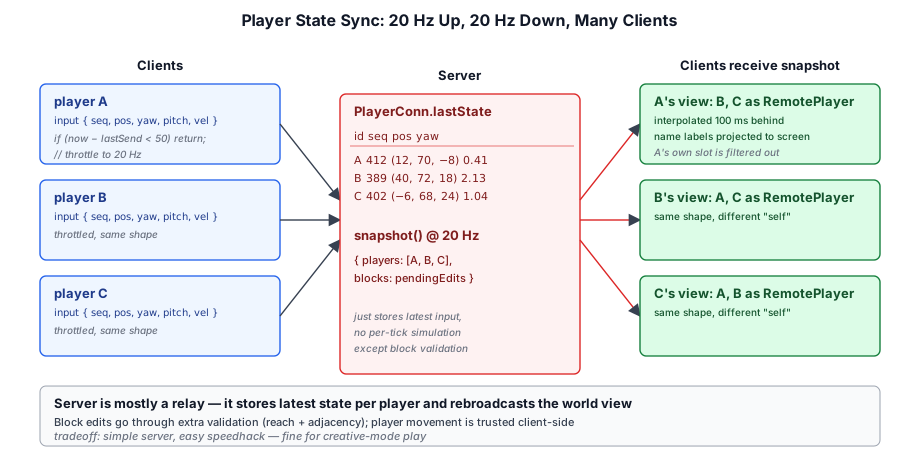
The client sends its player state to the server at a fixed rate (typically 20 Hz):
// ── from crafty/game/network_client.ts ──
class NetworkClient {
  private _lastSend = 0;

  sendInput(): void {
    const now = performance.now();
    if (now - this._lastSend < 50) return;  // 20 Hz
    this._lastSend = now;

    this.send({
      type: 'input',
      seq: this._seq++,
      position: this._player.position.toArray(),
      yaw: this._player.yaw,
      pitch: this._player.pitch,
      velocity: this._player.velocity.toArray(),
    });
  }
}
The server stores the latest state for each player and broadcasts snapshots to all clients:
// ── from server/src/world_room.ts ──
class PlayerConn {
  lastState: {
    seq: number;
    position: [number, number, number];
    yaw: number;
    pitch: number;
    velocity: [number, number, number];
  };

  snapshot() {
    return {
      id: this.id,
      name: this.name,
      ...this.lastState,
    };
  }
}
23.2 Snapshot Interpolation#
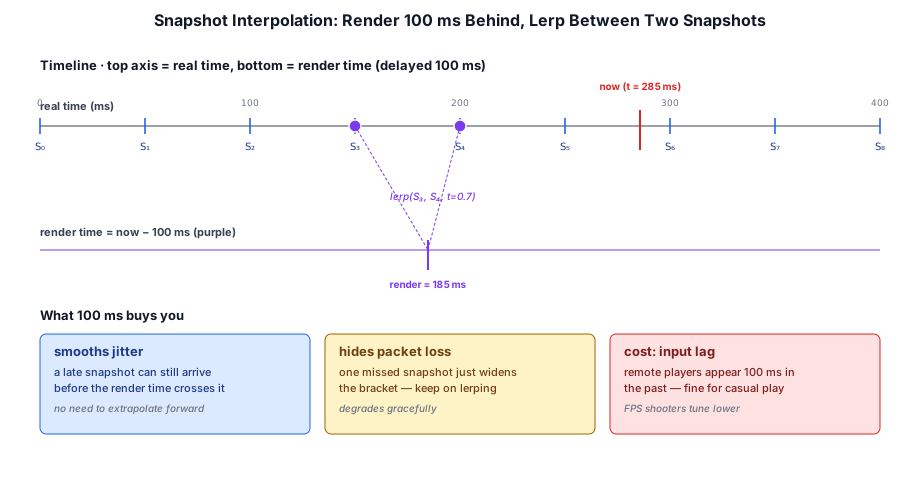
The client receives snapshots at 20 Hz but renders at 60+ Hz. Rather than maintaining a snapshot history with a render-delay cursor, Crafty uses a simpler exponential smoothing toward the latest target model: each incoming snapshot replaces the target transform, and the per-frame update() eases the displayed pose toward it.
// ── from crafty/game/remote_player.ts ──
setTargetTransform(x: number, y: number, z: number, yaw: number, pitch: number): void {
  if (!this._hasTarget) {
    // First update — snap.
    this._curX = x; this._curY = y; this._curZ = z;
    this._curYaw = yaw; this._curPitch = pitch;
  }
  this._tgtX = x; this._tgtY = y; this._tgtZ = z;
  this._tgtYaw = yaw; this._tgtPitch = pitch;
  this._hasTarget = true;
}

update(dt: number): void {
  if (!this._hasTarget) {
    return;
  }
  // Exponential smoothing toward the target. 12/s gives ~80 ms half-life.
  const a = 1 - Math.exp(-12 * dt);
  const dx = this._tgtX - this._curX;
  const dy = this._tgtY - this._curY;
  const dz = this._tgtZ - this._curZ;
  this._curX += dx * a;
  this._curY += dy * a;
  this._curZ += dz * a;
  this._curYaw = _lerpAngle(this._curYaw, this._tgtYaw, a);
  this._curPitch += (this._tgtPitch - this._curPitch) * a;
  // ...
}
The ~80 ms half-life is short enough that the avatar feels responsive, long enough to absorb most of the inter-packet jitter at 20 Hz. The first snapshot snaps (no smoothing) so newly-spawned players don't slide in from the origin.
23.3 Remote Player Rendering#
Remote players are rendered as animated character meshes with name labels. The RemotePlayer component updates its position from the interpolated snapshot:
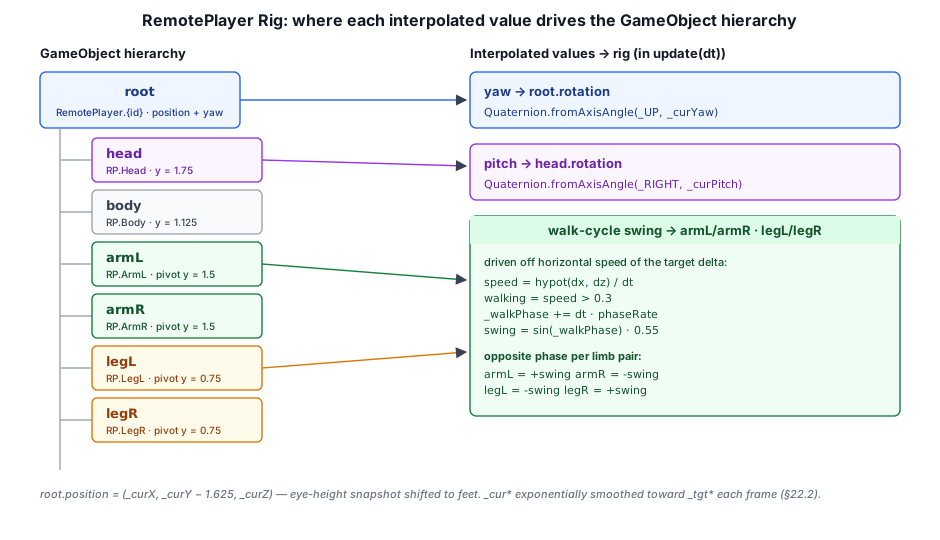
// ── from crafty/game/remote_player.ts ──
export class RemotePlayer {
  readonly playerId: number;
  readonly name: string;
  readonly root: GameObject;          // body / head / armL / armR / legL / legR

  private _curX = 0; private _curY = 0; private _curZ = 0;
  private _curYaw = 0; private _curPitch = 0;
  // ...target transform, walk-cycle phase, etc.

  update(dt: number): void {
    // Exponential smoothing toward _tgt* (see §22.2), then drive the rig:
    this.root.setPosition(this._curX, this._curY - 1.625, this._curZ);
    this.root.setRotation(Quaternion.fromAxisAngle(_UP, this._curYaw));
    this._head.setRotation(Quaternion.fromAxisAngle(_RIGHT, this._curPitch));
    // Procedural walk-cycle limb swing off horizontal speed...
  }
}
23.4 Name Labels#
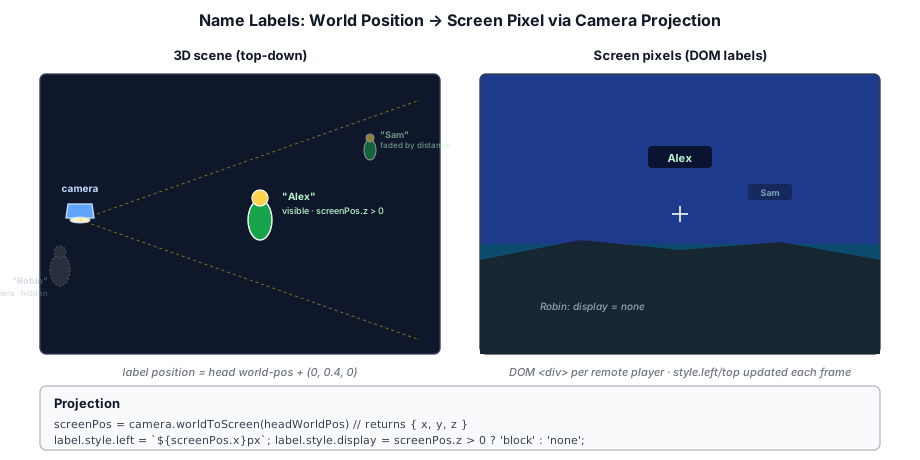
Each remote player has a name label rendered as a DOM element positioned above the player's head. The label position is projected from 3D world space to 2D screen space:
// ── from crafty/game/name_label.ts ──
function updateNameLabel(label: HTMLElement, worldPos: Vec3, camera: Camera,
    canvas: HTMLCanvasElement): void {
  const screenPos = camera.worldToScreen(worldPos);
  label.style.display = screenPos.z > 0 ? 'block' : 'none';
  label.style.left = `${screenPos.x}px`;
  label.style.top = `${screenPos.y}px`;
}
The label fades with distance and is hidden when behind the camera. Player names are sent once in the hello message and stored on the server; the name input is disabled after connecting to prevent confusion.
23.5 Block Edit Replication#
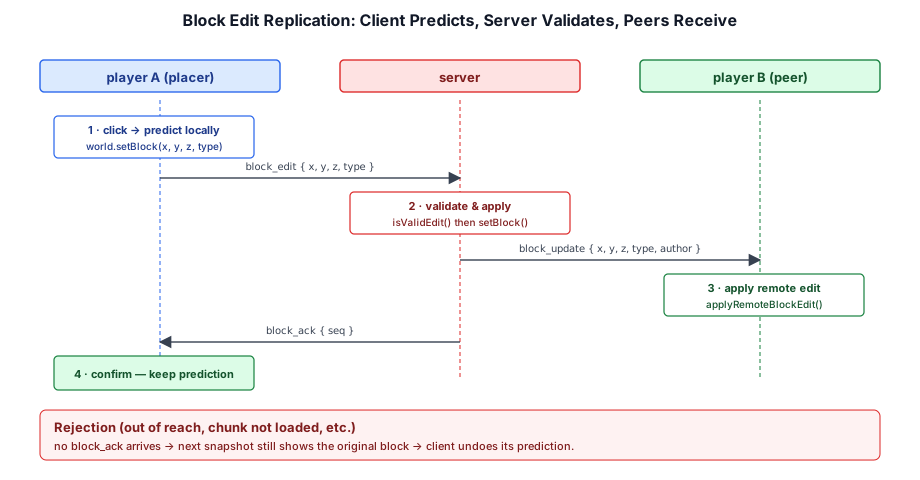
When a player places or breaks a block, the client sends a block_edit message and immediately applies the change locally (client-side prediction). The server validates the edit and broadcasts a block_update to all other clients:
// ── from server/src/world_room.ts ──
client.send({ type: 'block_edit', action: 'break', x, y, z });

// Server receives, validates, broadcasts:
server.onBlockEdit(player, msg) {
  if (isValidEdit(player, msg)) {
    world.setBlock(msg.x, msg.y, msg.z, msg.action === 'break' ? 0 : msg.type);
    room.broadcast({ type: 'block_update', x: msg.x, y: msg.y, z: msg.z,
                     type: msg.action === 'break' ? 0 : msg.type, author: player.id }, player);
    player.send({ type: 'block_ack', seq: msg.seq });  // Confirm to sender
  }
}
23.6 Chat#
Chat is the only non-positional player-to-player channel in Crafty. The shape — single-line input, server-authoritative validation, broadcast to every socket in the room — looks a lot like block edit replication, but the failure modes are different. A bad position update produces a brief visual glitch; a bad chat handler produces a spam vector, an XSS hole, or a stuck input field that blocks input for the rest of the session. The pieces below address each in turn.
23.6.1 Wire shape#
The protocol adds three things on top of the existing two-phase handshake: a length constant, one client-to-server message, and two server-to-client messages. The version bump is what keeps an older client from connecting to a server with the new payloads — the existing version_mismatch path in the crafty module (crafty_module.ts) rejects mismatched clients before they can speak.
// ── from shared/net_protocol.ts ──
export const PROTOCOL_VERSION = 3;
export const MAX_CHAT_LEN = 256;

// C2S
| { t: 'chat'; text: string }

// S2C
| { t: 'chat'; playerId: number; name: string; kind?: 'say' | 'me'; text: string }
| { t: 'chat_system'; text: string }
Two design choices worth calling out. First, the server stamps name from PlayerConn.name rather than trusting whatever the client sends — clients have no way to spoof another player by setting a different name on the wire. Second, kind?: 'say' | 'me' defaults to 'say' and is only set to 'me' when the sender used the /me slash command, so the styling decision lives entirely on the receiver and the protocol carries no formatting strings.
23.6.2 Server pipeline#
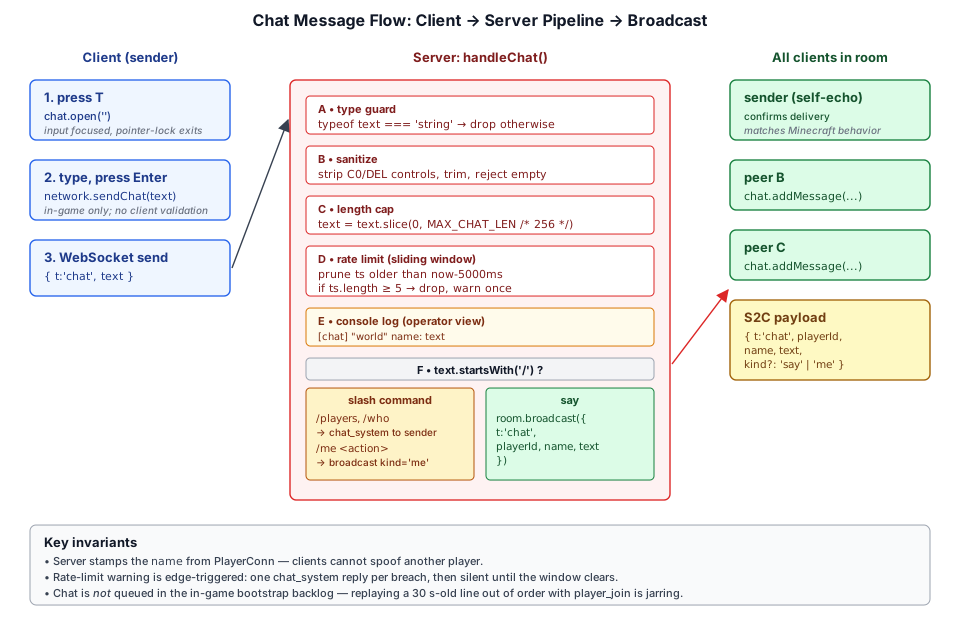
Every incoming chat message walks the same six-step pipeline before it can reach another player. Each step exists because the previous one isn't sufficient on its own — JSON allows control characters, <input maxlength> is a UI hint that a malicious client ignores, and rate limiting cannot be done on the client because the client is the attacker.
// ── from server/src/modules/crafty/crafty_module.ts ──
function sanitizeChat(raw: string): string {
  // eslint-disable-next-line no-control-regex
  return raw.replace(/[\x00-\x1F\x7F]/g, '').trim();
}

function handleChat(room: WorldRoom, player: PlayerConn, rawText: unknown): void {
  if (typeof rawText !== 'string') return;
  let text = sanitizeChat(rawText);
  if (text.length === 0) return;
  if (text.length > MAX_CHAT_LEN) text = text.slice(0, MAX_CHAT_LEN);

  // Sliding-window rate limit: 5 messages per 5 s
  const now = Date.now();
  const ts = player.chatTimestamps;
  while (ts.length > 0 && ts[0] < now - CHAT_RATE_WINDOW_MS) ts.shift();
  if (ts.length >= CHAT_RATE_MAX) {
    if (!player.chatRateLimited) {
      player.chatRateLimited = true;
      room.send(player.sessionId, { t: 'chat_system', text: 'Slow down — chat is rate-limited.' });
    }
    return;
  }
  player.chatRateLimited = false;
  ts.push(now);

  console.log(`[crafty] [chat] "${room.state.name}" ${player.name}: ${text}`);

  if (text.startsWith('/')) {
    handleChatCommand(room, player, text);
    return;
  }
  // Self-echo intentional: sender sees their own message via the round-trip.
  room.broadcast({ t: 'chat', playerId: player.sessionId, name: player.name, text });
}
A few non-obvious details:
- Rate-limit warning is edge-triggered. The first message that overflows the window sends one
chat_systemreply and setsplayer.chatRateLimited = true; subsequent over-limit messages drop silently. The flag clears when a message successfully gets through, so the next breach warns again. Without the flag, a spammer would receive a stream of "slow down" replies — which is itself rate-limit-defeating spam. - Self-echo is on purpose.
broadcastis called with noexceptSessionId, so the sender sees their own message arrive through the same path as everyone else. It confirms delivery, makes the chat log faithful to what other players see, and matches the Minecraft mental model. - The console log is operator UX. A server admin watching
stdoutshould see who said what in which world; the format[chat] "world" name: textis grep-friendly.
Slash commands branch off the same pipeline. They share the rate limit (so /players spam costs the same as message spam) and the same logging, but reply via chat_system to a single recipient instead of broadcasting:
// ── from server/src/modules/crafty/crafty_module.ts ──
function handleChatCommand(room: WorldRoom, player: PlayerConn, text: string): void {
  const sp = text.indexOf(' ');
  const cmd = (sp === -1 ? text : text.slice(0, sp)).toLowerCase();
  const args = sp === -1 ? '' : text.slice(sp + 1).trim();
  switch (cmd) {
    case '/players': case '/who': {
      const names: string[] = [];
      for (const c of room.connections()) names.push(c.name);
      room.send(player.sessionId, { t: 'chat_system', text: `Players (${names.length}): ${names.join(', ')}` });
      return;
    }
    case '/me': {
      if (args.length === 0) {
        room.send(player.sessionId, { t: 'chat_system', text: 'Usage: /me <action>' });
        return;
      }
      room.broadcast({ t: 'chat', playerId: player.sessionId, name: player.name, kind: 'me', text: args });
      return;
    }
    default:
      room.send(player.sessionId, { t: 'chat_system', text: `Unknown command: ${cmd}` });
  }
}
/me is the only command that broadcasts — it rebroadcasts as a regular chat message with kind: 'me', so the receiver-side styling code only needs one path.
23.6.3 Client dispatch — and what we deliberately don't queue#
The client receives chat through the same NetworkClient._dispatch switch as every other in-game message, with one wrinkle: chat is excluded from the _inGameBacklog. That backlog buffers player_join, player_leave, player_transform, and block_edit between welcome and setCallbacks so one-shot state-changing events survive the multi-second GPU/asset bootstrap. Chat does not belong there.
// ── from crafty/game/network_client.ts ──
// While the game is still bootstrapping (welcome received, callbacks not
// yet installed), queue live in-game events so the one-shot ones survive
// until `setCallbacks` replays them. Chat is intentionally NOT buffered —
// replaying a 30s-old chat after bootstrap arrives out of order with the
// `player_join` events that explain who's talking, so it's better to drop.
if (this._bufferingInGame) {
  switch (msg.t) {
    case 'player_join':
    case 'player_leave':
    case 'player_transform':
    case 'block_edit':
      this._inGameBacklog.push(msg);
      return;
  }
}
The thinking: a chat replayed after bootstrap arrives in the wrong temporal context. The receiver sees "alice: hi" referring to someone who hasn't joined yet from their perspective, or worse, sees it interleaved oddly with the joins it does replay. Better to drop it — chat is ephemeral by design (see §22.6.5).
23.6.4 UI: input, log, fade, and key isolation#
![A mock game viewport showing the chat log sitting at the bottom-left above the hotbar with sample messages (a [system] reply, a regular 'say' line in per-player color, a /me emote rendered italic) and the single-line input box just above it; a side legend lists the T/slash/Y/Enter/Esc hotkeys, message-type styling, and constraints (max 256 chars, 5 msgs / 5 s, 8 s fade, ~50-line ring buffer)](../illustrations/23-chat-ui-layout.svg)
The UI lives in crafty/ui/chat.ts and is only constructed when network !== null — local-mode worlds have no chat surface at all. The log is a <div> at the bottom-left of the canvas holding a ring of about 50 messages; opacity fades to 0 over half a second starting 8 s after the most recent line, unless the user has pinned the log with Y. Each player's name is colored by playerId % palette.length so a glance is enough to tell speakers apart. /me messages render italic with * name action. System messages render in muted yellow as [system] text. All user-supplied strings pass through escapeHtml before being inserted as innerHTML — chat is the only place in the game where another player's text reaches the DOM, and any XSS would inherit the full origin.
The input is hidden by default and shows when the user presses T (empty), / (prefilled with a leading slash, so the next keystroke continues the command), or any key that closes another overlay and then opens chat in the same frame. The handler captures keystrokes at the window level so the T keystroke itself doesn't land in the field:
// ── from crafty/ui/chat.ts ──
window.addEventListener('keydown', (e) => {
  if (e.repeat || isOpen()) return;
  if (e.target instanceof HTMLInputElement || e.target instanceof HTMLTextAreaElement) return;
  if (e.code === 'KeyT') { e.preventDefault(); open(''); }
  else if (e.code === 'Slash') { e.preventDefault(); open('/'); }
  else if (e.code === 'KeyY') { e.preventDefault(); /* toggle alwaysShow */ }
}, true);
Two pieces of input plumbing make the field actually usable:
// ── from crafty/ui/chat.ts ──
input.addEventListener('keydown', (e) => {
  e.stopPropagation();  // hide W/A/S/D etc. from controller listeners
  if (e.code === 'Enter') {
    e.preventDefault();
    const text = input.value.trim();
    if (text.length > 0) callbacks.onSend(text);
    close();
  } else if (e.code === 'Escape') {
    e.preventDefault();
    close();
  }
});

// Close chat when the input loses focus (alt-tab out, clicking the canvas
// for pointer lock, clicking another UI element). Without this the input
// stays visible-but-unfocused: typing does nothing, and `isOpen()` returns
// true so the T hotkey can't re-open the field.
input.addEventListener('blur', () => { close(); });
The blur listener fixes an early bug: alt-tabbing out blurred the input but left the chat overlay visible, then alt-tabbing back and clicking the canvas re-acquired pointer lock with the input still on-screen but unfocused — typing did nothing and T couldn't re-open the field because isOpen() still returned true. Closing on blur turns every focus-loss into a clean reset.
stopPropagation() alone is not enough to keep WASD out of the controllers, because the controllers attach their listeners on document and might already have fired by the time the input handler runs in deeper-nested DOM trees. The controllers also gate at the source:
// ── from crafty/game/player_controller.ts (and src/engine/camera_controller.ts) ──
this._onKeyDown = (e: KeyboardEvent) => {
  if (e.target instanceof HTMLInputElement || e.target instanceof HTMLTextAreaElement) {
    return;
  }
  this._keys.add(e.code);
};
The same guard goes on _onKeyUp. This is what keeps the avatar from sliding forward while the player types w mid-sentence, and what keeps the _keys set from accumulating phantom held keys when chat eats the keydown but the keyup arrives after focus has changed.
23.6.5 What chat doesn't do#
The current design is deliberately minimal in three places. Each could be added later if the need is real, but each has a non-trivial cost.
- No persistence. Chat is not saved with the world and not replayed in
welcome. Joining mid-conversation, you see nothing that came before. This avoids growing the save payload, avoids a backscroll the player has no way to scroll through, and avoids decisions about retention. - No DMs, channels, or party scoping. Every message in a world goes to every player in that world. The protocol has room for a
to: numberfield but no behavior depends on one yet. - No anti-spam beyond rate limiting. No word filter, no flood-on-join detection, no per-IP limits. Rate limiting plus the length cap is enough for friendly multiplayer; hostile multiplayer is out of scope for the current server.
23.7 Latency Compensation#
Crafty does not implement server-side rewind (lag compensation) for block interactions. Instead, the client uses a simple interpolation delay that trades a small amount of latency for smoothness:
- Player movement: predicted on the client, reconciled with server snapshots.
- Block editing: client predicts the change immediately; server validates and broadcasts.
- Remote players: interpolated with 100 ms delay to hide packet loss and jitter.
This approach is sufficient for a creative-mode voxel game where precise frame-perfect interaction timing is not critical.
23.8 Summary#
Multiplayer gameplay builds on the network architecture with:
- Input sync: Client sends input at 20 Hz; server stores latest state and broadcasts snapshots
- Snapshot interpolation: 100 ms render delay with lerp between bracketing snapshots for smooth 60+ Hz rendering
- Remote player rendering: Interpolated position, smooth rotation, name labels with distance fade and behind-camera hiding
- Block replication: Client-side prediction with server validation, broadcast, and acknowledgment
- Chat: Server-stamped name, length + rate-limited, slash commands, ephemeral (no save, no welcome replay)
- Latency strategy: Client-predicted movement, server-validated blocks, 100 ms interpolation for remote players
Further reading:
crafty/game/network_client.ts— Client network state managementcrafty/game/remote_player.ts— Remote player renderingcrafty/ui/chat.ts— Chat overlay, fade timer, hotkey handlingserver/src/world_room.ts— Server-side broadcast and per-connection chat stateserver/src/modules/crafty/crafty_module.ts— Chat sanitize/rate-limit pipeline and slash commandsshared/net_protocol.ts—chat/chat_systemwire shapes andMAX_CHAT_LEN