Almost every visible object in Taos Engine is represented by a mesh — a collection of vertices and indices that define its shape. This chapter covers how meshes are defined, uploaded to the GPU, and rendered.
Vertex and Index Buffers#
A mesh in WebGPU lives in two GPU buffers: a vertex buffer holding per-vertex data (positions, normals, UVs, tangents) and an index buffer specifying which vertices form triangles.
Taos Engine's Mesh class (src/assets/mesh.ts) owns these buffers:
export class Mesh {
  readonly vertexBuffer: GPUBuffer;
  readonly indexBuffer: GPUBuffer;
  readonly indexCount: number;
}
Vertex Layout#
Each vertex is 48 bytes — 12 consecutive 32-bit floats. The four attributes are packed back-to-back, with their byte offsets matching the @location(N) slots that the WGSL vertex shader reads:
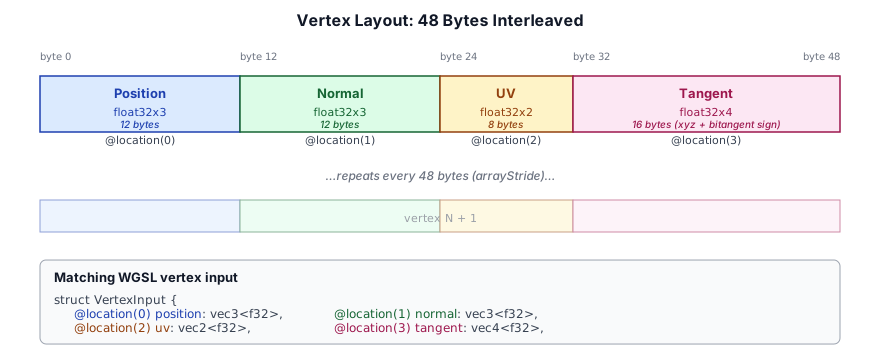
| Offset | Size | Attribute | Location |
|---|---|---|---|
| 0 | 12 bytes (float32x3) | Position | 0 |
| 12 | 12 bytes (float32x3) | Normal | 1 |
| 24 | 8 bytes (float32x2) | UV | 2 |
| 32 | 16 bytes (float32x4) | Tangent (xyz + bitangent sign) | 3 |
This is defined by the exported constants:
export const VERTEX_STRIDE = 48;

export const VERTEX_ATTRIBUTES: GPUVertexAttribute[] = [
  { shaderLocation: 0, offset:  0, format: 'float32x3' }, // position
  { shaderLocation: 1, offset: 12, format: 'float32x3' }, // normal
  { shaderLocation: 2, offset: 24, format: 'float32x2' }, // uv
  { shaderLocation: 3, offset: 32, format: 'float32x4' }, // tangent
];
The shaderLocation values correspond to @location(N) in the WGSL vertex shader input:
struct VertexInput {
  @location(0) position: vec3<f32>,
  @location(1) normal  : vec3<f32>,
  @location(2) uv      : vec2<f32>,
  @location(3) tangent : vec4<f32>,
}
Buffer Creation#
Meshes are created via Mesh.fromData(), which uploads CPU-side arrays to the GPU:
static fromData(device: GPUDevice, vertices: Float32Array, indices: Uint32Array): Mesh {
  const vb = device.createBuffer({
    label: 'Mesh VertexBuffer',
    size: vertices.byteLength,
    usage: GPUBufferUsage.VERTEX | GPUBufferUsage.COPY_DST,
  });
  device.queue.writeBuffer(vb, 0, vertices.buffer as ArrayBuffer,
    vertices.byteOffset, vertices.byteLength);

  const ib = device.createBuffer({
    label: 'Mesh IndexBuffer',
    size: indices.byteLength,
    usage: GPUBufferUsage.INDEX | GPUBufferUsage.COPY_DST,
  });
  device.queue.writeBuffer(ib, 0, indices.buffer as ArrayBuffer,
    indices.byteOffset, indices.byteLength);

  return new Mesh(vb, ib, indices.length);
}
Both buffers use COPY_DST so they can be populated with queue.writeBuffer(). This is a one-time upload — once populated, the vertex and index data lives entirely on the GPU.
Vertex Attributes and Layouts#
The vertex buffer layout is specified when creating a render pipeline:
vertex: {
  module: shaderModule,
  entryPoint: 'vs_main',
  buffers: [
    {
      arrayStride: VERTEX_STRIDE,     // 48 bytes between vertices
      attributes: VERTEX_ATTRIBUTES,  // position, normal, uv, tangent
    },
  ],
},
WebGPU supports multiple vertex buffers (for separate position/normal/UV streams), but Taos Engine uses interleaved vertices — all attributes for a single vertex are packed into one buffer entry. This is simpler and more cache-efficient for the typical rendering pattern of iterating vertices sequentially.
The Mesh Asset Type#
Taos Engine's Mesh class is the sole mesh representation. There is no higher-level "model" class — a model is simply a collection of Mesh + Material pairs enumerated during rendering.
Procedural Geometry#
Plane#
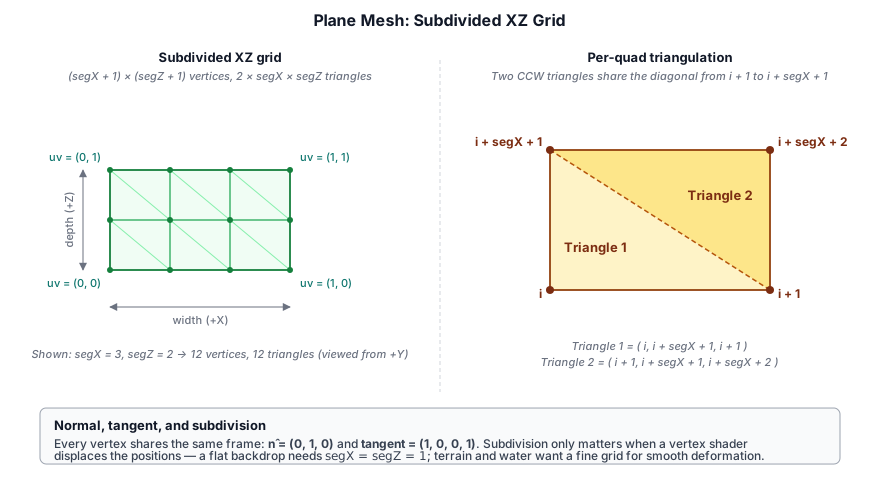
The plane is a flat, axis-aligned grid lying on the XZ plane centered at the origin. It is parameterized by overall width and depth plus a subdivision count segX × segZ, so the same generator produces both a single-quad billboard backdrop and a finely tessellated ground patch for vertex displacement:
static createPlane(device: GPUDevice, width = 10, depth = 10,
                   segX = 1, segZ = 1): Mesh {
  const vertData: number[] = [];
  const idxData: number[] = [];

  for (let z = 0; z <= segZ; z++) {
    for (let x = 0; x <= segX; x++) {
      const px = (x / segX - 0.5) * width;
      const pz = (z / segZ - 0.5) * depth;
      const u = x / segX;
      const v = z / segZ;
      // position, normal (up), uv, tangent (+X)
      vertData.push(px, 0, pz,  0, 1, 0,  u, v,  1, 0, 0, 1);
    }
  }

  for (let z = 0; z < segZ; z++) {
    for (let x = 0; x < segX; x++) {
      const i = z * (segX + 1) + x;
      // CCW winding when viewed from above (+Y)
      idxData.push(i, i+segX+1, i+1,  i+1, i+segX+1, i+segX+2);
    }
  }

  return Mesh.fromData(device, new Float32Array(vertData),
                       new Uint32Array(idxData));
}
Vertex grid. The outer loop walks a (segX + 1) × (segZ + 1) grid of vertices — one extra row and column beyond the segment count, because N quads along an axis need N+1 vertices to bound them. Positions are centered by subtracting 0.5 from the normalized coordinate before scaling by width / depth, so the plane spans [-width/2, +width/2] along X and [-depth/2, +depth/2] along Z.
Normals and tangents are constant across the entire surface — (0, 1, 0) for the upward normal and (1, 0, 0, 1) for the tangent pointing along +X. Because every vertex shares the same frame, lighting on an unmodified plane is perfectly flat; subdivision only matters when a vertex shader displaces the positions (terrain, water).
UVs map linearly from (0, 0) at the −X/−Z corner to (1, 1) at the +X/+Z corner, regardless of segment count or aspect ratio. Textures with non-square dimensions can be matched by scaling the UVs in the fragment shader, or by passing a non-square width/depth and letting the texture stretch with the mesh.
Indexing emits two triangles per quad with counter-clockwise winding when viewed from +Y (the side the normal faces). For the quad with lower-left vertex i:
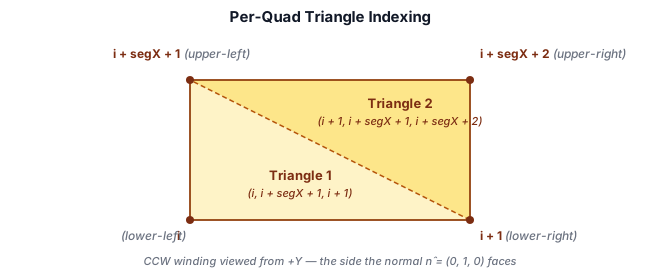
Only the top face is generated — the underside has no geometry. Anything that needs a double-sided plane either disables back-face culling on the pipeline or draws the plane twice with opposite winding.
The plane is used for ground patches, water surfaces, shadow receivers in samples, and as the input mesh for terrain displacement and tessellation experiments.
Cube#
static createCube(device: GPUDevice, size = 1): Mesh {
  const h = size / 2;
  // Six faces, each with 4 vertices
  // Each vertex: position(3) + normal(3) + uv(2) + tangent(4) = 12 floats
  const faces = [
    { normal:[0,0,1],  tangent:[1,0,0,1],
      verts: [[-h,-h,h],[h,-h,h],[h,h,h],[-h,h,h]] },    // front
    { normal:[0,0,-1], tangent:[-1,0,0,1],
      verts: [[h,-h,-h],[-h,-h,-h],[-h,h,-h],[h,h,-h]] },// back
    // ... four more faces ...
  ];
  // Builds vertex array and index array, calls fromData()
}
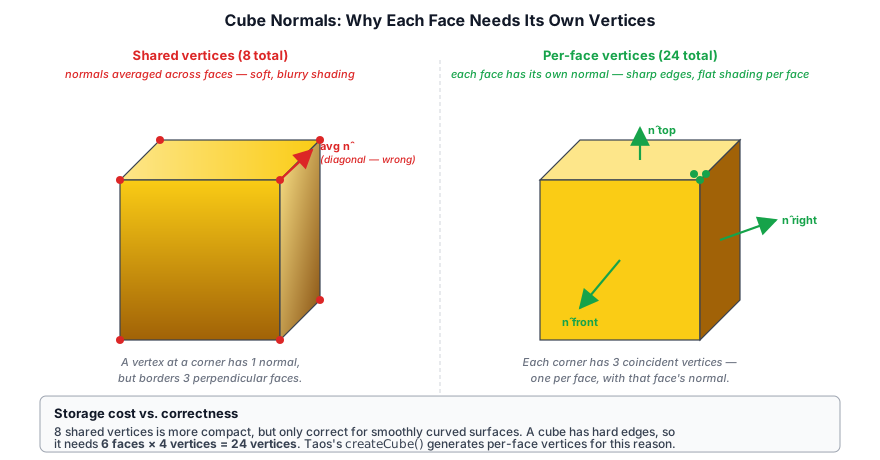
Each face has its own normal and tangent, enabling correct per-face lighting. The winding order is counter-clockwise (standard for WebGPU).
A common mistake with cube meshes is sharing vertices across faces (so a vertex has a single normal that is an average of the adjacent face normals). Taos Engine's cube creates unique vertices per face, so each face has its own explicit normal:
Face   Normal   Tangent        Vertices
─────  ───────  ────────────   ──────────────────────
front  (0,0,1)  (1,0,0,1)     (-h,-h,h)-(h,-h,h)-(h,h,h)-(-h,h,h)
back   (0,0,-1) (-1,0,0,1)    (h,-h,-h)-(-h,-h,-h)-(-h,h,-h)-(h,h,-h)
right  (1,0,0)  (0,0,-1,1)    (h,-h,h)-(h,-h,-h)-(h,h,-h)-(h,h,h)
left   (-1,0,0) (0,0,1,1)     (-h,-h,-h)-(-h,-h,h)-(-h,h,h)-(-h,h,-h)
top    (0,1,0)  (1,0,0,1)     (-h,h,h)-(h,h,h)-(h,h,-h)-(-h,h,-h)
bottom (0,-1,0) (1,0,0,-1)    (-h,-h,-h)-(h,-h,-h)-(h,-h,h)-(-h,-h,h)
This is important for correct lighting — without explicit per-face normals, a cube with hard edges would appear softly shaded at the corners:
UV Sphere#
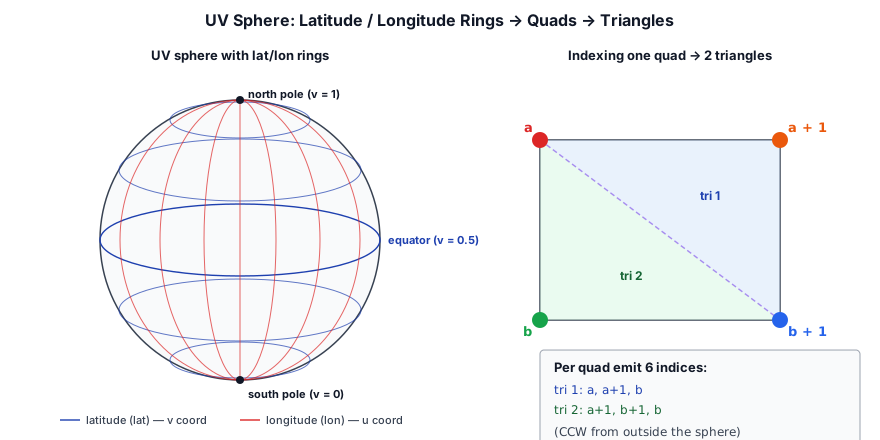
Mesh.createSphere(device, radius, latSegments, lonSegments) generates a UV sphere — a sphere built from latitude and longitude rings. Each pair of adjacent rings forms a band of quads, and each quad is split into two triangles:
static createSphere(device: GPUDevice, radius = 0.5,
                    latSegments = 32, lonSegments = 32): Mesh {
  const vertData: number[] = [];
  const idxData: number[] = [];

  for (let lat = 0; lat <= latSegments; lat++) {
    const theta    = (lat / latSegments) * Math.PI;
    const sinTheta = Math.sin(theta);
    const cosTheta = Math.cos(theta);

    for (let lon = 0; lon <= lonSegments; lon++) {
      const phi    = (lon / lonSegments) * Math.PI * 2;
      const sinPhi = Math.sin(phi);
      const cosPhi = Math.cos(phi);

      const nx = sinTheta * cosPhi;
      const ny = cosTheta;
      const nz = sinTheta * sinPhi;

      vertData.push(
        nx * radius, ny * radius, nz * radius,  // position
        nx, ny, nz,                              // normal
        lon / lonSegments, lat / latSegments,    // uv
        -sinPhi, 0, cosPhi, 1,                    // tangent
      );
    }
  }

  for (let lat = 0; lat < latSegments; lat++) {
    for (let lon = 0; lon < lonSegments; lon++) {
      const a = lat * (lonSegments + 1) + lon;
      const b = a + lonSegments + 1;
      idxData.push(a, a + 1, b);
      idxData.push(a + 1, b + 1, b);
    }
  }

  return Mesh.fromData(device, new Float32Array(vertData),
                       new Uint32Array(idxData));
}
Because the sphere is centered at the origin, the normal at each vertex equals the normalized vertex position — the unit vector (nx, ny, nz). The vertex position is simply that normal scaled by radius. This gives smooth, continuous normals across the entire surface, producing correct Lambertian and specular lighting.
The tangent is the derivative of the surface position with respect to longitude — (-sinPhi, 0, cosPhi) — which points eastward along the latitude ring. This gives the normal map a consistent local reference frame.
UV coordinates wrap u around the longitude (0 at the prime meridian, 1 at the same seam) and v across the latitude (0 at the south pole, 1 at the north pole). The seam at lon = lonSegments overlaps with lon = 0 — two distinct vertices share the same spatial position but have different UVs, creating a single sharp seam where the texture wraps.
Indexing produces two triangles per quad:
a ─── a+1         a = lat * (lonSegments + 1) + lon
│ \     │         b = a + lonSegments + 1
│   \   │
b ─── b+1
The winding is counter-clockwise when viewed from outside the sphere, which matches WebGPU's default front face.
Segment count trades quality for performance:
- 16×16 — 1,058 vertices, used for distant or small objects.
- 32×32 — 4,194 vertices, the default — smooth enough for most uses.
- 64×64 — 16,514 vertices, used when the sphere fills a large portion of the screen.
The sphere is used for debug light markers (showing point/spot light positions and colors) and for any procedural object requiring a round shape.
Cone#
Mesh.createCone(device, radius, height, segments) generates a cone with its apex at (0, height, 0) and its base centered at the origin on the XZ plane:
static createCone(device: GPUDevice, radius = 0.5,
                  height = 1.0, segments = 16): Mesh {
  const vertData: number[] = [];
  const idxData: number[] = [];

  const slope = Math.sqrt(height * height + radius * radius);
  const sn = height / slope;   // outward normal x/z scale
  const cn = radius / slope;   // outward normal y component

  // Apex
  vertData.push(0, height, 0,  0, 1, 0,  0.5, 0,  1, 0, 0, 1);

  // Side ring — segments+1 to close the seam
  const sideRingStart = 1;
  for (let i = 0; i <= segments; i++) {
    const t = (i / segments) * Math.PI * 2;
    const c = Math.cos(t), s = Math.sin(t);
    vertData.push(
      c * radius, 0, s * radius,
      c * sn, cn, s * sn,
      i / segments, 1,
      c, 0, s, 1,
    );
  }

  // Side triangles — apex, ring[i+1], ring[i]
  for (let i = 0; i < segments; i++) {
    idxData.push(0, sideRingStart + i + 1, sideRingStart + i);
  }

  // Base cap center
  const capCenter = sideRingStart + segments + 1;
  vertData.push(0, 0, 0,  0, -1, 0,  0.5, 0.5,  1, 0, 0, 1);

  // Base cap ring
  const capRingStart = capCenter + 1;
  for (let i = 0; i <= segments; i++) {
    const t = (i / segments) * Math.PI * 2;
    const c = Math.cos(t), s = Math.sin(t);
    vertData.push(
      c * radius, 0, s * radius,
      0, -1, 0,
      0.5 + c * 0.5, 0.5 + s * 0.5,
      1, 0, 0, 1,
    );
  }

  // Base triangles — center, ring[i], ring[i+1]
  for (let i = 0; i < segments; i++) {
    idxData.push(capCenter, capRingStart + i, capRingStart + i + 1);
  }

  return Mesh.fromData(device, new Float32Array(vertData),
                       new Uint32Array(idxData));
}
The cone is built from three parts: the apex (a single vertex at the tip), the side (a triangle fan from the apex to the base ring), and the base cap (a triangle fan from the center of the base to the ring). Side normals come from the cone's slope — perpendicular to the slanted surface in cross-section:
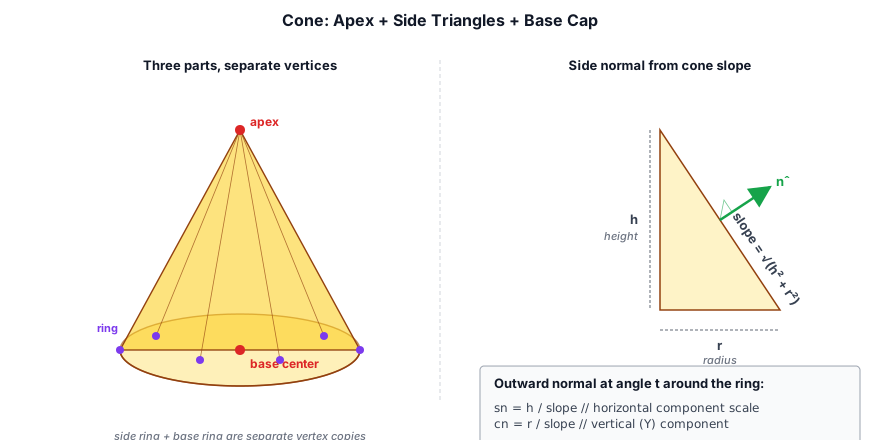
Side normals are computed from the slope of the cone. For a cone with radius r and height h, the outward normal on the side has a horizontal component proportional to h / sqrt(h² + r²) and a vertical component proportional to r / sqrt(h² + r²):
const slope = Math.sqrt(height * height + radius * radius);
const sn = height / slope;   // horizontal scale factor
const cn = radius / slope;   // vertical (Y) component
This produces normals that are perpendicular to the cone's slanted surface, giving correct Lambertian lighting across the sides.
Base cap normals are (0, -1, 0) — straight down — shared by both the center vertex and the ring vertices. The base and side use separate vertices at the same ring positions (the sideRingStart and capRingStart loops each generate their own copy of the ring), so the side and base can have different normals at the same spatial location.
UVs for the side map u around the circumference and v to the vertical position (0 at the apex, 1 at the base). The base cap uses a radial projection: (0.5 + cos(t) * 0.5, 0.5 + sin(t) * 0.5), creating a circular UV layout centered on the base.
Tangents for the side are (cos(t), 0, sin(t)) — the derivative of the vertex position around the ring. The apex and base center use a fixed (1, 0, 0, 1) tangent since they are singular points connected to all segments.
The cone is useful for rendering volumetric light cones (spot lights), particle emission cones, and any conical procedural shape.
Mesh.create* factory and is drawn straight from its vertex and index buffers through the 48-byte layout of §4.1; the readout shows the counts and buffer sizes. Raise Segments to watch the vertex count grow, shade by UVs to find the sphere's seam, and turn on Normals + tangents to see each vertex's frame (blue normal, red tangent). Orbit under the plane: it has no underside. Cube (welded) shares eight corners and averages their normals, and the smeared shading is exactly the mistake the per-face cube avoids.Skinned Meshes and Skeletons#
Skinned meshes extend the basic mesh with joint influences — each vertex is bound to up to four bones with corresponding weights. The actual deformation happens entirely on the GPU: every vertex carries 4 joint indices and 4 weights, and the vertex shader looks up the matching joint matrices in a storage buffer to produce the final position:
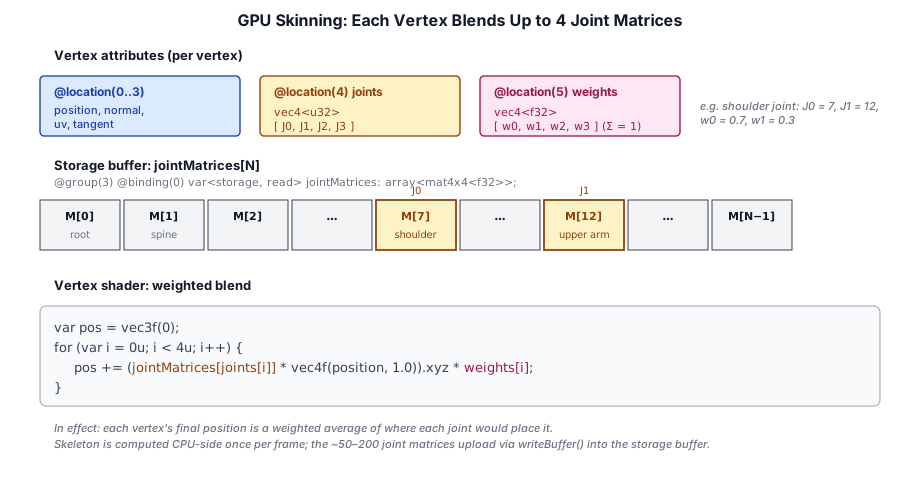
// Additional vertex attributes for skinned geometry
// location 4: joint indices (uint32x4 packed)
// location 5: joint weights (float32x4)
The skinning is computed on the GPU in the vertex shader, using a storage buffer of joint matrices:
@group(3) @binding(0) var<storage, read> jointMatrices: array<mat4x4<f32>>;

fn skin_position(position: vec3f, joints: vec4u, weights: vec4f) -> vec3f {
  var pos = vec3f(0);
  for (var i = 0u; i < 4u; i++) {
    pos += (jointMatrices[joints[i]] * vec4f(position, 1.0)).xyz * weights[i];
  }
  return pos;
}
The SkinnedGeometryPass renders these meshes into the G-Buffer, applying the joint transform before the standard vertex transform chain.
skin_position does: pos = w₀·(M₀·p) + w₁·(M₁·p). With Show per-joint positions on, each blended vertex shows where joint 0 alone and joint 1 alone would put it, and the skinned vertex lies on the straight line between the two. That straight-line blend is why the inside of a sharp bend collapses and the limb thins at the joint. A falloff of zero is rigid binding: no blending, just a hard crease.Animation#
Animation in Taos Engine is stored as clips — sequences of joint transforms sampled at a fixed rate. Animation playback interpolates between keyframes:
// Animation clip playback
class AnimationClip {
  // Samples per joint: translation, rotation (quaternion), scale
  sample(time: number, jointIndex: number):
    {translation: Vec3; rotation: Quaternion; scale: Vec3};
}
Joint transforms are computed on the CPU each frame and uploaded to a GPU storage buffer:
// Per frame: compute joint matrices, upload to GPU
const jointCount = skeleton.jointCount;
const jointBuffer = device.createBuffer({
  size: jointCount * 64,  // mat4x4 = 64 bytes per joint
  usage: GPUBufferUsage.STORAGE | GPUBufferUsage.COPY_DST,
});
queue.writeBuffer(jointBuffer, 0, jointMatrices.buffer);
The storage buffer is bound at group 3 of the skinned geometry pipeline, separate from the group-2 material bindings, so the same material system works for both static and skinned meshes.
GLTF 2.0 Binary Loader#
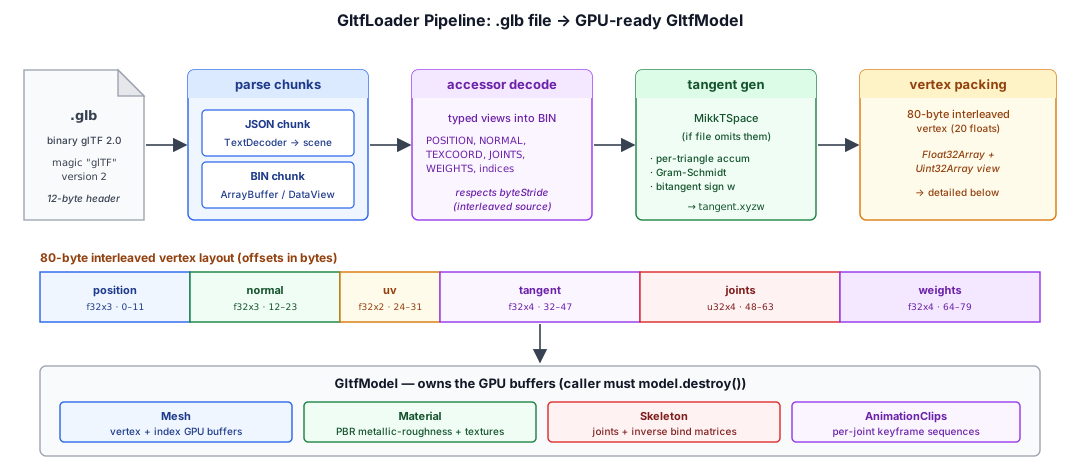
Taos Engine's GltfLoader (src/assets/gltf_loader.ts) loads animated, skinned models from binary glTF 2.0 (.glb) files. It parses the GLB container, decodes accessors, generates tangents, and produces GPU-ready meshes, materials, skeletons, and animation clips.
GLB Container Format#
A .glb file is a little-endian binary container with a 12-byte header followed by chunks:
┌────────────────────────────────────────────┐
│ Magic  (0x46546C67 = "glTF") | Version (2) │  12 bytes
│ File length                                 │
├────────────────────────────────────────────┤
│ Chunk length (JSON)   | Type (0x4E4F534A)  │  8 bytes + chunk data
│ Chunk: UTF-8 JSON describing the scene     │
├────────────────────────────────────────────┤
│ Chunk length (BIN)    | Type (0x004E4942)  │  8 bytes + chunk data
│ Chunk: binary buffer for accessors/images │
└────────────────────────────────────────────┘
The parser reads these chunks in sequence — the JSON chunk is decoded with TextDecoder and parsed, the BIN chunk is kept as an ArrayBuffer for direct DataView access:
const magic   = view.getUint32(0, true);
const version = view.getUint32(4, true);
if (magic !== 0x46546C67 || version !== 2) throw Error('Not a valid GLB 2.0');

while (offset < arrayBuf.byteLength) {
  const chunkLength = view.getUint32(offset, true);
  const chunkType   = view.getUint32(offset + 4, true);
  offset += 8;
  if (chunkType === 0x4E4F534A) { /* JSON chunk */ }
  else if (chunkType === 0x004E4942) { /* BIN chunk */ }
  offset += chunkLength;
}
Accessor Decoding#
glTF accessors describe typed views into the binary buffer. The loader handles all common formats:
componentType | C type | Method |
|---|---|---|
| 5126 | float32 | DataView.getFloat32 |
| 5125 | uint32 | DataView.getUint32 |
| 5123 | uint16 | DataView.getUint16 |
| 5121 | uint8 | DataView.getUint8 |
Accessors respect the buffer view's byteStride, allowing interleaved vertex data in the source file:
const n      = TYPE_COUNT[acc.type] ?? 1;
const bv     = bufferViews[acc.bufferView!];
const stride = bv.byteStride ?? (n * 4);

for (let i = 0; i < count; i++) {
  for (let c = 0; c < n; c++) {
    out[i * n + c] = src.getFloat32(i * stride + c * 4, true);
  }
}
MikkTSpace Tangent Generation#
Many glTF files omit tangents, relying on the engine to generate them. Taos Engine's computeTangents implements the MikkTSpace algorithm — it accumulates per-triangle tangent/bitangent contributions into vertex arrays, then applies Gram-Schmidt orthonormalization and calculates the bitangent sign (w):
for each triangle (i0, i1, i2):
  const e1 = p1 - p0, e2 = p2 - p0;
  const duv1 = uv1 - uv0, duv2 = uv2 - uv0;
  const r = 1 / (du1*dv2 - du2*dv1);
  const t = (dv2*e1 - dv1*e2) * r;
  const b = (du1*e2 - du2*e1) * r;
  accumulate t into tan1[i0,i1,i2], b into tan2[i0,i1,i2]

for each vertex i:
  Gram-Schmidt: t' = normalize(t - n * dot(n, t))
  w = sign(dot(cross(n, t'), tan2[i]))
  store t'.xyz and w as the 4-component tangent
Vertex Packing#
The loader packs parsed attributes into an 80-byte interleaved vertex (20 floats):
| Offset | Size | Attribute |
|---|---|---|
| 0 | 12 bytes | position (float32x3) |
| 12 | 12 bytes | normal (float32x3) |
| 24 | 8 bytes | uv (float32x2) |
| 32 | 16 bytes | tangent (float32x4) |
| 48 | 16 bytes | joints (uint32x4, written via Uint32Array view) |
| 64 | 16 bytes | weights (float32x4) |
Joints and weights are packed at fixed offsets using a Uint32Array view over the same Float32Array buffer — a common pattern for writing uint data into an f32 array without allocation:
const vertBuf = new Float32Array(vertCount * 20);
const vertU32 = new Uint32Array(vertBuf.buffer);

vertU32[f+12] = jointsRaw[i*4];   // joint 0-3 as uint32
vertBuf[f+16] = weights[i*4];     // weight 0-3 as float32
If the mesh has no joints or weights, a default weight of 1.0 is assigned to make it compatible with the skinned pipeline.
Material and Texture Resolution#
PBR materials are constructed from the glTF metallic-roughness model, but GltfLoader resolves a great deal more than base color and metallic-roughness. _loadPrimitiveMaterial produces a single PbrMaterial (Chapter 6) per primitive, mapping the glTF material — and its dozen-odd KHR_materials_* extensions — onto the engine's material parameters and packed texture channels.
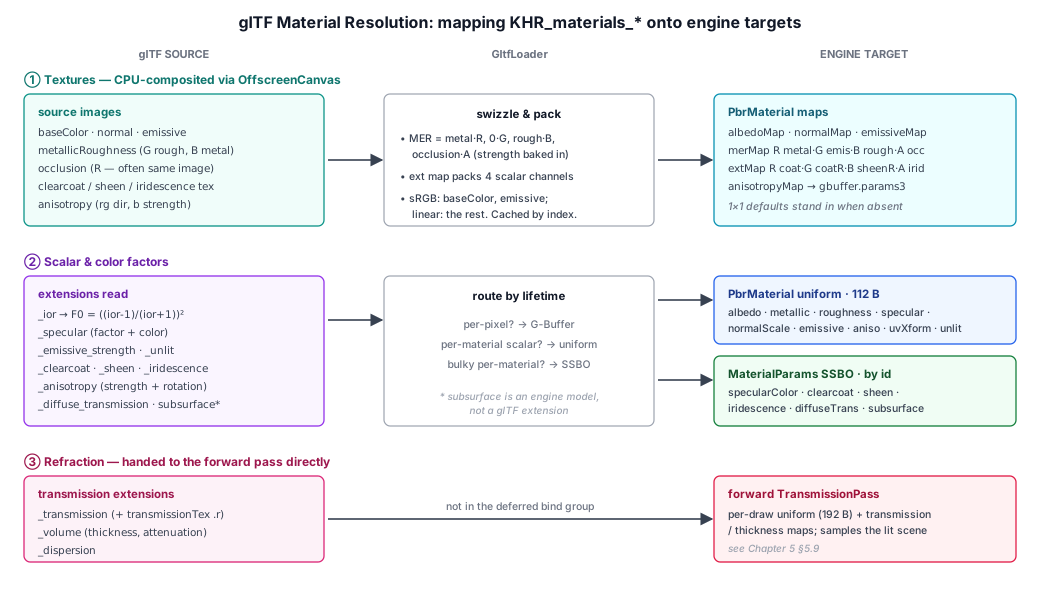
Image extraction#
Textures embedded in the BIN chunk are extracted as Blobs, decoded via createImageBitmap, and uploaded to the GPU as Texture objects. URI-based images are fetched as a fallback:
if (img.bufferView != null) {
  const bv     = gltf.bufferViews![img.bufferView];
  const bytes  = new Uint8Array(bin, bv.byteOffset ?? 0, bv.byteLength);
  const blob   = new Blob([bytes], { type: img.mimeType ?? 'image/png' });
  return createImageBitmap(blob, { colorSpaceConversion: 'none' });
}
if (img.uri) {
  const blob = await (await fetch(img.uri)).blob();
  return createImageBitmap(blob, { colorSpaceConversion: 'none' });
}
Decoded textures are cached by glTF texture index in a per-load textures[] array so an image referenced by several materials is uploaded once. Base color and emissive maps are uploaded srgb: true; normal, metallic-roughness, occlusion, and all the extension maps are linear.
glTF defaults are not engine defaults#
A subtle but critical point: metallicFactor and roughnessFactor both default to 1 in glTF (meaning "use whatever the metallic-roughness texture says"), not to the engine's PbrMaterial defaults (metallic 0, roughness 0.5). The loader passes the glTF defaults through verbatim:
roughness : pbr?.roughnessFactor ?? 1,
metallic  : pbr?.metallicFactor  ?? 1,
Substituting the engine defaults here silently mutes every glTF material's metallic channel — the kind of bug that makes a chrome visor render as flat plastic.
Channel packing: the MER texture#
The engine reads metallic, emissive, and roughness from a single packed MER texture (R=metallic, G=emissive scalar, B=roughness), but glTF splits these across two images with a different layout (G=roughness, B=metallic in the metallic-roughness texture; occlusion in a separate — or the same — image). loadGltfMerTexture swizzles the glTF layout into engine-MER on the CPU via OffscreenCanvas, and folds the occlusion map into the alpha channel:
glTF MR:   R unused, G=roughness, B=metallic          (linear)
glTF occ:  R=occlusion (often the SAME image — "ORM")  (linear)
engine:    R=metallic, G=0, B=roughness, A=occlusion
The occlusion strength (occlusionTexture.strength, default 1) is baked in as ao' = 1 + strength·(ao − 1). The resulting texture is cached by an (mr, occ, strength) key so a metallic-roughness image shared by several primitives is rebuilt only when its occlusion pairing differs. The geometry pass reads mer.a into the G-Buffer occlusion slot (Chapter 6).
Material extensions#
Most of _loadPrimitiveMaterial is dedicated to the KHR_materials_* extension set. These split into three handling strategies:
Scalar/color factors are read straight into PbrMaterial fields:
| Extension | Reads | Maps to |
|---|---|---|
KHR_materials_ior | ior (default 1.5) | dielectric F0 = ((ior−1)/(ior+1))² |
KHR_materials_specular | specularFactor, specularColorFactor | scales/tints dielectric F0 |
KHR_materials_emissive_strength | emissiveStrength | multiplies emissiveFactor (enables HDR emission > 1) |
KHR_materials_unlit | presence | flags an unlit material (base color, no lighting) |
KHR_materials_clearcoat | clearcoatFactor, clearcoatRoughnessFactor | clear-coat lobe |
KHR_materials_sheen | sheenColorFactor, sheenRoughnessFactor | fabric sheen lobe |
KHR_materials_iridescence | iridescenceFactor, iridescenceIor, iridescenceThicknessMaximum | thin-film interference |
KHR_materials_diffuse_transmission | diffuseTransmissionFactor, …ColorFactor | thin-surface translucency |
KHR_materials_anisotropy | anisotropyStrength, anisotropyRotation | tangent-aligned specular stretch |
KHR_materials_transmission | transmissionFactor | refractive (see-through) glass |
KHR_materials_volume | thicknessFactor, attenuationColor, attenuationDistance | Beer-Lambert absorption |
KHR_materials_dispersion | dispersion | prismatic per-channel IOR spread |
Per-pixel extension scalar maps (clearcoat intensity/roughness, sheen roughness, iridescence intensity) are too rare to deserve their own bindings, so loadGltfExtTexture packs their four source channels into one RGBA "ext map" the geometry pass samples through a single binding:
R ← clearcoatTexture.r           G ← clearcoatRoughnessTexture.g
B ← sheenRoughnessTexture.a      A ← iridescenceTexture.r
Each channel multiplies the matching constant factor in the shader, so a missing source defaults to 1.0 (255) and the factor passes through unchanged. The anisotropy direction/strength texture (anisotropyTexture, .rg direction × 2 − 1, .b strength) is uploaded directly and sampled into the G-Buffer's anisotropy-tangent attachment.
Refraction maps (transmissionTexture.r, thicknessTexture.g) are not part of the deferred material bind group at all — they're handed to the PbrMaterial for the forward TransmissionPass to sample per-draw (Chapter 6).
UV transform#
A single KHR_texture_transform (read from the base-color texture's textureInfo) is applied to all of the material's textures via the engine's uvOffset / uvScale / uvRotation. Per-texture transforms and a second UV set (TEXCOORD_1) are not supported — the engine has one UV stream and one material UV transform — so a material that requests texCoord 1 logs a warning and falls back to TEXCOORD_0.
The alphaMode maps to engine behavior: MASK becomes an alpha-test cutoff (default 0.5) the geometry shader discards against; BLEND sets transparent (routing through the forward path); OPAQUE does neither.
Skeleton and Animation Import#
Skinning data is reconstructed from glTF's node hierarchy. The loader builds a Skeleton by mapping joint nodes, computing parent indices, and reading inverse bind matrices. A root transform accumulates ancestor nodes above the skeleton root that contribute to the model-space transform:
let rootTransform = identity();
let anc = nodeParent[jointNodes[0]];
while (anc >= 0) {
  rootTransform = mat4Mul(nodeLocalMatrix(nodes[anc]), rootTransform);
  anc = nodeParent[anc];
}
skeleton = new Skeleton(parentIndices, invBindMats, restT, restR, restS, rootTransform);
Animation channels are grouped into AnimationClip objects, each containing per-joint keyframe sequences with configurable interpolation (LINEAR, STEP, CUBICSPLINE). The loader returns all parsed resources in a GltfModel object that owns the GPU buffers — the caller must call model.destroy() to release them. Alongside the meshes, skeleton, and clips, GltfModel carries a bounds field — an object-space bounding sphere accumulated over every primitive's positions (bind pose) for cheap CPU ray-picking and framing.
Load Variants#
GltfLoader exposes four entry points over the same parser:
| Method | Output | Skin/anim | Use |
|---|---|---|---|
load(device, url) | GltfModel (skinned meshes) | yes | animated characters |
loadFromArrayBuffer(device, buf) | GltfModel | yes | bytes already in hand (IPC, CSP-restricted) |
loadStatic(device, url, {keepData}) | GltfStaticModel (plain Mesh) | ignored | static props, MeshRenderer, SDF baking |
loadStaticFromArrayBuffer(...) | GltfStaticModel | ignored | static, bytes in hand |
The load* paths build 80-byte skinned vertices and a Skeleton; the loadStatic* paths skip skin/animation parsing entirely and pack plain 48-byte Mesh vertices in the authored bind-pose frame. Passing keepData: true retains the CPU vertex/index arrays so a returned Mesh can feed SdfVolume.fromMesh (§4.8).
Mesh Signed Distance Fields#
A signed distance field (SDF) is a 3D texture where each texel stores the shortest distance from that point in space to the surface of a mesh. The value's sign records which side of the surface the point is on: negative inside, positive outside, zero on the surface. The gradient of the field points away from the surface, so a single texture sample answers "how far am I from the surface, and which way do I step to get there?" — cheap to query, cheap to bake, and works for any closed mesh.
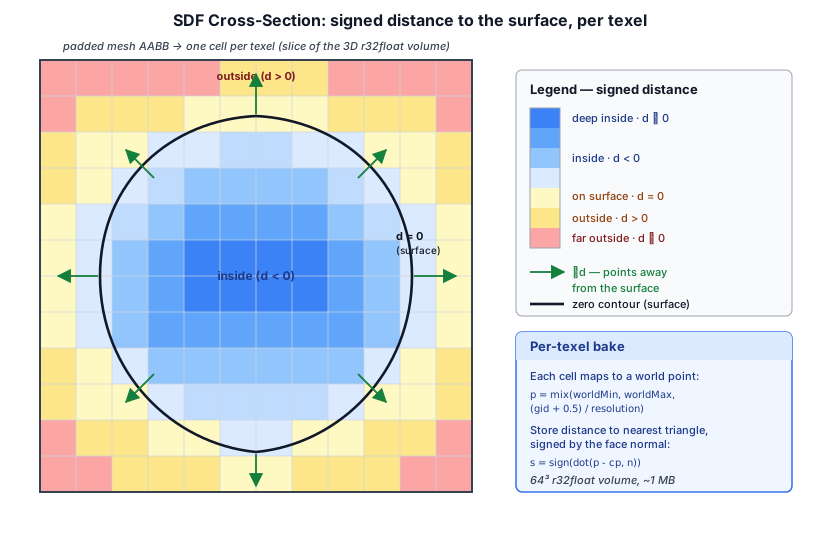
That makes an SDF a useful companion to the triangle mesh it was baked from. The particle system was the first consumer — surface emission and arbitrary-shape collision (§9.13) — but the representation is general: the same field answers proximity and inside/outside queries for collision, soft-shadow sphere-tracing, and other organic-shape effects. So it lives in its own src/sdf/ subsystem rather than under any one consumer.
The SdfVolume resource#
SdfVolume (src/sdf/sdf_volume.ts) owns an r32float 3D texture plus the AABB metadata that maps texel coordinates back to the space the field was baked in:
class SdfVolume {
  readonly texture:    GPUTexture;
  readonly view:       GPUTextureView;
  readonly sampler:    GPUSampler;
  readonly resolution: [number, number, number];
  readonly worldMin:   [number, number, number];
  readonly worldMax:   [number, number, number];
}
The format is r32float rather than the more compact r16float because the latter is not a guaranteed storage texture format in core WebGPU. At 64³ resolution one SDF is ~1 MB on the GPU — small enough to keep one per object without thinking about it.
Filtering note.
r32floatis not filterable in core WebGPU without thefloat32-filterablefeature, so the volume ships a non-filtering sampler. Consumers do their own trilinear interpolation in-shader via 8textureLoads + 7mixes. Works on every WebGPU adapter; the gradient stays smooth.
Baking from a mesh#
SdfVolume.bakeFromMesh(ctx, opts) runs a single compute dispatch — one thread per output texel — that finds the closest triangle and signs the distance by that triangle's face normal:
let p = mix(world_min, world_max, (vec3<f32>(gid) + 0.5) / resolution);
var best_d2 = 3.4e38;
var best_cp = vec3<f32>(0.0);
var best_n  = vec3<f32>(0.0);
for (var t = 0u; t < tri_count; t = t + 1u) {
  let r = closest_point_on_tri(p, a, b, c);   // Ericson §5.1.5
  if (r.dist2 < best_d2) {
    best_d2 = r.dist2;
    best_cp = r.cp;
    best_n  = cross(b - a, c - a);
  }
}
let s = sign(dot(p - best_cp, best_n));
textureStore(sdf_out, vec3<i32>(gid), vec4<f32>(sqrt(best_d2) * s, 0, 0, 0));
The algorithm is O(W·H·D · tri_count) — perfectly parallel on GPU, no acceleration structure needed up to ~10k triangles at 64³ (sub-second on typical hardware). For much heavier meshes you'd add a BVH or per-workgroup triangle batching; not yet implemented. The bake pads the mesh AABB by a configurable fraction (padding, default 10%) so the surface isn't flush against the texture boundary.
Closed manifold meshes give clean signs. Open or non-manifold meshes can flip sign near holes or sharp creases — for a more robust sign source you'd switch to ray-parity or generalized winding number; closest-face-normal is sufficient for the meshes we typically bake.
SdfVolume.fromMesh(ctx, mesh, { worldOffset, ... }) is a convenience that pulls positions out of a Mesh created with { keepData: true } (so the CPU vertex/index data is retained alongside the GPU buffers) and forwards them to bakeFromMesh. worldOffset translates positions before the bake — useful when the mesh is rendered at a non-origin world position and you want the SDF's AABB to line up with the rendered surface.
Bake frame and runtime placement#
The field is baked once in a fixed frame: the AABB (worldMin/worldMax) and texel grid are frozen at bake time. To move a baked SDF, a consumer doesn't re-bake — it supplies a transform that maps query points back into the bake frame before sampling, and scales the returned distance back into world units. Because the transform is independent of the bake, the same SdfVolume can be translated, rotated, and uniformly scaled at no extra cost. Non-uniform scale isn't supported this way (distances would no longer match the geometry); for that, re-bake with the desired non-uniform shape baked in. The particle pass implements exactly this — see Runtime transform in §9.13 for the sdf_sample snippet and the per-frame host call.
File reference#
| File | Purpose |
|---|---|
| src/sdf/sdf_volume.ts | SdfVolume runtime resource + bakeFromMesh / fromMesh helpers |
| src/sdf/sdf_math.ts | Pure CPU helpers: computeAabb, closestPointOnTri, bakeSdfCpu (test oracle) |
| src/shaders/sdf/sdf_bake.wgsl | Per-texel SDF bake compute shader (point-to-triangle, signed by face normal) |
Virtualized Geometry: Mesh Clusters and Streaming#
Everything so far assumes a mesh is small enough to draw whole. But the most detailed assets — a photogrammetry rock, an eroded landscape, a kit-bashed environment — are tens of millions of triangles, far more than fit on screen and far more than a frame's budget can rasterize. The classic answer is discrete LODs: pre-build a few coarser copies and swap between them. That pops, wastes memory, and still draws whole objects.
Taos Engine instead implements a virtual-geometry approach: detail is geometry (not a normal map), the mesh is broken into small clusters of triangles, a continuous level-of-detail DAG lets the drawn triangle budget stay roughly flat regardless of source size, and — for assets too large to even fit in memory — clusters stream in on demand so only the ones the view needs are resident. This section builds that up in layers: the draw model, the LOD DAG, the GPU cull, shrinking the baked asset, and finally streaming.
WebGPU constraints shape everything here. There are no mesh/task shader stages and no 64-bit atomics. So instead of a hardware mesh-shader pipeline, clusters are culled in a compute pass and drawn with a single non-indexed
drawIndirectover a storage-buffer vertex pool — "vertex pulling." That one constraint is why the data structures below look the way they do. The system lives under src/assets/cluster/ and src/shaders/cluster_*.wgsl.
4.9.1 Clusters and vertex pulling#
A cluster (the literature calls it a meshlet) is a small, fixed-cap group of triangles — Taos Engine uses the meshoptimizer-recommended 64 vertices / 124 triangles. buildClusters (clustered_mesh.ts) runs meshoptimizer's clusterizer over a mesh and lays the result out in flat, std430-friendly buffers a vertex-pulling shader can read:
- a shared vertex pool (the interleaved mesh vertices),
- a meshlet-vertex table (cluster-local index → global vertex index),
- a local-index table (triangle corner → cluster-local vertex), and
- a per-cluster descriptor (64 bytes: bounding sphere, normal cone, and the four
u32offsets/counts above).
There is no vertex buffer and no index buffer in the GPU sense. The draw is one drawIndirect over visibleClusters × 124 × 3 vertices, and the vertex shader reconstructs each triangle from @builtin(vertex_index) alone:
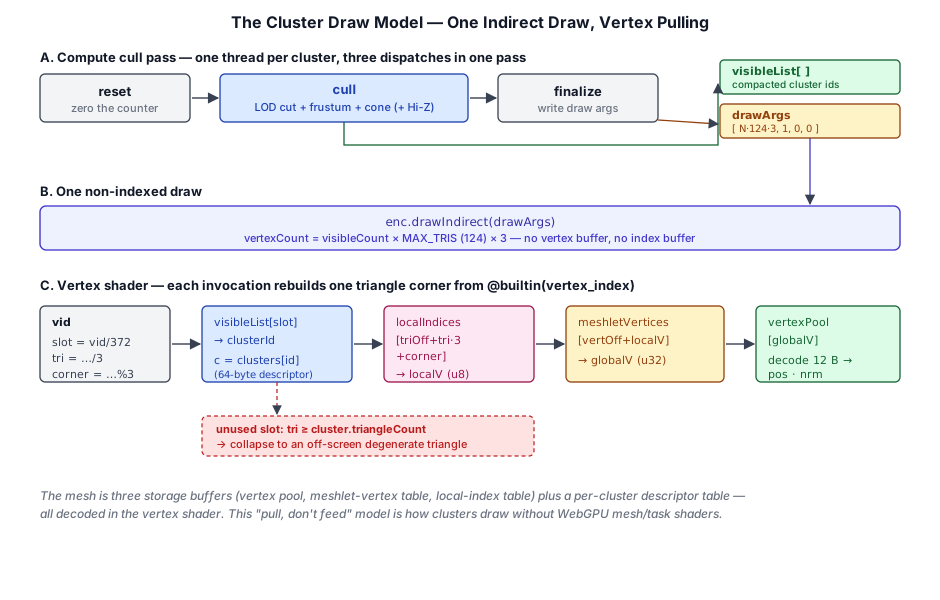
let slot   = vid / (MAX_TRIS * 3u);     // which visible cluster
let within = vid % (MAX_TRIS * 3u);
let tri    = within / 3u;
let corner = within % 3u;

let clusterId = visibleList[slot];      // compacted by the cull pass
let c = clusters[clusterId];
if (tri >= c.offsets.w) { return degenerate(); }   // unused slot → off-screen

let localV  = localIndices[c.offsets.y + tri*3u + corner];
let globalV = meshletVertices[c.offsets.x + localV];
let v       = decodeClusterVertex(vertexPool, globalV);   // pull from the pool
Clusters with fewer than 124 triangles have unused slots; those invocations emit a degenerate (zero-area, off-screen, clipped) triangle so the fixed-size draw stays valid. This "one indirect draw, decode everything in the vertex shader" pattern is the whole reason clusters work without mesh shaders.
4.9.2 The continuous-LOD DAG#
A single cluster level is not enough — drawing all of a 19 M-triangle mesh's clusters is still 19 M triangles. The win comes from a continuous level-of-detail DAG (cluster_dag.ts). buildClusterDag builds a hierarchy where each level is the previous one simplified ~2×:
- Group ~12 spatially adjacent clusters (by shared-vertex adjacency).
- Simplify each group's merged geometry to half its triangles with meshoptimizer — but with the group's outer boundary vertex-locked. A vertex shared with a neighboring group is frozen; only interior vertices may collapse.
- Re-cluster the simplified group into the level's parent clusters.
The boundary lock is the load-bearing trick. Because every group's seam with its neighbors is identical at both detail levels, any mix of fine and coarse clusters meets crack-free — there is never a T-junction at a level transition. This property (universal boundary locking) is what makes everything later watertight.
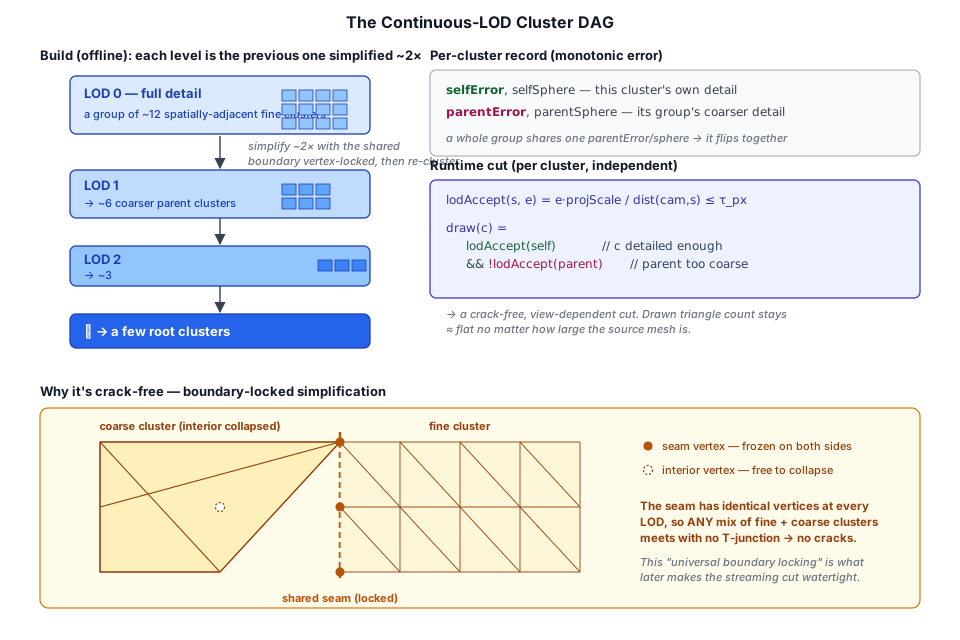
Each cluster records a monotonic error pair: its own (selfError, selfSphere) and its group's (parentError, parentSphere). At runtime the cut is chosen per cluster, entirely independently, by projecting those errors to screen-space pixels:
fn lodAccept(sphere: vec4<f32>, error: f32) -> bool {
  let dist = max(distance(camPos, sphere.xyz) - sphere.w, near);
  return error * projScale / dist <= thresholdPixels;   // detailed enough?
}
// draw c iff its own LOD is fine enough but its parent's is too coarse
fn lodSelected(c) -> bool {
  return lodAccept(c.selfSphere, c.selfError) && !lodAccept(c.parentSphere, c.parentError);
}
Because a whole group shares the same parent error and sphere, the entire group flips to its parent atomically as the camera pulls back — and boundary locking keeps the seam with neighbors consistent. The result is a crack-free, view-dependent cut whose drawn triangle count is roughly constant while the source is arbitrarily large.
Group size matters. Larger groups have a smaller locked-boundary-to-interior ratio, so far fewer groups fail to simplify. A group that can't be reduced leaves its members as terminal clusters with no coarser representation — which, once we get to streaming, must stay resident forever. Bumping
GROUP_SIZEfrom 4 to 12 cut the demo sphere's terminal clusters by ~4× and is tunable per build viabuildClusterDag(.., { groupSize }).
lodAccept(self) && !lodAccept(parent) on its own. The strip underneath is the hierarchy and the lit boxes are the cut: always exactly one cluster over every stretch of ground, so the drawn pieces always meet. LOD 0 hugs the camera, a few coarse clusters cover the distance, and the drawn count stays a fraction of the source.4.9.3 GPU culling into one indirect draw#
ClusterCullPass (cluster_cull_pass.ts) is a single compute pass with three dispatches (WebGPU inserts an implicit barrier between dispatches in one pass):
resetzeroes the visible counter.cull— one thread per cluster — runs the LOD cut, then frustum and normal-cone backface culling (and optional Hi-Z occlusion against the previous frame's depth). SurvivorsatomicAddtheir id into a compactedvisibleList.finalizewrites the non-indexeddrawIndirectargs:[visibleCount × 124 × 3, 1, 0, 0].
All math is in model space (the cluster bounds never move), so the same mvp that projects bounds for the Hi-Z test also gives model-space frustum planes. The geometry pass then issues exactly one drawIndirect, and ClusterGeometryFeature drops the whole thing into the deferred preset so sky/sun/shadows/AO/IBL light clustered geometry unchanged. Clusters also cast cascaded shadows via a depth-only vertex-pulling pass (cone culling off — back-facing clusters still shadow).
4.9.4 Shrinking the baked asset#
The DAG is expensive to build, so it is baked offline (a Node script) into a binary the runtime just fetches. At that scale the file is large (~450 MB for the 19 M-triangle terrain), which motivates two independent wins.
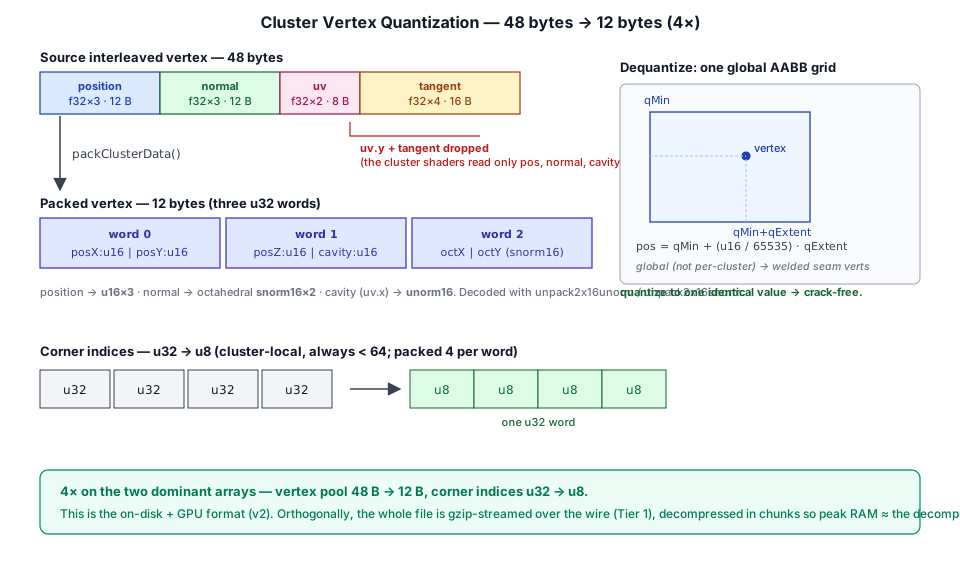
Quantization (the on-disk format). packClusterData (cluster_pack.ts) repacks each vertex from 48 bytes to 12 and each triangle-corner index from u32 to u8:
- Position →
u16 × 3, normalized into the whole-mesh AABB (qMin/qExtent, decoded in the vertex shader). The grid is global, not per-cluster, on purpose: a vertex welded across clusters/LODs quantizes to one value, so seams stay bit-identical and crack-free. Per-cluster grids would reintroduce cracks. - Normal → octahedral
snorm16 × 2; the unused uv.y and tangent are dropped entirely (the cluster shaders only ever read position, normal, and a baked cavity mask). - Corner indices →
u8(they're cluster-local, always< 64), unpacked 4-per-u32in the shader.
That is 4× on the two dominant arrays, decoded with unpack2x16unorm/unpack2x16snorm and a tiny octahedral decode shared via #import "cluster_vertex.wgsl".
Transport (the wire). Orthogonally, fetchClusterDag streams a gzip sibling through DecompressionStream, so the compressed bytes are inflated and freed in network-sized chunks — peak RAM ≈ the decompressed size you parse anyway, not both. (A subtle trap: many hosts serve .gz with Content-Encoding: gzip, so the browser already inflated it; the loader sniffs the magic bytes — 1f8b vs the TDAG header — and only inflates if it's still compressed.)
4.9.5 Streaming: virtualized residency#
Quantization shrinks the file; it does not bound GPU memory — a 120 MB pool still bumps maxStorageBufferBindingSize and loads whether or not you can see it. True virtualization keeps only the clusters the view needs resident. This is the largest piece, built around a paged format and a residency-aware draw.
The paged format (v3). Clusters are grouped into self-contained pages; the file is a header, a small always-resident index (per-cluster descriptors + LOD records + page ids), a table of contents, and the page payloads:
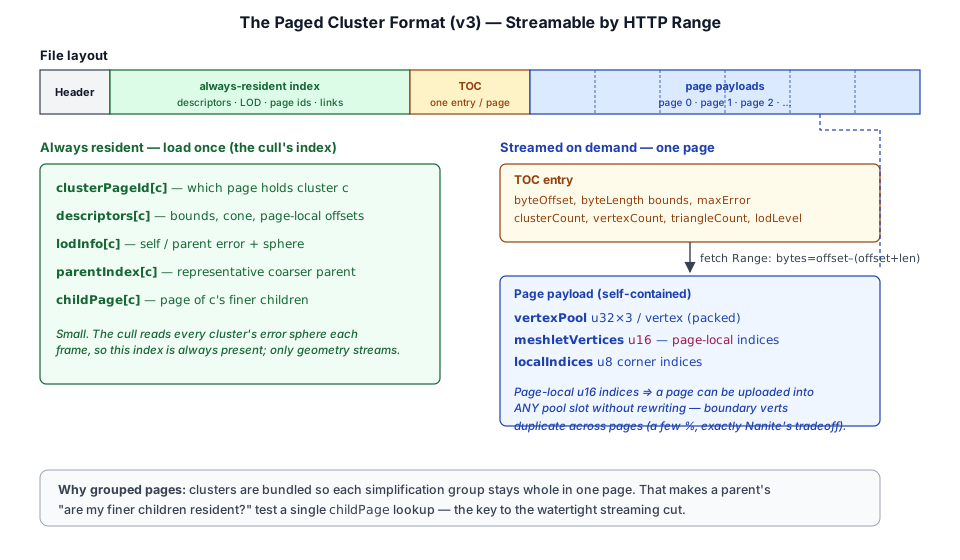
The key change is that a page is self-contained: its meshlet-vertex indices are page-local u16 (a page holds only a few thousand verts), so a page can be uploaded into any slot of a fixed pool without rewriting indices — at the cost of duplicating boundary vertices across pages (a few %, a deliberate tradeoff). Each page payload is addressed by a TOC byte range, so the runtime fetches it with a plain HTTP Range request — no special server.
The streaming pool. StreamingClusterPool (streaming_cluster_pool.ts) holds a fixed number of page slots (the VRAM budget) and a pageBase[pageId] table mapping each page to its slot's base offsets (and a resident flag). A ClusterResidencyManager (a pure LRU free-list) decides what to evict and load; a ClusterStreamSource fetches pages by HTTP Range or from an in-memory buffer. Each frame:
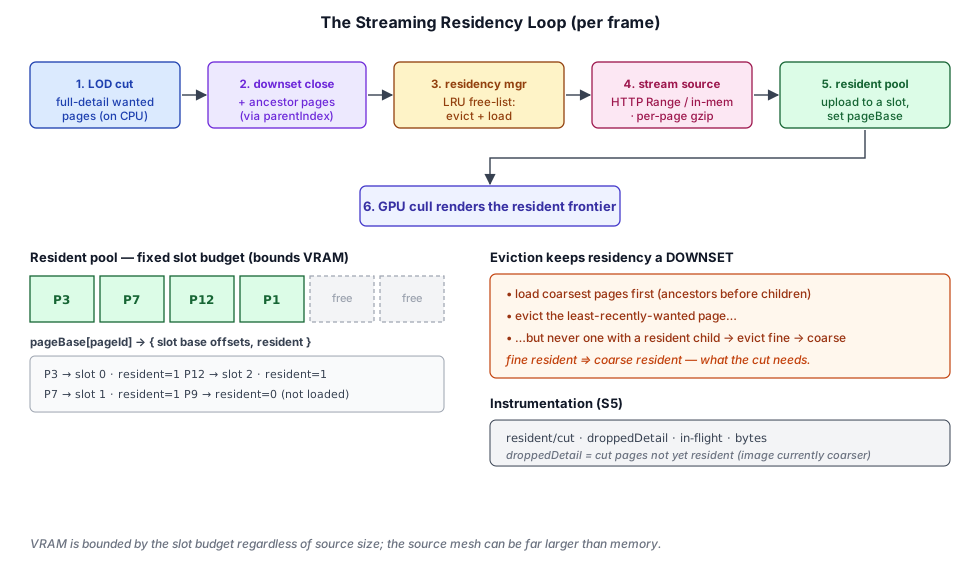
- Compute the full-detail LOD cut on the CPU (mirroring the shader), then downset-close it — pull in every wanted page's ancestor pages, so coarser context is always present.
- Reconcile against the budget: load missing pages (coarsest first), evict the least-recently-wanted, but never a page that still has a resident child (evict fine→coarse). This keeps the resident set a downset.
- Update
pageBase; the GPU cull renders whatever is resident.
The watertight residency-aware cut. The naïve idea — when a cluster's page isn't resident, draw a coarser parent instead — turns out to be fundamentally leaky: a group simplifies into several parents that together cover the region, and a single representative parent both under-covers (→ holes) and over-laps resident fine siblings (→ Z-fight flicker). The correct fix moves the residency decision into the cut itself. Since any antichain cut is crack-free (universal boundary locking), the cull simply selects the finest resident LOD per region:
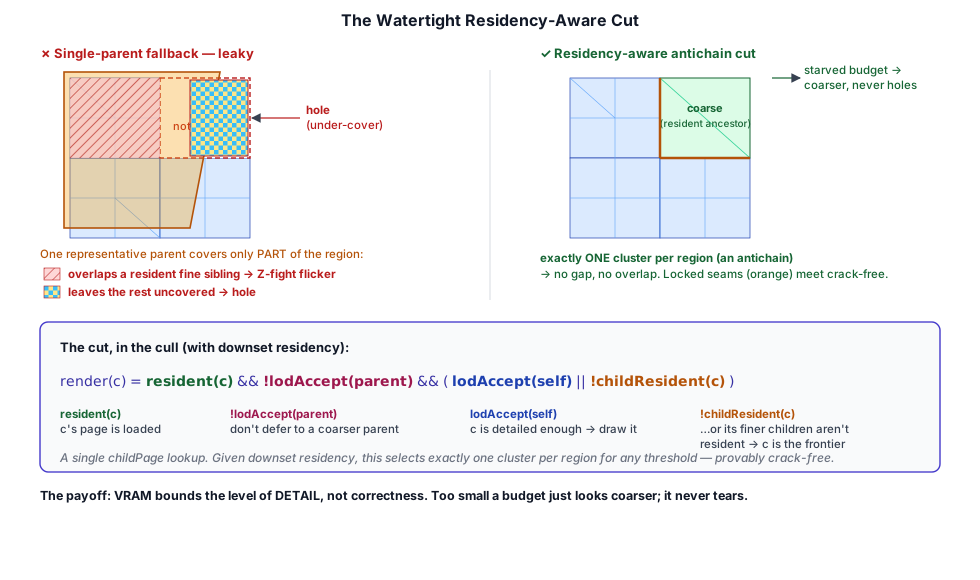
// render the finest RESIDENT level per region — a crack-free antichain
fn lodSelected(c) -> bool {
  if (pageBase[clusterPageId[c]].w == 0u)      { return false; } // c not resident
  if (lodAccept(c.parentSphere, c.parentError)){ return false; } // parent fine → parent draws
  if (lodAccept(c.selfSphere,   c.selfError))  { return true;  } // c fine enough → draw c
  let childResident = childPage[c] != NO_CHILD && pageBase[childPage[c]].w != 0u;
  return !childResident;   // too coarse: draw c iff its finer children aren't resident
}
Given downset residency, this provably selects exactly one cluster per surface region for any threshold — so a budget too small to hold the working set just renders coarser geometry where pages haven't arrived, never holes and never flicker. The "finest resident per region" decision needs a single childResident lookup, which is why the bake records each cluster's childPage (the page holding its finer children) and the paging keeps each simplification group whole in one page.
Compression, prefetch, and instrumentation. Pages can be gzipped individually (serializePagedCluster(.., { compressPage })) so they stay Range-streamable and are decompressed on fetch via DecompressionStream — unlike a whole-file gzip, which you can't range into. An opt-in predictive prefetch extrapolates the camera by a factor of its last-frame motion and streams that future view's pages early. And StreamingClusterPool.stats surfaces resident/budget pages, the full-detail cut size, droppedDetail (cut pages not yet resident — i.e. where the image is currently coarser than desired), in-flight fetches, and bytes streamed, so a streaming stall is never mistaken for "fully detailed."
4.9.6 Putting it together#
The pieces compose into the standard virtual-geometry shape, adapted to WebGPU's constraints:
| Stage | What it buys | Where |
|---|---|---|
| Clusters + vertex pulling | draw without mesh shaders | clustered_mesh.ts, cluster_geometry.wgsl |
| Continuous-LOD DAG | flat drawn budget, crack-free | cluster_dag.ts, cluster_cull.wgsl |
GPU cull → 1 drawIndirect | one compute pass, one draw | cluster_cull_pass.ts |
| Quantization + gzip | ~4× smaller asset, streamed decompress | cluster_pack.ts, cluster_dag_io.ts |
| Paged format + streaming pool | bounded VRAM, HTTP-Range fetch | cluster_page*.ts, streaming_cluster_pool.ts |
| Residency-aware cut | budget bounds detail, not correctness | cluster_cull.wgsl (#ifdef STREAM) |
Samples exercise each layer: mesh_clusters (forward DAG + LOD controls), cluster_engine/cluster_deferred (engine-integrated, shadow-casting), cluster (a 19 M-triangle micro-poly landscape from a baked asset), cluster_paged (the resident-pool indirection), and cluster_streaming (full streaming with a vivid checkerboard background that makes any residual hole unmistakable). The net result: a mesh's source triangle count is decoupled from both its drawn triangle count (the LOD cut) and its resident memory (the streaming budget) — the definition of virtualized geometry.
4.10 Summary#
The mesh system is self-contained and minimal:
Meshowns vertex/index GPU buffers with a fixed interleaved layout (48 bytes/vertex).- Procedural creation methods (
createCube,createPlane,createSphere) provide common geometry. - Skinned meshes add joint-weight vertex attributes and a storage buffer for GPU skinning.
- Animation clips sample joint transforms and upload them per-frame.
- A mesh can be baked into a
SdfVolume— a 3D signed-distance texture for proximity and inside/outside queries, shared across consumers (particles today; collision and soft shadows ahead). - For very large assets, a mesh is built into a cluster (meshlet) DAG — drawn without mesh shaders via compute culling + one vertex-pulling
drawIndirect, with a continuous-LOD cut, quantized + gzipped on disk, and streamed so resident VRAM is bounded regardless of source size (§4.9).
Meshes are drawn by render passes that iterate DrawItem lists — each item pairing a Mesh with a Material and a transform matrix.
Further reading:
src/assets/mesh.ts— Mesh class and all procedural generatorssrc/sdf/sdf_volume.ts—SdfVolumebake-from-mesh resource (§4.8)src/shaders/geometry.wgsl— Vertex/fragment shader for static geometrysrc/shaders/skinned_geometry.wgsl— Vertex/fragment shader for skinned geometrysrc/renderer/render_graph/passes/geometry_pass.ts— Draws static meshes into the G-Buffersrc/renderer/render_graph/passes/skinned_geometry_pass.ts— Draws skinned meshes into the G-Buffersrc/assets/cluster/— cluster build (clustered_mesh.ts), LOD DAG (cluster_dag.ts), quantization (cluster_pack.ts), and the v3 paged format + streaming pool (cluster_page*.ts,streaming_cluster_pool.ts) (§4.9)src/shaders/cluster_cull.wgsl/cluster_geometry.wgsl— compute cull (incl. the#ifdef STREAMresidency cut) + vertex-pulling draw