This chapter introduces the WebGPU API from the ground up. We cover every resource type and pipeline stage that Taos Engine uses, building toward the RenderContext abstraction that the rest of the engine is built on.
The Graphics Pipeline#
Before diving into the API, it is worth reviewing the modern GPU pipeline. Every frame, the GPU executes a sequence of stages:
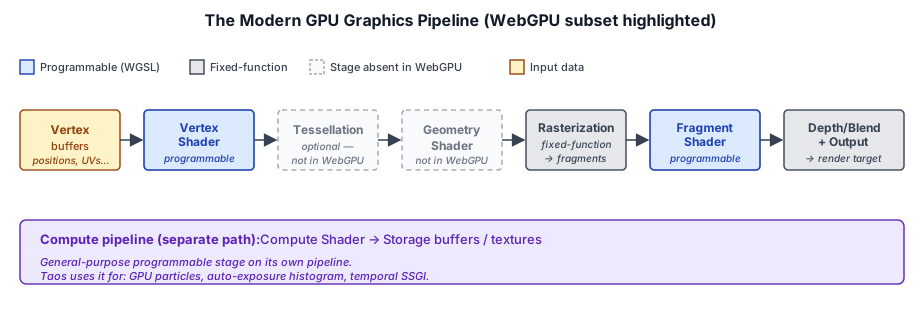
WebGPU exposes a subset of this pipeline with a clean, explicit API. The key programmable stages are:
- Vertex shader — transforms vertices from model space to clip space, passes interpolated data to the fragment shader.
- Fragment shader — computes the color of each rasterized pixel, performing lighting, texturing, and shading.
- Compute shader — a general-purpose shader that operates on arbitrary workgroups (used by Taos Engine for particle systems and auto-exposure).
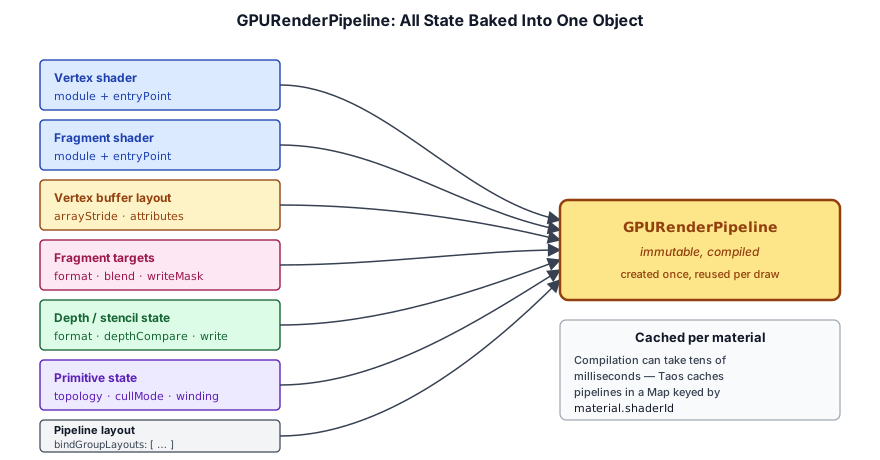
Pipeline state is fully explicit. Every combination of shaders, vertex layout, blend mode, depth test, and primitive topology is compiled into an immutable GPURenderPipeline object. There is no global state — you bind a pipeline, bind resources, and draw.
GPUAdapter and GPUDevice#
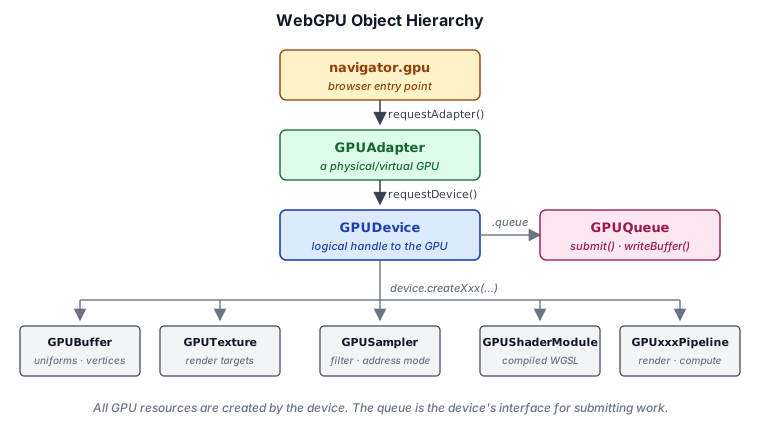
The entry point to WebGPU is navigator.gpu. The first step is to request an adapter (a physical or virtual GPU), then create a device (the logical handle to that GPU). The device, in turn, owns every resource you create — buffers, textures, shaders, pipelines — and exposes a single queue for submitting work:
static async create(canvas: HTMLCanvasElement,
    options: RenderContextOptions = {}): Promise<RenderContext> {
  if (!navigator.gpu) {
    throw new Error('WebGPU not supported');
  }

  const adapter = await navigator.gpu.requestAdapter({
    powerPreference: 'high-performance',
  });
  if (!adapter) {
    throw new Error('No WebGPU adapter found');
  }

  const device = await adapter.requestDevice({
    requiredFeatures: [],
  });
  // ...
}
Adapter selection. We request powerPreference: 'high-performance' to prefer the discrete GPU when one is available. The alternative 'low-power' prefers integrated GPUs to save battery. If the returned adapter is null, WebGPU is not available on this system.
Device creation. adapter.requestDevice() creates a logical device that owns all GPU resources. The requiredFeatures array requests optional WebGPU features; Taos Engine currently uses none, keeping compatibility as broad as possible.
Compatibility mode. WebGPU defines two feature levels: the default 'core' level targets modern desktop-class GPUs (roughly D3D12 / Vulkan 1.1 / Metal 2 hardware), and 'compatibility' targets a broader set of devices that includes older mobile GPUs, OpenGL ES 3.1 / D3D11-class hardware, and some integrated parts that cannot meet every core requirement. You opt in by passing featureLevel: 'compatibility' to requestAdapter():
const adapter = await navigator.gpu.requestAdapter({
  featureLevel: 'compatibility',
  powerPreference: 'high-performance',
});
A compatibility adapter exposes a strict subset of core WebGPU. The most visible restrictions:
- Lower default limits — fewer color attachments, fewer bind groups per pipeline, smaller storage buffer bindings, and reduced workgroup storage size. Always read
adapter.limitsrather than hard-coding values. - Texture view formats are pinned — a view's format must exactly match its underlying texture's format. Reinterpreting
rgba8unormasrgba8unorm-srgb(or vice versa) viacreateView({ format })is not allowed unless the texture was created with the matchingviewFormatsentry, and even then some pairs are disallowed. - No cube map arrays, no 3D storage textures, and no multi-sampled storage textures. Shaders that rely on these need a non-compat fallback path.
- Limited inter-stage interpolation — only
@interpolate(perspective, center)is guaranteed;linear,sample, andflat-on-floats may be unavailable. - Generated mipmaps and
viewFormatsreinterpretation can require additional usage flags.
Compatibility is also a strict subset in the behavioral sense: code that runs on a compatibility device is guaranteed to run on a core device, but not the other way around. For engines that need to ship to the widest range of hardware (mobile browsers, ChromeOS, older integrated GPUs), the usual pattern is to first try featureLevel: 'compatibility', use core-features-and-limits if it's available from the adapter putting the device into core mode, otherwise the device is in compatibility mode, and gate features like cube map arrays or extra G-Buffer attachments based on the limits and features avaialble to the device.
WebXR. If you intend to render to a WebXR session (VR/AR headset), pass xrCompatible: true to requestAdapter(). This asks the browser for an adapter whose device can be used as the source for a WebXR XRWebGPUBinding, which on multi-GPU systems typically means the GPU physically connected to the headset:
const adapter = await navigator.gpu.requestAdapter({
  xrCompatible: true,
  powerPreference: 'high-performance',
});
If you don't set this up front and later try to bind the device to an XRSession, you'll need to re-request the adapter (and recreate the device and all its resources) on the correct GPU. It's cheap to opt in early if WebXR is on the roadmap.
Canvas Configuration#
Once we have a device, we configure the canvas to create a swap chain:
const context = canvas.getContext('webgpu') as GPUCanvasContext;

// Attempt HDR canvas: rgba16float + display-p3 + extended tonemapping.
let format: GPUTextureFormat;
let hdr = false;
try {
  context.configure({
    device,
    format: 'rgba16float',
    alphaMode: 'opaque',
    colorSpace: 'display-p3',
    toneMapping: { mode: 'extended' },
  });
  const config = context.getConfiguration();
  // Verify that we actually got an HDR display.
  if (config.toneMapping.mode === "extended") {
    format = 'rgba16float';
    hdr = true;
  } else {
    // The display doesn't support HDR, get the format used by the canvas.
    format = navigator.gpu.getPreferredCanvasFormat();
  }
} catch {
  // Fallback to preferred SDR format
  format = navigator.gpu.getPreferredCanvasFormat();
  context.configure({ device, format, alphaMode: 'opaque' });
}
Taos Engine attempts an HDR swap chain (rgba16float with display-p3 color space and extended tone mapping). If the platform does not support it (the configure() call throws), we fall back to the platform's preferred SDR format — typically bgra8unorm on Windows and rgba8unorm on macOS.
GPUBuffer#
A GPUBuffer is a block of GPU-accessible memory. Buffers are the primary mechanism for moving data between CPU and GPU.
Buffer Creation#
Taos Engine provides a convenience wrapper createBuffer on RenderContext:
createBuffer(size: number, usage: GPUBufferUsageFlags, label?: string): GPUBuffer {
  return this.device.createBuffer({ size, usage, label });
}
The usage parameter specifies how the buffer can be used:
| Flag | Used for |
|---|---|
UNIFORM | Small, frequently updated per-frame data (matrices, lights) |
STORAGE | Large, randomly accessed data (skinning joints, particles) |
VERTEX | Vertex positions, normals, UVs |
INDEX | Triangle index lists |
COPY_DST | Receiving data from queue.writeBuffer() |
COPY_SRC | Source for commandEncoder.copyBufferToTexture() |
INDIRECT | Indirect draw/dispatch parameters |
Example from the GeometryPass camera uniform buffer:
const cameraBuffer = device.createBuffer({
  label: 'GeomCameraBuffer',
  size: CAMERA_UNIFORM_SIZE,   // 4 mat4 + vec3 + near/far = 288 bytes
  usage: GPUBufferUsage.UNIFORM | GPUBufferUsage.COPY_DST,
});
The COPY_DST flag is essential here — it allows us to upload data via queue.writeBuffer().
Uploading Data#
The fastest way to upload data is GPUQueue.writeBuffer(), which copies CPU memory directly into the GPU buffer without an explicit staging buffer:
writeBuffer(buffer: GPUBuffer, data: ArrayBuffer | ArrayBufferView, offset = 0): void {
  if (data instanceof ArrayBuffer) {
    this.queue.writeBuffer(buffer, offset, data);
  } else {
    this.queue.writeBuffer(buffer, offset,
      data.buffer as ArrayBuffer, data.byteOffset, data.byteLength);
  }
}
Taos Engine uses writeBuffer extensively for per-frame uniform updates. For example, the geometry pass uploads camera matrices each frame:
updateCamera(ctx: RenderContext): void {
  const camera = ctx.activeCamera;
  if (!camera) {
    throw new Error('GeometryPass.updateCamera: ctx.activeCamera is null');
  }
  const camPos = camera.position();
  const data = this._cameraScratch;  // pre-allocated Float32Array
  data.set(camera.viewMatrix().data, 0);
  data.set(camera.projectionMatrix().data, 16);
  data.set(camera.jitteredViewProjectionMatrix().data, 32);
  data.set(camera.inverseViewProjectionMatrix().data, 48);
  data[64] = camPos.x; data[65] = camPos.y; data[66] = camPos.z;
  data[67] = camera.near; data[68] = camera.far;
  ctx.queue.writeBuffer(this._cameraBuffer, 0, data.buffer as ArrayBuffer);
}
The _cameraScratch Float32Array is pre-allocated once in the constructor and reused every frame. This avoids garbage-collector pressure from per-frame allocations.
Buffer Mapping#
queue.writeBuffer() is the simplest path for updating a buffer, but WebGPU also lets you write directly into a buffer's memory through mapping.
mappedAtCreation is the most efficient way to populate a buffer with initial data. Pass mappedAtCreation: true to createBuffer() and the buffer is returned in a mapped state — call getMappedRange() to get an ArrayBuffer view of its memory, write your data into it, then call unmap() to release it to the GPU:
const buffer = device.createBuffer({
  size: data.byteLength,
  usage: GPUBufferUsage.VERTEX,
  mappedAtCreation: true,
});
new Float32Array(buffer.getMappedRange()).set(data);
buffer.unmap();
This avoids the intermediate copy that writeBuffer() performs and does not require COPY_DST in the usage flags — the upload happens through the mapping itself. It is the preferred way to initialize static data such as mesh vertex/index buffers and lookup tables.
mapAsync() maps a buffer's memory after creation. It is most commonly used to read back GPU-written data — for example, the result of a compute shader — and requires the buffer to have been created with MAP_READ (for reads) or MAP_WRITE (for staged writes):
const readback = device.createBuffer({
  size: byteLength,
  usage: GPUBufferUsage.MAP_READ | GPUBufferUsage.COPY_DST,
});
// ... copyBufferToBuffer into readback during a frame, then submit ...
await readback.mapAsync(GPUMapMode.READ);
const result = new Float32Array(readback.getMappedRange()).slice();
readback.unmap();
mapAsync() returns a Promise that resolves once the GPU has finished any in-flight work referencing the buffer. While mapped, the buffer cannot be used by the GPU; it must be unmapped before the next submit that touches it.
Buffer Alignment#
WebGPU imposes alignment requirements on buffer bindings:
- Uniform buffers:
minUniformBufferOffsetAlignment, typically 256 bytes. - Storage buffers:
minStorageBufferOffsetAlignment, typically 16 bytes.
Taos Engine uses dynamic offset uniform buffers in BlockGeometryPass to fit per-chunk data into a single large buffer, where each chunk gets a 256-byte aligned slot.
GPUTexture#
A GPUTexture is a GPU image — a 1D, 2D, or 3D array of texels used as render targets, depth buffers, or shader-readable inputs.
Texture Creation#
A texture is created with a size, format, and set of usage flags that declare how it will be used:
const colorTexture = device.createTexture({
  label: 'ColorTarget',
  size: { width, height },
  format: 'rgba8unorm',
  usage: GPUTextureUsage.RENDER_ATTACHMENT | GPUTextureUsage.TEXTURE_BINDING,
});
A depth texture follows the same pattern with a depth format:
const depthTexture = device.createTexture({
  label: 'DepthBuffer',
  size: { width, height },
  format: 'depth32float',
  usage: GPUTextureUsage.RENDER_ATTACHMENT | GPUTextureUsage.TEXTURE_BINDING,
});
A texture intended to hold image data uploaded from the CPU adds COPY_DST and is uploaded with queue.writeTexture():
const imageTexture = device.createTexture({
  label: 'AlbedoMap',
  size: { width, height },
  format: 'rgba8unorm-srgb',
  usage: GPUTextureUsage.TEXTURE_BINDING | GPUTextureUsage.COPY_DST,
});
Key texture parameters:
| Parameter | Description |
|---|---|
size | { width, height, depthOrArrayLayers } — 1 for a standard 2D texture |
format | Texel format — rgba8unorm, rgba16float, depth32float, etc. |
usage | Bitfield specifying how the texture is used (RENDER_ATTACHMENT, TEXTURE_BINDING, COPY_DST, etc.) |
mipLevelCount | Number of mip levels (default 1) |
sampleCount | MSAA sample count (default 1, no multisampling) |
Texture Views#
A GPUTextureView is a window into a texture — a specific subresource (mip level, array layer, aspect) that can be bound as a render target or shader input. Most of the time you just want the default view:
const view = colorTexture.createView();But some passes need specialized views — for example, reading only the depth aspect of a depth-stencil texture, or binding a single array layer of a cube map.
HDR Render Target#
The lighting pass writes into an HDR color attachment with format rgba16float:
export const HDR_FORMAT: GPUTextureFormat = 'rgba16float';This is a 16-bit-per-channel floating-point format, giving a wider dynamic range and color precision than the 8-bit sRGB swap chain. The HDR texture persists through post-processing (bloom, TAA, DOF) before being tone-mapped to SDR for display.
GPUSampler#
A GPUSampler controls how textures are sampled in shaders — filtering mode, addressing mode (wrap/clamp/mirror), and level-of-detail behavior. Samplers are created once and reused across passes.
Typical creation pattern from Taos Engine's passes:
const sampler = device.createSampler({
  addressModeU: 'repeat',
  addressModeV: 'repeat',
  magFilter: 'linear',
  minFilter: 'nearest',
  mipmapFilter: 'linear',
});
Samplers are lightweight objects that are bound to shaders through bind groups.
GPUBindGroup and GPUBindGroupLayout#
Resources are made available to shaders through bind groups. A GPUBindGroupLayout describes the types and visibility of resources a shader expects. A GPUBindGroup binds actual resources (buffers, textures, samplers) to that layout.
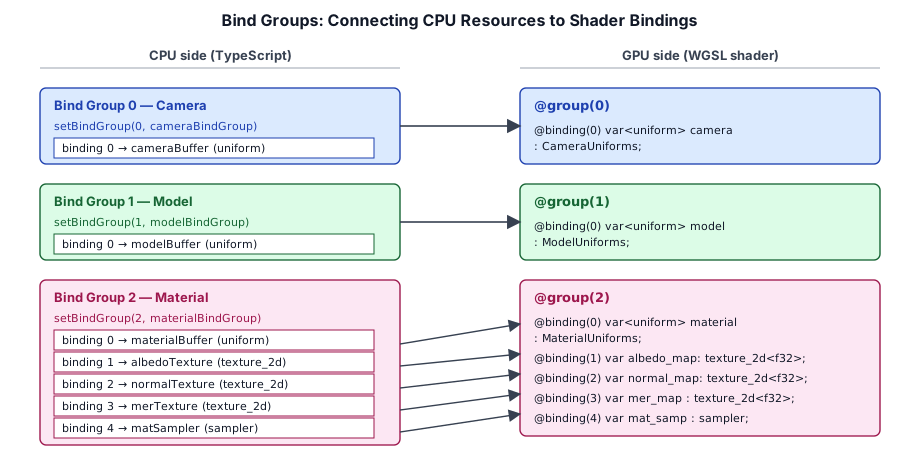
The bind group index from setBindGroup(N, …) on the CPU lines up with the @group(N) annotation in the shader, and the per-entry binding numbers line up with @binding(M). This is how Taos Engine's geometry pass connects camera, model, and material data to its WGSL:
Bind Group Layout#
Layouts are immutable descriptions of resource bindings. Here is the geometry pass creating layouts for its camera and model uniforms:
// bind group creation
const cameraBGL = device.createBindGroupLayout({
  label: 'GeomCameraBGL',
  entries: [
    {
      binding: 0,
      visibility: GPUShaderStage.VERTEX | GPUShaderStage.FRAGMENT,
      buffer: { type: 'uniform' },
    },
  ],
});

const modelBGL = device.createBindGroupLayout({
  label: 'GeomModelBGL',
  entries: [
    {
      binding: 0,
      visibility: GPUShaderStage.VERTEX,
      buffer: { type: 'uniform' },
    },
  ],
});
The visibility field controls which shader stages can access the resource. The type field specifies the resource type (uniform, storage, read-only-storage, texture, sampler, etc.).
Why does WebGPU use a BindGroupLayout, when a BindGroup should be enough? The answer is about validation. The BindGroupLayouts that will be used with a shader are included when creating a Pipeline object. This validates that the shader will be compatible with the resources you intend to use with the shader. The BindGroupLayout is also used to create a BindGroup, validating the BindGroup will be compatible with the Pipeline. Since everything has now been validated at object creation time, WebGPU doesn't need to do that validation at runtime.
Bind Group#
Bind groups are the actual resource handles bound to a layout:
const cameraBindGroup = device.createBindGroup({
  label: 'GeomCameraBindGroup',
  layout: cameraBGL,
  entries: [
    { binding: 0, resource: { buffer: cameraBuffer } },
  ],
});
During draw, the pipeline sets bind groups at indices matching the WGSL @group(N) attribute:
pass.setBindGroup(0, this._cameraBindGroup);   // @group(0) in shader
pass.setBindGroup(1, this._modelBindGroups[i]); // @group(1)
pass.setBindGroup(2, item.material.getBindGroup(device)); // @group(2)
In the WGSL shader, these correspond to:
@group(0) @binding(0) var<uniform> camera  : CameraUniforms;
@group(1) @binding(0) var<uniform> model   : ModelUniforms;
@group(2) @binding(0) var<uniform> material: MaterialUniforms;
@group(2) @binding(1) var albedo_map: texture_2d<f32>;
@group(2) @binding(2) var normal_map: texture_2d<f32>;
@group(2) @binding(3) var mer_map   : texture_2d<f32>;
@group(2) @binding(4) var mat_samp  : sampler;
Bind groups are lightweight to create and can be updated each frame when the underlying resource changes (e.g., a new shadow map texture).
GPUShaderModule and WGSL#
WebGPU shaders are written in WGSL (WebGPU Shading Language), a concise, SPIR-V-derived language designed for the web.
Shader Structure#
A WGSL shader module contains a sequence of declarations — structs, bindings, functions, and entry points. Here is a minimal vertex shader (abbreviated from the geometry pass):
struct CameraUniforms {
  viewProj : mat4x4<f32>,
}
@group(0) @binding(0) var<uniform> camera : CameraUniforms;

struct VertexInput {
  @location(0) position : vec3<f32>,
}

struct VertexOutput {
  @builtin(position) clip_pos  : vec4<f32>,
  @location(0)       world_pos : vec3<f32>,
}

@vertex
fn vs_main(in: VertexInput) -> VertexOutput {
  var out: VertexOutput;
  out.clip_pos  = camera.viewProj * vec4f(in.position, 1.0);
  out.world_pos = in.position;
  return out;
}
Key WGSL features visible here:
- Struct types define shader interfaces.
@group(N) @binding(M)attributes link bindings to the bind groups set from the CPU.@location(N)specifies vertex attribute locations and inter-stage varying slots.@builtin(position)marks the clip-space position output.var<uniform>declares a uniform buffer;var texture_2d<f32>declares a sampled texture.
Struct Layout and Alignment#
WGSL applies strict alignment and stride rules to struct members. The values that matter most for host/GPU buffer interop:
| Type | Size | Alignment |
|---|---|---|
f32, i32, u32 | 4 | 4 |
vec2<f32> | 8 | 8 |
vec3<f32> | 12 | 16 |
vec4<f32> | 16 | 16 |
mat4x4<f32> | 64 | 16 |
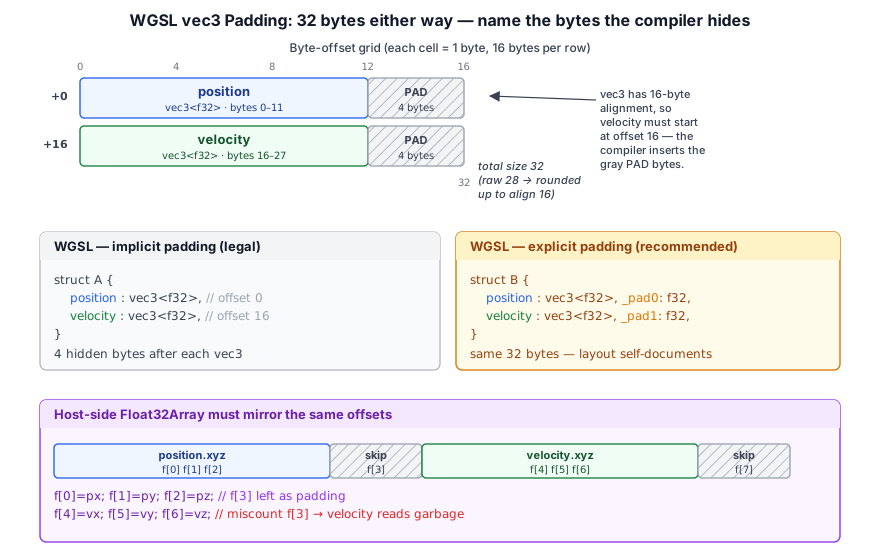
The non-obvious case is vec3<f32>: it occupies 12 bytes but has 16-byte alignment, so the next member's offset is rounded up to the next multiple of 16 — leaving 4 bytes of implicit padding the compiler inserts for you. A struct's total size is then rounded up to the alignment of its largest member, and array<T> element stride gets the same rounding.
This is the rule that catches host-side packing. If a Float32Array writer doesn't account for the implicit padding after a vec3, the next field on the GPU reads garbage. Explicit padding members are preferred for any struct shared across the host/GPU boundary, because they make the byte layout self-documenting:
// Implicit padding — legal, but the layout is easy to miscount on the host.
struct A {
  position : vec3<f32>,   // offset  0
  velocity : vec3<f32>,   // offset 16  (compiler inserts 4 bytes after position)
}                         // size 32 (raw 28, rounded up to alignment 16)

// Explicit padding — recommended for host-shared buffers.
struct B {
  position : vec3<f32>,   // offset  0
  _pad0    : f32,         // offset 12
  velocity : vec3<f32>,   // offset 16
  _pad1    : f32,         // offset 28
}                         // size 32, stride 32 in array<B>
Both layouts occupy the same 32 bytes — the explicit form just names the bytes the compiler would otherwise hide, so the TypeScript writer that fills the buffer can mirror the WGSL line-for-line. Taos Engine's Particle and SpawnRequest structs in src/particles/particle_builder.ts follow this convention.
Two practical notes:
- Uniform buffers add one extra restriction:
array<T>in theuniformaddress space requires the element stride to be a multiple of 16. Storage buffers don't have this restriction. vec3is the only sharp edge.mat4x4<f32>(a stack ofvec4s) and any struct whose members are allf32pairs,vec2/vec4, or matrices pack without surprises.
[n] in every slot is the Float32Array index a host-side writer would use. Compare vec3, f32 with f32, vec3 to see a trailing f32 tuck into the vec3's spare bytes, open mat3x3, f32 to find padding hidden inside the matrix's columns, then switch f32 ×3 to uniform to hit the stride-of-16 rule for arrays.Shader Compilation#
Shader modules are created from WGSL source code at runtime:
const shaderModule = device.createShaderModule({
  label: `GeometryShader[${material.shaderId}]`,
  code: material.getShaderCode(MaterialPassType.Geometry),
});
WebGPU parses and validates the WGSL source as part of createShaderModule(). Compilation errors are reported asynchronously through getCompilationInfo(), which returns a promise:
const info = await shaderModule.getCompilationInfo();
for (const msg of info.messages) {
  if (msg.type === 'error') {
    console.error(`Shader error at ${msg.lineNum}:${msg.linePos}: ${msg.message}`);
  }
}
Note that WebGPU doesn't actually compile the shader for the GPU backend (D3D, Vulkan, Metal) until a Pipeline object is created using the ShaderModule. This is because the other state information provided by the Pipeline can affect the shader that is compiled for the GPU backend. Because of this, you will find that creating Pipeline objects is significantly more time consuming than createShaderModule.
Taos Engine loads shaders at module scope via Vite's ?raw import syntax:
import deferredLightingWgsl from '../../shaders/deferred_lighting.wgsl?raw';This inlines the WGSL source as a string at build time, avoiding runtime fetch requests.
Preprocessor and Shader Blocks#
WebGPU does not include any built-in support for preprocessing shaders, or support for importing external shader code into shaders. This keeps the API simple, but it means that any mechanism for shader code reuse or conditional compilation must be provided by the application.
As shaders become more complex, and the more shaders an application has, the more shader code duplication you will start find between shaders. If you have two material shaders that both use the lighting features of Taos Engine, then without any sort of shared code mechanism both shaders would need to have their own copy of the lighting code. This both makes writing shaders more complicated and becomes a maintenance burden as changing the lighting code now needs to be done in multiple places.
Taos Engine includes its own system for preprocessing shaders and importing shader code blocks, exposed through two modules: preprocessShader and ShaderBlockManager.
The Preprocessor#
The preprocessShader function (src/assets/preprocess_shader.ts) processes a WGSL source string line-by-line, interpreting lines starting with # as preprocessor directives. The output is a new string with all directives stripped and conditional branches resolved.
Supported directives:
| Directive | Description |
|---|---|
#define NAME | Defines NAME with value 1 |
#define NAME value | Defines NAME with the given value |
#undef NAME | Removes a definition |
#ifdef NAME | Includes the block if NAME is defined |
#if expr | Includes the block if the expression is non-zero |
#elif expr | Alternative condition in an #if/#ifdef chain |
#else | Fallback branch |
#endif | Ends a conditional block |
The #if expression evaluator supports comparison operators (==, !=, >, <, >=, <=), logical operators (!, &&, ||), parentheses for grouping, and the defined(NAME) function that returns 1 if the macro is defined and 0 otherwise. Macro names in expressions are automatically expanded to their defined values; undefined identifiers evaluate to 0.
#define USE_SHADOWS 1
#define SHADOW_QUALITY 2

#ifdef USE_SHADOWS
  #if SHADOW_QUALITY >= 2
    // high-quality shadow sampling code
  #elif SHADOW_QUALITY == 1
    // low-quality shadow sampling code
  #else
    // simplest shadow (if at all)
  #endif
#else
  // no shadow code at all
#endif
Preprocessor directives respect nesting — #if blocks can be nested inside other #if or #ifdef blocks, and each block tracks its own conditional state independently.
ShaderBlockManager#
The ShaderBlockManager class (src/assets/shader_block_manager.ts) manages reusable WGSL code blocks. Blocks are identified by a string name and registered at runtime. When a shader source contains #import "name.wgsl", the manager replaces that line with the block's preprocessed WGSL code.
During construction, ShaderBlockManager automatically loads every .wgsl file from src/shaders/modules/ using Vite's import.meta.glob, registering each file as a named block (the filename without the .wgsl extension). This means the three built-in modules — camera.wgsl, lighting.wgsl, and model.wgsl — are immediately available for import without any manual registration.
Block lookups are recursive — if block A imports block B, the manager will resolve B's imports as well. Each block is also preprocessed before insertion, so blocks can contain their own #define, #ifdef, and other directives.
// Register a custom block at runtime
ctx.registerShaderBlock('my_utils', 'fn utility() {}');

// Use it in a shader
// #import "my_utils.wgsl"
Using #import in WGSL Shaders#
Shader source files use #import to pull in blocks. Here is a complete example from samples/procedural_test.wgsl:
// samples/procedural_test.wgsl
#import "camera.wgsl"
#import "lighting.wgsl"
#import "model.wgsl"

struct VertexInput {
  @location(0) position: vec3<f32>,
  @location(1) normal  : vec3<f32>,
  @location(2) uv      : vec2<f32>,
  @location(3) tangent : vec4<f32>,
};
// ... rest of the shader
The #import "lighting.wgsl" line is of particular note. The lighting.wgsl built-in block (220 lines) includes all of the PBR lighting infrastructure: light struct definitions (PointLight, SpotLight, DirectionalLight), the LightingUniforms struct, all 11 bind group entries at @group(3) for lights, shadow maps, IBL cubemaps and the BRDF LUT, plus all of the PBR calculation functions (calculate_pbr_lighting, fresnel_schlick, distribution_ggx, geometry_smith, shadow sampling functions). Any shader that needs to perform lighting in Taos Engine can include this single import rather than duplicating hundreds of lines of WGSL.
Conditional imports are also supported. Because importShaderBlocks runs the preprocessor before resolving imports, #import lines inside #ifdef or #else branches are only resolved when their branch is active:
#define USE_LIGHTING
#ifdef USE_LIGHTING
  #import "lighting.wgsl"
#else
  // manual shading code
#endif
RenderContext Integration#
The RenderContext class owns a ShaderBlockManager instance as a public property (shaderBlockManager), which is automatically initialized during context creation. It also provides convenience methods — registerShaderBlock, getShaderBlock, removeShaderBlock — that delegate to the manager.
The key integration point is RenderContext.createShaderModule:
createShaderModule(code: string, label?: string,
    defines?: Record<string, string>): GPUShaderModule {
  code = this.shaderBlockManager.importShaderBlocks(code, defines);
  return this.device.createShaderModule({ code, label });
}
This method runs the preprocessor and resolves all #import directives before passing the final WGSL to device.createShaderModule. Using ctx.createShaderModule() instead of device.createShaderModule() is all that is needed to enable the full preprocessor and shader block system:
// Without Taos's system — raw WebGPU:
const module = device.createShaderModule({ code: shaderSource, label });

// With Taos's system — preprocessing + imports:
const module = ctx.createShaderModule(shaderSource, label);
The optional defines parameter allows the caller to inject initial macro definitions that the preprocessor uses before processing any #define directives in the shader source. This is useful when the host application needs to control shader features at runtime without modifying the WGSL files.
Shader Variants#
The defines parameter makes it possible to generate multiple compiled variants of the same WGSL source without duplicating shader files. Instead of maintaining separate shaders for different feature levels, you write one shader that uses #if directives to guard feature-specific code, then compile variants by passing different define values to createShaderModule.
This is how Taos Engine's material system handles optional features like shadow mapping, fog, and debug overlay modes. Each Material type declares the set of defines it needs, and the render pass compiles a variant for each combination:
#ifdef SHADOWS
  #import "lighting.wgsl"
  // shadow-aware PBR
#else
  // simple unlit shading
#endif

#ifdef FOG
  fn apply_fog(color: vec3<f32>, depth: f32) -> vec3<f32> {
    // ...
  }
#endif

@fragment
fn fs_main(...) -> @location(0) vec4<f32> {
  var color = ...;
#ifdef FOG
  color = apply_fog(color, input.depth);
#endif
  return color;
}const baseShader = readShaderSource('materials/terrain.wgsl');
const opaqueModule = ctx.createShaderModule(baseShader, 'TerrainOpaque',
{ SHADOWS: '1', FOG: '1' });
const shadowModule = ctx.createShaderModule(baseShader, 'TerrainShadow',
{ SHADOWS: '0', FOG: '0' });
const debugModule = ctx.createShaderModule(baseShader, 'TerrainDebug',
{ SHADOWS: '1', FOG: '0', DEBUG_NORMALS: '1' });Each call produces a separate GPUShaderModule with only the code relevant to its feature set compiled in. The #if SHADOWS and #ifdef FOG branches are stripped or included at the source level, so the variant that does not need shadows never contains shadow-mapping code — the GPU driver sees a smaller, faster shader.
These modules are then compiled into separate GPURenderPipeline objects and cached:
private _variantPipelines = new Map<string, GPURenderPipeline>();

getOrCreatePipeline(ctx: RenderContext, defines: Record<string, string>): GPURenderPipeline {
  const key = Object.entries(defines)
    .sort(([a], [b]) => a < b ? -1 : 1)
    .map(([k, v]) => `${k}=${v}`)
    .join('|');

  let pipeline = this._variantPipelines.get(key);
  if (pipeline) return pipeline;

  const module = ctx.createShaderModule(this._shaderSource, this._label, defines);
  pipeline = ctx.device.createRenderPipeline({ /* ... */ vertex: { module },
      fragment: { module } });
  this._variantPipelines.set(key, pipeline);
  return pipeline;
}
The cache key is built from the sorted define pairs so that the same combination always reuses the same pipeline. This is important because pipeline creation is expensive — compiling variants from defines avoids duplicating WGSL source files while still keeping the number of pipelines bounded by the number of feature combinations actually used at runtime.
Some common uses for shader variants in Taos Engine:
| Variant | Defines | Purpose |
|---|---|---|
| Shadow pass | SHADOWS=0, FOG=0 | Depth-only shadow map rendering, minimal shader |
| Opaque geometry | SHADOWS=1, FOG=1 | Full PBR with shadow sampling and fog |
| Transparent geometry | SHADOWS=1, FOG=1, ALPHA=1 | Same as opaque but with alpha blending |
| Debug normals | SHADOWS=1, DEBUG_NORMALS=1 | Visualize world-space normals for debugging |
| Debug UVs | SHADOWS=0, DEBUG_UVS=1 | Visualize UV coordinates for texture debugging |
Because the preprocessor runs before the #import resolution, defines also control which shader blocks are pulled in — a variant without shadows will never even parse the lighting block's bindings and structs. This keeps the compiled shader modules as lean as possible for each pipeline variant.
#ifdef SHADOWS, #ifdef FOG and #if DEBUG_NORMALS blocks, run through Taos Engine's preprocessShader and compiled into a pipeline per combination. The first time you reach a combination the readout reports a new pipeline and what it cost to build; return to it and it is a cache hit. The sun slider is a uniform, so moving it never compiles anything.GPURenderPipeline and GPUComputePipeline#
Pipelines are the immutable, compiled representation of the entire GPU state for a draw or dispatch call.
Render Pipeline Creation#
Creating a render pipeline requires specifying vertex buffers, shader stages, fragment targets, depth/stencil state, and primitive topology — every piece of state needed to issue draw calls is funneled into one immutable object:
pipeline = device.createRenderPipeline({
  label: `GeometryPipeline[${material.shaderId}]`,
  layout: device.createPipelineLayout({
    bindGroupLayouts: [
      this._cameraBGL,
      this._modelBGL,
      material.getBindGroupLayout(device),
    ],
  }),
  vertex: {
    module: shaderModule,
    entryPoint: 'vs_main',
    buffers: [
      {
        arrayStride: VERTEX_STRIDE,        // bytes per vertex
        attributes: VERTEX_ATTRIBUTES,     // position, normal, uv, tangent
      },
    ],
  },
  fragment: {
    module: shaderModule,
    entryPoint: 'fs_main',
    targets: [
      { format: 'rgba8unorm' },    // albedo+roughness
      { format: 'rgba16float' },   // normal+metallic
    ],
  },
  depthStencil: {
    format: 'depth32float',
    depthWriteEnabled: true,
    depthCompare: 'less',
  },
  primitive: {
    topology: 'triangle-list',
    cullMode: 'back',
  },
});
Pipeline layout. The GPU PipelineLayout aggregates all bind group layouts used by the pipeline. This is optional — you can use layout: 'auto' — but explicit layouts give you portability and validation across different WebGPU implementations.
Vertex buffers. The buffers array describes the vertex input layout: arrayStride (bytes between consecutive vertices) and attributes (location, format, and offset within the stride).
Fragment targets. The targets array must match the color attachments in the render pass — one entry per attachment.
Depth/stencil. We use depth32float with less comparison and write enabled for the opaque geometry pass.
Culling. Back-face culling with counter-clockwise winding order (the default) assumes triangles are wound correctly during mesh creation.
Pipeline Caching#
Creating pipelines is expensive — compilation can take tens of milliseconds on complex shaders. Taos Engine caches pipelines in a Map<string, GPURenderPipeline> keyed by material shader ID:
private readonly _pipelineCache = new Map<string, GPURenderPipeline>();

private _getPipeline(material: Material, variantMask: number): GPURenderPipeline {
  const key = `${material.shaderId}:${variantMask}`;
  let pipeline = this._pipelineCache.get(key);
  if (pipeline) {
    return pipeline;
  }
  // ... compile shader + create pipeline ...
  this._pipelineCache.set(key, pipeline);
  return pipeline;
}
Materials that share the same WGSL shader source and variant mask reuse the same pipeline.
Compute Pipelines#
Compute pipelines are simpler — they have no vertex/fragment state, only a compute shader and layout:
const computePipeline = device.createComputePipeline({
  layout: pipelineLayout,
  compute: {
    module: shaderModule,
    entryPoint: 'cs_main',
  },
});
Taos Engine uses compute pipelines for particle simulation, auto-exposure histogram computation, and temporal SSGI.
GPUCommandEncoder and GPUQueue#
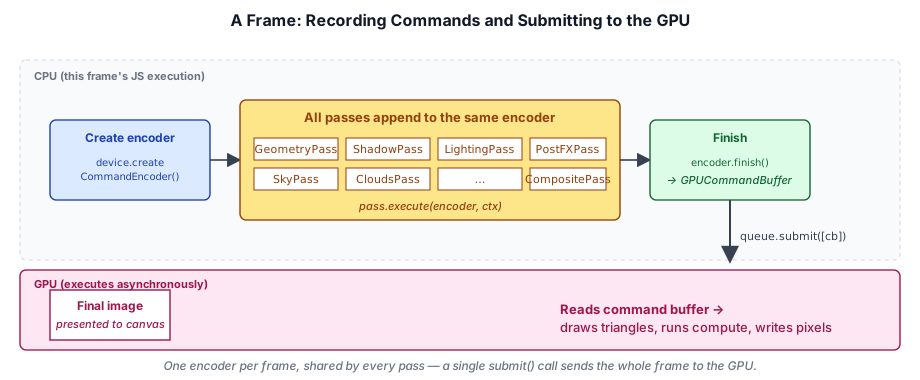
All GPU work is recorded into a command buffer via a GPUCommandEncoder, then submitted to the GPU through a GPUQueue. Every render pass for the frame writes into a single shared encoder, which is then finished and submitted as one command buffer:
The Frame Recording Pattern#
The render graph creates a single encoder per frame and walks the compiled list of passes against it, opening render or compute sub-passes as each pass requires:
async execute(compiled: CompiledGraph): Promise<void> {
  this.ctx.pushFrameErrorScope();

  const encoder = this.ctx.device.createCommandEncoder({ label: 'RenderGraph' });
  for (const cp of compiled.passes) {
    const node = cp.node;
    if (node.type === 'render') {
      const renderPass = encoder.beginRenderPass({ label: node.name, ...descriptor });
      node.execute({ commandEncoder: encoder, renderPassEncoder: renderPass }, resolved);
      renderPass.end();
    } else if (node.type === 'compute') {
      const computePass = encoder.beginComputePass({ label: node.name });
      node.execute({ commandEncoder: encoder, computePassEncoder: computePass }, resolved);
      computePass.end();
    } else {
      node.execute({ commandEncoder: encoder }, resolved);
    }
  }
  this.ctx.queue.submit([encoder.finish()]);

  await this.ctx.popFrameErrorScope();
}
All passes share one encoder. This is critical for correctness — each pass appends commands (render passes, buffer copies, barriers) into the same encoder. A single encoder.finish() produces one command buffer, and queue.submit() sends it to the GPU.
Render Passes#
A render pass records a set of draw calls that write into a fixed collection of attachments — textures that serve as the render targets for that pass. The pass begins by declaring those attachments and specifying load and store behavior for each one. It then records state changes (pipeline, bind groups, vertex and index buffers) and draw calls. When the pass ends, the GPU executes every recorded command against those attachments.
Conceptually, a render pass is a transaction: you declare what surfaces you are drawing into, you specify the starting and ending states of those surfaces, and you submit draw commands. The GPU processes the entire pass before the next pass can read from the same surfaces.
The GPURenderPassEncoder is the API object that represents this transaction. You create one by calling encoder.beginRenderPass() on a command encoder, record into it, and then call pass.end():
const pass = encoder.beginRenderPass(descriptor);
// ... set pipeline, bind groups, buffers, issue draws ...
pass.end();Attachments#
Every render pass operates on one or more attachments. There are two categories:
- Color attachments — textures that receive color output from the fragment shader. A pass can have up to the device's
maxColorAttachmentslimit (typically 8). Each attachment in thecolorAttachmentsarray corresponds to a@location(N)output in the fragment shader. - Depth/stencil attachment — an optional texture that receives depth and/or stencil output. When present, the GPU uses it for the depth test and stencil test on each fragment.
An attachment is described by three fields:
{
  view: GPUTextureView,          // which texture (and subresource) to write into
  loadOp: 'clear' | 'load',     // what to do at the start of the pass
  storeOp: 'store' | 'discard', // what to do at the end of the pass
  clearValue?: GPUColor,         // used only when loadOp is 'clear'
}
The view must be a GPUTextureView created from a texture whose usage flags include RENDER_ATTACHMENT. The texture format must match the format declared in the render pipeline's fragment targets for color attachments, and the depth/stencil format must match the pipeline's depthStencil.format.
Load and Store Operations#
The most important behavioral decision for each attachment is the combination of loadOp and storeOp.
loadOp controls what the GPU does to the attachment at the very start of the pass, before any draw calls execute:
loadOp | Behavior |
|---|---|
'clear' | Fills the entire attachment with clearValue before drawing. This is the most common choice for the first pass that writes to a surface. |
'load' | Preserves whatever was already in the texture. Use this when a later pass wants to add to the contents written by an earlier pass, such as when the block geometry pass appends to a G-Buffer that the mesh geometry pass already started filling. |
Choosing 'clear' is almost always correct for the first pass that writes to a given attachment each frame. It also signals to tile-based GPUs (common in mobile hardware) that they do not need to load the previous frame's contents from main memory into tile memory before beginning, which is a meaningful performance win on those architectures.
storeOp controls what happens to the attachment's contents at the end of the pass, after all draw calls have finished:
storeOp | Behavior |
|---|---|
'store' | Writes the rendered results back to the texture in memory, making them available for subsequent passes or presentation. |
'discard' | Tells the GPU it can throw away the rendered results. Use this for intermediate surfaces that are only needed by the GPU during the pass itself — for example, a multisample resolve target or an intermediate depth buffer that will not be read later. |
On tile-based GPUs, 'discard' avoids the cost of flushing tile memory back to main memory. When you use MSAA, you typically set storeOp: 'discard' on the multi-sampled color attachment and set up a resolveTarget pointing to the single-sampled texture where resolved output will be stored.
A complete color attachment for the first geometry pass looks like this:
// Raw GPURenderPassColorAttachment — what the render graph eventually builds for you:
{
  view: gbufferAlbedoView,
  clearValue: [0, 0, 0, 1],
  loadOp: 'clear',
  storeOp: 'store',
}
And a subsequent pass that reads the G-Buffer depth and writes additional geometry into it uses 'load':
// Second pass over the same target — preserve previous contents:
{
  view: gbufferAlbedoView,
  loadOp: 'load',
  storeOp: 'store',
}
In Taos Engine you don't construct these dictionaries directly — the render graph derives them from the AttachmentOptions you pass to b.write(handle, 'attachment', { loadOp, storeOp, clearValue }). The shape above is what beginRenderPass ultimately consumes.
Depth/stencil attachments have separate depthLoadOp / depthStoreOp and stencilLoadOp / stencilStoreOp fields, along with depthClearValue (a float, typically 1.0 for a standard near-to-far depth convention or 0.0 for a reverse-Z buffer) and stencilClearValue (an integer):
depthStencilAttachment: {
  view: gbufferDepthView,
  depthClearValue: 1.0,
  depthLoadOp: 'clear',
  depthStoreOp: 'store',
}'store' then 'load' both layers survive; give pass 2 'clear' and the triangle is wiped; give pass 1 'discard' and its work never reaches memory, so pass 2 loads zeros.Relationship to Render Pipelines#
The attachment configuration declared in beginRenderPass() must be compatible with every GPURenderPipeline you bind during that pass. Specifically:
- The number of color attachments must match the number of
targetsentries in the pipeline'sfragmentdescriptor. - Each attachment's texture format must match the corresponding
targets[N].format. - If a depth/stencil attachment is present, its format must match
depthStencil.formatin the pipeline. - The
sampleCountof the render pass textures must matchmultisample.countin the pipeline (default 1).
WebGPU validates this compatibility when you call setPipeline() during the pass. If there is a mismatch, a validation error fires immediately. This is the key reason that pipelines encode format information: it allows the runtime to verify pipeline-attachment compatibility without deferring the check to draw time.
// The pipeline's fragment targets...
fragment: {
  module: shaderModule,
  entryPoint: 'fs_main',
  targets: [
    { format: 'rgba8unorm' },    // must match albedoRoughness attachment
    { format: 'rgba16float' },   // must match normalMetallic attachment
  ],
},
// ...must exactly match the render pass attachments:
colorAttachments: [
  { view: albedoRoughnessView, /* format: rgba8unorm */ ... },
  { view: normalMetallicView,  /* format: rgba16float */ ... },
]
Multiple Render Targets#
A single render pass can write to multiple color attachments simultaneously. In the fragment shader, each output is declared with a separate @location(N) attribute:
struct FragOutput {
  @location(0) albedo_roughness : vec4<f32>,  // → colorAttachments[0]
  @location(1) normal_metallic  : vec4<f32>,  // → colorAttachments[1]
}

@fragment
fn fs_main(in: VertexOutput) -> FragOutput {
  var out: FragOutput;
  out.albedo_roughness = vec4f(albedo, roughness);
  out.normal_metallic  = vec4f(normal * 0.5 + 0.5, metallic);
  return out;
}
This is how Taos Engine's G-Buffer pass populates two separate textures in a single draw call sequence, rather than making two passes over the same geometry. Multiple render targets are only possible because the pipeline's targets array and the pass's colorAttachments array are matched by index.
Fullscreen Passes#
Many render passes — the lighting pass, SSAO, bloom, tone mapping — do not draw any scene geometry. Instead they draw a single large triangle that covers the entire viewport, running the fragment shader once for every pixel. A common pattern is:
// No vertex or index buffers; the shader generates a fullscreen triangle
// from @builtin(vertex_index)
pass.draw(3); // Three vertices, one triangle
In the vertex shader:
@vertex
fn vs_main(@builtin(vertex_index) idx: u32) -> @builtin(position) vec4<f32> {
  // Generates a CCW triangle that covers the clip-space square [-1,1]²
  let uv = vec2f(f32((idx << 1u) & 2u), f32(idx & 2u));
  return vec4f(uv * 2.0 - 1.0, 0.0, 1.0);
}
These passes use loadOp: 'clear' on their output attachments (since they will write every pixel) and loadOp: 'load' on any G-Buffer textures they sample as inputs — though those inputs are accessed as bound textures via TEXTURE_BINDING usage, not as attachments.
Viewport and Scissor#
By default the render pass covers the entire attachment. You can restrict drawing to a subregion with setViewport() and setScissorRect():
// Render into the top-left quarter of the attachment
pass.setViewport(0, 0, width / 2, height / 2, 0.0, 1.0);

// Clip all fragment output to this pixel rectangle (no border)
pass.setScissorRect(0, 0, width / 2, height / 2);
The viewport controls the NDC-to-pixel mapping (including depth range via the last two parameters, minDepth and maxDepth). The scissor rectangle clips the rasterizer's output: fragments outside the scissor are discarded before the depth test and fragment shader execute.
Occlusion Queries#
Render passes optionally accept an occlusion query set, allowing the CPU to ask "how many samples passed the depth test for this draw call?" You declare the query set on the pass descriptor and issue beginOcclusionQuery() / endOcclusionQuery() around the relevant draws. The results can drive CPU-side culling decisions for subsequent frames.
Draw Calls#
Inside a render pass, the typical draw sequence is:
pass.setPipeline(pipeline);
pass.setBindGroup(0, cameraBindGroup);
pass.setBindGroup(1, modelBindGroup);
pass.setBindGroup(2, materialBindGroup);
pass.setVertexBuffer(0, vertexBuffer);
pass.setIndexBuffer(indexBuffer, 'uint32');
pass.drawIndexed(indexCount);
Taos Engine uses indexed drawing (via drawIndexed) for all triangle meshes. Non-indexed draw() is used for fullscreen triangle passes (lighting, post-processing).
Compute Passes#
While render passes produce pixel output, compute passes run general-purpose GPU programs that operate on arbitrary data. A compute pass has no rasterizer, no attachments, and no fixed-function pipeline stages — just a compute shader dispatched over a grid of work items.
A compute pass is created with encoder.beginComputePass() and records one or more dispatchWorkgroups() calls against a bound compute pipeline:
const pass = encoder.beginComputePass({ label: 'ParticleUpdate' });
pass.setPipeline(this._simulatePipeline);
pass.setBindGroup(0, this._particleBindGroup);
pass.dispatchWorkgroups(Math.ceil(particleCount / 64));
pass.end();
There are no draw calls, no vertex buffers, and no color attachments. The compute shader writes its results into storage buffers or storage textures declared in its bind groups.
The Compute Shader Model#
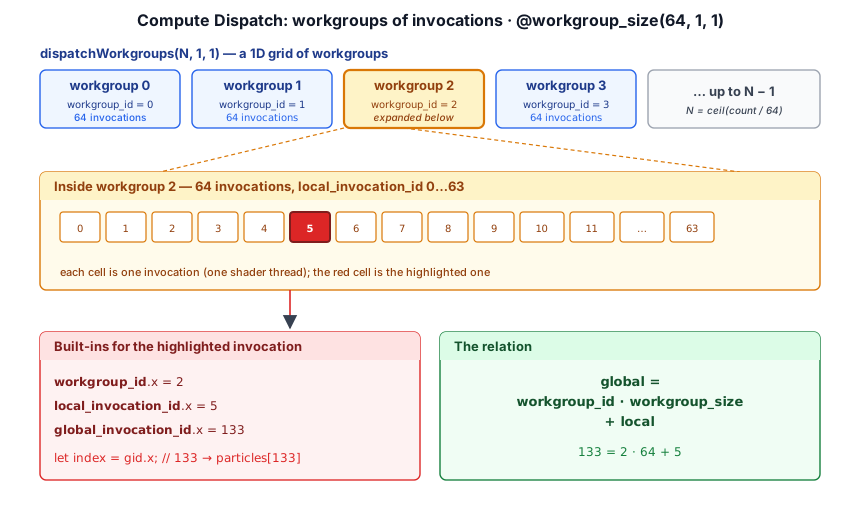
A compute shader runs as a three-dimensional grid of workgroups, each workgroup containing a fixed number of invocations (individual shader threads). The workgroup size is declared in WGSL with the @workgroup_size attribute:
@compute @workgroup_size(64, 1, 1)
fn cs_main(
  @builtin(global_invocation_id) gid: vec3<u32>,
  @builtin(local_invocation_id) lid: vec3<u32>,
  @builtin(workgroup_id) wid: vec3<u32>,
) {
  let index = gid.x; // global thread index across all workgroups
  if (index >= arrayLength(&particles)) { return; }
  // ... update particles[index] ...
}
Key built-in values:
| Built-in | Meaning |
|---|---|
global_invocation_id | Absolute thread position across the entire dispatch grid (x, y, z) |
local_invocation_id | Thread position within its own workgroup |
workgroup_id | Which workgroup this thread belongs to |
local_invocation_index | Flattened linear index within the workgroup |
num_workgroups | Total number of workgroups dispatched |
The total number of threads equals dispatchWorkgroups(Wx, Wy, Wz) × @workgroup_size(Sx, Sy, Sz). If your data has N elements and your workgroup size is 64, you dispatch ceil(N / 64) workgroups and guard against out-of-bounds access:
if (gid.x >= arrayLength(&particles)) { return; }workgroup_id and shaded by local_invocation_index; dark lines are workgroup boundaries and the white line is the edge of the data. The hatched cells are invocations launched by the rounded-up dispatch that fail the bounds guard. Make the image 65 wide with 64, 1 workgroups to see nearly half the threads idle, then hover to check the global = workgroup × size + local relation.Workgroup Memory#
Threads within the same workgroup can communicate through workgroup-shared memory, declared with the var<workgroup> address space:
var<workgroup> shared_data: array<f32, 64>;

@compute @workgroup_size(64)
fn cs_main(@builtin(local_invocation_index) lid: u32) {
  // Phase 1: each thread writes to shared memory
  shared_data[lid] = load_something(lid);

  // Synchronize: all threads must reach this barrier before any proceed
  workgroupBarrier();

  // Phase 2: each thread reads the result of its neighbor
  let neighbor = shared_data[(lid + 1u) % 64u];
  // ...
}
workgroupBarrier() issues a memory and execution barrier: no thread in the workgroup proceeds past it until every thread has reached it. This is the mechanism for parallel reduction, prefix sums, histogram computation, and other patterns that require intra-workgroup communication.
Workgroup memory is fast (on-chip) but limited. The WebGPU spec guarantees at least 16 KB per workgroup; typical hardware provides 32–64 KB. Exceeding the limit is a pipeline creation error.
Storage Buffers and Storage Textures#
Compute shaders communicate with the rest of the frame through storage buffers and storage textures — the only resource types that compute shaders can write to.
A storage buffer is declared with an access type of read for read-only, write for write-only, or read_write for access that allows both reading and writing to the buffer, as in var<storage, read_write>:
struct Particle {
  position: vec3<f32>,
  velocity: vec3<f32>,
  life:     f32,
}

@group(0) @binding(0) var<storage, read_write> particles: array<Particle>;
@group(0) @binding(1) var<uniform>              params:   ParticleParams;
A storage texture is also declared with an access type, but read_write storage textures support is much more restrictive for which formats support it. The WebGPU feature texture_formats_tier2 extend the number of formats that support read_write access, but it's not available everywhere. In general you should try to minimize the use of read_write storage texture access.
@group(0) @binding(0) var output_tex: texture_storage_2d<rgba8unorm, write>;

@compute @workgroup_size(8, 8)
fn cs_main(@builtin(global_invocation_id) gid: vec3<u32>) {
  let value = compute_value(gid.xy);
  textureStore(output_tex, vec2i(gid.xy), vec4f(value, 0.0, 0.0, 1.0));
}
Storage textures use textureStore() rather than textureSample() — there is no sampler, filtering, or mip selection. For reading from a texture in a compute shader, you can bind it as a regular texture_2d with textureLoad() (which reads a specific texel without filtering):
@group(0) @binding(1) var input_tex: texture_2d<f32>;

let texel = textureLoad(input_tex, vec2i(coord), 0); // mip level 0
Dispatching Work#
dispatchWorkgroups(x, y, z) launches a 3D grid of workgroups. The y and z dimensions default to 1 if omitted:
// 1D: particle simulation over N particles, 64 threads per workgroup
pass.dispatchWorkgroups(Math.ceil(particleCount / 64));

// 2D: image processing over a width × height texture
pass.dispatchWorkgroups(
  Math.ceil(width  / 8),
  Math.ceil(height / 8),
);

// 3D: volumetric operation over a 3D grid
pass.dispatchWorkgroups(
  Math.ceil(gridX / 4),
  Math.ceil(gridY / 4),
  Math.ceil(gridZ / 4),
);
For dynamic workload sizes determined by a previous compute pass (for example, the number of visible particles surviving a culling pass), use indirect dispatch:
// The compute shader wrote the workgroup counts into an INDIRECT buffer
pass.dispatchWorkgroupsIndirect(indirectBuffer, byteOffset);
The buffer at byteOffset must contain three uint32 values: [workgroupCountX, workgroupCountY, workgroupCountZ].
Compute Pipelines#
A GPUComputePipeline is simpler than a render pipeline — it has no vertex layout, no fragment targets, no depth state, and no primitive topology. It consists of a pipeline layout (bind group layouts) and a single compute shader entry point:
const computePipeline = device.createComputePipeline({
  label: 'ParticleSimulate',
  layout: device.createPipelineLayout({
    bindGroupLayouts: [particleBGL],
  }),
  compute: {
    module: shaderModule,
    entryPoint: 'cs_main',
  },
});
Like render pipelines, compute pipelines are immutable and expensive to create. They should be created once during initialization and cached.
The @workgroup_size declared in the WGSL shader becomes part of the compiled pipeline. If you need the same algorithm to run efficiently at multiple workgroup sizes (for hardware that prefers different tile widths), you need separate pipeline objects — or use WGSL override constants:
override WORKGROUP_SIZE: u32 = 64;

@compute @workgroup_size(WORKGROUP_SIZE)
fn cs_main(...) { ... }device.createComputePipeline({
compute: {
module: shaderModule,
entryPoint: 'cs_main',
constants: { WORKGROUP_SIZE: 128 }, // override at pipeline creation
},
});Synchronization Between Passes#
In WebGPU, resource synchronization between passes is managed by the API automatically. A storage buffer written by a compute pass is visible to the next render pass that reads it — there is no explicit barrier API call required from the application. The command encoder's ordering guarantees that:
- All commands in a compute pass complete before the next pass begins.
- A texture transitioned from
RENDER_ATTACHMENTusage toTEXTURE_BINDINGusage is automatically available to subsequent passes.
This is a significant simplification compared to Vulkan and D3D12, where explicit pipeline barriers and image layout transitions are the programmer's responsibility. The browser's WebGPU implementation tracks how each resource is used and inserts the necessary barriers for you.
The same guarantee extends inside a compute pass. Each dispatchWorkgroups() call is its own usage scope, so storage writes made by one dispatch are visible to the next dispatch in the same pass — the implementation inserts whatever barrier is needed between them:
// Fine: dispatch 2 sees everything dispatch 1 wrote
const pass = encoder.beginComputePass();
pass.setPipeline(writePipeline);
pass.dispatchWorkgroups(...); // writes buffer A
pass.setPipeline(readPipeline);
pass.dispatchWorkgroups(...); // reads buffer A
pass.end();
What does need care is synchronization within a single dispatch. Invocations of one dispatch run in no guaranteed order, so if one invocation writes a location that another reads, you have a data race. Inside a workgroup, workgroupBarrier() (for var<workgroup> memory) and storageBarrier() (for storage buffers and textures) make every invocation wait until the whole workgroup has reached the barrier and its writes are visible. There is no barrier that spans workgroups: an algorithm whose phase 2 needs the results of every workgroup's phase 1 — a global prefix sum, a reduction to a single value — must split the phases into separate dispatches. Within one dispatch, cross-workgroup communication is limited to atomics on storage memory.
Copy Operations#
The command encoder also supports copy operations. For example, copying the results of a compute shader into a storage buffer for indirect draw:
encoder.copyBufferToBuffer(source, 0, dest, 0, size);Taos Engine uses compute-to-buffer copies in the particle system to copy the computed particle count into the indirect draw buffer.
The RenderContext Abstraction#
The RenderContext class (src/renderer/render_context.ts) wraps the WebGPU device, queue, and canvas configuration into a single handle that flows through the entire render graph.
export class RenderContext {
  readonly device: GPUDevice;
  readonly queue: GPUQueue;
  readonly context: GPUCanvasContext;
  readonly format: GPUTextureFormat;
  readonly canvas: HTMLCanvasElement;
  readonly hdr: boolean;
  readonly enableErrorHandling: boolean;
}
It provides:
- Swap chain access via
getCurrentTexture(). - Buffer creation via
createBuffer(). - Data upload via
writeBuffer(). - Error scope management via
pushInitErrorScope()/popInitErrorScope()and per-frame/per-pass variants.
Pass instances live for the lifetime of the application; they own the long-lived state (pipelines, BGLs, persistent uniform buffers) and access the device via the RenderContext passed to their static create() factory. The RenderGraph itself is built fresh each frame from those persistent pass instances:
Application (main.ts / renderer_setup.ts)
   │
   │   (owns persistent pass instances + PhysicalResourceCache)
   │
   ▼
each frame:
   new RenderGraph(ctx, cache)
      │
      │  pass.addToGraph(graph, deps)   // wires reads/writes/execute
      │  graph.compile()                // validate, cull, sort, bind resources
      │  graph.execute(compiled)        // single GPUCommandEncoder → submit
      ▼
command buffer → GPUQueueLifecycle#
- Creation.
RenderContext.create(canvas)is called once during startup. It requests the adapter, creates the device, and configures the canvas. The renderer then constructs onePhysicalResourceCacheand one instance of everyPassvia itsstatic create(ctx)factory. - Frame loop. Each frame, the renderer builds a new
RenderGraph(ctx, cache), callsaddToGraph()on each pass to declare its reads/writes for the frame, then callscompile()andexecute(). One command encoder, one submit. - Resize. On canvas resize, the canvas pixel dimensions are updated and
cache.trimUnused()drops every pooled transient (they were sized to the previous canvas). Pass instances themselves don't care about canvas size — pipelines and BGLs survive resizes. - Destroy.
pass.destroy()releases each pass's long-lived GPU objects;cache.destroy()drops every pooled and persistent resource; the render context is discarded.
Error Checking#
Unlike the C/C++-flavored graphics APIs, WebGPU is asynchronous and forgiving by design: most invalid operations don't crash, they're flagged as errors that propagate up through the device. There are three error kinds the spec recognizes:
- Validation — you used the API wrong (mismatched bind-group layouts, an out-of-bounds buffer write, a pipeline whose vertex format doesn't match its shader). The overwhelming majority of bugs while writing renderer code.
- Out-of-memory —
createTexture/createBuffercouldn't allocate. Less common in practice but worth distinguishing because it implies you might be able to recover by trimming caches. - Internal — the implementation hit a bug or platform limit and gave up. Rare and usually unactionable from JS.
There are two layers of error reporting, and Taos Engine uses both — conditionally.
The Default Handler: uncapturederror#
GPUDevice is an EventTarget, and any error that isn't swallowed by an active error scope fires an uncapturederror event. Installing a single listener gives you a safety net that catches every leaked error in the application:
if (options.enableErrorHandling) {
  device.addEventListener('uncapturederror', (event) => {
    const err = event.error;
    if (err instanceof GPUValidationError) {
      console.error('[WebGPU Validation Error]', err.message);
    } else if (err instanceof GPUOutOfMemoryError) {
      console.error('[WebGPU Out of Memory]');
    } else {
      console.error('[WebGPU Internal Error]', err);
    }
  });
}
This is your "catch everything I forgot to wrap" backstop. Without it, errors that fall through every active scope are silently dropped by the browser. The cost is essentially free — the listener only fires when something has already gone wrong — so it's worth installing in every build, dev or production.
Granular Capture: Error Scopes#
A scope is a stack frame for errors. You call device.pushErrorScope(filter) before a region of code; you call device.popErrorScope() after, and the returned Promise resolves with the first error of that type captured inside the region (or null if none). Scopes nest: an inner scope captures errors first, an outer scope only sees what the inner one didn't filter for.
Taos Engine wraps three lifetimes:
pushInitErrorScope(): void {
  if (this.enableErrorHandling) {
    this.device.pushErrorScope('validation');
  }
}

pushFrameErrorScope(): void {
  if (this.enableErrorHandling) {
    this.device.pushErrorScope('validation');
  }
}

pushPassErrorScope(_passName: string): void {
  if (this.enableErrorHandling) {
    this.device.pushErrorScope('validation');
    this.device.pushErrorScope('out-of-memory');
    this.device.pushErrorScope('internal');
  }
}
The init scope wraps one-shot resource creation (createPipeline, createBindGroup of long-lived state); the frame scope wraps the whole per-frame addToGraph → compile → execute sequence; the pass scope wraps a single pass's recording and execution, with three nested filters so an out-of-memory in the middle of a pass gets attributed to that pass and not blamed on whatever happens to be running around it. The matching popXErrorScope(label) methods await the Promise and console.error with the supplied label so the message is actually attributable to a code site.
Performance Implications#
Error scopes are not free. Each pushErrorScope registers a region with the driver's validation layer; each popErrorScope returns a Promise whose resolution requires the implementation to actually complete enough work to know whether anything in that region went wrong. In practice the browser collapses this into a small amount of bookkeeping plus an inter-thread message, but the cost is real and grows with how many scopes you push per frame. Pushing one scope around every individual pass means N synchronization hops per frame instead of one. await-ing the popped Promise also stalls your JS until the GPU thread responds, so if you wait on the pass scope inside the frame loop you've effectively serialized CPU and GPU work.
For development this is exactly the trade you want: you'd happily lose 20% of your framerate to find out which pass corrupted the depth attachment. For production it's unhelpful — once the renderer is shipping, the validation work is wasted effort against code that has already been exercised.
Taos Engine's enableErrorHandling Switch#
Every error path in RenderContext is wrapped in if (this.enableErrorHandling). The flag is an option to RenderContext.create():
const ctx = await RenderContext.create(canvas, { enableErrorHandling: true });When true, the uncapturederror listener is installed and all the pushX/popXErrorScope helpers actually push/pop scopes. When false (the default), the listener is omitted and every scope helper is a no-op — there's zero per-frame overhead and no await on a popped Promise can ever stall the frame.
Taos Engine's samples turn it on (they're development environments by nature); a shipped game would leave it off and rely on testing plus the uncapturederror net to catch regressions in dev builds.
Summary#
In this chapter we covered every major WebGPU resource type and saw how Taos Engine uses them:
| Resource | Taos Engine usage | Key files |
|---|---|---|
GPUAdapter / GPUDevice | Created once in RenderContext.create() | render_context.ts |
GPUBuffer | Uniforms per-frame, vertex/index for meshes, storage for particles | geometry_pass.ts, particle_pass.ts |
GPUTexture | G-Buffer, HDR target, shadow maps, sky, cloud noise | render_graph/passes/block_geometry_pass.ts, deferred_lighting_pass.ts |
GPUSampler | Created per-pass for texture sampling | various passes |
GPUBindGroup / GPUBindGroupLayout | Group 0=camera, 1=model, 2=material | geometry_pass.ts |
GPUShaderModule | Loaded from .wgsl files via ?raw import | src/shaders/*.wgsl |
GPURenderPipeline | Cached per material shader ID | geometry_pass.ts |
GPUComputePipeline | Particles, auto-exposure, SSGI | particle_pass.ts, auto_exposure_pass.ts |
GPUCommandEncoder | One per frame, shared across all passes | render_graph/render_graph.ts |
GPUQueue | writeBuffer() for uniform uploads, submit() for command buffers | render_context.ts |
Further reading:
src/renderer/render_context.ts— GPUDevice/GPUAdapter creation and managementsrc/renderer/render_graph/passes/— Per-pass buffer, texture, and pipeline creationsrc/shaders/— All WGSL shader modulessrc/engine/camera.ts— Camera uniforms and bind group layout
In the next chapter, we see how these pieces come together in Taos Engine's render graph architecture — the system that orchestrates all these resources into a complete frame.