This chapter presents the architectural backbone of Taos Engine's renderer — the render graph, its passes, and how they compose to produce every frame.
The Render Graph#
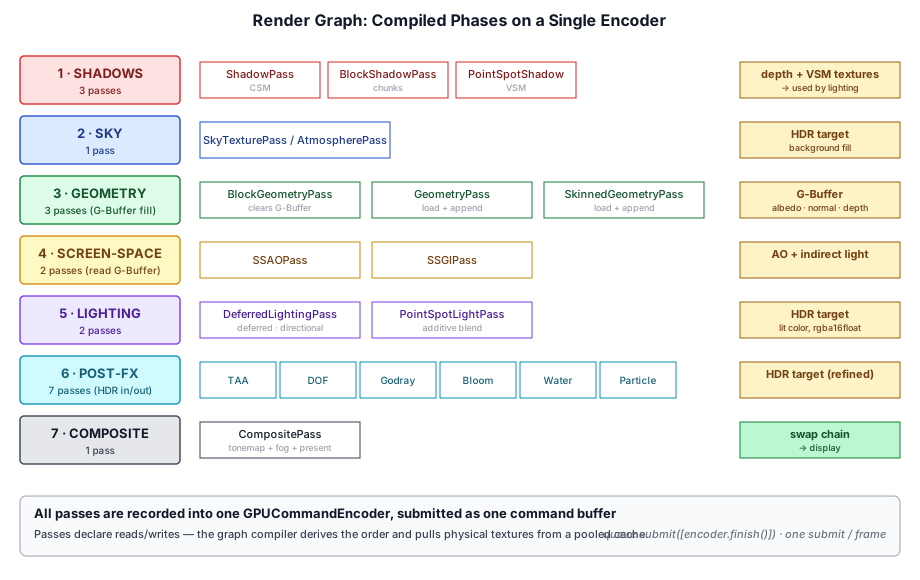
The render graph (src/renderer/render_graph/) is a dependency graph of passes that the renderer rebuilds, compiles, and executes once per frame. Each pass declares which virtual resources it reads and writes, and the graph compiler turns those declarations into an ordered command stream, allocating physical GPU objects from a pool as it goes.
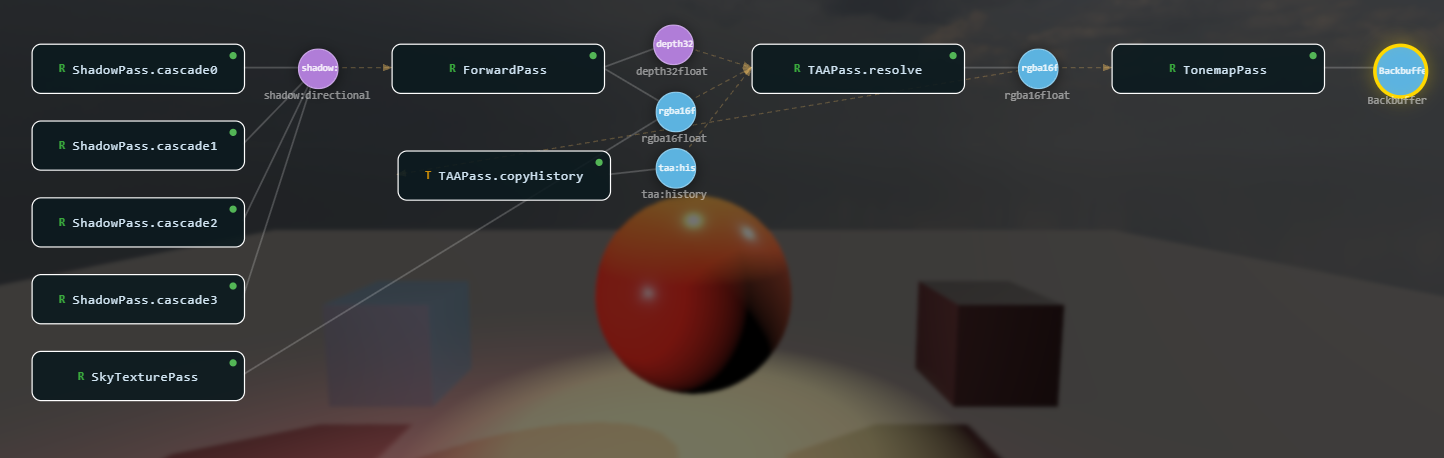
There are three classes at the heart of the system:
| Class | Role |
|---|---|
RenderGraph | Per-frame builder, compiler, and executor. Constructed each frame; thrown away after execute() returns. |
Pass | Long-lived owner of pipelines, bind group layouts, and persistent uniform buffers. Inserts itself into the graph each frame. |
PhysicalResourceCache | Cross-frame pool of GPUTexture / GPUBuffer / GPUBindGroup / GPUTextureView objects. Survives graph rebuilds. |
Why a Dependency Graph?#
Taos Engine's frame is a moving target. Bloom, depth-of-field, volumetric clouds, weather particles, temporal anti-aliasing, all come and go based on user settings. The G-Buffer depth alone feeds eight different consumers (screen space ambient occlusion, screen space global illumination, deferred lighting, godrays, water refraction, particle soft-edges, the block highlight outline, the composite pass). A render graph turns this kind of dynamic, branching workload into something the compiler can check, optimize, and rearrange on its own.
Four concrete capabilities fall out of organizing the frame as a dependency graph:
- Type-checked wiring. Each pass declares its dependencies and outputs in TypeScript interfaces. Connecting two passes is
b.write(a.output)— if the producer's output doesn't match the consumer's expected input, the compiler rejects it. - Automatic culling. Passes that don't reach the backbuffer (or a persistent / external resource) are dropped before execution. Disabling a downstream pass automatically prunes any upstream-only-fed passes — there's no manual bookkeeping to keep optional features in sync.
- Automatic resource lifetime. Transient textures and buffers are described, not allocated. The cache pools physical objects across frames keyed by descriptor, so a "new" half-res
rgba16floattexture is almost always a cheap pool hit. Lifetime correctness comes from the read/write declarations, not from manually tracking which texture is live at which point in the frame. - Validation. Every read declares the version of the handle it observed. Writing a handle bumps the version. Reading a stale version is caught at graph-build time, not as a silent shader bug.
Together, these capabilities collapse "what order should the passes run in?", "which textures do they share?", and "what usage flags does each resource need?" from three separate problems that the caller has to solve into a single set of declarations the graph compiles automatically.
Lifecycle (Per Frame)#
The graph is per-frame, not per-application. Persistent state lives on the pass instances and on the cache; the RenderGraph object itself is built fresh, compiled, executed, and discarded each frame.
async render(ctx: RenderContext, frame: FrameDeps): Promise<void> {
  const graph = new RenderGraph(ctx, cache);
  const backbuffer = graph.setBackbuffer('canvas');

  // Each pass.addToGraph(graph, deps) returns its outputs as handles.
  const shadow = shadowPass.addToGraph(graph, { cascades, drawItems });
  const gbuffer = blockGeometryPass.addToGraph(graph, { loadOp: 'clear' });
  const ssao = ssaoPass.addToGraph(graph, { normal: gbuffer.normal, depth: gbuffer.depth });
  // ... more passes wired together by handle ...
  compositePass.addToGraph(graph, { input: ..., backbuffer });

  const compiled = graph.compile();   // validate → cull → topo-sort → bind
  await graph.execute(compiled);      // one command encoder, one submit
}
Five steps run every frame:
- Build. Construct a new
RenderGraph(ctx, cache). The cache is owned by the renderer setup and lives across frames. - Declare. Each pass's
addToGraph()callsgraph.addPass(name, type, b => { ... })exactly once. The setup callback uses thePassBuilderto record reads, writes, and the execute callback. - Set the sink.
graph.setBackbuffer('canvas')(and optionallysetBackbufferDepth) tells the compiler which resource(s) the graph is producing. Everything not reachable from the sink will be culled. - Compile.
graph.compile()validates the declarations, culls dead passes, topologically sorts the survivors, and resolves every virtual resource to a physicalGPUTextureorGPUBufferfrom the cache. - Execute.
graph.execute(compiled)records every pass into a singleGPUCommandEncoder, opens render or compute passes as declared, submits one command buffer, and returns transient resources to the pool.
Per-frame rebuilds sound expensive, but the cost is dominated by compile() (a couple of Map lookups and a depth-first walk over a few dozen passes) and pooled getOrCreate* calls on the cache. Pipelines, shader modules, persistent uniform buffers, BGLs — the genuinely expensive things — live on the pass instances and are never re-created.
Virtual Resources and Handles#
Resources inside the graph are virtual until compile() runs. A pass receives a ResourceHandle from another pass, declares how it uses the resource, and gets back a new handle representing the post-write state:
export interface ResourceHandle {
  readonly id: number;
  readonly version: number;
}
The id identifies the underlying virtual resource; the version is bumped every time the resource is written. Pass A writes id 7 and gets back {id: 7, v: 1}. It hands that handle to pass B, which loads and writes it, receiving {id: 7, v: 2}. Pass C reads {id: 7, v: 2}. The handle versions form a single-producer chain per resource that the compiler can validate, sort, and cull against.
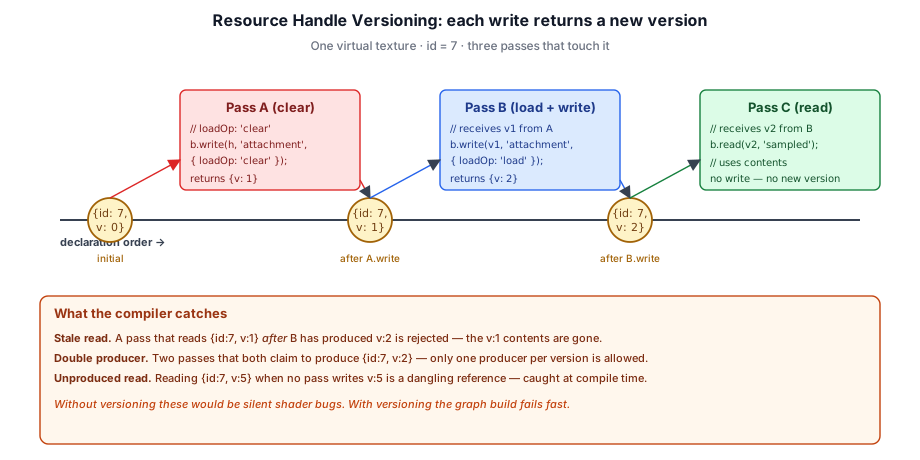
This versioning is the central trick that lets the graph reason about lifetimes without parsing shader code. Whoever called write() last "owns" the contents; whoever reads the returned handle observes those contents. Three mistakes the compiler catches as a consequence:
- Stale reads. A read of
{id: 7, v: 1}is invalid if a later pass already produced{id: 7, v: 2}— the new version overwrites the old, so the old contents are gone. - Double producers. If two passes both claim to produce
{id: 7, v: 2}, the compiler rejects the graph. There is exactly one producer per version. - Unproduced reads. If a pass reads
{id: 7, v: 5}and no pass writes that version, the read references something that does not exist.
Resource Usage Classification#
Every read and write declares a ResourceUsage from a fixed vocabulary. This single declaration drives both the GPU usage flags applied to the physical resource and which encoder type the graph opens for the pass:
ResourceUsage | Meaning | Usage flag(s) added |
|---|---|---|
'attachment' | Color attachment, write-only | RENDER_ATTACHMENT |
'depth-attachment' | Depth-stencil attachment | RENDER_ATTACHMENT |
'depth-read' | Read-only depth (bound to render pass with depthReadOnly: true) | RENDER_ATTACHMENT | TEXTURE_BINDING |
'sampled' | Bound to bind group as sampled texture | TEXTURE_BINDING |
'storage-read' | 'storage-write' | 'storage-read-write' | Bound as storage texture / buffer | STORAGE_BINDING (tex) or STORAGE (buf) |
'uniform' | 'vertex' | 'index' | 'indirect' | Buffer bound to the corresponding pipeline slot | UNIFORM / VERTEX / INDEX / INDIRECT |
'copy-src' | 'copy-dst' | Source / destination of a copyBufferToBuffer / copyTextureToTexture | COPY_SRC / COPY_DST |
The graph aggregates every usage of a virtual resource across all passes that touch it and creates the physical object with the union of those flags. A G-Buffer texture used by the geometry pass as 'attachment' and then by the lighting pass as 'sampled' gets RENDER_ATTACHMENT | TEXTURE_BINDING automatically — no manual usage bookkeeping.
Three usage classifications carry extra weight:
'attachment'and'depth-attachment'writes also carry anAttachmentOptionsstruct (loadOp,storeOp,clearValue, optional MSAAresolveTarget, optional view descriptor). The graph reads these to build theGPURenderPassDescriptor; the pass execute callback never touchesbeginRenderPass()directly.'depth-read'reads bind the depth texture as a read-only depth attachment instead of as a sampled texture. This lets the pass run with depth-test enabled without re-uploading a depth buffer.'copy-src'/'copy-dst'are how copy commands participate in the dependency graph. A pass that doesencoder.copyTextureToTexture(history, current, ...)declares the history texture as'copy-src'and the new texture as'copy-dst'; downstream passes that read the new texture see the dependency.
Pass Types#
Every pass is one of three types:
export type PassType = 'render' | 'compute' | 'transfer';'render'— the graph builds aGPURenderPassDescriptorfrom declared attachments, callsbeginRenderPass(), and hands the execute callback both the command encoder and the render pass encoder. Used by every G-Buffer pass, lighting pass, post-processing pass, and fullscreen pass.'compute'— the graph callsbeginComputePass()and hands the execute callback both encoders. Used by SSGI temporal accumulation, particle simulation, and auto-exposure histogram passes.'transfer'— no sub-pass is opened. The execute callback receives only the rawGPUCommandEncoder. Used for copy commands (copyBufferToBuffer,copyTextureToTexture), buffer clears, and the shadow pass family that opens many sub-passes of its own (one per cascade).
Example: Wiring Three Passes#
The clearest way to see the API in motion is to look at how the deferred renderer connects the G-Buffer fill, SSAO, and deferred lighting:
const gbuf = blockGeometryPass.addToGraph(graph, { loadOp: 'clear' });
const ssao = ssaoPass.addToGraph(graph, {
  normal: gbuf.normal,
  depth: gbuf.depth,
});
const lit = lightingPass.addToGraph(graph, {
  gbuffer: gbuf,
  shadowMap,
  ao: ssao.ao,
  hdr: skyHdr,
});
The handles returned from blockGeometryPass.addToGraph() are typed ({ albedo, normal, depth }), and TypeScript checks that ssaoPass.addToGraph() is given handles for normal and depth. Inside BlockGeometryPass.addToGraph(), the work looks like this:
graph.addPass(this.name, 'render', (b: PassBuilder) => {
  // Create transient attachments if no incoming GBuffer was supplied.
  const albedo = b.createTexture({ label: 'gbuffer.albedo', ...screenDesc('rgba8unorm') });
  const normal = b.createTexture({ label: 'gbuffer.normal', ...screenDesc('rgba16float') });
  const depth  = b.createTexture({ label: 'gbuffer.depth',  ...screenDesc('depth32float') });

  outAlbedo = b.write(albedo, 'attachment',
      { loadOp: 'clear', storeOp: 'store', clearValue: [0, 0, 0, 1] });
  outNormal = b.write(normal, 'attachment',
      { loadOp: 'clear', storeOp: 'store', clearValue: [0.5, 0.5, 1, 1] });
  outDepth  = b.write(depth,  'depth-attachment',
      { depthLoadOp: 'clear', depthStoreOp: 'store', depthClearValue: 1.0 });

  b.setExecute((pctx) => {
    const enc = pctx.renderPassEncoder!;
    // ... bind pipelines, iterate visible chunks, issue draws ...
  });
});

return { albedo: outAlbedo, normal: outNormal, depth: outDepth };
Three things to notice:
- The pass never builds its own
GPURenderPassDescriptor. It declares the attachments viab.write(..., 'attachment', { loadOp, ... })and the graph builds the descriptor at execute time. - The pass returns the post-write handles, not the originals. Downstream passes reading these handles observe the cleared-then-drawn versions, not the initial empty texture.
- The setup callback is synchronous and runs at graph-build time. The execute callback runs later, during
graph.execute(), with the resolved physical resources available viaResolvedResources.
Persistent and External Resources#
Some resources need to survive between frames: shadow maps that the next frame's lighting pass will sample, TAA history that the next frame's resolve will blend with, the auto-exposure scalar that drives composite. The graph supports two non-transient resource categories:
- Persistent.
graph.importPersistentTexture(key, desc)returns a handle backed by aGPUTexturekeyed bykeyin thePhysicalResourceCache. The samekeyacross frames returns the same physical texture. The graph never destroys persistent resources; the owning pass callscache.destroyPersistentTexture(key)in its owndestroy(). - External.
graph.importExternalTexture(tex, desc)wraps a caller-ownedGPUTextureas a graph handle. Used for assets like the block atlas or the cloud noise volume whose lifetime is managed by the loader.
Persistent resources participate in culling specially: any pass that writes a persistent resource is treated as a sink (the same way the backbuffer is), because the write is visible to the next frame's graph even if no pass in the current graph reads the new version. Without this, a pass that updates TAA history but doesn't directly feed the backbuffer would be culled.
Culling and Topological Sort#
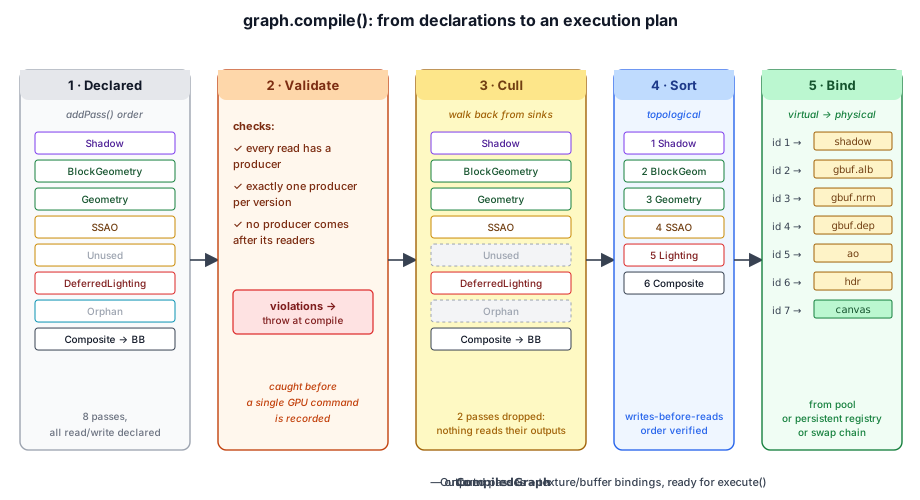
compile() walks the declared passes through five stages — validate, cull, sort, bind, plus the final packaging into a CompiledGraph:
- Validate. Every read at version > 0 must have a producer. Every version must have exactly one producer. Stale reads (caught at builder time) and dangling references (caught here) are both compile errors.
- Cull. Starting from the backbuffer (and from every pass that writes a persistent / external resource), walk the dependency graph backwards. Passes that aren't reached are dropped. A pass that writes version v of a resource is also kept if some live pass writes v + 1 — the new version's
'load'op needs the previous contents. - Sort. Passes are inserted in declaration order, and the API contract (write returns a fresh handle that downstream callers must use) already guarantees that order respects data flow. The compiler verifies this and rejects graphs that try to read a handle whose producer comes later.
- Bind. Each surviving virtual resource id is mapped to a physical
GPUTextureorGPUBuffer. Transients come from the pool, persistent resources from the cache's named registry, the backbuffer from the swap chain at execute time.
The reason culling matters in practice: many optional passes feed into the lighting pass via 'load' writes (atmosphere clears the HDR target). When SSGI is disabled, the SSGI pass is never added to the graph at all — but even if it were added with an output nothing reads, culling would drop it before execute.
Single Command Encoder, Single Submit#
const encoder = this.ctx.device.createCommandEncoder({ label: 'RenderGraph' });
for (const cp of compiled.passes) {
  const node = cp.node;
  if (node.type === 'render') {
    const renderPass = encoder.beginRenderPass({ label: node.name, ...descriptor });
    node.execute({ commandEncoder: encoder, renderPassEncoder: renderPass }, resolved);
    renderPass.end();
  } else if (node.type === 'compute') {
    const computePass = encoder.beginComputePass({ label: node.name });
    node.execute({ commandEncoder: encoder, computePassEncoder: computePass }, resolved);
    computePass.end();
  } else {
    node.execute({ commandEncoder: encoder }, resolved);
  }
}
this.ctx.queue.submit([encoder.finish()]);
this.cache.releaseAllTransients();
Every pass appends to the same GPUCommandEncoder, and the entire frame is submitted as a single command buffer. WebGPU's automatic synchronization model means resource hazards between passes are handled by the API — the graph's only responsibility is correct ordering, which the topological sort provides.
Passes#
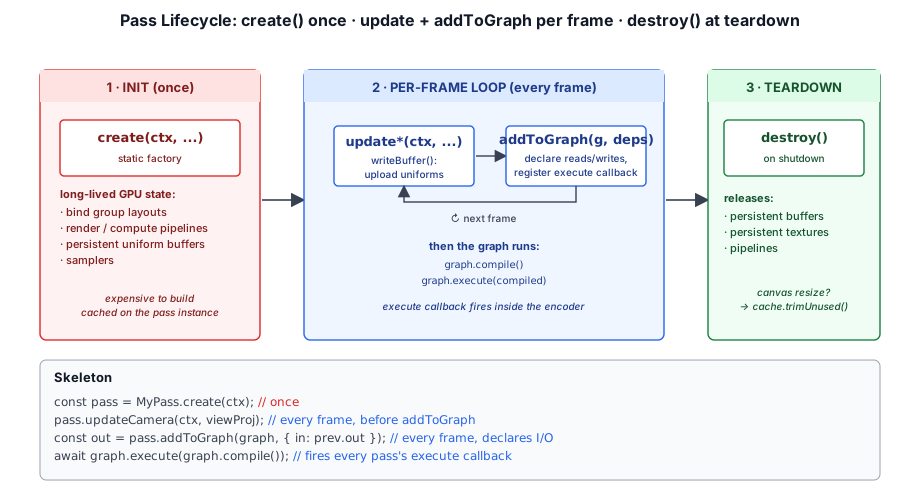
A pass is a Pass<TDeps, TOutputs> subclass that owns long-lived GPU state and, on each frame, inserts itself into a render graph:
export abstract class Pass<TDeps = undefined, TOutputs = void> {
  abstract readonly name: string;
  abstract addToGraph(graph: RenderGraph, deps: TDeps): TOutputs;
  destroy(): void {}
}
The split between long-lived state and per-frame declaration is intentional. Pipelines, BGLs, samplers, and persistent uniform buffers are expensive to create — the pass instance is built once and reused for every frame. The dependency wiring (which textures this pass reads, which it writes, what's in the execute callback) is cheap to declare and is rebuilt fresh each frame so it can respond to changes in the scene without rebuilding pipelines.
Authoring Convention#
Every Taos Engine pass follows the same three-method pattern:
export class MyPass extends Pass<MyDeps, MyOutputs> {
  readonly name = 'MyPass';

  // 1. Long-lived state.
  private readonly _pipeline: GPURenderPipeline;
  private readonly _bgl: GPUBindGroupLayout;
  private readonly _uniformBuffer: GPUBuffer;

  private constructor(/* ... */) { super(); /* ... */ }

  // 2. Static factory: compile pipelines, create persistent resources, etc.
  static create(ctx: RenderContext): MyPass {
    // ... build pipelines/BGLs/persistent buffers ...
    return new MyPass(/* ... */);
  }

  // 3. Per-frame uniform setters (optional).
  updateCamera(ctx: RenderContext, viewProj: Mat4): void {
    ctx.queue.writeBuffer(this._uniformBuffer, 0, viewProj.data);
  }

  // 4. Per-frame graph insertion: declare reads/writes, register execute.
  addToGraph(graph: RenderGraph, deps: MyDeps): MyOutputs {
    let out!: ResourceHandle;
    graph.addPass(this.name, 'render', (b) => {
      const result = b.createTexture({ /* ... */ });
      out = b.write(result, 'attachment', { loadOp: 'clear', ... });
      b.read(deps.input, 'sampled');

      b.setExecute((pctx, resources) => {
        const view = resources.getTextureView(deps.input);
        const bg = resources.getOrCreateBindGroup({ layout: this._bgl, entries: [/* ... */] });
        pctx.renderPassEncoder!.setPipeline(this._pipeline);
        pctx.renderPassEncoder!.setBindGroup(0, bg);
        pctx.renderPassEncoder!.draw(3);
      });
    });
    return { output: out };
  }

  destroy(): void {
    this._uniformBuffer.destroy();
    // pipelines/BGLs are GC'd with the device
  }
}
This split lets the renderer setup file (crafty/renderer_setup.ts) read top-to-bottom as a description of the frame:
const shadow   = shadowPass.addToGraph(graph, { cascades, drawItems });
const gbufBlk  = blockGeometryPass.addToGraph(graph, { loadOp: 'clear' });
const gbuf     = geometryPass.addToGraph(graph, { gbuffer: gbufBlk });
const ssao     = ssaoPass.addToGraph(graph, { normal: gbuf.normal, depth: gbuf.depth });
const skyHdr   = atmospherePass.addToGraph(graph).hdr;
const lit      = lightingPass.addToGraph(graph, { gbuffer: gbuf, shadowMap,
                      ao: ssao.ao, hdr: skyHdr });
The PassBuilder#
The setup callback inside graph.addPass(name, type, b => { ... }) receives a PassBuilder. It exposes four operations:
export interface PassBuilder {
  createTexture(desc: TextureDesc): ResourceHandle;
  createBuffer(desc: BufferDesc): ResourceHandle;
  read(handle: ResourceHandle, usage: ResourceUsage): ResourceHandle;
  write(handle: ResourceHandle, usage: ResourceUsage,
      attachment?: AttachmentOptions): ResourceHandle;
  setExecute(fn: ExecuteFn): void;
}createTexture/createBufferallocate a new transient virtual resource for this pass. The descriptor is recorded; the physical object is acquired from the pool at compile time.readdeclares a read of an existing handle at its current version. Returns the same handle (for chaining).writedeclares a write to an existing handle. Bumps the version and returns a new handle. Downstream consumers of the written value must use the returned handle, not the original. Same-pass read-then-write of the same id is rejected — split the work into two passes.setExecuteregisters the callback that runs at execute time. Must be called exactly once.
AttachmentOptions is passed to writes whose usage is 'attachment' or 'depth-attachment', and supplies loadOp / storeOp / clearValue, optional MSAA resolveTarget, and an optional view descriptor for slicing into a specific mip level, array layer, or cube face.
Execute Callbacks#
When graph.execute() runs a pass, the execute callback receives:
export interface PassContext {
  commandEncoder: GPUCommandEncoder;
  renderPassEncoder?: GPURenderPassEncoder;   // set when type === 'render'
  computePassEncoder?: GPUComputePassEncoder; // set when type === 'compute'
}

export interface ResolvedResources {
  getTexture(handle: ResourceHandle): GPUTexture;
  getTextureView(handle: ResourceHandle, viewDesc?: GPUTextureViewDescriptor): GPUTextureView;
  getBuffer(handle: ResourceHandle): GPUBuffer;
  getOrCreateBindGroup(descriptor: GPUBindGroupDescriptor): GPUBindGroup;
}
The callback resolves handles to physical resources via ResolvedResources. Bind groups assembled inside the callback are cached on the PhysicalResourceCache keyed by their entries, so a stable set of inputs returns the same GPUBindGroup on every frame.
Optional Passes#
A pass that's disabled this frame is simply not added to the graph. The renderer setup makes this explicit:
if (godrayPass) {
  hdr = godrayPass.addToGraph(graph, { hdr, depth: gbuf.depth, shadowMap,
      cameraBuffer, lightBuffer }).hdr;
}
When godrayPass is null, the godray pass never enters the graph, and the hdr handle continues to point at the previous pass's output. Downstream passes see the right thing without any conditional plumbing.
The Physical Resource Cache#
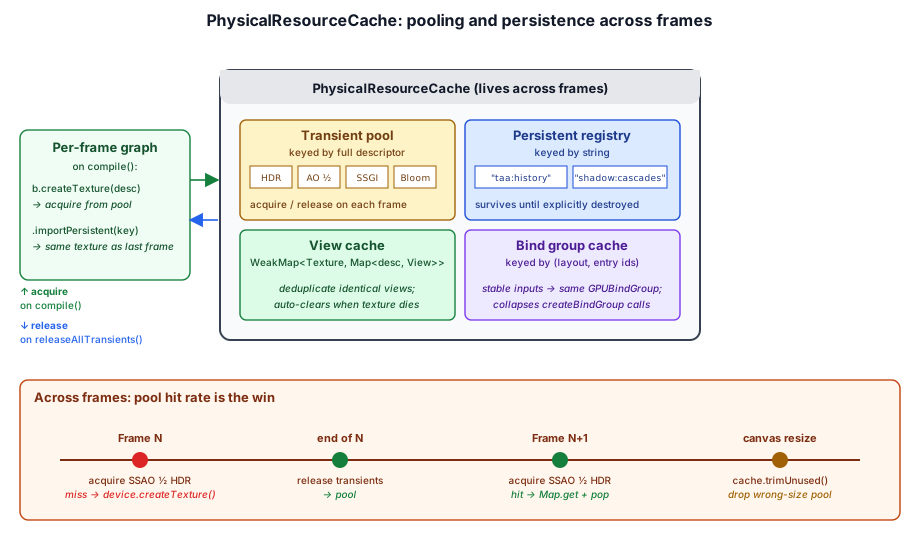
The PhysicalResourceCache is the cross-frame state behind the graph. It owns:
- Transient pools keyed by full descriptor (format, size, mip count, usage flags). When a pass calls
b.createTexture(desc), the compiler acquires from the pool if a matching texture is available, or creates one if not. At the end ofexecute(), every transient is returned to the pool. - Persistent registry of resources keyed by string (
"taa:history","lighting:exposure","shadow:cascades", ...). These never enter the transient pool; they're owned by the cache until their key is explicitly destroyed. - View cache keyed by
(GPUTexture, view descriptor). Avoids re-creating identical views every frame. The cache is aWeakMapon the texture so views are reclaimed when the texture is destroyed. - Bind group cache keyed by
(layout, entries). Bind groups assembled inside execute callbacks deduplicate to a stableGPUBindGroupper unique entry set.
Why Pool Across Frames?#
Creating a GPUTexture involves a driver allocation and a roundtrip to the GPU memory manager. For a frame that allocates a half-res HDR scratch texture for SSAO, another for SSGI, another for bloom, another for DOF — re-allocating those every frame would add measurable per-frame overhead. The pool is a free list per descriptor; the cost of a "new" transient is a Map.get and a pop.
The trade-off is memory: pooled textures sit allocated even when no pass needs them this frame. The cache offers trimUnused() to drop the entire pool, which the renderer calls after a canvas resize — every pool entry is sized to the old canvas and is now wrong.
Why Pool Bind Groups?#
createBindGroup() is moderately expensive and the typical pass builds many of them per frame (one per chunk, one per draw item). When the entries are stable across frames (which they usually are — same uniform buffer, same sampler, same view of a pooled texture that ends up at the same address), caching collapses thousands of calls per second into a Map.get.
The cache key is built from a stable id assigned to each GPUBuffer / GPUTextureView / GPUSampler plus the binding number, joined with |. The id assignment uses a WeakMap, so dead GPU objects don't leak entries.
RenderGraph and PassBuilder, then compiled by the real compile() against the real PhysicalResourceCache; only the GPU device is a stub. Columns are passes in declaration order and rows are virtual resources: squares are writes, labeled with the version they produce, and rings are reads. Untick Lighting reads AO and the SSAO pass is culled even though it was declared. Turn Bloom off and its texture stays allocated, idle in the pool; turn it back on and the strip at the bottom shows a pool hit, not a createTexture. A new canvas size calls trimUnused(), and the next frame allocates everything again.Multi-Pass Deferred Rendering#
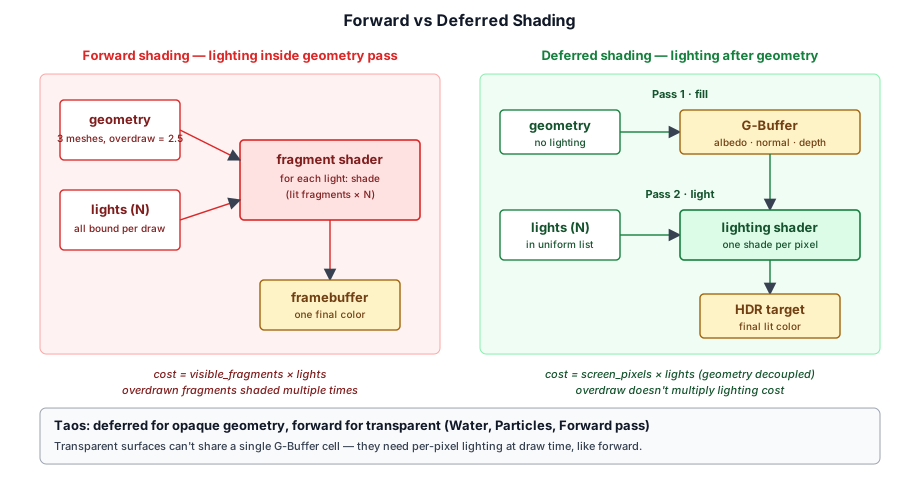
Taos Engine uses a deferred shading pipeline for its main geometry. Surface properties (albedo, normal, depth) are rendered into a G-Buffer in a first set of passes; lighting runs in a separate fullscreen pass that reads the G-Buffer.
Why Deferred?#
- Decoupled geometry from lighting. Shading cost depends on screen resolution, not on the number of lights or on geometric complexity.
- Supports many lights. The deferred lighting pass evaluates the directional light once per pixel; the point/spot pass additively blends each tile of lights with no vertex shader cost.
- Enables screen-space effects. SSAO, SSGI, TAA, and DOF all consume the G-Buffer (
normal,depth) as graph inputs and produce textures the lighting pass reads back.
The Deferred Pipeline#
The graph that crafty/renderer_setup.ts builds each frame is:
ShadowPass          (depth array, one layer per cascade)
BlockShadowPass     (loads + writes the same shadow map — voxel chunks)
PointSpotShadowPass (VSM atlas for point + spot lights)
BlockGeometryPass   (clears + writes G-Buffer)
GeometryPass        (loads G-Buffer + draws mesh objects)
SSAOPass            (samples normal + depth → AO)
SSGIPass?           (samples normal + depth + prev TAA history → indirect)
AtmospherePass      (clears HDR target with sky + sun + moon)
DeferredLightingPass    (loads HDR + samples gbuffer/shadow/AO/SSGI/IBL)
PointSpotLightPass?     (additively blends point + spot lights)
WaterPass               (forward, alpha-blended)
GodrayPass?             (additive volumetric shafts)
ParticlePass × N        (forward weather + break + explosion particles)
CloudPass? (overlay)    (premultiplied-alpha cloud composite)
AutoExposurePass        (compute: HDR histogram → exposure buffer)
TAAPass                 (temporal resolve + writes history)
DofPass?                (circle-of-confusion blur)
BloomPass?              (prefilter + downsample + upsample)
BlockHighlightPass      (selected block outline)
CompositePass           (tonemap + fog + exposure → backbuffer)
Optional passes (marked ?) come and go based on user settings. Each is added to the graph only when present; the connections re-route automatically because the downstream pass takes the previous hdr handle as input regardless of which producer wrote it.
Forward Rendering#
Two categories of work bypass deferred shading because the G-Buffer can only hold a single surface per pixel:
- Water.
WaterPassrenders refractive surfaces with forward lighting, reading the HDR target as the refraction source. - Particles.
ParticlePassrenders alpha-blended billboards via a forward pipeline.
Both run after deferred lighting, in the order they're added to the graph. Each takes the current hdr handle as input and returns the post-write handle.
HDR Rendering Pipeline#
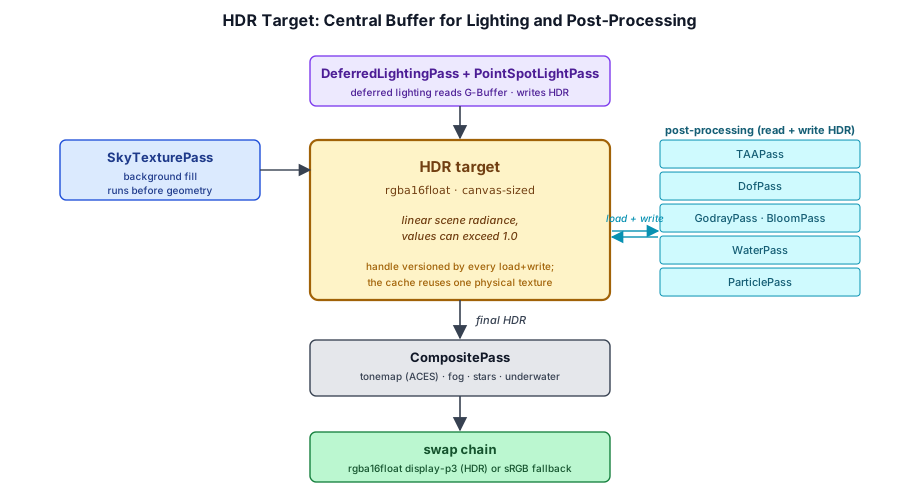
Taos Engine renders in HDR (high dynamic range) throughout the lighting and post-processing stages, then tone-maps to SDR (or passes through to an HDR swap chain) at the very end.
The HDR Handle#
The atmosphere pass creates the initial HDR texture:
export const HDR_FORMAT: GPUTextureFormat = 'rgba16float';From the lighting pass onward, the HDR target is just a ResourceHandle that gets passed from pass to pass. Each pass loads the current version, composites on top, and returns the new version. The pool keeps the physical texture alive across passes within a frame (because the descriptor is identical), and 'load' writes pick up where the previous pass left off:
let hdr: ResourceHandle = lit.hdr;
if (pointSpotShadows) hdr = pointSpotLightPass.addToGraph(graph, { ..., hdr }).hdr;
hdr = waterPass.addToGraph(graph, { hdr, depth: gbuf.depth }).hdr;
if (godrayPass) hdr = godrayPass.addToGraph(graph, { hdr, ... }).hdr;
hdr = blockBreakPass.addToGraph(graph, { gbuffer: { depth: gbuf.depth }, hdr }).hdr;
if (cloudPass) hdr = cloudPass.addToGraph(graph, { hdr, depth: gbuf.depth, overlay: true }).hdr;
Because each step reassigns the local hdr variable, the chain naturally re-routes when a pass is missing. The compiler sees a clean linear dependency.
Tone Mapping#
The final CompositePass converts HDR to SDR using ACES filmic approximation (or passes through if the swap chain is HDR). It also applies depth fog, samples the auto-exposure buffer, and presents to the backbuffer.
fn aces_filmic(x: vec3<f32>) -> vec3<f32> {
  let a = 2.51; let b = 0.03; let c = 2.43; let d = 0.59; let e = 0.14;
  return clamp((x * (a * x + b)) / (x * (c * x + d) + e), vec3<f32>(0.0), vec3<f32>(1.0));
}The G-Buffer#
The G-Buffer, also known as the Geometric Buffer or Graphics Buffer, is three handles produced by the geometry passes:
| Output | Format | Channels | Producer |
|---|---|---|---|
albedo | rgba8unorm | RGB = albedo, A = roughness | BlockGeometryPass, then GeometryPass, SkinnedGeometryPass |
normal | rgba16float | RGB = world-space normal, A = metallic | (same chain) |
depth | depth32float | depth | (same chain) |
G-Buffer Fill Strategy#
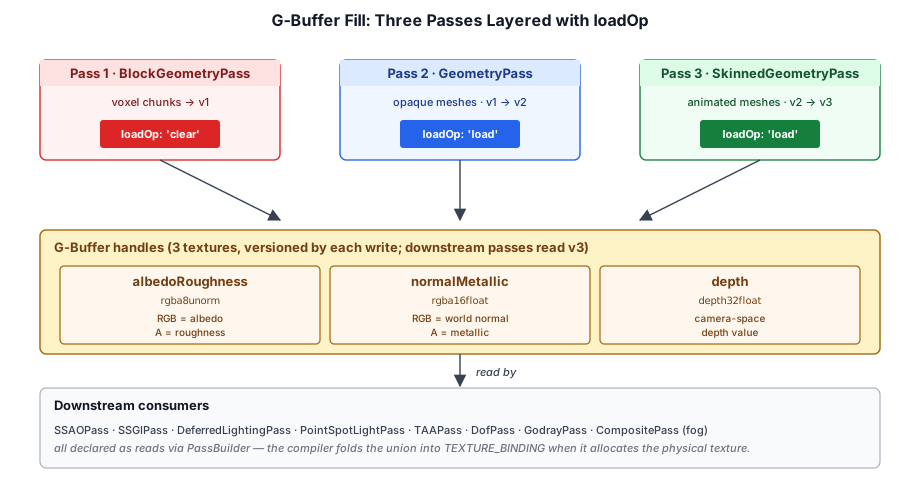
The first geometry pass clears the attachments by passing loadOp: 'clear'; subsequent passes consume the previous pass's outputs and re-emit them after their own writes:
const gbufBlock = blockGeometryPass.addToGraph(graph, { loadOp: 'clear' });
const gbuf      = geometryPass.addToGraph(graph, { gbuffer: gbufBlock });
geometryPass.addToGraph() declares the same three handles as both reads and writes (with loadOp: 'load' under the hood), so the version chain reads:
v0 → BlockGeometryPass(clear) → v1 → GeometryPass(load) → v2Downstream consumers (SSAO, SSGI, lighting, composite, godrays, water, particles) take v2 and just read it. The compiler folds all of those uses into the union usage flags (RENDER_ATTACHMENT | TEXTURE_BINDING) when it allocates the underlying physical texture.
Forward+ Rendering#
Deferred shading decouples geometry from lighting by writing surface properties into a G-Buffer, but that G-Buffer holds exactly one surface per pixel. Translucent surfaces, multi-sample anti-aliasing, and wide material variety all fight that constraint — each wants more than a single opaque sample per pixel. (Taos Engine's Water and particle passes sidestep it by forward-rendering after deferred lighting; see Forward Rendering in §3.4.)
Classic forward shading has the opposite shape: every fragment shades itself, so transparency and MSAA come for free — but a naive forward fragment shader loops over every light in the scene, whether or not that light reaches the pixel. With hundreds of point lights that loop dominates the frame.
Forward+ keeps forward shading and fixes the loop. Before shading, a compute pass sorts the scene's point lights into screen-space cells; the fragment shader then iterates only the lights its cell actually received. Forward shading scales to many lights without ever allocating a G-Buffer.
There are two cull strategies, selected by ForwardPlusPass.cullMode. Clustered (the default) bins lights into a 3D froxel grid whose bounds come from the projection alone; tiled bins them into 2D screen tiles and reduces a depth slab per tile. The sections below build up the tiled path first — its depth pre-pass and per-tile list are the simpler shape — then show what clustered changes and why it's the default.
Three Passes Per Frame#
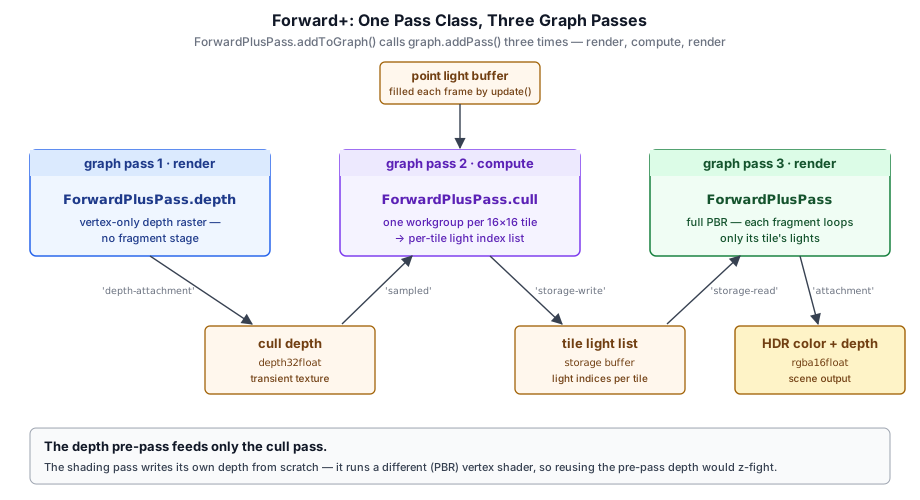
ForwardPlusPass is a single Pass subclass, but in tiled mode its addToGraph() inserts three graph passes — one of each type the graph supports (the default clustered mode drops the first; see Clustered Light Culling below):
ForwardPlusPass.depth   (render)   depth-only pre-pass — rasterizes geometry depth
ForwardPlusPass.cull    (compute)  one workgroup per 16×16 tile → per-tile light list
ForwardPlusPass         (render)   full PBR shading, walking each tile's light list
A pass that needs more than one graph node simply calls graph.addPass() more than once; the ResourceHandle returned by one feeds the next. The depth pre-pass writes a depth32float texture; the cull pass reads it as 'sampled' and writes a storage buffer; the shading pass reads that buffer as 'storage-read'.
graph.addPass(`${this.name}.depth`, 'render',  (b) => { /* depth pre-pass */ });
graph.addPass(`${this.name}.cull`,  'compute', (b) => { /* light culling  */ });
graph.addPass(this.name,            'render',  (b) => { /* PBR shading     */ });
One subtlety: the shading pass renders its own depth from scratch rather than depth-testing against the pre-pass buffer. The two passes run different vertex shaders (forward_plus_depth.wgsl is position-only; forward_plus.wgsl is the full PBR vertex stage), and the float matrix-multiply ordering differs enough between them to z-fight if one tested against the other's depth. The pre-pass depth exists only to feed the culling pass tight per-tile depth bounds.
Tiled Light Culling#
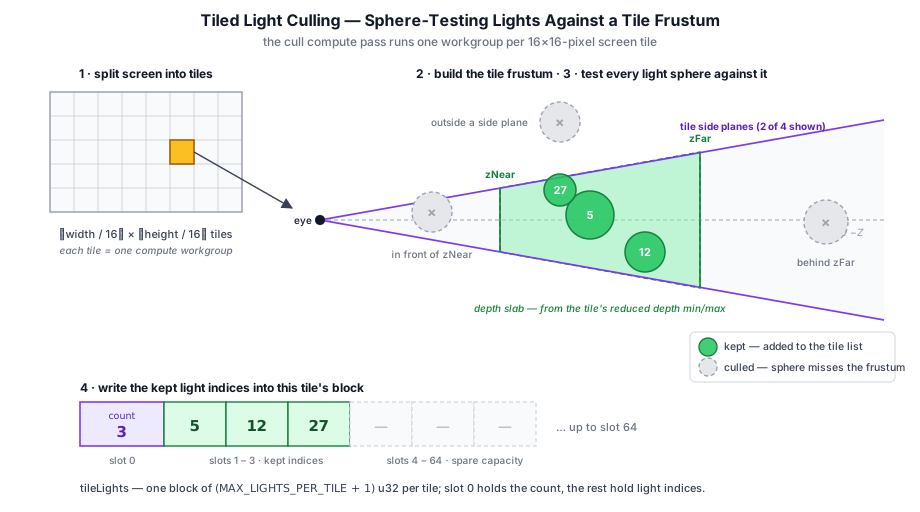
The culling compute pass (light_culling.wgsl) dispatches one workgroup per 16×16 pixel tile, 256 threads each. The threads cooperate in four steps:
- Depth reduction. Each thread reads its pixel's depth from the pre-pass and
atomicMin/atomicMaxes it into workgroup memory. Background pixels (depth == 1.0) are skipped so the tile's depth slab hugs real geometry. - Frustum construction. From the tile's screen rectangle and the inverse projection matrix, the workgroup builds a view-space frustum: four side planes through the eye, plus a near/far depth slab from the reduced bounds.
- Sphere test. The scene's point lights are striped across the 256 threads. Each light is a bounding sphere (
position,range); it survives if its sphere is inside all four side planes and overlaps the depth slab. - List write. Surviving light indices are appended to a workgroup array via
atomicAdd, then flushed to this tile's slot of the output buffer.
for (var i = lid; i < cull.numLights; i = i + THREADS_PER_TILE) {
  let lp = (cull.view * vec4<f32>(lights[i].position, 1.0)).xyz;
  let r  = lights[i].range;
  var inside = true;
  for (var p = 0u; p < 4u; p = p + 1u) {
    if (dot(planes[p], lp) < -r) { inside = false; }
  }
  if (inside && hasGeometry) {
    if (lp.z - r > zNear || lp.z + r < zFar) { inside = false; }
  }
  if (inside) {
    let slot = atomicAdd(&wgCount, 1u);
    if (slot < MAX_LIGHTS_PER_TILE) { wgIndices[slot] = i; }
  }
}
The depth slab is what makes the cull tight: a tile covering a distant wall rejects lights floating in the empty foreground even though they fall inside its four side planes.
The Per-Tile Light List#
The cull pass writes one storage buffer that the shading pass reads. It is a flat array of u32, one block per tile, sized from three constants shared between the host code and both shaders:
| Constant | Value | Meaning |
|---|---|---|
TILE_SIZE | 16 | Tile edge length, in pixels |
MAX_LIGHTS | 256 | Hard cap on scene point lights (sizes the light storage buffer) |
MAX_LIGHTS_PER_TILE | 64 | Per-tile light-list capacity |
Each tile gets MAX_LIGHTS_PER_TILE + 1 slots: slot 0 is the surviving light count, slots 1..N are the light indices. The buffer is a transient the graph allocates per frame, sized from the current canvas:
const tilesX = Math.ceil(ctx.width / TILE_SIZE);
const tilesY = Math.ceil(ctx.height / TILE_SIZE);
const tileBufferSize = tilesX * tilesY * (MAX_LIGHTS_PER_TILE + 1) * 4;
Because the size is keyed off the canvas dimensions, a resize produces a differently-sized descriptor and the pool hands back a fresh buffer — the same mechanism that retires stale transient textures on resize (§3.3).
Shading Against the Tile List#
The shading pass re-rasterizes the geometry with the full PBR fragment shader. The directional sun (with cascaded shadows) and IBL ambient are evaluated globally — only point lights are tile-culled. Each fragment recomputes its tile from clip_pos, reads the count, and loops just that tile's lights:
let pixel   = vec2<u32>(in.clip_pos.xy);
let tile    = pixel / lighting.tileSize;
let tileIdx = tile.y * lighting.tilesX + tile.x;
let base    = tileIdx * (MAX_LIGHTS_PER_TILE + 1u);
let count   = tileLights[base];

// ... directional sun + cascaded shadows evaluated globally ...

for (var t = 0u; t < count; t = t + 1u) {
  let light = pointLights[tileLights[base + 1u + t]];
  // ... attenuate by distance and accumulate ...
}
The tile arithmetic here must match the culling shader exactly — both key tiles off raw pixel coordinates and the shared TILE_SIZE — or a fragment would read the wrong tile's light list.
ForwardPlusPass exposes a debugTiles flag. When set, the shading shader skips PBR and instead renders a blue → green → red heatmap of count / MAX_LIGHTS_PER_TILE, making the culling result directly visible; the rg_forward_plus sample toggles it with the T key.
Clustered Light Culling (the default)#
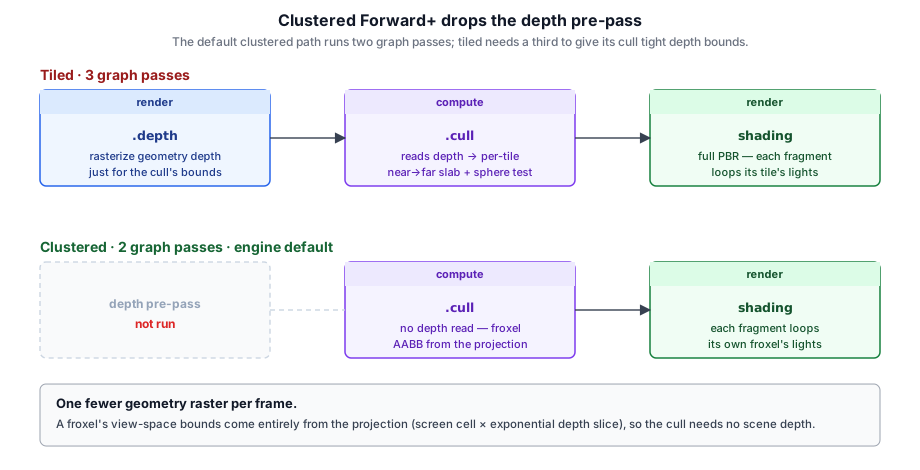
Tiled has two weaknesses, both rooted in collapsing each screen tile to a single near→far depth slab. First, it needs that depth pre-pass — a whole extra geometry raster — just to bound the slab. Second, the slab is derived from opaque depth, which is wrong for transparents and loose across depth discontinuities. Clustered culling, which ForwardPlusPass uses by default (cullMode = 'clustered'), fixes both by binning lights into a 3D froxel grid — CLUSTER_X × CLUSTER_Y screen cells × CLUSTER_Z exponential depth slices — instead of 2D tiles. Each froxel's view-space bounds come purely from the projection, so a fragment looks up its own froxel by view-Z and loops only the lights binned there.
The mechanics of the froxel grid — the exponential depth mapping (computeClusterZParams), the corner-ray AABB, the shared per-cell list layout — are exactly the deferred path's, covered in detail in §3.8. Forward+ reuses that same machinery (it even calls computeClusterZParams from the deferred pass). What's worth drawing out here is what clustered changes about the Forward+ pipeline specifically.
It drops the depth pre-pass. Because the froxel bounds need no scene depth, the default clustered path runs only two graph passes — the cull compute and the shading render — where tiled runs three. That's one fewer full-geometry rasterization every frame:
It lights transparents correctly. This is the bigger win for a forward renderer, whose whole reason to exist is transparency. Tiled derives its per-tile slab from the opaque depth pre-pass, but a transparent fragment was never written into that pre-pass — so its tile's slab is set by whatever opaque surface sits behind it, and lights actually surrounding the transparent surface can fall outside that slab and get culled. Clustered has no such coupling: every fragment, opaque or transparent, resolves its froxel from its own view-Z.
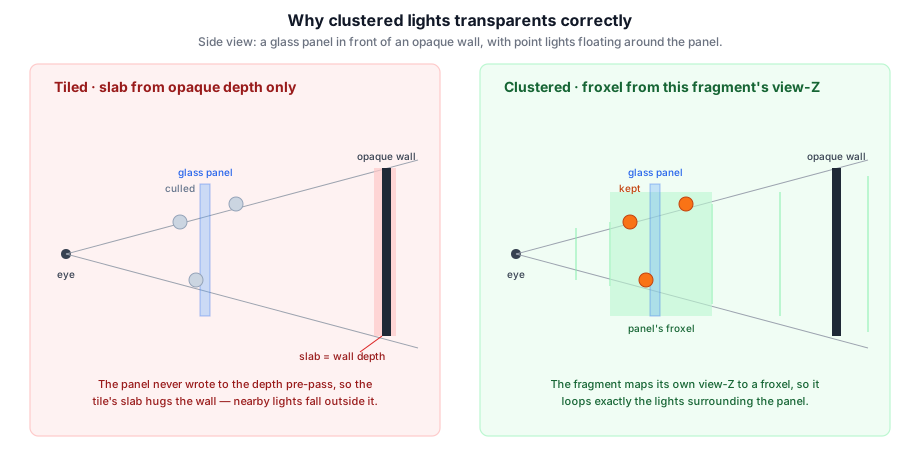
It also inherits the depth-discontinuity robustness shown for the deferred path in §3.8: a froxel is a far smaller volume than a whole-depth tile slab, so a cell straddling near and far geometry no longer over-keeps the lights floating in the empty gap between them.
ForwardPlusFeature and forwardPlusPreset both surface the choice, defaulting to clustered:
// default — clustered
forwardPlusPreset({ pointLights: () => lights });
// opt back into the tiled path
forwardPlusPreset({ pointLights: () => lights, cull: 'tiled' });
// or flip it per-frame on the live feature
forwardPlusFeature.cullMode = 'clustered';
Unlike the deferred PointSpotLightFeature, Forward+ has no 'auto' mode: it always culls (there is no brute-force forward+ path to fall back to), so the only choice is which cull. The tiled↔clustered decision is about depth complexity, not light count — the same reason auto never infers it deferred-side (§3.8) — so it stays a per-scene knob rather than an automatic switch.
debugTiles heatmap colors each pixel by the length of its cell's light list (blue few, red many). Under Tiled, the 16×16 tiles that straddle a pillar's edge span the whole near-to-far gap and light up along every silhouette. Clustered slices the same screen into depth froxels and the halos disappear, though its coarser screen grid gathers more lights per cell on the open wall. Turn the heatmap off to see the lit scene, which looks the same in both modes.Forward+ vs Deferred#
| Deferred (§3.4) | Forward+ | |
|---|---|---|
| Geometry passes | Fill the G-Buffer once | Shading re-raster (+ a depth pre-pass only in tiled mode) |
| Lighting | Fullscreen pass reads the G-Buffer | In the geometry fragment shader |
| Many lights | Tiled / clustered point/spot pass over the G-Buffer | Clustered froxel cull (default) or tiled cull → per-cell list |
| Memory | Albedo + normal + depth targets | One per-cell light-list buffer (+ depth target in tiled mode) |
| Transparency / MSAA | Needs forward bypass passes | Native to forward shading (clustered lights them correctly) |
| Screen-space effects | SSAO / SSGI / TAA consume the G-Buffer | No G-Buffer to sample |
Crafty's game (crafty/renderer_setup.ts) uses the deferred pipeline — its voxel world leans on the G-Buffer for SSAO, SSGI, and TAA. ForwardPlusPass is a self-contained alternative to ForwardPass. Because both pipelines are just Pass instances inserted into the same render graph, a renderer can pick either one without changing the graph machinery underneath.
The two pipelines aren't fully exclusive either: ForwardPlusPass also supports an overlay mode. When addToGraph is called with externalDepth: frame.gbuffer.depth (and loadOp: 'load') the pass skips its own depth pre-pass, runs the cull (clustered reads no depth; tiled reads the supplied G-Buffer depth for its slab), and shades transparents with depthWriteEnabled: false plus src-alpha blending. That's how deferredPreset({ overlayLighting: 'forward+' }) reuses forward+ as a culled transparency layer on top of the deferred opaque pass — transparents shade against many point lights without the per-fragment fixed loop, and the lit deferred result composites underneath through the blend. Clustered is the natural fit here: those transparents are exactly the surfaces a per-tile opaque-depth slab would mis-light.
Deferred Light Culling#
Forward+ (§3.7) tile-culls its point lights so each fragment loops only the lights its tile received. The deferred pipeline has the same problem in a different place: after the directional DeferredLightingPass, PointSpotLightPass runs a fullscreen pass that additively blends every point and spot light onto the HDR target. Historically that fragment shader looped every light for every pixel — O(pixels × lights) — so the light count was hard-capped (32 of each) to keep the loop affordable.
The fix is the same tiling idea, applied to a deferred pass instead of a forward one. PointSpotLightPass carries a mode field that selects between the original brute-force loop and two culled paths:
export type PointSpotCullMode = 'none' | 'tiled' | 'clustered';Four Modes: none, tiled, clustered, auto#
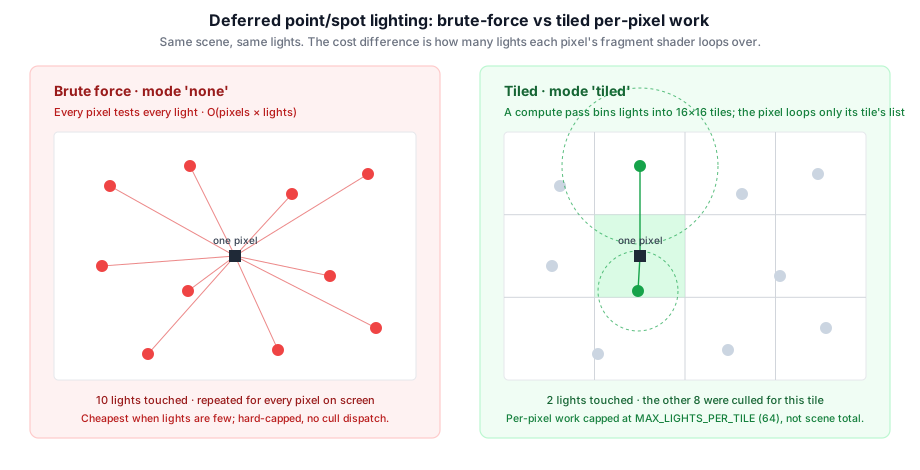
The pass exposes three modes; the feature on top adds a fourth (auto) that chooses between two of them per frame:
none— brute force. Every pixel loops every light. There is no cull dispatch, so for a handful of lights this is the cheapest option: it skips the compute pass entirely and pays only the per-pixel loop. This is the default, and the right choice when a scene has a dozen lights, not hundreds.tiled. A compute pre-pass bins lights into 16×16 screen tiles; the lighting shader then loops only the lights in the current pixel's tile. Per-pixel cost is capped atMAX_LIGHTS_PER_TILE(64) regardless of how many lights the scene holds, so the cap rises to 256 point + 256 spot lights and the per-pixel loop stays short.clustered. Bins lights into a 3D froxel grid (screen cells × exponential depth slices) instead of 2D tiles, so a tile straddling near and far geometry doesn't over-keep lights floating in the empty depth between them. Detailed below.auto. ThePointSpotLightFeaturedecides brute vs. culled each frame from the live light count, with hysteresis (covered below). It deliberately does not decide tiled vs. clustered — that's a depth-complexity call it can't make from a cheap frame-time signal — so which culled strategy it escalates to is a config knob (autoCulled, defaulttiled). All pipelines are compiled up front so any switch is free.
The crossover is real: below roughly 16–24 lights the brute-force loop beats tiled, because tiling adds a fixed cost (the cull dispatch, the tile-list buffers) that only pays off once the per-pixel savings exceed it. That is exactly why the mode is a knob and not a hard-coded "always tile."
The Tiled Cull Reuses the G-Buffer Depth#
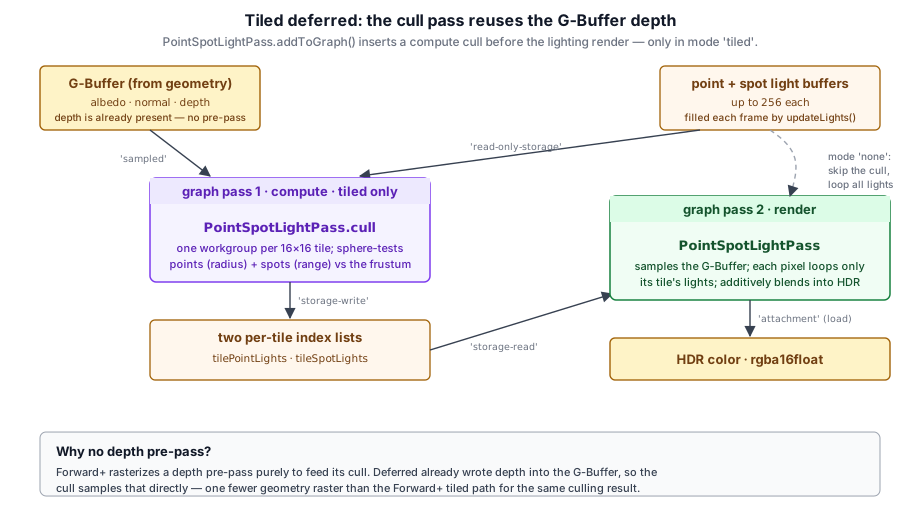
In tiled mode, addToGraph() inserts a compute pass before the lighting render pass. Its culling shader (point_spot_cull.wgsl) is structurally the same as the Forward+ cull from §3.7 — one workgroup per tile, depth reduction, frustum build, sphere test — with two differences:
- It culls both light types. Point lights are sphere-tested by
radius, spot lights by their bounding sphere (range). The pass writes two per-tile lists,tilePointLightsandtileSpotLights. (Approximating a spot cone by its bounding sphere is conservative — it can keep a spot a tighter test would drop, never the reverse.) - It needs no depth pre-pass. This is the key win over the Forward+ tiled path. Forward+ rasterizes a depth pre-pass purely so the cull has tile depth bounds to work from. Deferred has already written depth into the G-Buffer, so the cull samples that directly:
graph.addPass(`${this.name}.cull`, 'compute', (b: PassBuilder) => {
  b.read(deps.gbuffer.depth, 'sampled');
  const pointTiles = b.createBuffer({ label: 'PSLTilePointLights', size: tileBufferSize });
  const spotTiles  = b.createBuffer({ label: 'PSLTileSpotLights',  size: tileBufferSize });
  tilePointHandle = b.write(pointTiles, 'storage-write');
  tileSpotHandle  = b.write(spotTiles,  'storage-write');
  // ... dispatch (tilesX, tilesY) ...
});
The two tile-list buffers are transients the graph allocates per frame, sized off the canvas exactly like the Forward+ list (§3.7). They are not a new bind group, though: a deferred lighting pass already uses bind groups 0–3, and WebGPU's compatibility mode caps a pipeline at four. So in tiled mode the tile lists and a small cullParams uniform join the existing light bind group (group 2) in a TILED-only layout variant, alongside the point/spot/area buffers the brute path already binds.
Inside the cull, the 256 threads of a tile's workgroup cooperate in four steps — the same shape as the Forward+ cull (§3.7): (1) atomicMin/atomicMax-reduce the tile's depth bounds from the G-Buffer, skipping background pixels so the slab hugs real geometry; (2) build the tile's view-space frustum — four side planes through the eye plus the near/far slab from those bounds; (3) stripe the scene's lights across the threads and sphere-test each against the frustum; (4) append survivors to a workgroup array, then flush it to this tile's block of the output buffer. The test-and-append is the heart of it:
for (var i = lid; i < cull.numPoint; i = i + THREADS_PER_TILE) {
  let lp = (cull.view * vec4<f32>(pointLights[i].position, 1.0)).xyz;   // view-space center
  let r  = pointLights[i].radius;
  var inside = true;
  for (var p = 0u; p < 4u; p = p + 1u) {
    if (dot(planes[p], lp) < -r) { inside = false; }                    // outside a side plane
  }
  if (inside && hasGeometry) {
    if (lp.z - r > zNear || lp.z + r < zFar) { inside = false; }        // outside the depth slab
  }
  if (inside) {
    let slot = atomicAdd(&wgPointCount, 1u);
    if (slot < MAX_LIGHTS_PER_TILE) { wgPointIdx[slot] = i; }           // append, capped
  }
}
Each thread handles a stripe of lights (i = lid, lid + 256, …), so the workgroup tests all of them in parallel and races to atomicAdd a slot. That if (slot < MAX_LIGHTS_PER_TILE) guard is small but consequential — it's where a cell that fills up silently drops the surplus, the one place this scheme can produce a visible artifact. We return to it under Capacity, Overflow, and Seams.
The Per-Cell List Layout#
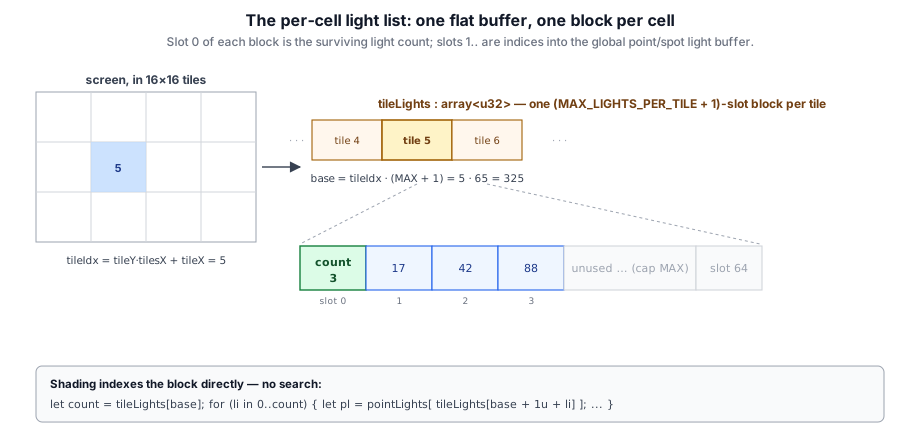
Both culls write the same layout: one flat array<u32>, numCells blocks of MAX + 1 slots each. Slot 0 is the surviving count; slots 1.. are indices into the global point (or spot) light buffer. The flush step is just:
let base       = tileIdx * (MAX_LIGHTS_PER_TILE + 1u);
let pointCount = min(atomicLoad(&wgPointCount), MAX_LIGHTS_PER_TILE);
if (lid == 0u) { tilePointLights[base] = pointCount; }          // slot 0 = count
for (var i = lid; i < pointCount; i = i + THREADS_PER_TILE) {
  tilePointLights[base + 1u + i] = wgPointIdx[i];               // slots 1..count
}
Because the stride is fixed (MAX + 1), the shader reaches a cell's data with one multiply — no per-pixel search. Clustered uses the identical scheme with MAX_LIGHTS_PER_CLUSTER and a 3D clusterIdx, which is what lets the two paths share one group-2 layout and one shading loop.
Shading Against the Lists#
The lighting shader is one file with TILED / CLUSTERED defines. Without either, the loops run over the whole scene (lightCounts.numPoint); with one, they resolve the pixel's cell and loop only that cell's list into a shared listBase — the shading math after the lookup is identical, so all three paths produce the same image for the same lights:
#if defined(TILED)
  let tileX    = u32(coord.x) / cullParams.tileSize;
  let tileY    = u32(coord.y) / cullParams.tileSize;
  let listBase = (tileY * cullParams.tilesX + tileX) * (MAX_LIGHTS_PER_TILE + 1u);
  let pointCount = tilePointLights[listBase];
#elif defined(CLUSTERED)
  // screen cell + exponential depth slice → froxel index → listBase
  let pointCount = clusterPointLights[listBase];
#else
  let pointCount = lightCounts.numPoint;
#endif

  for (var li = 0u; li < pointCount; li++) {
#if defined(TILED)
    let i = tilePointLights[listBase + 1u + li];
#elif defined(CLUSTERED)
    let i = clusterPointLights[listBase + 1u + li];
#else
    let i = li;
#endif
    let pl = pointLights[i];
    // ... attenuate, shadow, accumulate — identical in all variants ...
  }
Because all three pipelines are built once in create(), switching mode between frames only changes which pipeline the render pass binds and whether (and which) cull pass is added — never a shader recompile.
Clustered: Froxels Instead of Tiles#
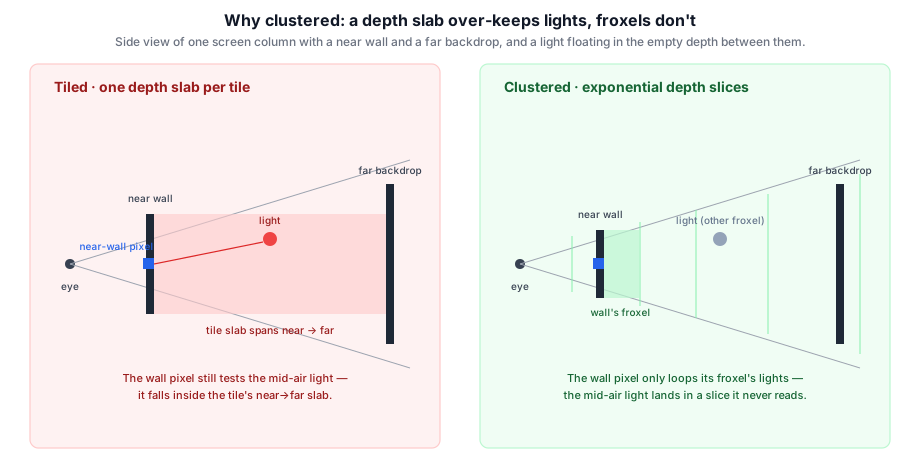
tiled collapses each screen tile to a single near→far depth slab. A tile that straddles a near wall and a far backdrop gets a slab spanning the whole gap, so every pixel in it loops any light floating in that empty depth — even pixels on the near wall. This is the classic depth-discontinuity weakness.
clustered slices the frustum into a 3D grid — CLUSTER_X × CLUSTER_Y screen cells × CLUSTER_Z exponential depth slices (froxels). A pixel maps its view-space distance to a slice with the standard log mapping; it then loops only the lights binned into its froxel, so the near-wall pixel never sees a light that only overlaps a deeper slice. The mapping is a pure helper shared with the cull, computed host-side from near/far:
// slice = floor(log(viewDist) * zScale + zBias)  — near → slice 0, far → numSlices
export function computeClusterZParams(near: number, far: number, numSlices: number) {
  const logRatio = Math.log(far / near);
  return { zScale: numSlices / logRatio, zBias: -(numSlices * Math.log(near)) / logRatio };
}
Three things make the implementation a contained addition rather than a rewrite:
- No depth read at all. Where
tiledsamples the G-Buffer depth to tighten its slab, a froxel's bounds come entirely from the projection — its screen rect unprojected at the slice's near/far Z. So point_spot_cluster_cull.wgsl binds no depth texture; it dispatches one workgroup per froxel (CLUSTER_X × CLUSTER_Y × CLUSTER_Z) and does an AABB-vs-sphere test per light. (It's also reversed-Z-agnostic for free: the corner rays and slice distances don't depend on the depth encoding.) - It reuses the tiled plumbing. The shading pipeline shares the tiled group-2 layout (a params uniform + two storage lists — same shape), and the lighting shader's loop is the same
#elif defined(CLUSTERED)branch shown above. Only the cull shader and a params uniform are genuinely new. - A fixed coarse grid bounds memory. The grid is
16 × 9 × 24 ≈ 3456froxels regardless of resolution, so the two index buffers stay ~1.8 MB. A per-16px-tile froxel grid would be finer laterally but balloon to ~100 MB at 1080p — which is why production clustered renderers use a compact offset/count + shared index list. That compaction is deliberately out of scope here; the coarse grid is fine because clustered's whole point is the depth slicing, not lateral tightness.
The froxel's bounds and the light test replace the tiled cull's plane-and-slab logic with a corner-derived AABB — and note there's no depth texture anywhere in it:
// 8 froxel corners = the 4 screen-corner rays, each taken at this slice's near (zN) and far (zF) view-Z
let corners = array<vec3<f32>, 8>(
  rayAtZ(r0, zN), rayAtZ(r1, zN), rayAtZ(r2, zN), rayAtZ(r3, zN),
  rayAtZ(r0, zF), rayAtZ(r1, zF), rayAtZ(r2, zF), rayAtZ(r3, zF),
);
var lo = vec3<f32>( 1e30); var hi = vec3<f32>(-1e30);
for (var i = 0u; i < 8u; i++) { lo = min(lo, corners[i]); hi = max(hi, corners[i]); }
// keep the light if its sphere reaches the froxel's AABB (sqDist clamps the center into the box)
if (sqDistPointAabb(lp, lo, hi) <= r * r) { /* append, capped, exactly like tiled */ }
The slice's zN/zF come straight from the exponential mapping (near · ratio^(slice/numSlices)), and rayAtZ walks each screen-corner ray to that depth — so one workgroup, one froxel, no shared depth read. Everything downstream (the per-cell list, the cap, the shading loop) is shared with tiled.
clustered is reached either explicitly (pointSpotLights: { culling: 'clustered' }) or as auto's escalation target ({ autoCulled: 'clustered' }). auto never infers it from the light count, because the tiled↔clustered choice is about depth complexity, not light count — so it's a deliberate per-scene knob, not an automatic decision.
Tiled vs. Clustered: Choosing Between Them#
Neither strategy dominates — they trade lateral precision for depth precision in opposite directions:
tiled | clustered | |
|---|---|---|
| Lateral granularity | Fine — 16×16-px tiles | Coarse — fixed 16×9 grid (≈120 px/cell at 1080p) |
| Depth granularity | One slab per tile, tightened to the tile's actual geometry depth | Fine — 24 exponential froxel slices |
| Reads the G-Buffer depth? | Yes (to bound the slab) | No — projection-only, reversed-Z-agnostic |
| Depth discontinuity in a cell | Slab balloons → over-keeps lights in the empty gap | Each froxel stays tight → robust |
| Many small lights spread laterally | Excellent (fine tiles separate them) | Weaker (a coarse cell lumps them) |
| Per-cell overflow risk | Higher — a whole-depth slab gathers more lights | Lower — a froxel is a smaller volume |
| Index-buffer memory | Scales with resolution (tiles × 65 × 4 × 2) | Fixed ~1.8 MB at any resolution |
| Cull work | Depth reduction + 2D dispatch | No depth read + 3D dispatch |
The rule of thumb that falls out of this:
- Reach for
tiledwhen depth is locally coherent and lights are many, small, and spread across the screen — interiors, flat arenas, top-down scenes. The fine 16-px lateral grid is doing the heavy lifting, and the single depth slab is tight because nothing in a tile is far apart in Z. This is why it'sauto's default escalation. - Reach for
clusteredwhen the view has a large depth range or strong near–far discontinuities in the same screen region — open worlds, big vistas, anything where a tile routinely spans "wall in front of mountain." Tiled's slab would balloon there and over-test (and risk overflow); the froxel slices keep each pixel's light set tight. Crafty setsautoCulled: 'clustered'for exactly this reason — a voxel world goes from a near cave wall to terrain at the view distance within one tile.
If you can't characterize the scene up front, tiled is the safer default (its weakness is a performance over-test, never a correctness problem), and you can switch a known depth-heavy scene to clustered with one option.
Choosing a Mode Automatically#
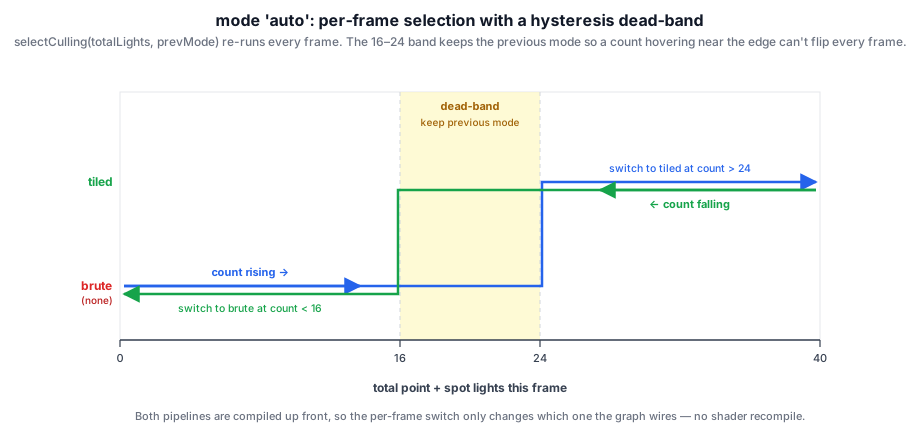
PointSpotLightFeature accepts culling: 'auto' | 'none' | 'tiled' | 'clustered' (default 'auto') plus autoCulled: 'tiled' | 'clustered' (default 'tiled'). In 'auto', it re-evaluates the live light count every frame and sets lightPass.mode via a pure helper — deciding brute vs. culled, and escalating to whichever strategy autoCulled names. The helper uses two thresholds rather than one, so a scene whose light count hovers near the boundary doesn't flip methods every frame:
const AUTO_CULL_ON = 24;   // above this, switch from brute to culled
const AUTO_CULL_OFF = 16;  // below this, switch back to brute

export function selectCulling(
  totalLights: number, prev: PointSpotCullMode, escalateTo: AutoCulledMode = 'tiled',
): PointSpotCullMode {
  if (totalLights > AUTO_CULL_ON)  { return escalateTo; }  // 'tiled' or 'clustered'
  if (totalLights < AUTO_CULL_OFF) { return 'none'; }
  return prev;  // inside the 16–24 dead-band, keep doing what we were doing
}
The gap between AUTO_CULL_OFF and AUTO_CULL_ON is the dead-band: inside it the previous mode is held. A count rising through 16→24 stays on brute until it clears 24; a count falling back through 24→16 stays on the culled strategy until it drops below 16. The two switch points differ, so the cost of changing methods is paid at most once per crossing, not once per frame of jitter.
Note the split of responsibility: auto only ever decides whether to cull — which cull (tiled vs. clustered) is autoCulled, because no cheap CPU-side signal distinguishes them at frame time. That gives two practical configurations, the ones the sample surfaces as Auto Tiled and Auto Clustered:
new PointSpotLightFeature({ culling: 'auto', autoCulled: 'tiled' });      // brute ↔ tiled
new PointSpotLightFeature({ culling: 'auto', autoCulled: 'clustered' });  // brute ↔ clustered
Both brute-force a near-empty scene and escalate once the lights pile up; they differ only in what they escalate to — pick the one whose culled strategy suits the scene's depth (per the table above). Crafty runs Auto Clustered. Because it hand-rolls its graph rather than using the feature, it calls the same helper directly with the escalation target as the third argument:
passes.pointSpotLightPass!.mode = selectCulling(
  pointLights.length + spotLights.length, passes.pointSpotLightPass!.mode, 'clustered',
);
Capacity, Overflow, and Seams#
Each cell's list is capped at MAX_LIGHTS_PER_TILE (64) — that's the if (slot < MAX_LIGHTS_PER_TILE) guard from the cull loop and the min(atomicLoad(…), MAX) in the flush. So what happens when more than 64 lights overlap one cell, and could adjacent cells holding different light sets seam the render?
First, the reassuring case. When no cell overflows, there is no seam — even though neighboring cells legitimately hold different light sets. The culling is conservative: a light is binned into a cell exactly when its bounding sphere intersects that cell's frustum, and a pixel only ever reads its own cell. Could a pixel be missing a light that actually lights it? No — the pixel's shaded surface lies inside its cell's frustum, so any light reaching that surface is within range of a point in the frustum, so its sphere intersects the frustum, so it's in the list. The place where a light drops out of a neighboring cell's list is precisely where its sphere stops reaching that cell — i.e. where its attenuation has already fallen to zero. The two cells differ only by lights whose contribution is ~0 at the boundary, so the seam is invisible.
Overflow breaks that guarantee. If a cell gathers more than 64 lights, the surplus is silently dropped, and which 64 survive is whichever threads won the atomicAdd race — nondeterministic, and different from one cell to the next.
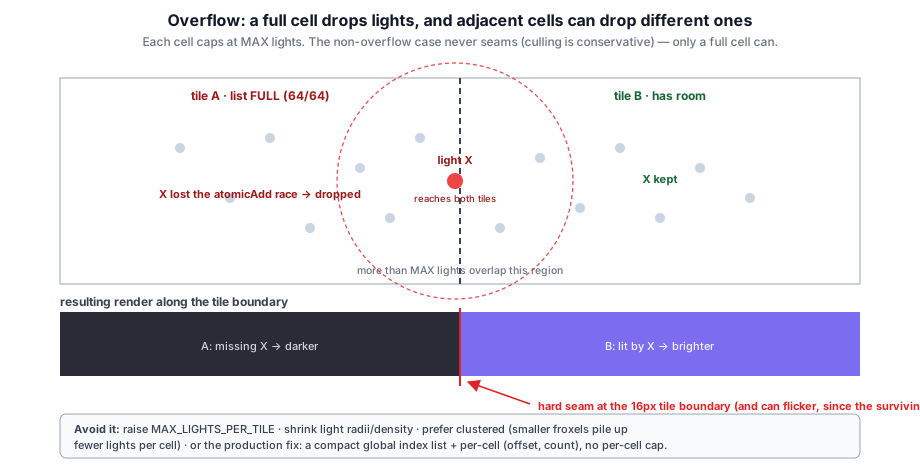
Now a cell can drop a light that does contribute. The pixels in that cell lose it, while the neighboring cell — which overflowed to a different subset, or didn't overflow at all — keeps it. The same light is shaded on one side of a 16-px tile boundary and not the other: a hard seam. And because the surviving subset is race-dependent, an overflowed cell can also flicker frame to frame as the race resolves differently.
Avoiding it:
- Raise
MAX_LIGHTS_PER_TILE— costs index-buffer memory and a longer worst-case per-pixel loop, but it's a one-constant change shared between host and shaders. - Shrink light radii / reduce density so fewer spheres pile into one cell.
- Prefer
clusteredin dense scenes. A froxel is a far smaller volume than a full near→far tile slab, so dramatically fewer lights land in any one cell — overflow is much rarer for the same scene. (This is a second, independent reason to choose clustered, separate from the depth-discontinuity one.) - The production fix is the compact scheme noted earlier: a single global light-index buffer filled via an atomic counter, plus a per-cell
(offset, count)grid — no per-cell cap at all, at the cost of the extra compaction pass.
In practice 64/cell is generous — with the sample's ~4–7-unit-radius lights you'd need dozens overlapping a single 16-px column to hit it — but it is the one failure mode worth recognizing, and it's why the cap lives in a named constant the host and both shaders share.
Trying It#
deferredPreset forwards the choice — pointSpotLights: true enables the feature with 'auto', and pointSpotLights: { culling: 'tiled' } forces a mode:
deferredPreset({ pointSpotLights: { culling: 'auto', autoCulled: 'clustered' } });The deferred_lighting_test sample scatters up to 240 point lights plus a configurable count of spots over a grid and exposes a live panel to switch the cull mode and both light counts. Its dropdown has five entries — Tiled, Clustered, Brute force, Auto Tiled, and Auto Clustered — where the two Auto entries set culling: 'auto' with the matching autoCulled target. Flipping to Brute force and dragging the counts up makes the O(pixels × lights) cost visible as a falling frame rate; the culled modes stay flat. The HUD prints what auto resolved to this frame — e.g. auto:clustered → none at a low count, auto:clustered → clustered once it clears the dead-band — so you can watch both the brute↔culled hysteresis and the escalation target at once.
RenderFeatures and Presets#
Everything earlier in this chapter — passes, handles, the cache, addToGraph() — is the plumbing layer. It's expressive enough to express any pipeline, but composing twenty-odd passes by hand each frame is exactly the kind of work that motivated the graph in the first place. Taos Engine puts a thin, optional layer on top: RenderFeature bundles up a unit of rendering work; Engine drives the per-frame loop; presets are functions that register a coordinated bundle of features for one pipeline shape.
A RenderFeature Is One Bundle of Pass Work#
A RenderFeature owns one or more Pass instances and the per-frame logic that drives them:
interface RenderFeature {
  readonly name: string;
  enabled: boolean;
  setup(engine: Engine): void | Promise<void>;
  earlyUpdate?(frame: Frame): void;
  update?(frame: Frame): void;
  addPasses(frame: Frame): void;
  destroy?(): void;
}
The four lifecycle hooks decompose the work cleanly:
setupruns once when the feature is added to an engine. Construct the long-livedPassinstance(s).earlyUpdateruns across every feature before any feature'supdate— used for state that must mutate camera/uniform values before downstream features read them. TAA's sub-pixel camera jitter lives here so geometry-fill passes pick up the jittered view-projection.updatepushes per-frame uniforms to the owned passes (lights, exposure, camera matrices, time).addPassesdeclares the pass onframe.graphand updates the slots downstream features will read from. Most features readframe.hdr/frame.gbuffer/frame.shadowMap/frame.ao, declare their pass, and write the returned handle back into the same slot so the next feature picks up the updated version. This is the same per-handle chain thatrenderer_setup.tswrites by hand (§3.5).
The split between update and addPasses matters: writing uniforms is cheap and runs every frame; declaring graph passes only runs when the graph is being rebuilt.
The Frame Object#
The per-frame state every feature receives is a single mutable Frame:
interface Frame {
  readonly ctx: RenderContext;
  readonly scene: Scene;
  readonly camera: Camera;
  readonly dt: number;
  readonly time: number;
  readonly frameIndex: number;

  // Pre-bucketed draw lists.
  readonly opaque: DrawItem[];
  readonly transparent: ForwardDrawItem[];
  readonly shadowCasters: ShadowMeshDraw[];

  // Per-frame graph + backbuffer handle.
  graph: RenderGraph;
  backbuffer: ResourceHandle;

  // Well-known slots features chain through.
  hdr: ResourceHandle | null;
  gbuffer: GBufferHandles | null;
  shadowMap: ResourceHandle | null;
  ao: ResourceHandle | null;
  depth: ResourceHandle | null;
  exposureBuffer: ResourceHandle | null;
  lightingCameraBuffer: ResourceHandle | null;
  lightingLightBuffer: ResourceHandle | null;

  // Escape hatch for handles outside the well-known slots.
  extras: Map<string, unknown>;
}
The well-known slots are how features compose. Reading from frame.hdr and writing the result back is the feature-layer equivalent of reassigning hdr in the manual chain (§3.5):
addPasses(frame: Frame): void {
  if (!frame.hdr) return;
  const { result } = this.pass.addToGraph(frame.graph, { hdr: frame.hdr });
  frame.hdr = result;
}
A feature that doesn't fit the well-known slots stashes its handle in frame.extras for downstream features to look up by key.
The Engine Drives the Loop#
Engine is the object that owns RenderContext, Scene, the active Camera, the PhysicalResourceCache, the registered features, and the per-frame loop:
async frame(): Promise<void> {
  ctx.update();                                 // canvas resize, dt
  this.scene.update(dt);                        // simulate components
  this.scene.updateRender(ctx);                 // refresh render-side caches
  this._bucketScene();                          // opaque / transparent / shadow buckets

  for (const f of features) f.earlyUpdate?.(frame);
  for (const f of features) f.update?.(frame);

  const graph = new RenderGraph(ctx, cache);    // §3.1 — fresh per-frame
  frame.graph = graph;
  frame.backbuffer = graph.setBackbuffer('canvas');
  frame.hdr = null; frame.gbuffer = null; frame.shadowMap = null; /* ... */

  for (const f of features) f.addPasses(frame);

  const compiled = graph.compile();             // §3.1
  await graph.execute(compiled);                // §3.1
}
The RenderGraph is built fresh every frame from scratch — the same per-frame builder pattern described in §3.1 — and the PhysicalResourceCache is owned by the engine and reused across frames (§3.3). Pass instances live on their owning features, so pipelines and persistent uniform buffers survive the per-frame graph rebuild for free.
Presets — Composing Features Into a Pipeline#
A preset is a function that registers a coordinated bundle of features on an engine. The three built-ins live in src/renderer/presets/. The deferred preset composes the pipeline this chapter has been describing:
export function deferredPreset(opts: DeferredPresetOptions = {}): RenderPreset {
  return (engine: Engine): void => {
    if (opts.shadow !== false) engine.addFeature(new ShadowFeature(opts.shadow));
    engine.addFeature(new GeometryFeature());
    if (opts.ao !== false) engine.addFeature(new AOFeature({ method: opts.ao ?? 'ssao' }));
    registerSkyFeature(engine, opts.sky);             // 'none' | 'color' | 'texture' | 'atmosphere'
    engine.addFeature(new DeferredLightingFeature({ ibl: opts.ibl, ...opts.lighting }));
    if (opts.pointSpotLights)     engine.addFeature(new PointSpotLightFeature());
    if (opts.transparent ?? true) engine.addFeature(new ForwardOverlayFeature({
      plus: opts.overlayLighting === 'forward+',      // forward or forward+ for the overlay
    }));
    if (opts.taa ?? true)         engine.addFeature(new TAAFeature());
    if (opts.dof)   engine.addFeature(new DofFeature(/* ... */));
    if (opts.bloom) engine.addFeature(new BloomFeature(/* ... */));
    engine.addFeature(new TonemapFeature({ exposure: opts.exposure, aces: opts.aces }));
  };
}
That registration order is the order the features will run each frame: shadows produce the cascade array, geometry fills the G-Buffer, AO reads gbuffer.normal + gbuffer.depth, sky writes frame.hdr, lighting reads everything and writes the lit HDR, point/spot lights additively blend, the transparent overlay (forward by default, or forward+ when overlayLighting: 'forward+') adds transparency on top, TAA / DoF / Bloom post-process, tonemap composites to the backbuffer. Each feature reads slots populated by earlier features and writes whichever slot downstream consumers expect — exactly the same chain renderer_setup.ts writes manually, just declared once at startup instead of every frame.
All three presets share the same sky?: SkyOption shape (a tagged union with kind: 'none' | 'color' | 'texture' | 'atmosphere') and the same post-process options where they apply (shadow, ibl, taa, dof, bloom, exposure, aces, hdrCanvas). The deferred preset adds the path-specific knobs: ao, transparent, overlayLighting, pointSpotLights, lighting. The forward preset is the smallest of the three — sky → optional shadow → ForwardLitFeature → optional TAA/DoF/Bloom → tonemap — and is shaped for material-showcase scenes that don't need a G-Buffer. The forward+ preset (forwardPlusPreset) sits between them: it adds a required pointLights callback and a ForwardPlusFeature whose compute pre-pass tiles point lights into 16×16 screen blocks (§3.7), so each fragment shades only the lights its tile received — the pick for many-light scenes that still need forward-native transparency or MSAA.
The deferred preset's overlayLighting: 'forward+' option reuses the same ForwardPlusPass for the transparency overlay, this time wired with externalDepth = frame.gbuffer.depth. The pass skips its own depth pre-pass — the deferred path already has an authoritative depth buffer — runs the tile cull against the gbuffer depth, then shades transparents with depthLoadOp: 'load', depthWriteEnabled: false, and src-alpha blending. Useful when the transparent layer needs to see hundreds of point lights.
When to Skip the Engine Layer#
Three application shapes coexist in the same repo, each picking how high up the stack to enter:
| Layer | Entry point | Used by |
|---|---|---|
| Engine + preset | Engine.create({ renderPreset: deferredPreset(...) }) | samples/rg_deferred_simple.ts, most demos |
| Engine + features | Engine.create({ canvas }); engine.addFeature(...) | The crafty game (crafty/main.ts) registers a single CraftyPipelineFeature that wires the voxel pipeline |
| Manual render graph | new RenderGraph(ctx, cache) directly | samples/rg_forward_simple.ts, and the legacy crafty/renderer_setup.ts path |
Higher layers don't restrict what the lower layers can do — each layer is the previous layer's machinery, packaged for ergonomics. A custom feature can call frame.graph.addPass(...) and access raw handles from frame.extras; an engine.beforeRender callback can declare one-off inline passes between feature-registered passes. The Engine/RenderFeature/preset layer is just the place to put the common case so the application's main.ts doesn't have to re-derive it.
The Backbuffer and Presentation#
graph.setBackbuffer('canvas') returns a ResourceHandle whose physical binding is deferred until execute() time, because the swap chain texture changes every frame. At execute time the graph asks the RenderContext for the current texture and binds it just before recording.
context.configure({
  device,
  format: 'rgba16float',
  alphaMode: 'opaque',
  colorSpace: 'display-p3',
  toneMapping: { mode: 'extended' },
});
The final pass — typically CompositePass — declares the backbuffer handle as its color attachment write. WebGPU automatically presents the swap chain texture once the command buffer finishes; no explicit present() call is needed.
Canvas Resize#
On resize, the renderer updates the canvas pixel dimensions and calls cache.trimUnused() to drop every pooled texture (they're sized to the previous canvas):
onResize(): void {
  cache.trimUnused();
}
Persistent resources keyed by string survive the trim. The next frame's compile() re-acquires transients at the new size. Pass instances themselves are not destroyed — pipelines, BGLs, and persistent uniform buffers don't care about canvas dimensions.
Render Graph Visualization#
RenderGraphViz renders an interactive DAG view of the compiled graph. After compile() returns, the caller can hand the graph + compiled result to the viz, which dumps every pass node and resource edge into an overlay. Useful when adding new passes ("which producer wrote v3 of this handle?") and when debugging unexpected culls.
Reversed-Z Depth#
The G-Buffer's depth attachment (§3.6) is a depth32float texture, and by default the engine fills it the conventional way: the near plane maps to 0, the far plane to 1, and the depth test keeps the nearer (smaller) value. That works fine until the far/near ratio gets large: with a small near plane and a very distant far plane, standard depth z-fights badly — distant surfaces collapse onto the same handful of depth codes and shimmer.
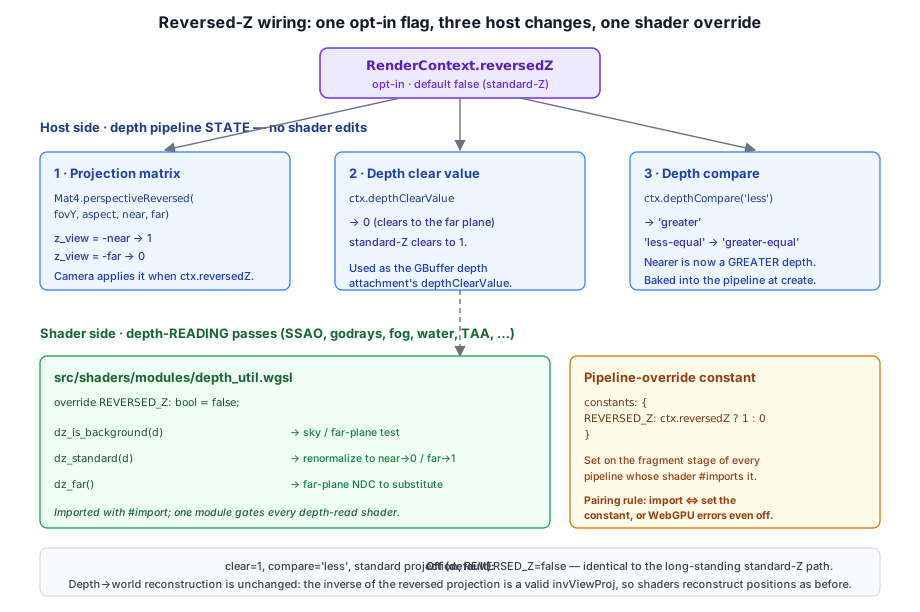
Reversed-Z is an opt-in fix, threaded through RenderContext as a single flag.
Why It Helps#
A perspective projection stores 1/z in the depth buffer, so equal steps in world distance produce ever-smaller steps in NDC as you approach the far plane — depth precision is already lopsided toward the near plane. A floating-point depth buffer has its own lopsidedness: IEEE-754 packs far more representable values near 0 than near 1. Under standard mapping (near→0, far→1) those two effects stack — the dense float codes pile up at the near plane, where precision was already abundant, and the far plane is left starved.
Reversed-Z maps near→1, far→0 instead. Now the float buffer's dense-near-zero codes land at the far plane, almost exactly canceling the 1/z crowding. The result is near-uniform world-space precision across the whole range, so the far plane can be astronomically distant without z-fighting — no extra passes, no log-depth tricks.
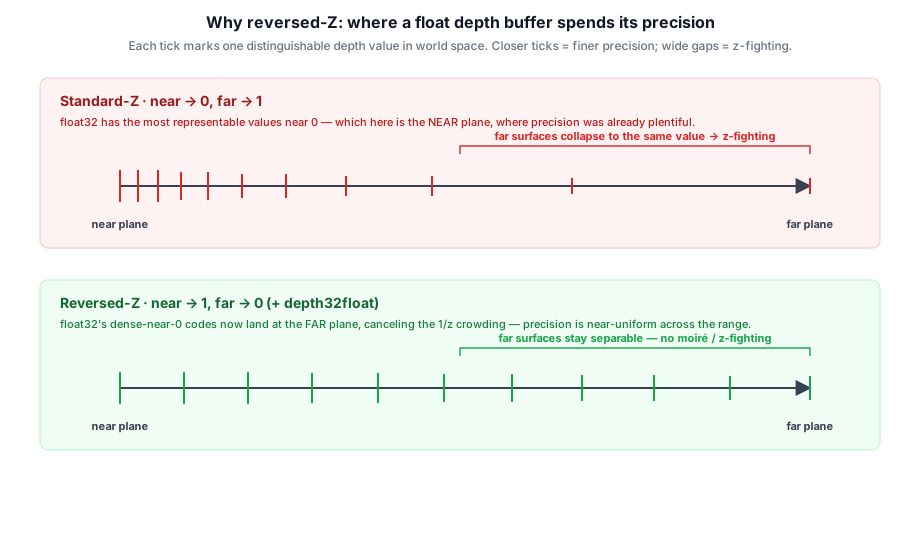
Mat4.perspective and Mat4.perspectiveReversed and the spacing of float32 values. Standard-Z (red) loses precision with distance until surfaces a few centimeters apart z-fight; reversed-Z (blue) stays far below the line all the way to the far plane. Tick 24-bit integer depth and the two curves become one: the trick needs a floating-point depth buffer.Three Host-Side Changes#
Turning on reversed-Z is mechanically small. RenderContext exposes two helpers that every depth-writing pass already routes through, so a pass works in either mode without branching:
/** The FAR plane: 0 under reversed-Z, 1 under standard-Z. */
get depthClearValue(): number { return this.reversedZ ? 0 : 1; }

/** Under reversed-Z, "nearer" is a GREATER depth, so 'less' → 'greater'. */
depthCompare(standard: GPUCompareFunction): GPUCompareFunction {
  if (!this.reversedZ) {
    return standard;
  }
  switch (standard) {
    case 'less':       return 'greater';
    case 'less-equal': return 'greater-equal';
    case 'greater':    return 'less';
    case 'greater-equal': return 'less-equal';
    default:           return standard;
  }
}
The third change is the projection matrix. Mat4.perspectiveReversed builds a projection whose depth row is derived so z_view = -near lands at 1 and z_view = -far at 0 — the standard near↔far swap:
static perspectiveReversed(fovY: number, aspect: number, near: number, far: number): Mat4 {
  const f  = 1 / Math.tan(fovY / 2);
  const fn = 1 / (far - near);
  return new Mat4([
    f/aspect, 0, 0,           0,
    0,        f, 0,           0,
    0,        0, near*fn,    -1,   // depth row: z_view=-near → 1, z_view=-far → 0
    0,        0, far*near*fn, 0,
  ]);
}
So a depth-writing pass clears with ctx.depthClearValue, sets its pipeline's depthCompare to ctx.depthCompare('less'), and the Camera swaps in perspectiveReversed when ctx.reversedZ is set. None of these touch shader source — they're all pipeline/clear state.
The Shader Side#
The passes that write depth are mode-agnostic once they route through the helpers. The passes that read depth are not: a shader that tests "is this pixel the background?" with depth >= 1.0, or that linearizes a sampled depth, bakes the standard convention into its math. Those shaders #import depth_util.wgsl, which exposes a pipeline-override constant plus three tiny helpers:
override REVERSED_Z: bool = false;

// Is a sampled depth the cleared far plane (sky / background)?
fn dz_is_background(d: f32) -> bool { return select(d >= 1.0, d <= 0.0, REVERSED_Z); }

// Renormalize a sampled depth back to the standard near→0 / far→1 convention,
// so downstream linearization / sky math needs no further change. Exact: standard = 1 - reversed.
fn dz_standard(d: f32) -> f32 { return select(d, 1.0 - d, REVERSED_Z); }

// The far-plane NDC in the active convention (1.0 standard, 0.0 reversed) — for
// shaders that SUBSTITUTE the far plane rather than merely test it.
fn dz_far() -> f32 { return select(1.0, 0.0, REVERSED_Z); }
A depth-reading pass sets the constant on its pipeline's fragment stage, constants: { REVERSED_Z: ctx.reversedZ ? 1 : 0 }, and wraps its sky tests in dz_is_background() and its linearizers in dz_standard(). Because the default is false, a shader that imports the module but whose pipeline doesn't set the constant is byte-for-byte the old standard-Z behavior.
One pairing rule keeps this safe: a pipeline must set REVERSED_Z if and only if its shader imports depth_util — WebGPU errors on an override constant the module never declared, and equally on a declared constant the pipeline never supplies, even when the value is false.
Crucially, depth→world reconstruction needs no change at all. Shaders rebuild world position by multiplying NDC by the inverse view-projection; the inverse of the reversed projection is a perfectly valid invViewProj, so the reconstruction math is identical in both modes. Only code that interprets the raw depth value — background tests, hand-rolled linearizers, far-plane substitution — has to care which way the buffer runs.
Summary#
Taos Engine's render graph is a dependency-graph builder: each pass declares its reads, writes, and produced resources via a typed PassBuilder, and the graph compiles those declarations into an ordered execution plan that culls unused passes and pulls physical resources from a cross-frame cache.
- Frame structure: graph rebuilt every frame from persistent pass instances; one command encoder per frame, one submit.
- Resource flow: virtual handles with versioning. Writes return new handles; downstream passes consume those handles. Compile time catches stale reads and double producers.
- Resource lifetime: transients pooled per descriptor across frames; persistent resources keyed by string; external resources wrapped from caller-owned objects.
- Optional passes: passes that aren't added to the graph are simply absent. Culling drops any upstream-only passes that depended on them.
- Pass authoring:
Passsubclasses own pipelines and uniforms;addToGraph()is the per-frame wiring step;destroy()releases the long-lived resources. - Engine layer:
RenderFeatures bundle one or more passes with the per-frame update + graph-wiring logic;Enginedrives the per-frame loop and hands every feature aFrameto read from and write back into; presets register a coordinated set of features for one pipeline shape.
The compiled graph still resolves to a single GPUCommandEncoder and one queue.submit() per frame — the graph's job is to derive a correct, minimal execution plan from explicit, validated dependencies, then hand the result off to WebGPU as a single command buffer.
Further reading:
- src/renderer/render_graph/render_graph.ts — Graph builder, compiler, executor
- src/renderer/render_graph/pass.ts — Abstract
Passbase class - src/renderer/render_graph/pass_builder.ts —
PassBuilderinterface and implementation - src/renderer/render_graph/physical_resource_cache.ts — Transient pool, persistent registry, view + bind group caches
- src/renderer/render_graph/types.ts — Resource handles, descriptors, usage flags
- src/renderer/render_graph/passes/ — Every concrete pass
- src/engine/engine.ts, src/engine/render_feature.ts, src/engine/frame.ts — Engine, features, and per-frame state
- src/renderer/features/ — Every built-in feature
- src/renderer/presets/ —
forwardPreset,forwardPlusPreset, anddeferredPresetreference compositions - docs/api-guide.md — Quick-start guide for the Engine / Feature / Preset layer
- crafty/renderer_setup.ts — How the game manually wires the full pipeline