Chapter 18: Crafty Player Physics
Crafty's player is an FPS-style walking entity built on top of the engine's controller pattern from Chapter 13: Input. This chapter covers the crafty-specific layer: the player controller that consumes input, the minimal physics it relies on (gravity, AABB collide-and-slide), and the block-interaction routines (ray casting, breaking, placement) that turn player input into voxel-world edits. There is no general-purpose physics engine — only what the gameplay requires.
18.1 The Player Controller#
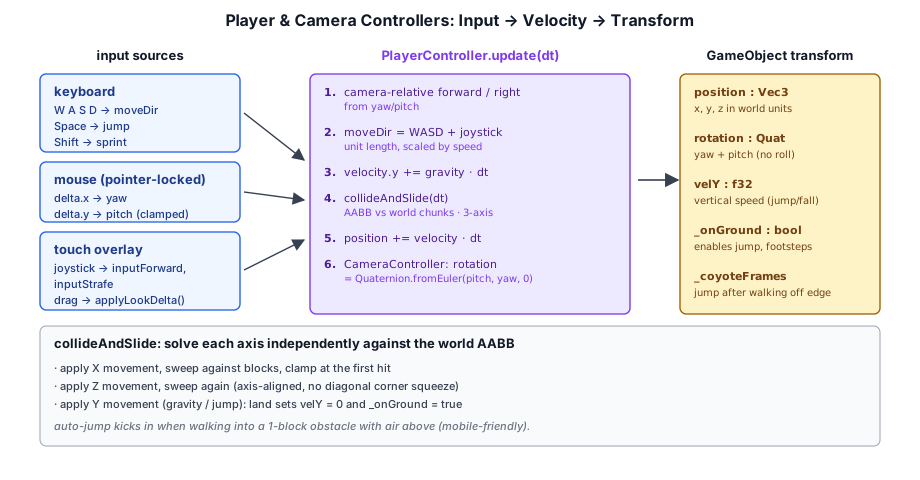
PlayerController is the FPS-style walking controller for crafty. It adds gravity, jumping with coyote time, sprint/sneak modifiers, AABB collision against the BlockWorld, water swimming, and a mobile auto-step. The input surface mirrors the engine's CameraController — same analog fields, plus a few flags specific to walking:
// ── from crafty/game/player_controller.ts ──
inputForward = 0;     // [-1, 1] analog (touch joystick)
inputStrafe  = 0;     // [-1, 1] analog (positive = right)
inputJump    = false; // OR-ed with Space
inputSneak   = false; // OR-ed with ShiftLeft
inputSprint  = false; // OR-ed with ControlLeft / AltLeft

update(eyeGO: GameObject, dt: number): void {
  dt = Math.min(dt, 0.05);

  const sprinting = this._keys.has('ControlLeft') || this._keys.has('AltLeft') || this.inputSprint;
  const sneaking  = this._keys.has('ShiftLeft') || this.inputSneak;
  const speed = sprinting ? SPRINT_SPEED : sneaking ? SNEAK_SPEED : WALK_SPEED;

  let mx = 0, mz = 0;
  // ... WASD ...
  if (this.inputForward !== 0) { mx -= sinY * this.inputForward; mz -= cosY * this.inputForward; }
  if (this.inputStrafe  !== 0) { mx += cosY * this.inputStrafe;  mz -= sinY * this.inputStrafe;  }

  const jumpHeld = this._keys.has('Space') || this.inputJump;
  // ... gravity, swim, per-axis collide-and-slide ...
}
The same shape — read keyboard, read public analog fields, blend, apply — is what makes the touch overlay drop in cleanly. Touch never has to know whether the controller it's driving is the free-fly camera or the FPS player; it just writes the same fields.
18.2 Collision Detection (AABB)#
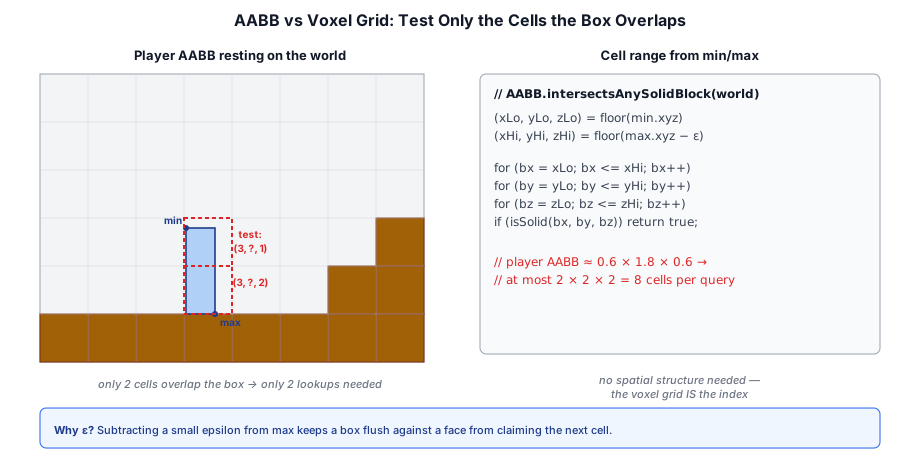
The player's collision volume is an axis-aligned bounding box (AABB). Collision detection tests the player's AABB against solid blocks in the world:
// ── AABB collision (conceptual) ──
class AABB {
  min: Vec3;
  max: Vec3;

  intersectsBlock(wx: number, wy: number, wz: number): boolean;
  sweepTest(velocity: Vec3, world: World): { hit: boolean; normal: Vec3; time: number };
}
The sweep test moves the AABB along the velocity vector and finds the first collision. This allows the player to slide along walls — if the velocity has an X component that causes collision, the X component is zeroed and the remaining Y/Z sweep continues.
18.3 Player Movement and Gravity#
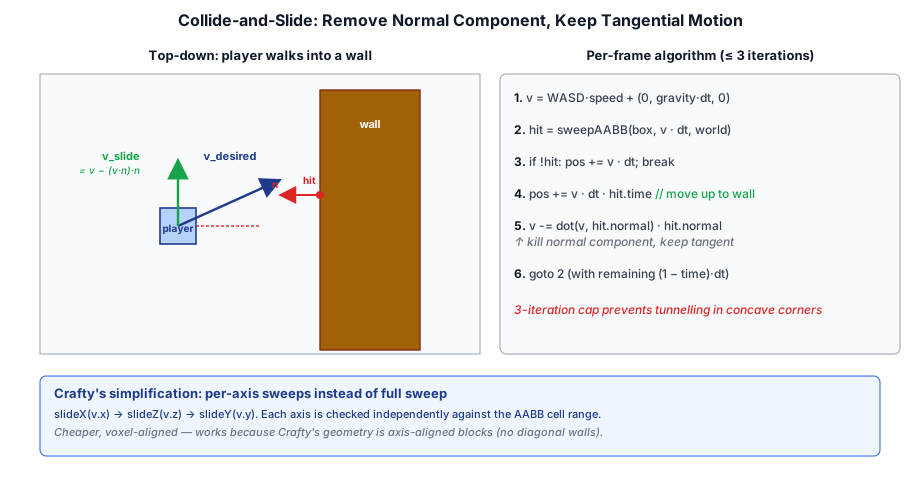
The player controller implements a simplified collide-and-slide algorithm:
- Compute desired velocity from input and gravity.
- Sweep-test the velocity against world blocks.
- If collision, slide along the collision normal (remove the velocity component along the normal).
- Repeat up to 3 iterations to handle corners and multiple collisions.
- Apply the final velocity to the player position.
Gravity is constant at -20 m/s² (slightly higher than Earth's -9.8 for a more responsive feel). Ground friction slows horizontal movement when the player is standing on a block.
Coyote Time and Variable Jump Height#
Two interrelated mechanics make jumping feel responsive even with imperfect input timing:
Coyote time gives a short grace window (~100 ms) after the player walks off a ledge during which a jump still succeeds. This prevents the frustration of pressing jump a frame too late after stepping off an edge:
// ── from crafty/game/player_controller.ts ──
// Coyote timer: refreshed on landing, counts down while airborne
if (landed) {
  this._coyoteFrames = 6;
} else if (!inWater) {
  this._coyoteFrames = Math.max(0, this._coyoteFrames - 1);
}

// Jump triggers on ground OR within the coyote window
if (jumpHeld && (this._onGround || this._coyoteFrames > 0)) {
  this._velY        = JUMP_VEL;
  this._coyoteFrames = 0;
}
The counter is refreshed to 6 frames whenever the player is grounded and decrements only while airborne (and not in water). This gives a consistent ~100 ms at 60 FPS where a late jump press still connects.
Variable jump height emerges naturally from the single-impulse jump model: the initial upward velocity (JUMP_VEL = 11.5 blocks/s, peak ~2.36 blocks) is applied once on the frame the jump triggers. Because the player is airborne immediately after, releasing the jump button has no further effect — gravity decelerates the ascent at GRAVITY = -28 blocks/s² and the player begins descending. The perceived height varies because:
- The player can choose to jump early (near the edge) or late (deep in the coyote window), changing the height at which the jump occurs relative to the ground below.
- Holding Space through the coyote window lets the player jump from the last possible moment, preserving maximum height even after a mistimed dismount.
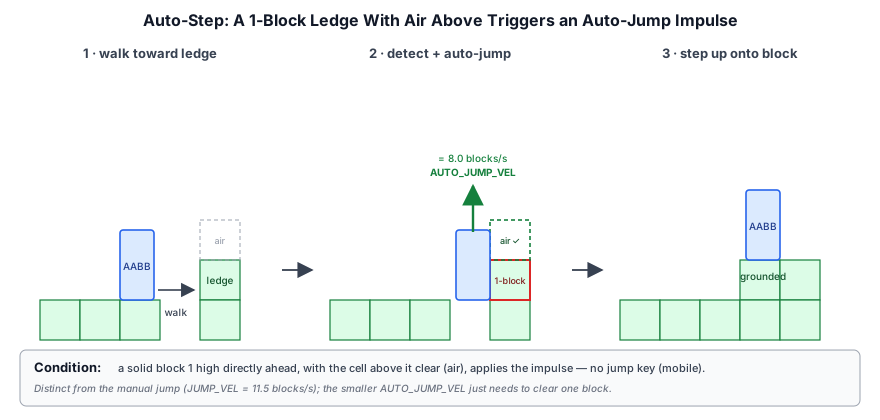
The auto-jump system augments this for mobile: when walking into a 1-block-high obstacle with air above it, a velocity of AUTO_JUMP_VEL = 8.0 blocks/s is applied automatically, stepping the player onto the block without explicit input:
// ── from crafty/game/block_interaction.ts ──
function placeBlock(hit: BlockHit, blockType: BlockType) {
  const nx = hit.x + hit.normal.x;
  const ny = hit.y + hit.normal.y;
  const nz = hit.z + hit.normal.z;
  if (world.getBlock(nx, ny, nz) === BlockType.Air) {
    world.setBlock(nx, ny, nz, blockType);
  }
}
18.4 Block Ray Casting#
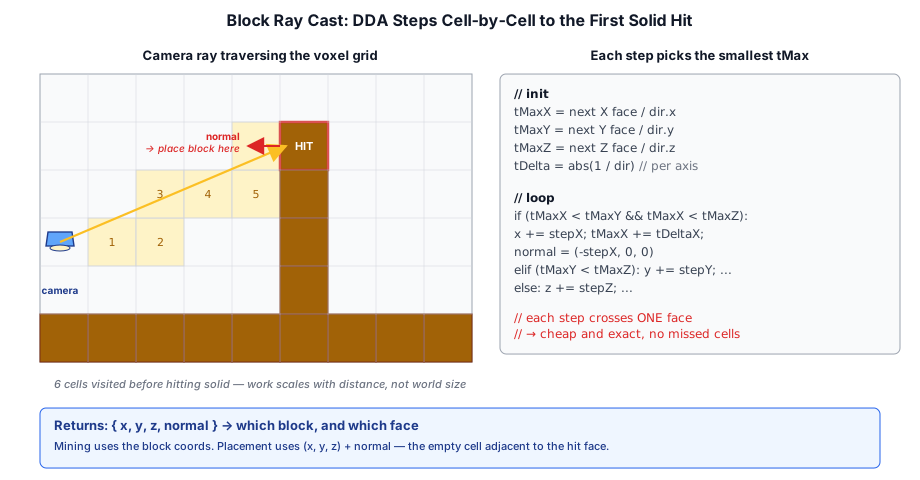
To determine which block the player is looking at, a ray is cast from the camera through the crosshair. The DDA (Digital Differential Analyzer) algorithm traverses the voxel grid efficiently:
// ── from src/block/world.ts ──
function raycastVoxels(origin: Vec3, dir: Vec3, world: World, maxDist: number): BlockHit | null {
  let x = Math.floor(origin.x), y = Math.floor(origin.y), z = Math.floor(origin.z);
  const stepX = sign(dir.x), stepY = sign(dir.y), stepZ = sign(dir.z);
  let tMaxX = ((dir.x > 0 ? (x + 1) : x) - origin.x) / dir.x;
  let tMaxY = ((dir.y > 0 ? (y + 1) : y) - origin.y) / dir.y;
  let tMaxZ = ((dir.z > 0 ? (z + 1) : z) - origin.z) / dir.z;
  const tDeltaX = abs(1 / dir.x), tDeltaY = abs(1 / dir.y), tDeltaZ = abs(1 / dir.z);

  for (let i = 0; i < MAX_STEPS; i++) {
    if (world.getBlock(x, y, z) !== BlockType.Air) {
      return { x, y, z, normal: ... };
    }
    // Step to next voxel boundary
    if (tMaxX < tMaxY) { tMaxX += tDeltaX; x += stepX; }
    else if (tMaxY < tMaxZ) { tMaxY += tDeltaY; y += stepY; }
    else { tMaxZ += tDeltaZ; z += stepZ; }
  }
  return null;
}
The return value includes the block position and the face normal (which side was hit), used for placing new blocks adjacent to the hit face.
18.5 Block Interaction#
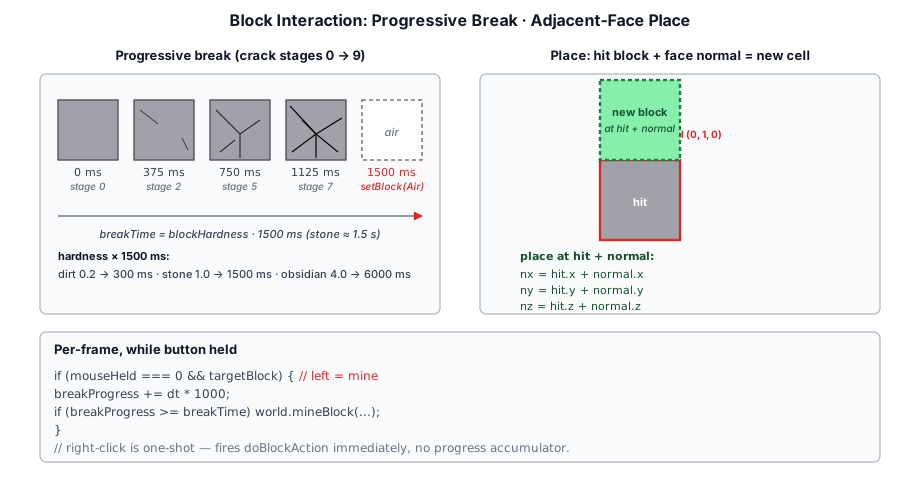
Block breaking uses a progressive crack animation — holding the mouse button on a block gradually breaks it:
// ── from crafty/game/block_interaction.ts ──
// Block breaking state
let breakProgress = 0;
const breakTime = blockHardness * 1.5;  // Stone ~1.5s, dirt ~0.3s

function updateBreak(dt: number, hit: BlockHit) {
  breakProgress += dt;
  if (breakProgress >= breakTime) {
    world.setBlock(hit.x, hit.y, hit.z, BlockType.Air);
    breakProgress = 0;
  }
  // Update crack overlay texture
  const stage = Math.min(Math.floor(breakProgress / breakTime * 10), 9);
  blockHighlightPass.setCrackStage(stage);
}
Block placement inserts a block at the face adjacent to the hit position:
function placeBlock(hit: BlockHit, blockType: BlockType) {
  const nx = hit.x + hit.normal.x;
  const ny = hit.y + hit.normal.y;
  const nz = hit.z + hit.normal.z;
  if (world.getBlock(nx, ny, nz) === BlockType.Air) {
    world.setBlock(nx, ny, nz, blockType);
  }
}
A more detailed treatment of the per-frame break state machine, crack overlay rendering, particle emission, and surface-specific audio lives in Chapter 17: Block Voxel Terrain, where the same callback hooks fire on remote (multiplayer) edits as well.
18.6 Summary#
The player physics and interaction system is deliberately minimal for a creative-mode voxel game:
- Player controller: Shares the analog-input surface with the engine's
CameraController; adds gravity, jump (with coyote time), sprint/sneak, swim, and a mobile auto-step. - Collision detection: AABB sweep tests with collide-and-slide algorithm (up to 3 iterations).
- Player movement: Gravity at −20 m/s², coyote time (100 ms), variable jump height, auto-step.
- Block targeting: DDA voxel ray casting with progressive break animation (10 crack stages).
- Block placement: Adjacent to the hit face, subject to server validation in multiplayer.
Further reading:
- crafty/game/player_controller.ts — FPS player controller (coyote time, swim, auto-step), collide-and-slide and movement physics
- src/block/world.ts — DDA ray casting and block queries
- crafty/game/block_interaction.ts — Block break/place state machine
- src/renderer/render_graph/passes/block_highlight_pass.ts — Crack overlay rendering