After the scene is rendered into the HDR target, a series of post-processing passes refines the image. This chapter covers tonemapping (with its folded-in color-grading and lens/film-FX stacks), bloom, anti-aliasing (both spatial SMAA and temporal TAA), motion blur, and depth of field.
Tone Mapping and HDR Display#
The final step before presentation is tone mapping — converting HDR pixel values to the SDR (or HDR) display range. Taos Engine's TonemapPass (src/renderer/render_graph/passes/tonemap_pass.ts) performs this as a standalone fullscreen draw that samples the post-FX HDR scene and writes the backbuffer.
Tone-Mapping Operators#
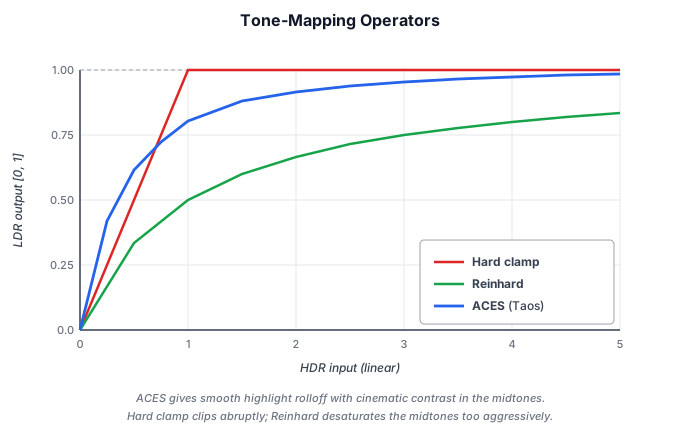
Taos Engine defaults to a filmic ACES (Academy Color Encoding System) curve, which holds the midrange and rolls highlights off smoothly — unlike a hard clamp() (which clips bright values flat) or Reinhard (which desaturates the midtones aggressively):
There are two ACES fits to choose from. The first is Krzysztof Narkowicz's single-curve approximation — one rational expression, very cheap, slightly punchy:
fn aces_filmic(x: vec3<f32>) -> vec3<f32> {
  let a = 2.51; let b = 0.03; let c = 2.43; let d = 0.59; let e = 0.14;
  return clamp((x * (a * x + b)) / (x * (c * x + d) + e), vec3<f32>(0.0), vec3<f32>(1.0));
}
The second is Stephen Hill's fit of the full ACES Reference Rendering Transform + Output Device Transform, sandwiched between the ACEScg input/output color matrices. It costs a couple of matrix multiplies more than Narkowicz but retains hue better through bright, saturated highlights — it's the curve Filament ships:
fn aces_fitted(color: vec3<f32>) -> vec3<f32> {
  let cg  = ACES_INPUT_MAT * color;          // render primaries → ACEScg
  let fit = rrt_and_odt_fit(cg);             // RRT + ODT rational fit
  return clamp(ACES_OUTPUT_MAT * fit, vec3<f32>(0.0), vec3<f32>(1.0));
}
The third operator is not an ACES fit at all but the Khronos PBR Neutral tone mapper (from the glTF Sample Viewer). Both ACES curves are filmic: they bend hue and pull saturated colors toward a film-stock look as they brighten, which flatters photographic scenes but skews an authored material away from its true albedo. PBR Neutral is built for the opposite goal — material and product viewing — so it preserves hue and (below a compression knee) saturation, rolling only the brightest values off to white. It subtracts a small black-point offset, then compresses the per-pixel peak channel once it crosses the knee and desaturates only that compressed highlight:
fn pbr_neutral(color_in: vec3<f32>) -> vec3<f32> {
  let start_compression = 0.8 - 0.04;        // knee where highlights desaturate
  let desaturation = 0.15;
  var color = color_in;
  let x = min(color.r, min(color.g, color.b));
  let offset = select(0.04, x - 6.25 * x * x, x < 0.08);
  color = color - vec3<f32>(offset);         // black-point offset
  let peak = max(color.r, max(color.g, color.b));
  if (peak < start_compression) {            // below the knee → untouched
    return color;
  }
  let d = 1.0 - start_compression;
  let new_peak = 1.0 - d * d / (peak + d - start_compression);
  color = color * (new_peak / peak);         // compress the peak channel
  let g = 1.0 - 1.0 / (desaturation * (peak - new_peak) + 1.0);
  return mix(color, vec3<f32>(new_peak), g); // desaturate only the highlight
}
The fourth curve is AgX (Troy Sobotka's design, here in its minimal polynomial fit). It converts to a slightly inset wide-gamut space, log-encodes the signal over a fixed range of about 16.5 stops, and pushes it through a sigmoid contrast curve before converting back. Because the compression happens in that inset space, bright saturated colors drift smoothly toward white instead of skewing hue — a soft filmic look without the ACES hue shifts:
fn agx_tonemap(color: vec3<f32>) -> vec3<f32> {
  let min_ev = -12.47393;
  let max_ev = 4.026069;
  var val = AGX_MAT * max(color, vec3<f32>(0.0));                // inset primaries
  val = clamp(log2(max(val, vec3<f32>(1e-10))), vec3<f32>(min_ev), vec3<f32>(max_ev));
  val = (val - min_ev) / (max_ev - min_ev);                      // log2 → [0,1]
  val = agx_curve(val);                                          // sigmoid polynomial
  val = AGX_MAT_INV * val;
  return pow(max(val, vec3<f32>(0.0)), vec3<f32>(2.2));          // back to display-linear
}
All five curves (clamp-only plus the four above) sit behind one tonemap_curve(x, op) switch. The active operator (none / Narkowicz / fitted / PBR Neutral / AgX) is selected at runtime through TonemapFeature.tonemapper — no pipeline rebuild, since the choice rides in a uniform. The tonemap_grading_test sample puts the first four (none through PBR Neutral) side by side against bright emissive bars where the difference is easiest to see: the ACES fits shift the bars' hue as they clip, while PBR Neutral holds the orange/green/blue and rolls only the brightest values to white.
Params: operator + HDR passthrough#
Both the operator and the HDR-canvas behavior are packed into the flags field of the params uniform, set per-frame by TonemapPass.updateParams. Bits 0-2 hold the operator (0 = none, 1 = Narkowicz, 2 = fitted, 3 = PBR Neutral, 4 = AgX — room remains for three more); bit 3 skips the sRGB encode for an HDR swap chain (rgba16float + display-p3), where the high bit depth has no 8-bit banding to correct; bit 4 preserves the scene's alpha as a coverage mask for AR passthrough. The operator argument accepts a boolean for back-compat (true → Narkowicz) or the numeric index:
updateParams(
  ctx: RenderContext,
  exposure: number,
  operator: boolean | number,
  hdrCanvas: boolean,
  preserveAlpha = false,
): void {
  const op = operator === true ? 1 : operator === false ? 0 : (operator & 7);
  let flags = op;
  if (hdrCanvas) {
    flags |= 8;
  }
  if (preserveAlpha) {
    flags |= 16;
  }
  // ...
}
sRGB Encode#
For SDR output the tone-mapped value is encoded to sRGB before presentation. Rather than the common pow(1/2.2) shorthand, Taos Engine applies the exact piecewise sRGB transfer function — a short linear segment near black plus a gamma-2.4 curve — which matches the EOTF the display (and the texture sampler) assumes on the way back to light:
fn linear_to_srgb(c: vec3<f32>) -> vec3<f32> {
  let lo = c * 12.92;
  let hi = 1.055 * pow(c, vec3<f32>(1.0 / 2.4)) - 0.055;
  return select(hi, lo, c <= vec3<f32>(0.0031308));
}
A triangular-PDF dither (±1 LSB, from two decorrelated interleaved-gradient noise samples) is added after the encode to break up 8-bit banding on smooth gradients — most visibly the sky dome.
Color Grading#
The TonemapPass does more than map HDR → SDR: it also carries a full film color-grading stack, folded into the same fullscreen draw rather than running as a separate pass. The reason is ordering. A grade has two halves that straddle the tonemap operator — a primary grade that must run in linear HDR before the curve (white balance, lift/gamma/gain, etc.) and a display-space 3D LUT that must run after it (in the [0,1] range a .cube file is authored for) — so the one place that already sits on both sides of the operator is the natural, allocation-free home for it.
The CPU side (src/renderer/color_grade.ts) owns a friendly ColorGradeSettings whose every field defaults to a neutral value, so a bare {} is an exact identity — enabling the grade with no edits never changes the image — and packColorGrade() flattens it into a 224-byte uniform. The shader math lives in a #imported module (src/shaders/modules/color_grade.wgsl); tonemap.wgsl calls it on either side of the operator:
scene = grade_apply_linear(scene, grade);   // white balance → filter → channel mix →
                                            // contrast → lift/gamma/gain → S/M/H →
                                            // split-tone → saturation → hue  (linear HDR)
// ... exposure already applied; tonemap operator runs here ...
ldr = grade_apply_lut(ldr, grade, lut_tex, lut_samp);   // display-space .cube 3D LUT
An identity 2³ LUT is bound by default and the whole stack is gated behind flag bits in the uniform, so a single pipeline serves graded and ungraded frames alike. The grade and LUT are exposed through TonemapFeature.grade (mutate its fields for live sliders) and TonemapFeature.setLut / loadLut, and forwarded by deferredPreset({ grade, lut, lutAmount }). The color_grading_test sample drives the whole stack live, including a .cube file loader.
Lens and Film Effects#
The same pass also carries a stack of camera-lens and film-stock effects — lens distortion, Panini projection, chromatic aberration, vignette, and film grain — again folded in rather than added as separate passes, for the same allocation-free reason: they all sit on the HDR→display path the tonemap pass already owns. They fall into two families by where they act:
- Geometric warps (lens distortion, Panini, chromatic aberration) change where the HDR scene is sampled — they run before exposure, on the sampling UV.
- Display-space ops (vignette, film grain) modify the already-tonemapped color.
The fragment shader threads them through the existing chain:
let warped_uv = postfx_warp_uv(in.uv, postfx);          // Panini → lens distortion
var scene     = postfx_sample_scene(hdr_tex, samp, warped_uv, postfx);  // + chromatic aberration
// ... exposure → grade → tonemap operator → LUT ...
ldr = postfx_vignette(ldr, in.uv, postfx);              // display space, undistorted UV
// ... sRGB encode ...
srgb = postfx_grain(srgb, in.pos.xy, postfx);           // display space, then dither
The settings (src/renderer/post_fx.ts) are a nested PostFxSettings — one optional object per effect, each running only when present and not { enabled: false } — packed into a 112-byte uniform bound at the pass's fourth bind group. Every effect gates behind its own flag bit, so the one pipeline covers any combination from "none" to "all", and the disabled default is byte-identical to the plain tonemap path. The shader math lives in the #imported src/shaders/modules/post_fx.wgsl.
Lens distortion is a Brown–Conrady radial polynomial about the (aspect-corrected) frame center — a negative coefficient bows the image outward (barrel/fisheye), a positive one pinches it in (pincushion), and a zoom factor crops the warped border:
var c = (uv - center) * vec2<f32>(p.aspect, 1.0);
let r2 = dot(c, c);
let f = 1.0 + p.distort_k1 * r2 + p.distort_k2 * r2 * r2;   // k1<0 barrel, k1>0 pincushion
c = c * f * p.distort_scale;
return center + c / vec2<f32>(p.aspect, 1.0);
Panini projection is the wide-FOV de-stretch that keeps vertical lines straight. Because the scene is rendered rectilinear, the post pass has to invert the projection: for each output (Panini) pixel it finds the rectilinear UV to sample. Taos Engine uses a derived closed-form inverse of the cylinder projection rather than a copied approximation — project a point on the unit horizontal circle from a center d behind the axis, x_p = (d+1)·X/(d+Z) with X²+Z² = 1, solve the resulting quadratic for Z (front root) and recover the rectilinear x_r = X/Z. The mapping collapses to the identity at d = 0, and that property (plus the horizontal edge-compression for d > 0) is unit-tested:
let a = (xp * xp) / (s1 * s1);                                   // s1 = d + 1
let z = (-a * d + sqrt(max(a * (1.0 - d * d) + 1.0, 0.0))) / (a + 1.0);
let x = xp * (d + z) / s1;
let xr = x / z;                                                  // rectilinear sample coord
The Panini warp needs the camera's vertical FOV to size its tangent space; TonemapFeature feeds tan(½·fov) from the live camera each frame (unless panini.fov overrides it), so the de-stretch tracks the rendered FOV.
Chromatic aberration samples R, G, and B at radially staggered offsets — red pushed outward, blue pulled inward, the offset growing with radius — to fake the wavelength-dependent focus of a real lens. It is the one warp that needs three texture taps; when disabled, postfx_sample_scene collapses to a single tap, matching the original plain-tonemap sample.
Vignette darkens the corners toward a tint color, using the undistorted screen UV (so the falloff tracks the real frame, not the warped sample position). Intensity, falloff smoothness, and a roundness that blends between a circle and the frame aspect are exposed.
Film grain adds animated, luminance-weighted noise in display space. Driven by a per-frame time so it shimmers like real grain rather than freezing into a static pattern, it fades out of the highlights (more visible in shadows and mids), and can be monochrome or per-channel colored:
let response = mix(1.0, 1.0 - luma, p.grain_lum);   // less grain in highlights
let g = (n - vec3<f32>(0.5)) * 2.0 * p.grain_intensity * response;
return max(color + g, vec3<f32>(0.0));
All five are live-mutable through TonemapFeature.postFx and configured via deferredPreset({ postFx }):
deferredPreset({
  postFx: {
    lensDistortion: { amount: -0.2, scale: 1.08 },   // gentle barrel + zoom to crop
    panini: { distance: 1.3 },                       // FOV tracks the camera automatically
    chromaticAberration: { amount: 0.006 },
    vignette: { intensity: 0.55, roundness: 1.0 },
    filmGrain: { intensity: 0.06, luminance: 0.8 },
  },
});
The post_fx_test sample renders a high-contrast grid scene — straight edges for the warps, contrast edges for the aberration, dark corners for the vignette — with per-effect toggles, sliders, and cinematic / vintage / VR-wide presets.
Bloom#
Bloom simulates the scattering of bright light in a camera lens, creating a soft glow around bright regions. Taos Engine's BloomPass follows a standard three-step process — extract the bright pixels, blur them, and add the result back:
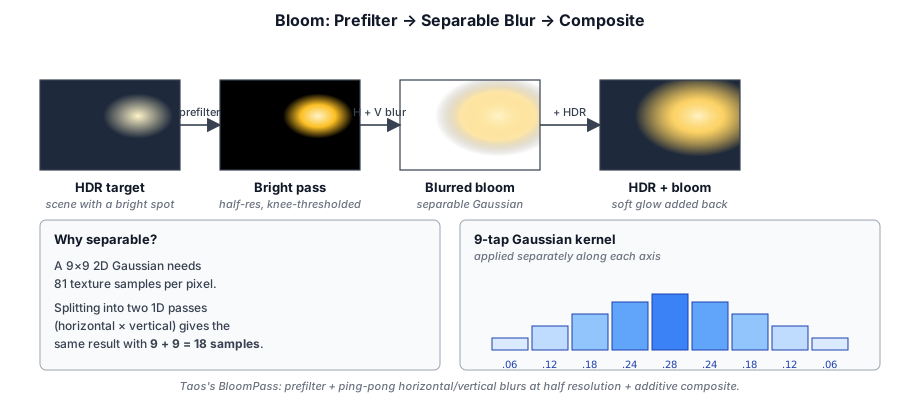
1. Prefilter. Downsample the HDR target 2× (a four-tap box average) and extract the bright pixels. Brightness is the pixel's maximum channel rather than its luminance, so a saturated pure-blue light blooms as readily as a white one. A soft knee ramps the response in quadratically between threshold − knee and threshold + knee instead of switching on at a hard edge, and the resulting weight scales the color so its hue is kept:
// Soft knee: smooth ramp from (threshold - knee) to (threshold + knee)
let brightness = max(c.r, max(c.g, c.b));
let rq         = clamp(brightness - bloom.threshold + bloom.knee, 0.0, 2.0 * bloom.knee);
let weight     = max(bloom.knee * rq * rq, brightness - bloom.threshold)
               / max(brightness, 0.0001);
return vec4<f32>(c * weight, 1.0);
2. Separable Gaussian blur. The prefiltered bright-pass texture is blurred with a two-pass separable Gaussian. Ping-ponging between two half-resolution textures:
BrightPass ──► Horizontal Blur ──► Vertical Blur ──► Blurred BloomThe blur kernel is a 9-tap Gaussian (σ ≈ 2): the center tap plus four on each side, with symmetric weights normalized to sum to one:
// 9-tap separable Gaussian, sigma ≈ 2. Weights are normalized to sum 1.
const W0: f32 = 0.20416;   // center
const W1: f32 = 0.18009;   // ±1 texel
const W2: f32 = 0.12388;   // ±2
const W3: f32 = 0.06626;   // ±3
const W4: f32 = 0.02763;   // ±4
3. Composite. The blurred half-resolution bloom texture is bilinearly upsampled and added to the original HDR image:
let glow = textureSample(bloom_tex, samp, in.uv).rgb;
return vec4<f32>(hdr + glow * params.strength, 1.0);
The bloom intensity and threshold are adjustable parameters exposed through the settings UI.
Anti-Aliasing#
Rasterization makes a binary decision at each pixel — a triangle either covers the sample point or it doesn't — so any edge that isn't axis-aligned turns into a staircase, and geometry that shrinks below one pixel (distant foliage, thin poles, a slatted fence) flickers as those binary decisions flip from frame to frame. The classic fix, MSAA, takes several coverage samples per pixel inside the rasterizer. That works beautifully for a forward renderer, but Taos Engine is deferred: shading happens in a later full-screen pass over the G-Buffer, long after rasterization. Running MSAA there means storing a multi-sampled G-Buffer (several × the memory and bandwidth) and shading every sample — prohibitively expensive. So Taos Engine, like most deferred engines, anti-aliases as a post-process: a pass (or passes) that takes the already-shaded HDR image and smooths its edges.
Two families of post-process AA matter here, and Taos Engine ships both as interchangeable resolve-slot features:
- Spatial AA (SMAA) looks only at the current frame. It detects edges from color/luma discontinuities, figures out the silhouette each edge belongs to, and re-blends pixels along it to reconstruct a smooth coverage gradient. One frame in, one frame out.
- Temporal AA (TAA) spreads the cost over time. It jitters the camera by a sub-pixel offset each frame and averages the result with a reprojected history buffer, so a static scene converges toward true supersampling over ~16 frames.
Neither is strictly better; they trade different things:
| SMAA (spatial) | TAA (temporal) | |
|---|---|---|
| Inputs | current frame only | current frame + history + motion |
| Recovers sub-pixel detail | no — it can only smooth edges it can see | yes — accumulates detail finer than one pixel |
| Ghosting / smearing | none | possible on motion & disocclusions |
| Stability under motion | can still shimmer on sub-pixel geometry | very stable once converged |
| Extra plumbing | none — pure image filter | camera jitter, history texture, reprojection |
| Cost | 3 full-screen passes + 2 small lookup textures | 1 resolve pass + a persistent history texture |
| Fails toward | slightly soft edges | blur / trails while moving |
The practical rule of thumb: TAA when you want the cleanest possible result and can absorb the temporal plumbing and the occasional ghost (it's Taos Engine's default, and the only option that genuinely resolves sub-pixel detail); SMAA when you want a stable, single-frame filter with no history and no ghosting — useful for screenshots, for motion-sickness-sensitive content, or any pipeline where the temporal machinery isn't worth it.
Both are wired the same way: a feature that reads frame.hdr and writes the anti-aliased result back to frame.hdr, slotted after lighting/overlays and before bloom/DoF/tone mapping. The render presets expose the choice through one option:
deferredPreset({ aa: 'taa' });   // temporal (default)
deferredPreset({ aa: 'smaa' });  // spatial
deferredPreset({ aa: false });   // none
The antialiasing_test sample renders a field of thin poles and a slatted fence — deliberately alias-prone, sub-pixel geometry — with a live TAA / SMAA / Off switch so the trade-offs above are visible side by side.
Spatial AA: SMAA (Subpixel Morphological Anti-Aliasing)#
SMAA is a morphological technique: it reconstructs the smooth edge that the rasterizer turned into a staircase by recognizing the staircase's shape. Where a naive edge blur would soften everything, SMAA classifies each edge into one of a small set of patterns (L, Z, U shapes) and computes the exact sub-pixel coverage area for that pattern, so it only blends where a real silhouette runs. The implementation is a faithful port of Jorge Jimenez's reference SMAA 1x, run as three full-screen sub-passes in SMAAPass over the shader smaa.wgsl:
// 1. edge detection  -> edges    (rg8)
// 2. blend weights    -> weights  (rgba8)
// 3. neighborhood blend -> resolved (HDR)
Pass 1 — edge detection. A full-screen pass compares each pixel's luma against its left and top neighbors; where the difference exceeds a threshold (default 0.1) it marks an edge in the red/green channels of an rg8 target, then applies a local-contrast adaptation step so a strong edge suppresses weaker neighboring ones (this stops a single feature spawning a thick band of edges). Pixels with no edge discard, leaving the target's cleared zero — so the next pass only does work where edges exist. SMAA's thresholds assume perceptual (gamma-ish) values, but Taos Engine's input is linear HDR, so the shader applies a Reinhard curve c/(c+1) to the luma for the edge test only — the actual color is never touched here.
Pass 2 — blend-weight calculation. This is the heart of SMAA. For each edge pixel the shader searches left/right (or up/down) to find how far the edge line runs and what "crossing" edges cap its ends, which together identify the morphological pattern. It then looks up the coverage area for that pattern in a precomputed AreaTex, using a small SearchTex to accelerate the run-length search. The output is up to four blend weights (one per edge direction) in an rgba8 target. Those two lookup textures are the only non-obvious dependency, and Taos Engine generates them on the CPU at startup rather than shipping binary blobs:
// Faithful TS ports of the reference generators (AreaTex.py / SearchTex.py).
// AreaTex: 160×560 RG8 — sub-pixel coverage area per (pattern, distances).
// SearchTex: 64×16 R8  — how far to step in the last search iteration.
export function generateAreaTex(includeDiag = true): Uint8Array<ArrayBuffer> { /* … */ }
export function generateSearchTex(): Uint8Array<ArrayBuffer> { /* … */ }
Diagonal-pattern and sharp-corner detection are optional refinements gated behind the SMAA_DIAG / SMAA_CORNER shader defines (both on by default). The diagonal AreaTex region is the only expensive part of generation — a brute-force area integration — so it's skipped entirely when diagonal detection is off.
Pass 3 — neighborhood blending. The final pass reads the original HDR color plus the blend-weight texture and, for each pixel, mixes itself with the neighbor in the direction of the strongest weight. This blend runs in linear HDR (only the edge test in pass 1 was tone-mapped), so no dynamic range is lost. The result is written back as the resolved HDR.
Because SMAA only ever reads the current frame, it needs no camera jitter, no history texture, and no motion reprojection — SMAAFeature simply reads and rewrites frame.hdr, and drops unchanged into the forward, forward+, and deferred pipelines. The cost is that it cannot manufacture detail finer than a pixel: on the sub-pixel pole field it removes the jaggies but can still shimmer slightly as poles cross pixel boundaries, where TAA's accumulation would average that shimmer away.
Temporal Anti-Aliasing (TAA)#
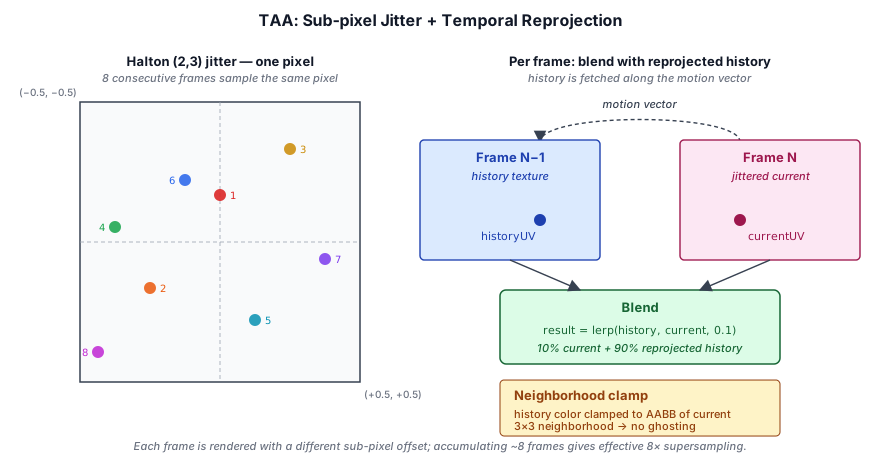
The TAAPass reduces aliasing by averaging the current frame with previous frames, using sub-pixel jitter to shift the sample pattern each frame. The Halton (2,3) sequence spreads samples evenly within a pixel, so accumulating ~8 frames approximates 8× supersampling:
updateCamera: jitter and reprojection uniforms#
The pass exposes a single per-frame setter that does three things at once:
updateCamera(ctx: RenderContext): void {
  const camera = ctx.activeCamera;
  if (!camera) {
    throw new Error('TAAPass.updateCamera: ctx.activeCamera is null');
  }
  const hi = (this._frameIndex % this.sampleCount) + 1;
  const jx = (halton(hi, 2) - 0.5) * (2 / ctx.width);
  const jy = (halton(hi, 3) - 0.5) * (2 / ctx.height);
  camera.applyJitter(jx, jy);

  const data = this._scratch;
  data.set(camera.inverseViewProjectionMatrix().data, 0);
  data.set(camera.previousViewProjectionMatrix().data, 16);
  ctx.queue.writeBuffer(this._uniformBuffer, 0, data.buffer as ArrayBuffer);
  this._frameIndex++;
}
The Halton-(2, 3) offset is in clip-space units: a ±1/width shift in NDC moves the projected position by half a pixel in screen space. camera.applyJitter(jx, jy) adds that offset into a separate matrix on the camera (_jitteredViewProj) — the un-jittered viewProj and prevViewProj are left intact so reprojection, frustum culling, and shadow fitting see the stable camera.
The other two writes pack the TAA uniform buffer: the current frame's inverse view-projection (for reconstructing world position from depth) and the previous frame's view-projection (for re-projecting that world position back into the prior frame's NDC).
Camera.jitteredViewProj and Camera.prevViewProj#
Two matrix accessors on the Camera component carry the temporal state TAA needs:
/** Returns the TAA-jittered viewProj if applyJitter ran this frame,
 *  otherwise falls back to the un-jittered viewProjectionMatrix(). */
jitteredViewProjectionMatrix(): Mat4 {
  return this._jitteredViewProj ?? this.viewProjectionMatrix();
}

/** Previous frame's un-jittered view-projection, snapshotted by updateRender.
 *  Falls back to viewProjectionMatrix() on the first frame so reprojection
 *  sees no apparent motion (and no ghosting). */
previousViewProjectionMatrix(): Mat4 {
  return this._prevViewProj ?? this.viewProjectionMatrix();
}
The lifecycle is symmetric: every frame the camera's updateRender() runs first, which (a) snapshots last frame's _viewProj into _prevViewProj and (b) clears _jitteredViewProj back to null. Then taaPass.updateCamera(ctx) calls camera.applyJitter(jx, jy) to fill in this frame's jittered matrix. The fall-throughs to the un-jittered viewProj make both accessors safe to call regardless of whether TAA ran — geometry passes don't need to special-case it.
Every geometry-fill pass uploads the jittered viewProj as part of its camera uniform, so vertices land at sub-pixel-shifted positions in the G-Buffer. The geometry pass shows the pattern:
data.set(camera.viewMatrix().data, 0);
data.set(camera.projectionMatrix().data, 16);
data.set(camera.jitteredViewProjectionMatrix().data, 32);  // ← jittered
data.set(camera.inverseViewProjectionMatrix().data, 48);BlockGeometryPass, SkinnedGeometryPass, and ForwardPass follow the same pattern. SSGI also pulls previousViewProjectionMatrix() for its own reprojection step.
Ordering: updateCamera before geometry uploads#
Because the geometry passes upload camera.jitteredViewProjectionMatrix() during their updateCamera() calls, TAA's updateCamera() must run first in the host frame loop:
ctx.activeCamera = camera;
// TAA picks the next sub-pixel jitter and applies it to the camera so
// subsequent geometry passes (geometry, block_geometry, skinned, forward)
// pick it up via camera.jitteredViewProjectionMatrix().
passes.taaPass!.updateCamera(ctx);
If the order is reversed, the geometry passes see a null _jitteredViewProj, fall back to the un-jittered VP, and TAA has nothing to converge — the image accumulates the same un-jittered samples every frame, defeating the algorithm.
When TAA is disabled in a sample or in the deferred factory, this call is simply skipped. Geometry passes still ask for the jittered matrix; the accessor's null-coalesce returns the un-jittered VP, and rendering is correct (just without anti-aliasing).
Place in the Render Graph#
TAAPass.addToGraph() declares two sub-passes — a render pass that produces the resolved frame, and a transfer pass that copies the resolved frame into the persistent history texture for next frame:
const history = graph.importPersistentTexture(TAA_HISTORY_KEY, {
  ...HISTORY_DESC, width: ctx.width, height: ctx.height,
});

// Pass 1: render the resolved frame from {hdr, history, depth}.
graph.addPass('TAAPass.resolve', 'render', (b) => {
  const target = b.createTexture({ /* TAAResolved, rgba16float */ });
  resolved = b.write(target, 'attachment', { loadOp: 'clear', /* ... */ });
  b.read(deps.hdr, 'sampled');
  b.read(history, 'sampled');
  b.read(deps.depth, 'sampled');
  // ... setExecute draws a fullscreen triangle that blends hdr × history.
});

// Pass 2: copy resolved → history for next frame.
graph.addPass('TAAPass.copyHistory', 'transfer', (b) => {
  b.read(resolved, 'copy-src');
  nextHistory = b.write(history, 'copy-dst');
  // ... setExecute calls encoder.copyTextureToTexture(resolved, history).
});

return { resolved, history: nextHistory };
Three things to note about how this fits into the graph:
- The history texture is persistent.
graph.importPersistentTexture(TAA_HISTORY_KEY, ...)returns a handle backed by a single physicalGPUTexturein thePhysicalResourceCachekeyed by"taa:history". The same physical texture is bound across frames, so what the copy pass writes today is what the resolve pass reads tomorrow. See §3.3 Persistent and External Resources. - The copy participates in the dependency graph. The transfer pass is
type: 'transfer', declares the resolved frame as'copy-src'and the history handle as'copy-dst', and its execute callback issues acopyTextureToTexture. Because the write produces a new handle version, the compile-time culling treats it as a sink — the copy is never dropped even if nothing else in the current frame reads the new history version. - SSGI reads last frame's history. In Taos Engine's deferred wiring, the SSGI pass imports the same
"taa:history"key earlier in the frame, before TAA's copy bumps the version. SSGI consumesv=0(the previous frame's contents) and TAA producesv=1later — the versioning makes the read-old / write-new sequence explicit and prevents the compiler from re-ordering them:
// 6. SSGI uses last frame's TAA history as previous-radiance source.
// The TAA pass owns the persistent key; we import it here so SSGI reads
// the v=0 (previous frame's) contents before TAA bumps it later this frame.
const taaHistory = graph.importPersistentTexture('taa:history', {
  label: 'TAAHistory', format: 'rgba16float',
  width: ctxArg.width, height: ctxArg.height,
});
ssgi = ssgiPass.addToGraph(graph, { prevRadiance: taaHistory, /* ... */ }).result;Reprojection#
In the resolve shader, each fragment's NDC is multiplied by the current frame's invViewProj to reconstruct world position, then by prevViewProj to find where that point was in the previous frame. The difference is the motion vector used to sample history:
// Sample history using motion vector
let historyUV = currentUV + motionVector;
let historyColor = textureSample(historyTexture, sampler, historyUV);

// Blend with current frame (clamp to neighborhood to avoid ghosting)
let currentColor = textureSample(currentTexture, sampler, currentUV);
let result = lerp(historyColor, currentColor, 0.1);  // 0.1 = feedback factor
The feedback factor (~0.1) means each frame contributes ~10% of the resolved image and the rest comes from accumulated history — convergence takes roughly the Halton sample count (16 frames) for static scenes.
Neighborhood Clamping#
To prevent ghosting from rapid scene changes, the history sample is clamped to the bounding box (AABB) of the current pixel's neighborhood:
let neighborhood = [
  textureSample(currentTexture, sampler, currentUV + vec2f( 1, 0) * texelSize),
  textureSample(currentTexture, sampler, currentUV + vec2f(-1, 0) * texelSize),
  textureSample(currentTexture, sampler, currentUV + vec2f( 0, 1) * texelSize),
  textureSample(currentTexture, sampler, currentUV + vec2f( 0,-1) * texelSize),
];
let minColor = min(neighborhood);
let maxColor = max(neighborhood);
historyColor = clamp(historyColor, minColor, maxColor);Motion Blur#
The MotionBlurPass (src/renderer/render_graph/passes/motion_blur_pass.ts) smears moving pixels along their per-frame motion vector — the same effect a real camera shutter would capture during the exposure window. Taos Engine ships two modes behind one pass and one shader:
- Camera-only (default). Reconstructs the world position of each pixel from depth, reprojects that point through the previous frame's view-projection, and uses the screen-space difference as the per-pixel velocity. Only camera translation and rotation contribute, but the cost is a single fullscreen pass with no changes to the G-Buffer layout or any geometry shader.
- Velocity-buffer (opt-in). An extra geometry pass re-rasterizes mesh + skinned-mesh draws with both the current and previous frame's view-projection and model/joint matrices, writing the resulting per-pixel
(uv_current − uv_prev)into anrg16floatvelocity texture that the motion blur shader reads. This catches the one case the camera-only path misses — objects moving while the camera is still — at the cost of doubling the per-mesh vertex transform work each frame. See §11.4 — Per-object motion blur below for the trade-off.
Reconstructing velocity from depth#
The pass takes the same two inputs as TAA — the post-TAA HDR target and the jittered G-Buffer depth — plus the reprojection matrices uploaded to its uniform buffer:
updateParams(ctx, camera, strength = 1.0, maxRadiusPx = 32.0, samples = 12): void {
  const data = this._scratch;
  data.set(camera.jitteredViewProjectionMatrix().invert().data, 0);
  data.set(camera.previousViewProjectionMatrix().data, 16);
  data[32] = strength;
  data[33] = maxRadiusPx;
  data[34] = Math.max(1, samples | 0);
  // ...
}
The invViewProj is taken from the jittered current VP so that unprojecting the G-Buffer depth lands at the same point the geometry pass wrote (see §11.3). The previous-frame matrix is un-jittered — that's the stable, pixel-grid-aligned reference frame we want to compare against. In the shader, the per-pixel velocity in pixels is just current-UV minus reprojected-previous-UV, scaled by the screen dimensions:
let ndc       = vec4<f32>(in.uv.x * 2.0 - 1.0, 1.0 - in.uv.y * 2.0, depth, 1.0);
let world_h   = mb.invViewProj * ndc;
let world_pos = world_h.xyz / world_h.w;
let prev_clip = mb.prevViewProj * vec4<f32>(world_pos, 1.0);
let prev_ndc  = prev_clip.xyz / prev_clip.w;
let prev_uv   = vec2<f32>(prev_ndc.x * 0.5 + 0.5, -prev_ndc.y * 0.5 + 0.5);

var velocity_px = (in.uv - prev_uv) * dim;
velocity_px = velocity_px * mb.params.x;  // user strength
Sample-line accumulation#
Once velocity is known, the fragment shader takes N evenly-spaced taps along the line, centered on the current pixel, and averages them:
let sample_count = i32(mb.params.z);
let step_uv      = (velocity_px / dim) / f32(sample_count);
// Center the sample line on the current pixel so blur is symmetric.
let start_uv     = in.uv - step_uv * 0.5 * f32(sample_count - 1);

var accum = vec3<f32>(0.0);
for (var i = 0; i < sample_count; i++) {
  accum += textureSampleLevel(color_tex, linear_samp, start_uv + step_uv * f32(i), 0.0).rgb;
}
return vec4<f32>(accum / f32(sample_count), 1.0);
Centering the sample line (rather than trailing it behind the current pixel) keeps the blur symmetric around the shading point, which reads as "lens motion" instead of "comet tail."
Two guards against streaking#
Two cheap early-outs prevent the most common artifacts:
// Sky: depth==1 lives infinitely far. Treating it as a real position makes
// pure rotation produce wildly long velocity vectors that smear the sky
// across the screen. Skip motion blur on the background entirely.
if (depth >= 1.0) {
  return vec4<f32>(center, 1.0);
}

// ...
// Clamp to max radius so a sudden teleport / camera cut doesn't streak the
// whole frame.
if (speed > max_radius) {
  velocity_px = velocity_px * (max_radius / speed);
}

// Cheap early-out: sub-pixel motion means a single tap suffices.
if (speed < 0.5) {
  return vec4<f32>(center, 1.0);
}
The sky-skip is the most important one: at infinite depth, even a tenth of a degree of camera yaw resolves to a multi-thousand-pixel velocity. The radius clamp catches respawns and teleports. The sub-pixel skip avoids burning N texture taps on a static frame.
Placement in the post-FX chain#
Motion blur slots in immediately after TAA and before DoF / Bloom:
let postHdr: ResourceHandle = effects.taa
  ? taaPass.addToGraph(graph, { hdr, depth: gbuf.depth }).resolved
  : hdr;
if (motionBlurPass) {
  postHdr = motionBlurPass.addToGraph(graph, { hdr: postHdr, depth: gbuf.depth }).result;
}
if (dofPass) {
  postHdr = dofPass.addToGraph(graph, { hdr: postHdr, depth: gbuf.depth }).result;
}
This order matters for two reasons. Reading the TAA-resolved input means motion blur convolves a clean, jittered-and-converged image — feeding it the raw lit HDR would smear the same per-pixel temporal jitter that TAA exists to cancel. And running it before DoF / Bloom means the depth-of-field circle of confusion and the bloom bright-pass both respond to blurred highlights, which is what you'd see through a real lens.
The per-frame updateParams call must run after taaPass.updateCamera in the host loop, since it reads camera.jitteredViewProjectionMatrix():
if (effects.taa) {
  passes.taaPass!.updateCamera(ctx);  // populates _jitteredViewProj
}
// ... later ...
passes.motionBlurPass?.updateParams(ctx, camera, 1.0, 32.0, 12);
Per-object motion blur via a velocity buffer#
The camera-only path treats every visible surface as static: a spinning fan, a thrown axe, or a sprinting NPC produces zero per-object velocity at its silhouette pixels, so the shader blurs them with the camera's screen velocity instead of their own. The velocity-buffer mode addresses that case by remembering each object's previous-frame transform and re-rasterizing the scene one more time with both transforms in hand.
What gets tracked#
Two transform snapshots are kept on the engine side:
MeshRenderer.previousWorldMatrix(src/engine/components/mesh_renderer.ts). The engine's bucketing snapshotsgameObject.localToWorld()at the end of every frame and exposes the prior snapshot on the next frame'sDrawItem.previousModelMatrix.AnimatedModel.previousJointMatrices(src/engine/components/animated_model.ts). The animation update copies the current pose into the snapshot before sampling the next pose, so the velocity pass sees the inter-frame skin deformation.
Both default to "same as current frame" on the first frame an object is seen — that way a freshly spawned mesh produces zero velocity (no spike) the frame it appears.
The velocity pass#
VelocityPass (src/renderer/render_graph/passes/velocity_pass.ts) is a thin geometry pass that owns two pipelines sharing one shader: vs_main for rigid meshes and the #ifdef SKINNED variant for skinned meshes. Both write to the same rg16float velocity attachment and read the G-Buffer depth read-only (depth-attachment with depthReadOnly: true) so they only emit velocity at visible pixels — no overdraw, no z-pre-pass redundancy.
The vertex shader computes both frames' clip-space positions; the fragment shader does the perspective divide in FS (preserves perspective-correct interpolation) and emits the UV-space delta:
@vertex
fn vs_main(vin: VertexInput) -> VertexOutput {
#ifdef SKINNED
  let skin_curr  = skin_pos(vin.position, vin.joints, vin.weights, true);
  let skin_prev  = skin_pos(vin.position, vin.joints, vin.weights, false);
  let world_curr = model.current  * skin_curr;
  let world_prev = model.previous * skin_prev;
#else
  let world_curr = model.current  * vec4<f32>(vin.position, 1.0);
  let world_prev = model.previous * vec4<f32>(vin.position, 1.0);
#endif
  let clip_curr = camera.jitteredViewProj * world_curr;
  let clip_prev = camera.prevViewProj     * world_prev;
  // ...
}

@fragment
fn fs_main(in: VertexOutput) -> @location(0) vec2<f32> {
  let curr_ndc = in.curr_clip.xy / in.curr_clip.w;
  let prev_ndc = in.prev_clip.xy / in.prev_clip.w;
  let curr_uv  = vec2<f32>(curr_ndc.x * 0.5 + 0.5, -curr_ndc.y * 0.5 + 0.5);
  let prev_uv  = vec2<f32>(prev_ndc.x * 0.5 + 0.5, -prev_ndc.y * 0.5 + 0.5);
  return curr_uv - prev_uv;
}
Two matrices the velocity pass shares with the rest of the frame: the jittered current VP (so velocity samples line up with the same G-Buffer depth TAA reads) and the un-jittered previous VP (the stable pixel-grid-aligned reference TAA's history was rendered against).
Reading the buffer in motion_blur.wgsl#
The motion blur shader compiles with a HAS_VELOCITY_TEXTURE define when the feature provides a velocity input. Pixels covered by the velocity pass use the recorded value; everything else (cleared, sky, geometry not in the velocity pass — voxel chunks, particles, transparents) falls through to the existing depth-reprojection path:
var velocity_uv: vec2<f32>;
#ifdef HAS_VELOCITY_TEXTURE
  let sampled_vel = textureLoad(velocity_tex, coord, 0).xy;
  let recorded_px = length(sampled_vel * dim);
  // Treat anything under the sub-pixel early-out threshold as "not written"
  // so a static moving-object render-list still gets camera blur via the
  // fallback path, instead of suppressing motion blur on the rest of the frame.
  if (recorded_px > 0.5) {
    velocity_uv = sampled_vel;
  } else {
    velocity_uv = camera_velocity_uv(in.uv, depth);
  }
#else
  velocity_uv = camera_velocity_uv(in.uv, depth);
#endif
The 0.5-pixel threshold matters: chunks and other geometry skipped by the velocity pass write nothing, but a static mesh that is drawn into the velocity buffer also writes (≈0, ≈0). The fallback handles both identically — both yield to camera reprojection — which is the correct behavior in both cases.
Why it stays optional#
The velocity-buffer mode isn't free, and it isn't strictly an improvement for every scene:
- An extra geometry pass. Every visible mesh + skinned mesh is rasterized a second time, each with double the vertex-shader matrix multiplies. The fragment work is trivial (one perspective divide + a subtraction), but the vertex work scales linearly with mesh count and bone count.
- Full-resolution
rg16floatattachment. ~8 MB at 1080p, allocated every frame the pass runs. Pooled through thePhysicalResourceCachebut still a real bandwidth bump on the velocity write + the motion-blur sample. - CPU bookkeeping per draw. Two model matrices per mesh and two joint-matrix arrays per skinned mesh, written into uniform/storage buffers each frame even when nothing actually moved.
- Diminishing returns in Crafty. Voxel terrain isn't rendered by the velocity pass — chunks are static and
BlockGeometryPasswas intentionally left out — so the velocity buffer only ever covers the comparatively small set of mesh entities (mobs, items, the player rig). The camera-only fallback already handles the chunks correctly, and for many gameplay moments the dynamic-object pixel coverage is small enough that the visual win is marginal versus the cost.
Toggling is one line of preset configuration:
deferredPreset({
  motionBlur: { useVelocityBuffer: true },  // opt in
  // ...
});
Or programmatically:
engine.addFeature(new MotionBlurFeature({ useVelocityBuffer: true }));For Crafty's mostly-static voxel world the camera-only path is the right default; samples and downstream games that lean harder on animated characters (fps_shooter, grassy_hills, terranaut) can opt in when the extra per-frame geometry pass is worth the per-object blur.
Depth of Field (DOF)#
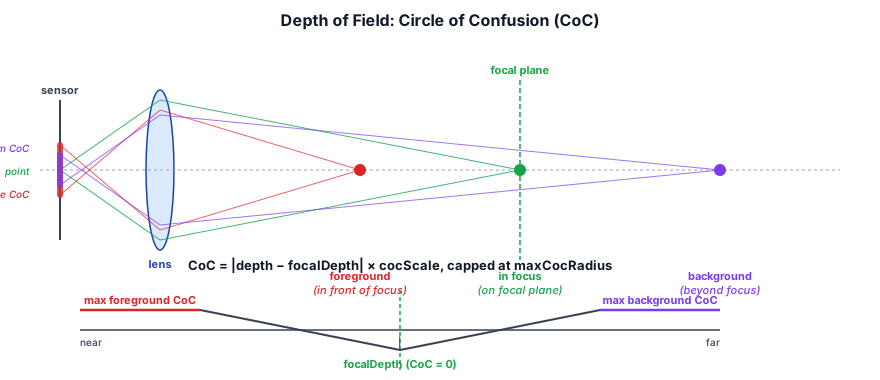
The DofPass (src/renderer/render_graph/passes/dof_pass.ts) simulates camera lens defocus blur. Objects at a specific focal distance are sharp; objects farther or closer become increasingly blurred. Geometrically, off-focus points project to a disk on the sensor instead of a single point — that disk's diameter is the circle of confusion:
Circle of Confusion#
The circle of confusion (CoC) is computed per pixel from the linearized depth buffer. It is signed: the same distance from the focus plane gives the same blur size on either side, but the sign records which side the pixel is on:
fn compute_coc(lin_depth: f32) -> f32 {
  return clamp(
    (lin_depth - dof.focus_distance) / max(dof.focus_range, 0.001),
    -1.0, 1.0
  ) * dof.bokeh_radius;
}
A positive CoC means the pixel is behind the focal plane (the far field); a negative CoC means it is in front of it (the near field). The magnitude ramps linearly from 0 at focusDistance to bokehRadius (in half-resolution texels) at focusRange meters on either side, then holds. DofFeature exposes these three as focusDistance, focusRange and bokehRadius. A fourth option, skyInFocus, forces the CoC of far-plane sky pixels to 0 so a starfield or moon stays crisp while nearer objects still blur onto it.
The sign matters because the two fields blur differently. A far-field object sits behind whatever is in focus, so its blur must stay behind it: an in-focus edge in front of it keeps its sharp silhouette. A near-field object sits in front, so its blur must spill outward over the in-focus pixels behind it. A real lens shows this as a soft, semi-transparent fringe around an out-of-focus foreground. If the CoC were clamped to [0, 1] (only the far field), the foreground would never blur at all.
Near and Far Fields#
DofPass adds three render-graph passes:
- Prefilter (half resolution). A 4-tap 2× downsample of the HDR color, with the signed CoC in alpha. The near field wins the 2×2 footprint: if any of the four depths is in front of the focus plane, the texel takes the most negative CoC, because averaging signed values would cancel a foreground edge against the background behind it.
- Near-CoC tiles. One
r16floattexel per 8×8 block of the half-res buffer, holding that block's largest near-field CoC magnitude. It is a tiny pass, 1/16 the width and height of the screen. - Composite (full resolution). It composites near over far over sharp.
The composite first works out this pixel's own CoC from the full-resolution depth, since the bilinearly filtered half-res CoC smears across silhouettes. If that CoC is positive, it gathers a 48-tap Fibonacci-spiral disc of that radius from the half-res buffer, weighting each tap by its far-field CoC, so near-field color never leaks into the background blur. Then it blends from the sharp source to the blur over the first texel of CoC.
The near field cannot use the pixel's own CoC: an in-focus pixel next to a blurred foreground object has CoC 0 yet must be covered by that object's blur. So the composite takes the maximum near CoC over the surrounding tiles (the dilated near CoC) as its gather radius R, and treats the gather as scattering in reverse. A tap counts only if its own near CoC reaches this pixel. Each tap spreads its energy over a disc of area ∝ c², so it is weighted by reach/c²:
let c     = max(-s.a, 0.0);                     // tap's near CoC
let reach = clamp((c - r) * inv_edge + 0.5, 0.0, 1.0) * clamp(c - 0.5, 0.0, 1.0);
let w     = reach / max(c * c, 1.0);
nacc += s.rgb * w;
nw   += w;
// ...after the loop:
let alpha = clamp(nw * near_r * near_r / f32(NUM_TAPS), 0.0, 1.0);
The summed weight, scaled by the area each tap represents (R²/N), is the near layer's coverage. It is about 1 deep inside a blurred foreground object, about 0.5 right on its silhouette, and falls to 0 at the edge of its reach. So the foreground fades out across its edge instead of ending in a hard outline. Inside the silhouette the background is hidden, so the taps that are not in the near field stand in for it, which keeps the blend continuous from one side of the edge to the other. The final color is mix(base, near_color, alpha), where base is the far-over-sharp result.
Three details keep the gather clean. The near taps are point-sampled (textureLoad): bilinear filtering would invent taps with a tiny CoC along every silhouette, and their 1/c² weight would saturate alpha in speckles. The reach edge is softened over a width wider than the tap spacing, so the coverage count does not flicker between neighboring pixels. And each pixel rotates the spiral by interleaved gradient noise, which breaks the fixed pattern into fine grain. Pixels with no near CoC within reach skip the near gather entirely, so a scene with nothing in the foreground pays only for the far field and the tile lookups. Set DofFeature.showCoc to replace the image with the signed CoC, near field orange and far field blue, to see where each field begins.
Auto-Exposure#
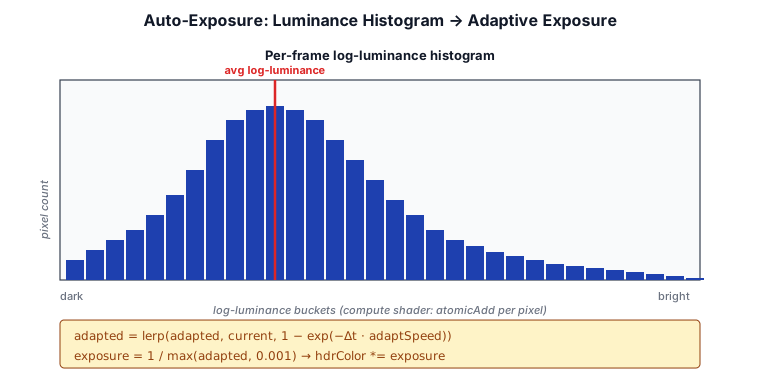
The AutoExposurePass (src/renderer/render_graph/passes/auto_exposure_pass.ts) computes a scene-adaptive exposure value using compute shaders. It adapts the overall brightness when the scene changes (e.g., walking from indoors to sunlight). The mechanism is a per-frame log-luminance histogram, smoothed temporally so that exposure tracks scene changes without snapping:
Histogram Computation#
A compute shader divides the HDR image into workgroups and each thread computes the luminance of a pixel, incrementing a histogram bucket:
let luminance = dot(hdrColor, vec3f(0.2126, 0.7152, 0.0722));
let bucket = u32(log2(luminance + 0.0001) * HISTOGRAM_SCALE + HISTOGRAM_OFFSET);
atomicAdd(&histogram[bucket], 1u);
Average Luminance#
The histogram is read back to compute the average log-luminance, which is then smoothed temporally:
let adaptedLuminance = lerp(previousLuminance, currentLuminance,
                            1.0 - exp(-deltaTime * adaptationSpeed));
The adapted luminance drives exposure:
let exposure = 1.0 / max(adaptedLuminance, 0.001);
hdrColor *= exposure;
This provides a smooth, automatic transition between lighting conditions.
Physical-camera exposure (EV100)#
Histogram metering is one way to choose an exposure; a physical camera is the other. Instead of measuring the scene, you dial in aperture, shutter, and ISO and let the photographic exposure model decide — exactly how a real camera works in Manual mode. The three controls combine into an exposure value at ISO 100 (Lagarde & de Rousiers, Moving Frostbite to PBR), which maps to the same linear exposure multiplier the tonemapper applies before the curve:
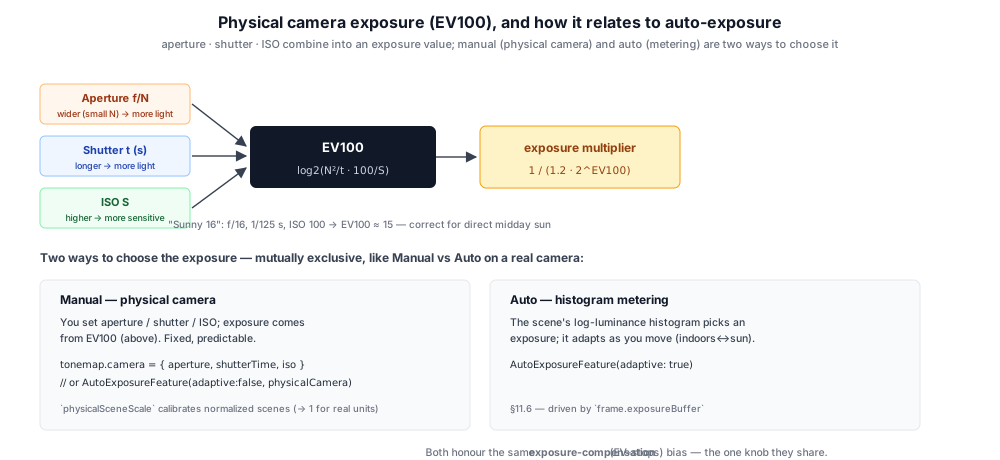
export function computeEv100(aperture: number, shutterTime: number, iso: number): number {
  return Math.log2(((aperture * aperture) / shutterTime) * (100 / iso));
}
export function ev100ToExposure(ev100: number, compensation = 0): number {
  return 1.0 / (1.2 * Math.pow(2, ev100 - compensation));   // 1.2 = middle-gray calibration
}
So "sunny 16" — f/16, 1/125 s, ISO 100 — lands at EV100 ≈ 15, the correct exposure for a subject in direct midday sun. This is the camera half of physical lighting: paired with lights authored in real photometric units (§7.5, physical light units), real-world values expose correctly with no fudge factors.
Manual vs auto are alternative modes, not simultaneous. You either meter the scene (auto) or set the camera (manual) — answering the same question two ways, just like a camera's mode dial. Both live on AutoExposureFeature: adaptive = true runs the histogram; adaptive = false with a physicalCamera computes the fixed EV100 exposure. The simpler TonemapFeature also takes a camera directly (used by forwardPreset/deferredPreset({ camera })), recomputing exposure each frame so camera sliders are live. Whichever mode is active, the exposure-compensation knob (in EV stops) biases the result — the one control they share.
One wrinkle while the engine's lights are still in normalized units: EV100 exposure is defined for physical luminance (cd/m²), so a physicalSceneScale calibration scales it onto a normalized scene (default 1, correct once lights carry real units — §7.5). The physical_camera_test and physical_lighting_test samples demonstrate both halves.
Fog#
The FogPass (src/renderer/render_graph/passes/fog_pass.ts) blends the HDR scene toward a fog color along a depth and/or height curve. It samples the HDR input plus the G-Buffer depth, reconstructs world position from depth, and writes a fresh HDR texture for the next stage. The fog color itself is shaped by an atmosphere-scatter call so the haze takes on the warm tint of the sun direction near sunrise/sunset and cools off at midday.
Depth and Height Modes#
Both fog modes share a fog_flags bitfield (bit 0 = depth, bit 1 = height) and can be enabled independently. The shader picks the stronger of the two per pixel:
var fog_amount = 0.0;
if ((fog.fog_flags & 1u) != 0u && fog.depth_density > 0.0) {
  let far = select(fog.depth_end, cam_far, fog.depth_end <= 0.0);
  let t   = smoothstep(fog.depth_begin, far, view_dist);
  fog_amount = max(fog_amount, pow(t, fog.depth_curve) * fog.depth_density);
}
if ((fog.fog_flags & 2u) != 0u && fog.height_density > 0.0) {
  let t = smoothstep(fog.height_min, fog.height_max, world_pos.y);
  fog_amount = max(fog_amount, pow(t, fog.height_curve) * fog.height_density);
}
return mix(scene, fog_col, clamp(fog_amount, 0.0, 1.0));
Depth fog uses a smoothstep between depthBegin and depthEnd distances (or the camera's far plane when depthEnd <= 0), raised to depthCurve to bias toward near or far. Height fog uses a smoothstep on world-Y between heightMin and heightMax, useful for valley mist or sea-level haze that thins out at altitude.
Sky Skip#
Sky pixels (depth == 1.0) bypass fog entirely — the fragment shader checks the depth before running the fog block. This keeps the atmosphere visible at the horizon instead of getting double-shaded by the fog tint:
let depth = textureLoad(dep_tex, coord, 0u);
if (depth >= 1.0) {
  // Sky pixel — pass HDR through unchanged.
  return vec4<f32>(scene, 1.0);
}
Atmosphere-Scattered Color#
Rather than a constant tint, the fog color is produced per-pixel by sampling the atmosphere along the camera-to-fragment horizontal direction with the current sun position, then multiplied by the user-supplied fogColor. This means warm scenes pick up warmer fog and overcast scenes pick up cooler fog with no extra parameters to tune — the fog tracks the sky the player already sees.
Underwater Screen-Space Effects#
When the camera is submerged, the UnderwaterPass (src/renderer/render_graph/passes/underwater_pass.ts) applies a series of screen-space effects that simulate the visual experience of being underwater. It samples the HDR scene with perturbed UVs, applies a blue-green tint, and modulates the result with a radial vignette before writing a fresh HDR texture for the next stage in the chain. The math lives in a shared shader module (src/shaders/modules/postfx_underwater.wgsl) so the merged composite shader can call the same functions.
UV Distortion#
Before sampling the HDR scene, the UV coordinates are perturbed by a pair of animated sine/cosine waves that create a gentle, caustic-like shimmer:
fn postfx_underwater_distort_uv(uv: vec2<f32>, time: f32) -> vec2<f32> {
  let distort = vec2<f32>(
    sin(uv.y * 18.0 + time * 1.4) * 0.006,
    cos(uv.x * 14.0 + time * 1.1) * 0.004,
  );
  return clamp(uv + distort, vec2<f32>(0.001), vec2<f32>(0.999));
}
The distortion is small (≤0.6% of screen width), anisotropic (horizontal distortion is stronger), and animated over time to simulate moving water ripples above the camera. The animation time is fed in per-frame via the pass's time field, written into the params uniform by UnderwaterPass.updateParams.
Color Tint and Vignette#
After the distorted sample is read, submerged fragments receive a strong blue-green color cast and a vignette that darkens the screen periphery:
fn postfx_underwater_tint(scene: vec3<f32>, uv: vec2<f32>) -> vec3<f32> {
  var out = scene * vec3<f32>(0.20, 0.55, 0.90);
  let d = length(uv * 2.0 - 1.0);
  out *= clamp(1.0 - d * d * 0.55, 0.0, 1.0);
  return out;
}
The tint absorbs red light preferentially (0.20× red vs 0.90× blue), mimicking the wavelength-dependent attenuation of water. The vignette uses a quadratic falloff from the screen center, smoothly reaching 45% darkening at the corners.
Whether to add UnderwaterPass to the graph is decided per-frame by the host (typically driven by camera-position-vs-water-surface in the game code); when the camera surfaces, the pass is simply omitted and the post-FX chain skips it entirely.
Depth-Based Murk: Extinction, Fog, and Light Shafts#
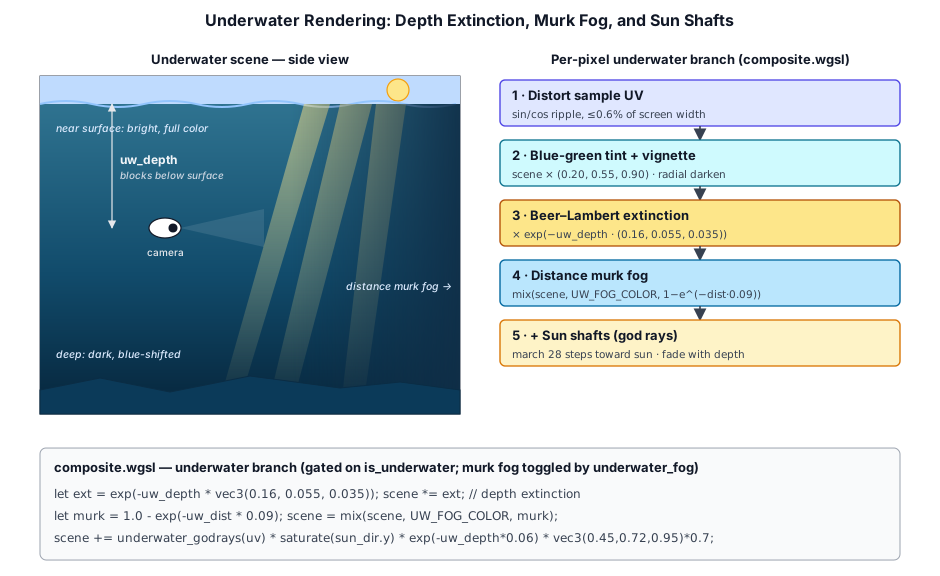
The distortion + tint + vignette above are the whole story for the standalone UnderwaterPass and the shared postfx_underwater.wgsl module. Taos Engine, however, runs the merged CompositePass (§11.9), and its underwater branch goes considerably further — it layers in depth-based extinction, a distance murk fog, and screen-space sun shafts. These extra effects live directly in src/shaders/composite.wgsl (not the shared module), gated to the underwater branch so above-water frames pay nothing for them.
Two new inputs drive this. The host packs them into the composite params uniform each frame via CompositePass.updateParams:
uw_depth— how far the camera sits below the water surface, in blocks. The game computes it in crafty/main.ts by walking up from the camera's block until it leaves water:
const isUnderwater = isBlockWater(world.getBlockType(_camBX, Math.floor(camPos.y), _camBZ));
let waterDepth = 0;
if (isUnderwater) {
  let surfaceY = Math.floor(camPos.y);
  for (let i = 0; i < 96 && isBlockWater(world.getBlockType(_camBX, surfaceY + 1, _camBZ)); i++) {
    surfaceY++;
  }
  waterDepth = Math.max(0, surfaceY + 1 - camPos.y);
}- The
underwater_fogeffect toggle (a user setting in crafty/config/effect_settings.ts, surfaced as "Underwater Fog" in the World settings group) sets bit 2 of the paramsfog_flags, letting the murk fog be turned off independently of the tint.
Sunlight caustics. A wavy surface focuses sunlight into a drifting web of bright lines on whatever lies below. When fog_flags bit 4 is set (the caustics toggle), the composite reconstructs each submerged pixel's world position, measures its depth below the surface (taken as flat at the camera's water level, camera.position.y + uw_depth), and multiplies the scene by a caustic factor before the tint and extinction, so the web is lit water and then sinks into the murk like everything else:
let below  = camera.position.y + params.uw_depth - c_pos.y;
let shear  = to_sun.xz / max(to_sun.y, 0.25);
scene = scene * water_caustics(c_pos, below, params.uw_time, shear, c_str);
The pattern itself lives in the shared water_caustics.wgsl module: two layers of animated Voronoi cell borders (F2 − F1 ≈ 0 on a border) at different scales, rotations and drift speeds, brightest where their lines cross. It is looked up where the sun ray through the point crosses the surface (p.xz + shear · depth), so the web slides with the sun angle; lines are crisp just under the surface, widen and fade with depth, and the multiplier dims between lines so its average stays near 1. The water surface pass (water.wgsl) applies the same function to its refracted color, so the floor seen from above water carries the identical web.
Both of those paths multiply the lit color, so a floor in shadow still shows a faint web through its ambient light. When the world can say where its water is, the deferred lighting pass does better: DeferredLightingPass.setWaterCaustics({ surfaceMap, mapSize, strength }) binds an r32float map of the water-surface height over each world column (a sliding window, modular-addressed like the world heightmap), and the shader multiplies only the direct sun term by water_caustics(p, surface − p.y, …). The shadow factor is already in that term, so shaded floors stay dark and the web appears only where sunlight actually lands. Crafty builds the map alongside its world heightmap (a column is water when its top block is water) and, with it, turns the two multiply paths off — the composite keeps only the caustic light shafts (fog_flags bit 5), a short view-ray march that samples one pattern layer at each sample's depth so bright streaks hang in the water, lined up with the web on the floor.
Rainbows. Sky pixels also get an optional rainbow (CompositePass.rainbowStrength, 0 = off): the primary bow sits at ~40.5–42.5° from the antisolar point with red outermost, and a fainter secondary at ~50.5–53.5° with the order reversed. Each is a soft spectral band indexed by the angle between the view ray and -sun_dir, added in proportion to the sky's own luminance so it can never outshine the sky behind it. Crafty eases the strength in while the ground is still wet from rain that has passed, the sun is out, and the sun is below 42° — above that the whole bow sinks under the horizon.
Beer–Lambert extinction. Once submerged, the scene color is multiplied by a per-channel exponential of the camera's depth, so the whole image dims and shifts blue the deeper you swim — red is absorbed fastest, blue penetrates furthest:
let ext = exp(-params.uw_depth * vec3<f32>(0.16, 0.055, 0.035));
scene = scene * ext;
Distance murk fog. When the underwater_fog flag is set, distant geometry — and the bright surface above — is blended toward a deep blue-teal (UW_FOG_COLOR = vec3(0.06, 0.18, 0.28)) using an exponential of the reconstructed view distance to each fragment. Sky/far pixels (depth >= 1.0) use camera.far, so they fog out completely and visibility stays short:
let murk = clamp(1.0 - exp(-uw_dist * 0.09), 0.0, 1.0);
scene = mix(scene, UW_FOG_COLOR, murk);
Screen-space sun shafts. Finally, cheap radial-blur god rays march from the pixel toward the sun's projected screen position, accumulating only the bright (above-surface/sky) HDR samples so beams stream down from where light breaks the surface. The shafts are added on top of the murk so light cuts through it, and they fade with both sun elevation and depth:
let sun_up     = saturate(star_uni.sun_dir.y);
let shaft_fade = exp(-params.uw_depth * 0.06);
let shafts     = underwater_godrays(in.uv) * (sun_up * shaft_fade);
scene = scene + shafts * vec3<f32>(0.45, 0.72, 0.95) * 0.7;
The underwater_godrays helper projects a far point along the toward-sun direction to a UV, then takes 28 steps toward it, seeding a shaft only where the sampled luminance is bright enough (smoothstep(0.7, 2.5, lum)) and decaying 5% per step. Like the lens flare (§11.10), it reads star_uni.sun_dir (the true toward-sun vector the host writes) rather than the key light, which crafty swaps to the moon at night.
CompositePass — Combining Effects into One Uber-Shader#
Each effect above ships as a discrete pass so a pipeline can mix-and-match: a sample that only wants tonemap can use TonemapPass alone, and one that wants fog can drop FogPass in front of it. But running them serially writes and reads several intermediate HDR textures, and each pass boundary costs a BeginRenderPass / EndRenderPass plus the bandwidth of a full-screen store and a full-screen load.
The CompositePass (src/renderer/render_graph/passes/composite_pass.ts) merges fog + underwater + stars + tonemap into a single fullscreen draw that writes straight to the backbuffer. Its shader (src/shaders/composite.wgsl) #imports the same shared modules that the standalone passes use, so the math stays identical — only the wiring changes:
#import "postfx_fog.wgsl"
#import "postfx_underwater.wgsl"
#import "postfx_stars.wgsl"
The merged shader follows the natural per-pixel order: sample the HDR scene (with optional underwater UV distortion) → apply fog (skipped for sky pixels) → apply the underwater branch (tint+vignette → Beer–Lambert depth extinction → distance murk fog → additive sun shafts, all from §11.8) → multiply by exposure → splat stars onto sky pixels → tonemap and gamma-encode. All of this lands in one fragment-shader invocation per backbuffer pixel.
This eliminates two intermediate rgba16float full-screen textures and two render-pass boundaries compared to the standalone fog → underwater → tonemap chain — a measurable win at higher resolutions where the post-FX bandwidth dominates. The trade-off is a single uniform buffer (64 bytes) that has to carry parameters for every merged effect, plus a slightly more complex bind-group layout: three groups for textures (HDR/AO/depth), shared buffers (camera + light), and params (effect params + stars + exposure).
Lens Flare#
A lens flare is the scatter, ghosting, and streaking a real lens produces when a very bright light — typically the sun — is in or near frame. Taos Engine implements it as a screen-space pass: given the sun's projected screen position, it draws a glowing disc, an anamorphic streak, and a chain of chromatic "ghost" reflections, then occludes the whole thing against scene depth so the flare disappears the instant something eclipses the sun. The pass (src/renderer/render_graph/passes/lens_flare_pass.ts + src/shaders/lens_flare.wgsl) and its LensFlareFeature wrapper (src/renderer/features/lens_flare_feature.ts) read the HDR scene plus depth and write a fresh HDR texture, exactly like the fog and stars passes.
Because the flare is bright HDR, it is registered after lighting/sky (so the scene HDR and depth exist) and before bloom and tonemap — the disc and streak bloom along with everything else. The space_combat sample uses it as the only sun: there is no sun mesh in the scene, just the directional light and this flare drawn from the same direction.
Projecting the sun to screen space#
The flare has no geometry, so the feature computes where the sun lands on screen each frame. It places a virtual sun far along the sun direction, transforms it by the camera's view-projection, and converts the clip-space result to a UV. When the sun is behind the camera (w <= 0), the intensity is forced to zero and the pass becomes a no-op:
const eye = cam.position();
const dir = this._sunDir();               // unit vector toward the sun
const clip = cam.viewProjectionMatrix().transformVec4(
  new Vec4(eye.x + dir.x * this._distance, /* y */, /* z */, 1));

let u = 0.5, v = 0.5, intensity = 0;
if (clip.w > 1e-4) {                       // sun is in front of the camera
  u = (clip.x / clip.w) * 0.5 + 0.5;
  v = 1 - ((clip.y / clip.w) * 0.5 + 0.5);
  intensity = this._intensity;
}
this.pass!.updateParams(frame.ctx, u, v, aspect, intensity, this._color);
Passing aspect (viewport width / height) lets the shader keep the disc and ghosts circular instead of stretched.
Depth occlusion#
The flare should vanish when a ship, asteroid, or planet passes in front of the sun. Rather than a separate occlusion query, the shader samples a small neighborhood of the same depth buffer the scene already wrote: sky pixels read depth == 1.0, so the fraction of taps that are still sky is the visibility. A 3×3 grid gives a soft edge as a silhouette sweeps across the sun:
var vis = 0.0;
if (on_screen) {
  for (var j = -1; j <= 1; j = j + 1) {
    for (var i = -1; i <= 1; i = i + 1) {
      let c = clamp(vec2<i32>(sun * dim) + vec2<i32>(i, j) * 2,
                    vec2<i32>(0), vec2<i32>(dim) - 1);
      vis = vis + select(0.0, 1.0, textureLoad(dep_tex, c, 0) >= 1.0);
    }
  }
  vis = vis / 9.0;
}
// Fade the whole flare as the sun leaves frame.
let edge = max(max(-sun.x, sun.x - 1.0), max(-sun.y, sun.y - 1.0));
let strength = p.intensity * vis * (1.0 - smoothstep(0.0, 0.35, edge));
Disc, streak, and chromatic ghosts#
The visible flare is three procedural layers, all keyed off the aspect-corrected distance from the current pixel to the sun:
- a tight white-hot disc plus a wide soft halo,
- an anamorphic streak — a bright horizontal line through the sun, the signature of an anamorphic lens,
- a chain of ghosts: faint colored blobs placed at fixed fractions along the line from the sun through screen center, each tinted a different hue to mimic the chromatic aberration of internal lens reflections.
var flare = exp(-d * d * 900.0) * 1.6;       // disc
flare = flare + exp(-d * 7.0) * 0.18;        // halo
let streak = exp(-dy * dy * 7000.0) * exp(-abs(dx) * 2.2) * 0.5;
var col = p.color * (flare + streak);

let axis = vec2<f32>(0.5, 0.5) - sun;        // sun → screen center
for (var k = 0; k < 6; k = k + 1) {
  let gpos = sun + axis * ghost_t[k];        // ghost position along the axis
  let g = exp(-adist(in.uv, gpos) * adist(in.uv, gpos) / (ghost_s[k] * ghost_s[k]));
  col = col + ghost_c[k] * g * 0.22;
}
scene = scene + col * strength;              // additive into the HDR scene
The ghost tables (ghost_t/ghost_s/ghost_c) are declared var rather than let so the dynamic loop index can address them — WGSL only permits dynamic indexing of a variable, not of a let-bound array value.
Summary#
Post-processing transforms the raw HDR render into the final image. The diagram below shows how the passes chain together — every post-FX stage reads from and writes back to the HDR target until the final pass produces SDR output for the swap chain:
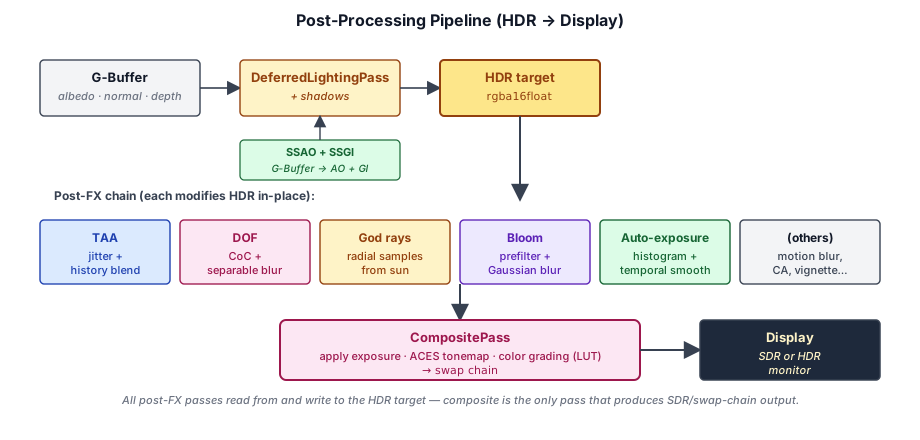
| Pass | Input | Output | Purpose |
|---|---|---|---|
| TAA | HDR + history + motion | Anti-aliased HDR | Temporal supersampling |
| Motion Blur | HDR + depth + prev VP (+ optional velocity) | Shutter-blurred HDR | Per-pixel motion blur — camera-only by default, optional velocity-buffer mode for per-object motion |
| DOF | HDR + depth | Blurred HDR | Lens defocus simulation |
| Bloom | HDR bright pass | HDR + glow | Lens glare simulation |
| Lens Flare | HDR + depth + sun screen pos | HDR + flare | Sun disc, streak, and chromatic ghosts, depth-occluded |
| Auto-exposure | HDR → histogram → exposure | Adapts HDR brightness | Automatic exposure |
| Fog | HDR + depth + camera + light | Fogged HDR | Atmosphere-scattered depth/height fog |
| Underwater | HDR | Tinted HDR | Submerged-camera distortion + tint |
| Tonemap | HDR + exposure | Swap chain output | Color grade (+ .cube LUT) → selectable operator (none / ACES Narkowicz / ACES fitted / Khronos PBR Neutral / AgX) → lens/film FX (distortion, Panini, chromatic aberration, vignette, grain) + piecewise sRGB encode |
| Composite | HDR + AO + depth + camera/light/exposure | Swap chain output | Fog + underwater + stars + tonemap merged |
Further reading:
src/renderer/render_graph/passes/taa_pass.ts— Temporal anti-aliasingsrc/renderer/render_graph/passes/motion_blur_pass.ts— Camera-only / velocity-buffer motion blursrc/renderer/render_graph/passes/velocity_pass.ts— Optional per-object velocity buffer for motion blursrc/renderer/render_graph/passes/bloom_pass.ts— HDR bloomsrc/renderer/render_graph/passes/lens_flare_pass.ts— Screen-space lens flare (src/shaders/lens_flare.wgsl)src/renderer/render_graph/passes/dof_pass.ts— Depth of fieldsrc/renderer/render_graph/passes/auto_exposure_pass.ts— Auto-exposuresrc/renderer/render_graph/passes/fog_pass.ts— Standalone fogsrc/renderer/render_graph/passes/underwater_pass.ts— Standalone underwatersrc/renderer/render_graph/passes/tonemap_pass.ts— Standalone tonemap (+ folded-in color grade and lens/film FX)src/renderer/color_grade.ts/src/shaders/modules/color_grade.wgsl— Film color-grading stack +.cube3D LUTsrc/renderer/post_fx.ts/src/shaders/modules/post_fx.wgsl— Lens distortion, Panini, chromatic aberration, vignette, film grainsrc/renderer/render_graph/passes/composite_pass.ts— Merged fog + underwater + stars + tonemapsrc/shaders/composite.wgsl— Composite uber-shader