Chapter 25: Physics
Chapter 18 describes the physics Crafty uses: a hand-written kinematic character controller that sweeps an axis-aligned box against the voxel grid. That code is perfect for a Minecraft-style world — the world is a grid of integer-addressed boxes, so collision is a cheap cell lookup — and it is deliberately not a general physics engine. It has no notion of mass, no angular velocity, no stacking, no arbitrary mesh colliders. Roll a barrel down a ramp and it does nothing sensible.
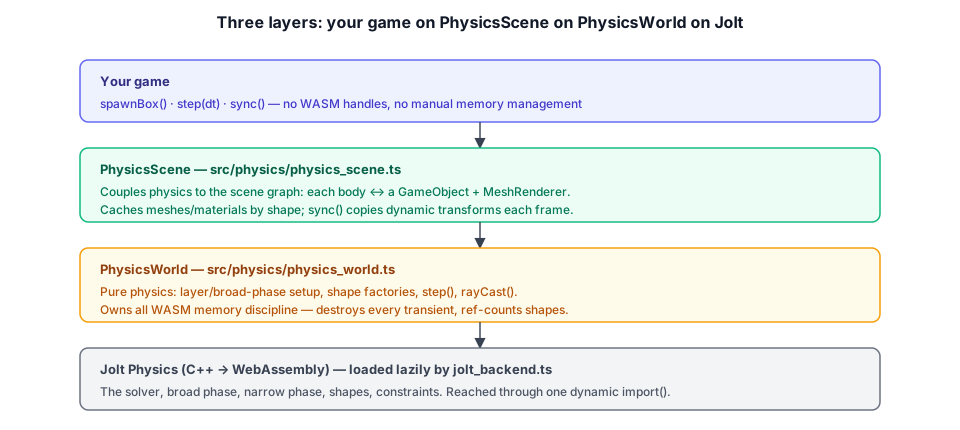
For games that want barrels rolling down ramps — falling crates, swinging chains, balls bouncing across streamed terrain — the engine offers a second, completely separate physics path: a thin wrapper around the Jolt Physics engine, living in src/physics/. It is a rigid-body simulator: it tracks the position and orientation of solid objects, gives them mass and inertia, detects when they touch, and resolves the contacts so they bounce, slide, settle, and stack the way real objects do. This chapter is about that wrapper — what Jolt is, how Taos hides its sharp edges, and the simulation concepts you need to drive it.
The whole subsystem is five files and about 1,200 lines. It is exercised by the physics_test sample (a demo harness with shape-rain, mesh terrain, height fields, convex hulls, and a pendulum chain), the character_controller_test sample (a capsule character that walks, jumps, climbs stairs, and trips a trigger zone), and by geo_physics, which drops bouncing balls onto streamed Cesium terrain (Chapter 26).
25.1 Why a Third-Party Physics Engine#
Rendering, the engine writes itself: a renderer is the point of the project, and every pass is something we want to understand down to the WGSL. A rigid-body solver is different. A correct, stable, fast one is a multi-year specialty — the hard parts are not the high-school physics of F = ma but the numerical problems hiding underneath it:
- Stable stacking. Naively integrating contacts lets a stack of boxes jitter and slowly sink into each other. Production solvers use sequential-impulse or TGS solvers with carefully tuned iteration counts and warm-starting to keep a stack of fifty crates rock-steady.
- The broad phase. With N bodies there are N² potential collisions. Testing all of them is hopeless past a few hundred objects; you need a spatial acceleration structure (a tree or a grid of "broad-phase layers") that culls non-touching pairs in close to O(N).
- Continuous collision. A fast, small object can pass entirely through a thin wall between two steps ("tunnelling"). Catching it needs swept tests, not just point-in-time overlap.
- Robust convex collision. The GJK/EPA algorithms that compute the contact between two convex shapes are notoriously finicky to make numerically bulletproof.
These are solved problems — just not cheaply solved. So Taos does for physics what it does for nothing else in the renderer: it takes a best-in-class implementation off the shelf. The chosen engine is Jolt.
25.2 What Jolt Is#
Jolt Physics is an open-source (MIT) rigid-body and collision engine written in C++ by Jorrit Rouwe, and battle-tested as the physics engine of Horizon Forbidden World. It is multi-threaded, deterministic, and designed for games: stable large stacks, a fast multi-layer broad phase, continuous collision, a rich shape library (boxes, spheres, capsules, convex hulls, triangle meshes, height fields, compounds), and constraints (hinges, points, sliders, …).
We do not run the C++. Jolt ships a WebAssembly build — jolt-physics on npm — compiled with Emscripten, which exposes the C++ classes to JavaScript through a generated glue layer. Calling new jolt.BoxShape(...) from TypeScript constructs a C++ object on the WASM heap and hands back a JS handle to it. That arrangement is powerful but has two costs Taos's wrapper exists to manage:
- The WASM blob is large. We don't want every Taos app paying for it. The loader (§25.3) keeps Jolt out of the bundle unless the app actually asks for physics.
- WASM objects are not garbage-collected. A JS handle going out of scope does not free the C++ object behind it; you must call
destroy()explicitly or leak WASM heap. The wrapper (§25.6, §25.7) encapsulates that discipline so application code never touches it.
Naming. Throughout this chapter, Jolt means the raw WASM module (the
joltobject in the code), andPhysicsWorld/PhysicsScenemean Taos's wrappers around it. The wrapper deliberately exposes only a small, engine-flavored slice of Jolt's very large API.
25.3 Loading the WASM Backend#
jolt_backend.ts is the only file in the engine that names jolt-physics, and it names it through a dynamic import() so the bundler splits Jolt into its own chunk. An app that never initializes physics never pulls that chunk into its graph — it ships zero Jolt bytes.
// ── from src/physics/jolt_backend.ts ──
export type JoltModule = Awaited<ReturnType<typeof import('jolt-physics')['default']>>;

let loadPromise: Promise<JoltModule> | null = null;
let loaded: JoltModule | null = null;

export function loadJolt(opts: PhysicsInitOptions = {}): Promise<JoltModule> {
  if (!loadPromise) {
    loadPromise = (async () => {
      const { default: factory } = await import('jolt-physics/wasm');
      const moduleArgs: { locateFile?: (path: string) => string; wasmBinary?: ArrayBuffer } = {};
      if (opts.wasmBinary) {
        moduleArgs.wasmBinary = opts.wasmBinary;
      } else if (opts.wasmUrl) {
        const url = opts.wasmUrl;
        moduleArgs.locateFile = () => url;
      } else {
        // Default (Vite): let Vite emit + hash the `.wasm` and hand back its URL.
        const wasmUrl = await import('jolt-physics/jolt-physics.wasm.wasm?url');
        moduleArgs.locateFile = () => wasmUrl.default;
      }
      loaded = await factory(moduleArgs);
      return loaded;
    })();
  }
  return loadPromise;
}
Three things are worth pulling out:
- The type is erased.
JoltModuleis atypeof import(...)type, which TypeScript evaluates at compile time and emits nothing for. Every other physics file importsjolt-physicsasimport type, so the only runtime reference to the package is theimport()inside this function. That is what guarantees the code-split. locateFilepoints Emscripten at the.wasm. The Emscripten glue needs a URL for the binary. With Vite,import('....wasm?url')makes the bundler emit the file with a content hash and return its final URL — so it survives production builds. Non-Vite bundlers don't understand?url, which is exactly whyPhysicsInitOptionslets you passwasmUrl(self-host the file) orwasmBinary(hand over the bytes yourself).- The load is memoized.
loadPromiseguards against concurrent and repeat calls — the first call wins, everyone awaits the same promise.isPhysicsInitialized()reports whetherloadedis set.
The public entry points are initializePhysics(opts?) (await it once at startup) and, more commonly, PhysicsWorld.create(), which calls loadJolt for you.
25.4 Fundamentals of Rigid-Body Simulation#
Before the API, the concepts. A rigid body is a solid object that does not deform: a box, a ball, a length of terrain. The simulator tracks, for each dynamic body, a position and orientation (together, its transform) and their rates of change — linear velocity and angular velocity. Each body also has a shape (its collision geometry), a mass, and an inertia tensor (how mass is distributed, which governs how torques spin it).
Bodies come in three motion types, all three reachable through Taos's BodyOptions:
| Motion type | Moves? | Driven by | Taos BodyOptions |
|---|---|---|---|
| Static | never | nothing — it's nailed down | motion: 'static' (or dynamic: false) |
| Dynamic | yes | forces, gravity, collisions | motion: 'dynamic' (the default) |
| Kinematic | yes | your code sets its velocity; physics doesn't push back | motion: 'kinematic' |
A static floor never moves but other things collide with it; a dynamic crate falls, bounces, and tumbles; a kinematic body (a moving platform, a scripted door, or the inner body of the character controller in §25.13) follows the transform your code gives it and shoves dynamics aside without being pushed back. The original boolean dynamic flag is still honoured — dynamic: false means static — but motion is the fuller knob.
Each simulation step advances time by a fixed dt and runs the same pipeline:
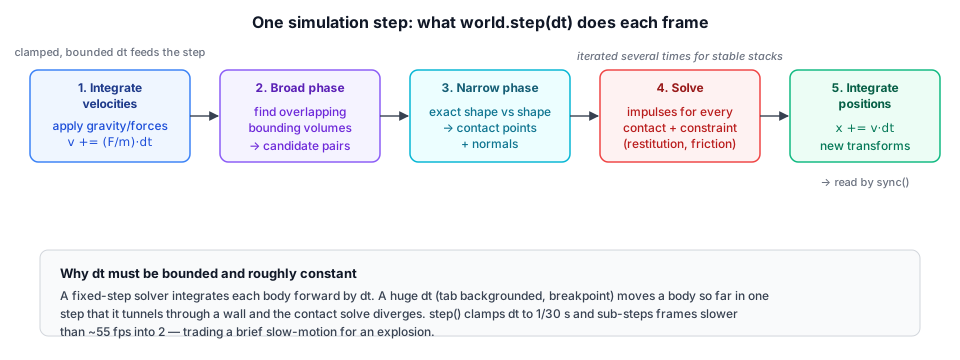
- Apply forces & integrate velocities. Gravity (and any applied forces) change each dynamic body's velocity:
v += (F/m)·dt. - Broad phase. Cheaply find pairs of bodies whose bounding volumes overlap — the candidates for an actual collision. This is the O(N)-ish cull that makes thousands of bodies tractable (§25.5).
- Narrow phase. For each candidate pair, do the exact shape-vs-shape test and, where they overlap, compute contact points and contact normals.
- Solve constraints. A contact is a constraint ("these two surfaces must not interpenetrate"). The solver computes impulses that, applied to the bodies' velocities, satisfy every contact and joint at once — iterating several times for stability. This is where restitution (bounciness) and friction enter: restitution scales how much normal velocity survives the bounce; friction opposes sliding along the contact tangent.
- Integrate positions. Finally each body's position and orientation move by the freshly-solved velocity:
x += v·dt.
Two body properties tune step 4, both exposed by Taos as BodyOptions:
- Restitution ∈ [0, 1]: 0 is a dead thud, 1 is a perfect (energy-conserving) bounce. Taos defaults to 0.2.
- Friction ∈ [0, ~1]: 0 is ice, 1 is rubber-on-rubber. Higher friction resists sliding.
The critical practical fact about a fixed-step solver is that the step size must be bounded and roughly constant. Feed it a huge dt (after a breakpoint or a backgrounded tab) and bodies integrate so far in one step that they tunnel through walls and the solver explodes. §25.8 is entirely about defending against that.
25.5 Collision Layers and the Broad Phase#
The broad phase needs a way to skip pairs that can never collide. Two pieces of static level geometry, for instance, never move, so testing them against each other every frame is pure waste — but the deeper need is gameplay filtering: a player's bullets should hit the world and enemies but pass straight through the player who fired them; a trigger volume should notice only the player. Jolt expresses all of this with object layers and broad-phase layers.
Taos uses Jolt's mask-based scheme, which mirrors the layer/mask model you may know from Unity or Godot. Every body carries two bit-sets: a layer (which groups it belongs to) and a mask (which groups it collides with). The named bits live in CollisionLayer:
// ── from src/physics/physics_world.ts ──
export const CollisionLayer = {
  World:   1 << 0,  // static level geometry (mapped to the non-moving broad phase)
  Player:  1 << 1,
  Enemy:   1 << 2,
  Bullet:  1 << 3,
  Prop:    1 << 4,  // dynamic debris — the default for dynamic bodies
  Trigger: 1 << 5,  // sensor / trigger volumes
  All:     0xffff,
} as const;
A BodyOptions then names a body's layer and mask (both default sensibly — World for statics, Prop for dynamics, and mask: All). The collision rule is symmetric: two bodies interact only when each one's layer is in the other's mask. So a bullet that should ignore the player is created with layer: Bullet, mask: World | Enemy — the player's layer (Player) is absent from that mask, so the pair is dropped regardless of what the player's own mask says. The matching machinery is one filter object, not a hand-built matrix:
// ── from src/physics/physics_world.ts ──
// The object layer packs a (group, mask) pair; the filter decodes and ANDs them.
const objectFilter = new jolt.ObjectLayerPairFilterMask();
// ... later, per body:
const layer = this.layerFilter.sGetObjectLayer(group, mask);  // pack into one ObjectLayer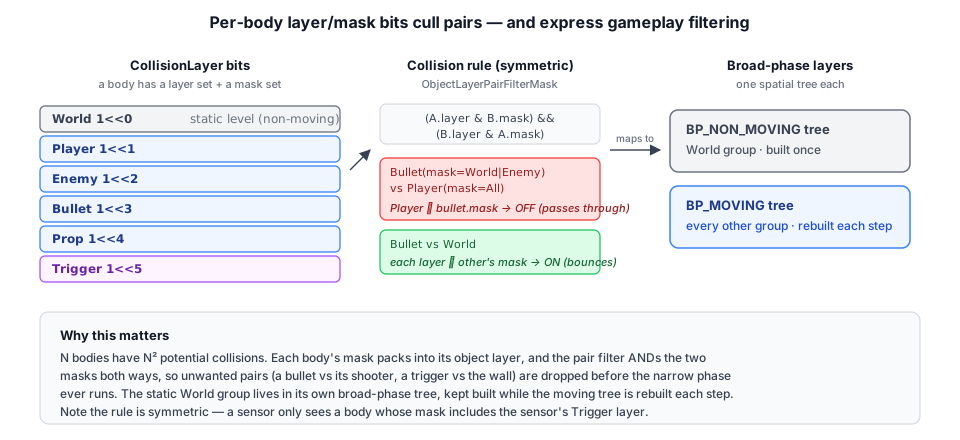
On top of object layers sit broad-phase layers, a coarser grouping the acceleration structure is actually built around. Jolt keeps a separate spatial tree per broad-phase layer; keeping all statics in one and everything dynamic in another lets it hold the (rarely-changing) static tree built once while it rebuilds the (constantly-moving) dynamic tree each step. Taos routes the World group to the non-moving layer and every other group to the moving layer:
// ── from src/physics/physics_world.ts ──
const bpInterface = new jolt.BroadPhaseLayerInterfaceMask(NUM_BROAD_PHASE_LAYERS);
bpInterface.ConfigureLayer(bpNonMoving, STATIC_GROUPS, 0);   // STATIC_GROUPS = World
bpInterface.ConfigureLayer(bpMoving, DYNAMIC_GROUPS, 0);     // everything else

settings.mObjectLayerPairFilter = objectFilter;
settings.mBroadPhaseLayerInterface = bpInterface;
settings.mObjectVsBroadPhaseLayerFilter = new jolt.ObjectVsBroadPhaseLayerFilterMask(bpInterface);
The broad-phase mapping is purely a performance hint — a static sensor parked in the "moving" layer is still correct, just slightly less efficient — so the partition can follow the World bit without worrying about each body's exact motion type. The three filter objects (object-pair, broad-phase interface, object-vs-broad-phase) are handed to a JoltInterface, which takes ownership of them.
One sharp edge worth flagging, because it bites: collision queries (raycasts, character sweeps) need a layer filter that honours these mask rules, built with makeObjectLayerFilter(layer) / makeBroadPhaseFilter(layer) (which wrap Jolt's DefaultObjectLayerFilter / DefaultBroadPhaseLayerFilter). Jolt's superficially-tempting SpecifiedObjectLayerFilter does exact-equality on the packed layer value, so it silently matches nothing and a query — or a whole character — quietly falls through the world. The staticOnly flag on rayCast/rayDownY is implemented with a mask filter that accepts only the World group.
25.6 The PhysicsWorld Abstraction#
PhysicsWorld is the pure-physics layer: it creates the Jolt world, exposes shape factories, steps the simulation, and answers ray queries. No rendering. Its constructor is private — you make one through the async factory, which loads the backend first:
// ── from src/physics/physics_world.ts ──
static async create(opts?: PhysicsInitOptions): Promise<PhysicsWorld> {
  const jolt = await loadJolt(opts);
  return new PhysicsWorld(jolt);
}
The constructor (abbreviated in §25.5) builds the layer filters, constructs a JoltInterface from a JoltSettings, and caches two handles every later call needs: the PhysicsSystem (the world) and its BodyInterface (the factory/registry for bodies). Gravity defaults to Earth's (0, −9.81, 0) and is settable:
// ── from src/physics/physics_world.ts ──
setGravity(x: number, y: number, z: number): void {
  const g = new this.jolt.Vec3(x, y, z);
  this.system.SetGravity(g);
  this.jolt.destroy(g);   // the temporary Vec3 is copied in; free it immediately
}
That destroy(g) is the WASM-memory discipline in miniature, and the subject of the next section.
The body factories are the meat of the public surface. Each takes a Taos Vec3/Quaternion, builds the matching Jolt shape, and returns a Jolt Body:
| Factory | Shape | Static / dynamic |
|---|---|---|
addBox(half, pos, rot, opts?) |
box (half-extents) | either |
addSphere(radius, pos, opts?) |
sphere | either |
addCapsule(halfHeight, radius, pos, rot, opts?) |
capsule (Y axis) | either |
addConvexHull(points, pos, rot, opts?) |
convex hull of a point cloud | dynamic |
addMeshCollider(positions, indices, pos, rot, opts?) |
arbitrary triangle "soup" | static only |
addHeightField(heights, sampleCount, cellSize, originXz, opts?) |
regular height grid | static only |
Every factory takes the same BodyOptions, which beyond the physical tunables (restitution, friction, gravityFactor, motionQuality) carries the gameplay knobs from §25.5: layer, mask, motion, and — for trigger volumes — isSensor/sensor (§25.12). The capsule is the actor/projectile shape, and the foundation the character controller in §25.13 is built on; halfHeight is the half-length of the cylindrical section, so a capsule stands 2·(halfHeight + radius) tall.
The static-only restriction on meshes and height fields is not a Taos limitation — it is intrinsic to rigid-body simulation. A triangle soup has no well-defined volume or inertia tensor, so it cannot be given mass and tumbled; every physics engine allows it on static (or kinematic) bodies only. For a dynamic object with a custom shape you give it a convex hull (which does have a defined volume and inertia), decomposing concave dynamic objects into several hulls if needed. §25.9's terrain example uses addMeshCollider; the physics_test height-field demo uses addHeightField, the fast, memory-light path for terrain (Chapter 24's heightmaps map straight onto it).
25.7 Shapes and WASM Memory Ownership#
Because Jolt objects live on the WASM heap and the JS garbage collector can't see them, every Jolt allocation has exactly one rule: whoever makes it, frees it — the moment it has been copied into whatever will own it long-term. The wrapper follows that rule rigorously so callers never have to.
Watch it play out in addMeshCollider. Building a MeshShape means feeding Jolt a TriangleList; each triangle is a transient Triangle built from three transient Vec3s. Every one of those is destroyed as soon as Jolt has copied it:
// ── from src/physics/physics_world.ts ──
const triangles = new J.TriangleList();
triangles.reserve(indices.length / 3);
const v0 = new J.Vec3(0, 0, 0);
const v1 = new J.Vec3(0, 0, 0);
const v2 = new J.Vec3(0, 0, 0);
for (let t = 0; t < indices.length; t += 3) {
  const a = indices[t] * 3, b = indices[t + 1] * 3, c = indices[t + 2] * 3;
  v0.Set(positions[a], positions[a + 1], positions[a + 2]);
  v1.Set(positions[b], positions[b + 1], positions[b + 2]);
  v2.Set(positions[c], positions[c + 1], positions[c + 2]);
  const tri = new J.Triangle(v0, v1, v2);
  triangles.push_back(tri);   // Jolt copies the triangle into the list…
  J.destroy(tri);             // …so the transient is free to go now.
}
J.destroy(v0); J.destroy(v1); J.destroy(v2);   // the three reusable corners, too
Notice the three Vec3s are allocated once and reused via .Set() across the whole loop — a mesh with 50 000 triangles still only ever holds three live corner objects. This is the difference between a leak-free wrapper and one that thrashes the WASM heap.
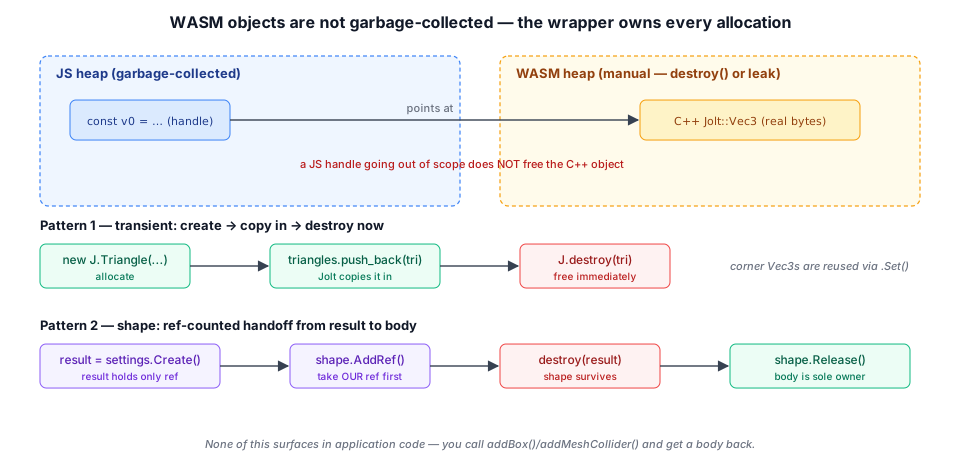
Shapes carry a second subtlety: reference counting. A Jolt ShapeSettings.Create() returns a result that holds the only reference to the new shape. If we destroyed that result before the body had taken its own reference, the shape would be freed out from under the body. The wrapper threads the ref-count carefully:
// ── from src/physics/physics_world.ts ──
private shapeFromSettings(settings: initJolt.ShapeSettings): initJolt.Shape {
  const result = settings.Create();
  if (result.HasError()) {
    const message = result.GetError().c_str();
    this.jolt.destroy(result);
    this.jolt.destroy(settings);
    throw new Error(`Jolt shape build failed: ${message}`);
  }
  const shape = result.Get();
  shape.AddRef();              // our own reference, taken BEFORE freeing the result
  this.jolt.destroy(result);   // result's reference goes…
  this.jolt.destroy(settings); // …but the shape survives on ours
  return shape;
}
The companion bodyFromSettings builds the shape, makes a body with it, then Release()s the bridging reference so the body becomes the sole owner — the shape's memory is then freed automatically when the body is destroyed. The error path is just as careful: a bad shape (degenerate triangles, an empty hull) surfaces as a thrown JS Error carrying Jolt's own message, not a silent WASM abort.
Finally, createBody turns a shape into a live body: it packs a BodyCreationSettings with the transform, motion type, layer, and the BodyOptions tunables, creates the body through the bodyInterface, frees every transient, and registers the body for teardown:
// ── from src/physics/physics_world.ts ──
const settings = new J.BodyCreationSettings(shape, rPos, qRot, motion, layer);
settings.mRestitution = opts.restitution ?? 0.2;
if (opts.friction !== undefined) { settings.mFriction = opts.friction; }
if (opts.gravityFactor !== undefined) { settings.mGravityFactor = opts.gravityFactor; }
// ... optional initial linearVelocity ...
const body = this.bodyInterface.CreateBody(settings);
J.destroy(settings); J.destroy(rPos); J.destroy(qRot);
this.bodyInterface.AddBody(body.GetID(),
  dynamic ? J.EActivation_Activate : J.EActivation_DontActivate);
this.bodies.push(body);
bodies and constraints arrays let clear() tear a whole scene down — removing and destroying every body — and removeBody(body) drop a single one. destroy() clears the world and then frees the JoltInterface itself. None of this bookkeeping leaks into user code: you call addSphere, you get a body, and the engine owns the cleanup.
25.8 Stepping the Simulation#
step(dt) advances the world. Its whole job beyond calling Jolt is to keep the fixed-step solver inside its stable envelope:
// ── from src/physics/physics_world.ts ──
step(deltaTime: number): void {
  // Clamp pathological frames (tab switch, breakpoint) so nothing explodes.
  const dt = Math.min(deltaTime, 1 / 30);
  const steps = dt > 1 / 55 ? 2 : 1;
  this.joltInterface.Step(dt, steps);
}
Two defenses, both from §25.4's "bounded, roughly constant" rule:
- Clamp the maximum frame. If the tab was backgrounded for two seconds,
deltaTimearrives as2.0. Integrating bodies forward two full seconds in one shot tunnels them through walls and detonates the solver. Clamping to1/30 smeans a long hitch produces slow motion (time effectively pauses and resumes) rather than an explosion — almost always the lesser evil in a game. - Sub-step longer frames. Jolt's second argument is a collision step count: it splits the
dtinto that many internal sub-steps, each with its own collision detection. A frame longer than1/55 s(i.e. running below ~55 fps) is split into 2, halving the per-sub-step distance and tightening collision accuracy where it's most needed.
You call step once per frame, typically inside beforeFrame. Nothing renders yet — the bodies have new transforms on the WASM heap; getting them onto the screen is PhysicsScene's job (§25.10).
25.9 Ray Casting#
The one spatial query the wrapper exposes is a closest-hit ray cast — the workhorse for grounding a character against terrain, line-of-sight checks, and click-to-pick:
// ── from src/physics/physics_world.ts ──
rayCast(origin: Vec3, direction: Vec3, staticOnly = false): Vec3 | null {
  const J = this.jolt;
  const o = new J.RVec3(origin.x, origin.y, origin.z);
  const d = new J.Vec3(direction.x, direction.y, direction.z);
  const ray = new J.RRayCast(o, d);
  const settings = new J.RayCastSettings();
  const collector = new J.CastRayClosestHitCollisionCollector();
  // staticOnly → a mask filter accepting only the World group (see §25.5);
  // otherwise an accept-all object filter, plus default bp/body/shape filters.
  this.system.GetNarrowPhaseQuery().CastRay(
    ray, settings, collector, bpFilter, objFilter, bodyFilter, shapeFilter);
  let hit: Vec3 | null = null;
  if (collector.HadHit()) {
    const f = collector.mHit.mFraction;   // 0..1 along the ray
    hit = new Vec3(origin.x + direction.x * f, origin.y + direction.y * f, origin.z + direction.z * f);
  }
  // ... destroy every transient (o, d, ray, settings, collector, 4 filters) ...
  return hit;
}
direction is the full ray vector — its length is the maximum cast distance — and the result is a world-space hit point or null. Passing staticOnly: true restricts the cast to the World group, so a ray fired from above an actor doesn't hit the actor itself — exactly what grounding a character wants. The mFraction Jolt returns is the normalized distance along the ray, so the hit point is a simple lerp. Note the by-now-familiar tail: every WASM transient allocated is destroyed. (RVec3 is Jolt's "real" double-precision vector for world positions, distinct from the single-precision Vec3 used for directions and extents.)
A companion rayDownY(x, y, z, dist, staticOnly?) is the allocation-free straight-down variant: it reuses cached scratch objects instead of allocating per call, so it's safe to fire hundreds of times a frame — for example baking a collision heightmap by sampling streamed terrain colliders.
25.10 PhysicsScene: Coupling to the Scene Graph#
PhysicsWorld simulates; it knows nothing about meshes or the scene. PhysicsScene is the bridge: every body it spawns gets a paired GameObject + MeshRenderer, and once per frame it copies each dynamic body's transform onto its GameObject so the renderer draws bodies where physics put them.
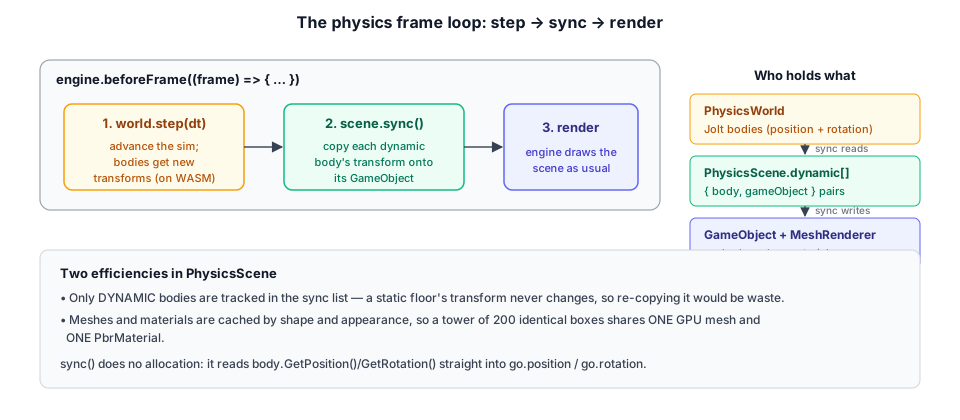
The spawn helpers wrap the PhysicsWorld factories and attach a visual:
// ── from src/physics/physics_scene.ts ──
spawnBox(half: Vec3, pos: Vec3, opts: SpawnOptions = {}): initJolt.Body {
  const body = this.world.addBox(half, pos, opts.rot ?? null, opts);
  const mesh = this.boxMesh(half.x * 2, half.y * 2, half.z * 2);
  this.attach(body, mesh, pos, opts);
  return body;
}
SpawnOptions extends BodyOptions (the physics tunables) with visual ones — color, roughness, metallic, castShadow, initial rot. There are matching helpers for spheres, an addGround() slab, addStaticBox for walls and ramps, addStaticMesh/addHeightField for static colliders that come with their own render mesh, and spawnConvexHull for dynamic custom shapes.
Two efficiencies hide in attach and its mesh/material helpers. Meshes and materials are cached by shape and appearance, so a tower of 200 identical gray boxes shares one GPU mesh and one PbrMaterial:
// ── from src/physics/physics_scene.ts ──
private boxMesh(w: number, h: number, d: number): Mesh {
  const key = `box:${w.toFixed(3)}:${h.toFixed(3)}:${d.toFixed(3)}`;
  let mesh = this.meshCache.get(key);
  if (!mesh) {
    mesh = Mesh.createBox(this.device, w, h, d);
    this.meshCache.set(key, mesh);
  }
  return mesh;
}
And only dynamic bodies are tracked for syncing — a static floor's transform never changes, so re-copying it every frame would be waste. attach pushes to the per-frame dynamic list only when the body is dynamic.
sync() is the per-frame copy, and it is deliberately tiny — reading the Jolt transform straight into the GameObject's position/rotation with no allocation:
// ── from src/physics/physics_scene.ts ──
sync(): void {
  for (const { body, go } of this.dynamic) {
    const p = body.GetPosition();
    const q = body.GetRotation();
    go.setPosition(p.GetX(), p.GetY(), p.GetZ());
    const r = go.rotation;
    r.x = q.GetX(); r.y = q.GetY(); r.z = q.GetZ(); r.w = q.GetW();
  }
}
The whole loop, then, is three lines in beforeFrame: advance the simulation, copy transforms, let the engine render the scene as usual.
// ── typical wiring, from samples/physics_test.ts ──
const world = await PhysicsWorld.create();
const scene = new PhysicsScene(engine, world);
scene.addGround();

engine.beforeFrame((frame) => {
  world.step(frame.dt);   // 1. simulate
  scene.sync();           // 2. copy body transforms onto GameObjects
});                       // 3. engine renders the scene (as for any GameObject)
clear() removes every GameObject and clears the world in one call, freeing demo-built meshes (the shared box/sphere caches are intentionally kept), which is what lets the physics_test harness swap between demos cleanly.
25.11 Constraints#
A constraint ties bodies together with a rule the solver enforces every step — the basis of hinges, ropes, ragdolls, and vehicles. Taos surfaces the most common one, a point (ball-and-socket) constraint, which pins a point on one body to a point on another, leaving rotation free. pointLink builds it in world space:
// ── from src/physics/physics_scene.ts ──
pointLink(body1: initJolt.Body, body2: initJolt.Body, worldPivot: Vec3): void {
  const J = this.world.jolt;
  const settings = new J.PointConstraintSettings();
  settings.mSpace = J.EConstraintSpace_WorldSpace;
  const p1 = new J.RVec3(worldPivot.x, worldPivot.y, worldPivot.z);
  const p2 = new J.RVec3(worldPivot.x, worldPivot.y, worldPivot.z);
  settings.mPoint1 = p1;
  settings.mPoint2 = p2;
  this.world.addConstraint(settings, body1, body2);
  J.destroy(p1); J.destroy(p2);
}
Chaining several spheres with point links between consecutive pivots gives a swinging pendulum chain — exactly what the physics_test pendulum demo builds. The lower-level PhysicsWorld.addConstraint(settings, a, b) accepts any Jolt TwoBodyConstraintSettings (hinge, slider, distance, …), so reaching past pointLink to richer joints is a matter of constructing the appropriate settings object and handing it over — the wrapper consumes and destroys it for you, and tracks the resulting constraint for clear().
25.12 Sensors and Triggers#
A sensor is a body that detects overlaps but imparts no collision response — the foundation of a door that opens when you walk up to it, a kill volume under the level, a reverb zone, an enemy's awareness radius. Any factory body becomes one by passing a sensor callback pair (or isSensor: true) in its BodyOptions:
// a static trigger volume that fires as the player enters and leaves
world.addBox(new Vec3(2, 1.2, 0.5), pos, null, {
  dynamic: false, layer: CollisionLayer.Trigger, mask: CollisionLayer.All,
  sensor: {
    onEnter: (other) => openDoor(),
    onExit:  (other) => {},
  },
});
Under the hood the world lazily installs a single Jolt ContactListenerJS the first time a sensor is registered, and routes its OnContactAdded / OnContactRemoved events to the right callbacks. Bodies are tracked in a map keyed by BodyID, so the listener can hand each callback the other body that triggered it (or undefined when the overlapper isn't a tracked body — e.g. the character controller's internal capsule). Sensors are also flagged to collide with kinematic and static overlappers, so a scripted or kinematic body walking into a static trigger still registers.
The symmetric layer/mask rule from §25.5 applies here too, and it is the usual cause of a trigger that "doesn't fire": for a sensor to detect a body, that body's mask must include the sensor's layer (Trigger), not only the other way round. The simplest way to stay out of trouble is to give bodies that should be broadly detectable a mask of All — which is exactly why the character controller defaults to it.
25.13 The Character Controller#
Bullets and crates want full rigid-body dynamics; a player almost never does. A capsule driven by forces slides down ramps, tips over, bounces off steps, and generally fights the player for control. What a humanoid wants instead is move-and-slide kinematics: "try to move here; slide along whatever you hit; step up small ledges; stick to the floor going downhill" — with no bouncing and no tipping. Jolt provides exactly this as CharacterVirtual, an object that is not a body in the world but sweeps its shape through it each frame, and Taos wraps it as CharacterController.
You create one against a world, set a desired horizontal velocity each frame, and call move(dt):
// ── typical character loop ──
const character = new CharacterController(world, {
  radius: 0.35, halfHeight: 0.6, position: new Vec3(0, 2, 0),
  layer: CollisionLayer.Player,
});

engine.beforeFrame((frame) => {
  character.velocity.x = inputX * walkSpeed;
  character.velocity.z = inputZ * walkSpeed;
  if (jumpPressed) { character.jump(jumpSpeed); }  // only takes effect when grounded
  world.step(frame.dt);     // advance dynamics (props, bullets, sensor contacts)…
  character.move(frame.dt);  // …then sweep the character against the updated world
});
move does three things: it folds gravity into velocity.y (zeroing accumulated fall speed while grounded so the character doesn't build phantom velocity standing still), runs Jolt's ExtendedUpdate to sweep-slide-and-stair-walk the capsule, then writes the collision-resolved velocity and position back. After it returns, position, velocity, isGrounded, groundState ('ground' | 'steep' | 'air' | 'unsupported'), and groundNormal are all readable — enough to drive an animation state machine and a camera.
Two design points are worth calling out, because both were sharp edges in the building:
- It is hittable. By default the controller also spawns a kinematic inner body matching the capsule, on the character's layer, so raycasts and other bodies can collide with it — a player you can't shoot is not much use. That inner body is what makes the character register against sensors, too.
- The query filters must be mask-aware. The character collides with whatever its mask allows via
makeObjectLayerFilter/makeBroadPhaseFilter; building those withSpecifiedObjectLayerFilterinstead (the natural-looking choice) matches nothing and the character drops through the floor — the same trap flagged in §25.5.
The crucial loop ordering is world.step then character.move: the controller sweeps against the world as it stands after this frame's dynamics have moved, not before. The character_controller_test sample wires all of this — walking, jumping, stair-climbing, a trigger zone, and a layer-filtered "bullet" that passes through the player but bounces off the world.
25.14 Summary#
The physics subsystem is a deliberately thin, leak-free skin over a best-in-class engine:
- Buy, don't build, the solver. A stable, fast rigid-body simulator is a specialty; Taos wraps Jolt rather than reinventing it, the one place the engine takes a major dependency off the shelf.
- Pay-for-what-you-use loading. Jolt's WASM is reached through a single dynamic
import()behind a type-only interface, so physics-free apps ship none of it;locateFile/wasmBinarymake it portable across bundlers. - The simulation step is the mental model. Integrate velocities → broad phase → narrow phase → solve contacts/constraints → integrate positions, with restitution and friction tuning the contact solve and a bounded, roughly-constant
dtkeeping it stable — hence the clamp-and-sub-step instep(). - Layer/mask bits make N bodies tractable and express gameplay. Each body has a
layer(what it is) and amask(what it hits), ANDed symmetrically by Jolt's mask filter, with the staticWorldgroup routed to its own broad-phase tree. Bullets pass through their shooter, triggers notice only what they should. - Sensors and a character controller sit on the same primitives. A
sensorcallback turns any body into an overlap-detecting trigger via a lazily-installed contact listener;CharacterControllerwraps Jolt'sCharacterVirtualfor move-and-slide humanoid motion (gravity, stairs, floor-stick, jump, ground state), with a kinematic inner body so it stays hittable. Both honour the symmetric mask rule — hence themask: Alldefault on the character. - WASM memory is owned, never leaked. Every transient
Vec3/Quat/Settingsis destroyed the instant it's been copied; shapes are ref-counted across the result→body handoff — but a directly-built shape handed to a body or character is left for that owner to release, never double-freed; bodies and constraints are tracked soclear()/destroy()release everything. None of it surfaces in application code. PhysicsWorldsimulates,PhysicsScenerenders. The pure layer steps and answers ray queries; the scene layer pairs each body with a cached mesh + material andsync()s dynamic transforms onto GameObjects once per frame. The whole game loop isstep → sync → render(withcharacter.moveslotted in afterstep).
Where the heightmap terrain of Chapter 24 gave us large static worlds, and the next chapter gives us planet-scale ones, this chapter gives those worlds dynamics — and Chapter 26's geo_physics sample combines the two, building Jolt mesh colliders from streamed terrain tiles so balls can bounce down a real mountainside.